




(Small).png.20e01e54adf9a0993af949e43e312763.png)
CorneliousJD
Members
-
Joined
-
Last visited
Everything posted by CorneliousJD
-
I just ran into same problem. Instead of downgrading I just added this to my /appdata/qbtorrent/qBittorrent/qBittorrent.conf file WebUI\HostHeaderValidation=false Then it worked after saving that and restarting the container Hope this helps! SOURCE: https://github.com/guillaumedsde/alpine-qbittorrent-openvpn/issues/32 & https://github.com/qbittorrent/qBittorrent/issues/8095#issuecomment-472740702
-
Thanks! I do believe Ih ad this working where you mentioned actually, however I ended up going with an actual database instead of SQLite for mine.
-
So from the main Cookbook page, click the three "..." icons next to search page and you can import from webiste there.

-
You could either fire up a TFTP port as described above in the thread, or just use something like Krusader or Dolphin (both available as docker containers) to move files, they should run as root and have full access to all the files, then you can copy/paste them out of the appdata directory and back them up elsewhere. I always keep Krusader and Dolphin installed for managing files, docker permissions get tricky sometimes and I can pretty much always do what I need to do with one of those and never have to touch the command line. Hope this helps! If not let me know, I'll see what I can do to more directly assist w/ screenshots, etc later. EDIT: If you're not running anything that needs to be saved then go ahead and just blow the whole thing away. For example if you're running a Minecraft world that nobody has really started using yet, you might as well just start it over fresh IMO.
-
Off hand, I don't know how to fix this short of wiping the container's data out compltely and setting it up again with a static MAC address that it needs from the very first launch. It sounds like having a differnt mac after you first launched it is what caused this. You can (and should) of course backup your game server data first, so you can just restore it once you get AMP set back up and re-activated.
-
Thank you for popping in and supporting your creation here too! Much apprecaited. You would need to edit the container and add a new port if you want to run more than one port open to AMP, yes. Pretty easy to do, if you need help with that though let me know and I can take some screenshots to show you later! Are you running with a properly generated MAC as this thread describes? Failure to have a consistent MAC address would result in it being deactivated for sure.
-
This is going to be an issue of AMP-Dockerized, and not specifically running it on unRAID. See GitHub Page here: https://github.com/MitchTalmadge/AMP-dockerized
-
You can just chmod the folder to gain access, or if you're not comfortable with a command line you can use something like Krusader or Dolphin docker containers to modify permissions to give yourself access too short of SFTP, but yeah you can certainly use SFTP if you'd like to!
-
Yep, you'll need to verify evertyhing when importing anyways as the import from URL parser doesn't always get everything perfect anyways, but for now you'll need to convert manually for fractions. This is an ehancement/feature request to support fractions. I'd suggest logging a comment to show your support for wanting fractions as well. https://github.com/vabene1111/recipes/issues/142
-
Yep this is pretty normal. I hoenstly didn't even know it had TFTP support since I figured most users would have full access to their unRAID filesytem, so never thought to add 22 to the port list there. Same with games, the defualt game port listed is Minecraft, but if you want to run another game or multiple games you'll need to edit the container to add more ports. There's no way I could add every port for every game into the template, and thought Minecraft would be the most popular choice for running AMP so I left that as the one I added as an example port.
-
As always, thank you thank you thank you!
-
This is an issue in the app - it has to do with the developer looking for a legacy string about how it's connecting to postgres, which I left out because it's depreciated. See here: https://github.com/vabene1111/recipes/issues/204 EDIT: He will fix it soon
-
There's why right there, not enough permissions. Try the GRANT statement again, if that doesn't seem to work then just use the postgres user and password you have defined in the postgres container, if you want. That's similar to the root user/pass for MariaDB/MySQL
-
Check the logs of the container to see what errors it shows, it should shed some light as to why. I also ran into this once and it's because i didn't grant all permissions on the database for that user so it was failing. (I had missed the semicolon at the end of the grant statement the first time, whoops!) That's a question for the developer on the github page, that I don't know off hand, sorry!
-
In the repository field (may need to toggle advanced in top right corner) it'll say postgres:11 you can change that to postges:13 or postgres:latest
-
Yep! This one here. When you install it you can install the latest verison which is :13 instead of :11 if you want. Or leave it at latest, but warning it will auto-update to 13.x or 14 when those are released which may include breaking changes. console into the container (click it, choose console) Here's the commands to run. This is from memory, su - postgres createuser --interactive --pwprompt Pick a username for the database. No to all, superuser, DB create permission, create new roles. createdb recipes psql GRANT all privileges ON DATABASE recipes to (username you made); (BE SURE TO END WITH SEMICOLON) Once it confirms GRANT then \q exit NOTE: If it commplains about the word "privileges" try leaving it out, so just GRANT all ON...
-
I did not, I've just been letting it ride as-is for now. Using it as file locking/caching for nextcloud.
-
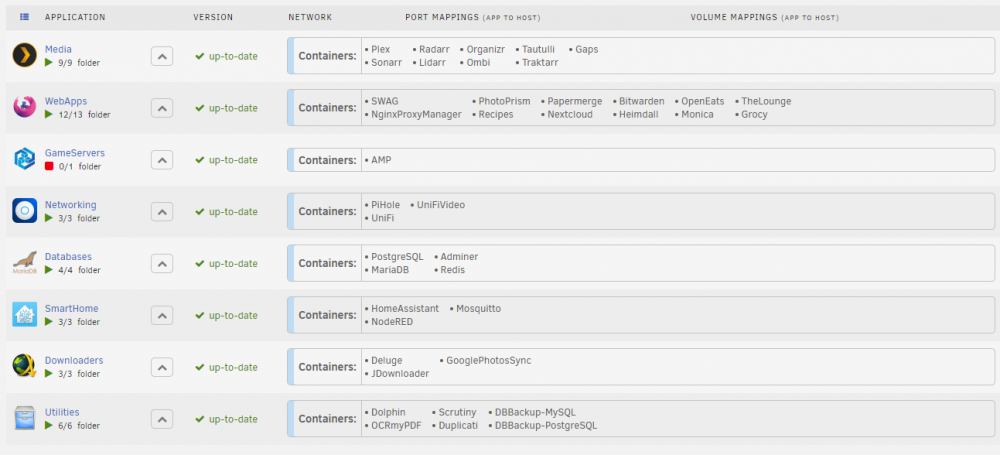
Awesome, thank you so much for this! I spent a lot of time figuring out exactly what settings I wanted to get it looking like this. Will SOME DAY go through and pick custom icons for the folders, but right now I'm just using some primary apps as the icon. My OCD is cured, almost! If I had an option I'd personally prefer that the single-item folder is still the same hight as all the others, but either way it's centered now and looks better than before! EDIT: Forgot screenshot (again)
-
I believe so, however you won't see much of a benefit in using MariaDB over SQLite because you'll still lose out on the Trigram similarity search without PostgreSQL, so I would still recommend Postgres if you're going to ditch the SQLite, however if you edit the DB Backend to be 'django.db.backends.mysql' then it should work, just enter your MySQL user/pass/database where it asks for Postgres info, and that should take it.
-
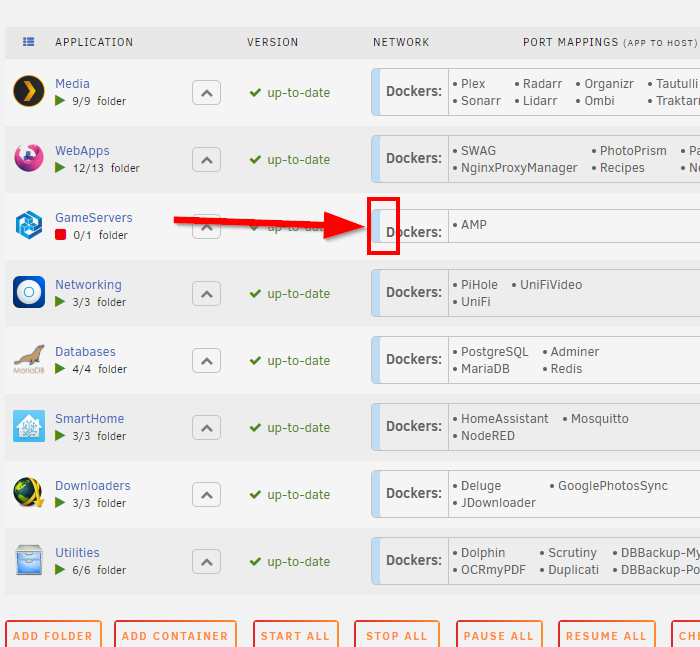
This is fantastic and has allowed me to be way more comforterable having more containers and even working on more containers myself. One thing that I noticed today, if you make a folder with only one container in it, the "Dockers" label gets all wonky looking. It is centered vertically, but the height of the table it's in, is cut in half it seems since there's only one container. It would look much better if even with one container in the folder, that it stays the same height. This is my OCD. EDIT: Forgot image
-
It does require a license, yes. It's a permenant license though, cost is very cheap (less than $10 USD) currently during their special. Note I'm not affiliated with CubeCoders at all. I had an old McMyAdmin license from them which is now part of AMP and my brother requested I try to get AMP running on unraid, so here it is. I do not profit at all if you decide to buy a license. In my opinion, the management for Minecraft alone is very much worth the price of entry. Hope this helps!
-
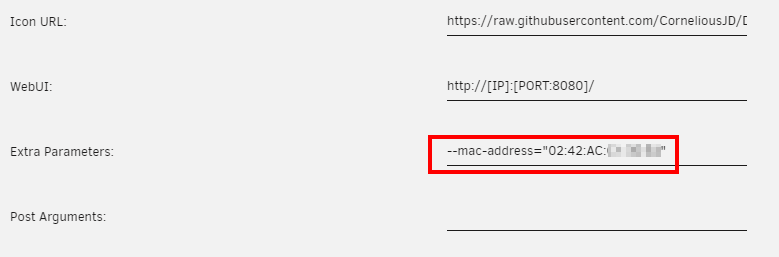
About AMP is short for Application Management Panel, it is a piece of software designed for managing multiple game servers from a single user interface. This supports Minecraft via McMyAdmin3, TF2, Starbound, and a whole lot more! Please see the GitHub page for different modules you can use and create with this! Requirements You will need an AMP license, or a McMyAdmin license in order to get this to run. NOTE: If you use a McMyAdmin license, this container will limit you to only have access to Minecraft and nothing else. For license management, see here: https://manage.cubecoders.com/ If you are migrating from McMyAdmin2 to AMP, please see here: https://github.com/cubecoders/amp/wiki/How-to-import-an-existing-Minecraft-server-into-AMP PLEASE READ: You must also set a static MAC address on this container! AMP is designed to detect hardware changes and will de-activate all instances when something significant changes. This is to stop people from sharing pre-activated instances and bypassing the licencing server. One way of detecting changes is to look at the MAC address of the host's network card. A change here will de-activate instances. By default, Docker assigns a new MAC address to a container every time it is restarted. Therefore, unless you want to painstakingly re-activate all your instances on every server reboot, you need to assign a permanent MAC address. In order to do this on unRAID, please follow these steps. 1. Visit this page: https://miniwebtool.com/mac-address-generator/ 2. Put 02:42:AC in as a prefix. 3. Choose to format with : colons 4. Generate a MAC address. 5. In the container template during install (or edit) please make sure the "advanced" toggle is on in the top right corner. 6. In the "Extra Paramters" enter your MAC address like this --mac-address="02:42:AC:XX:XX:XX" Variables LICENCE: The licence key for CubeCoders AMP. You can retrieve or buy this on their website here: https://manage.cubecoders.com/ Note if a McMyAdmin license is applied, it will limit AMP to MyMyAdmin only mode. MODULE: Which Module to use for the main instance created by this image. Please see GitHub page for more options. USERNAME: The username of the admin user created on first boot. PASSWORD: The password of the admin user. This value is only used when creating the new user. If you use the default value, please change it after first sign-in. GAME PORT: Be sure to use the proper port, and edit the port to be TCP/UDP based on what the game uses! Other Variables: For a list of other variables that can be used and created, plese see the GitHub page. Reverse Proxy This should work just fine with a reverse proxy (like LinuxServer's SWAG container, or Nginx Proxy Manager). I would recommend setting this up as a subdomain, such as https://amp.yourdomain.com A basic example would be as follows. Note that I have currently not tested this. #AMP server { listen 80; server_name amp.yourdomain.com; return 301 https://amp.yourdomain.com$request_uri; } server { listen 443 ssl http2; server_name amp.yourdomain.com; location / { include /config/nginx/proxy.conf; proxy_pass http://192.168.1.10:8080/; } } Known Issues I do not know of any known issues with this container at this time.

-
Just click like you're reading the recipe, not editing it. Let me know if you find it there. If not I'll take some screenshots when I'm at my home PC.
-
You're welcome, glad people are finding good uses for it. I plan on using it instead of OpenEats moving forward as well, although there's still some things about OE I like better In regards to adding a recipe to the cookbook, you have to go into the recipe itself first, and then in the top right there's a little "..." icon that you can click to add it to a specific cookbook. If you're still stuck let me know and I can get some example screenshots for you later.
-
Well, it's done! Recipes container is successfully running self-contained with no other DB required. Sorry it took so long, I hoenstly didn't give it an honest effort until this evening but it's working now! It'll be up on CA within 2 hours or so -- if it's not there yet when you look just check back in a few. It's all in a self-contained docker container now. Support thread for it is here From this point forward thoiugh please keep everything related to the Recipes container in the following thread. That will leave this one just for OpenEats support.
(Small).thumb.png.b884b0484e848c502a315fc27b995f59.png)





