




(Small).png.20e01e54adf9a0993af949e43e312763.png)
CorneliousJD
Members
-
Joined
-
Last visited
Everything posted by CorneliousJD
-
Just click force update - this has been fixed already in another new update.
-
User @Barny made a modification of a container that has really helped me (and at least a few others out) but it wasn't a template for it. I decided to create one along with a support thread. The main purpose for this container is to connect to Android TV or FireTV devices so you can control them and automate them with HomeAssistant. See here: https://www.home-assistant.io/integrations/androidtv/ The actual usage of the container should be fairly straight forward, just make sure to set static IPs or DHCP reservations for your Android TV devices so they don't change. NOTE: @Barny had this is --privileged in the DockerHub, however I am running it without that flag and it's functioning so I've left that out of my template, unless there's a need for it, it will remain excluded here.
-
When I install Telegraf with post args of /bin/sh -c 'apk update && apk upgrade && apk add ipmitool && apk add smartmontools && telegraf' Then Telegraf doesn't run, container logs return /bin/sh: 1: apk: not found I assume I'm doing something wrong but would like to see if anyone knows what based on this, thanks!
-
No, only from original paperless to paperless-ng PaperMerge is a different project/product alltogether. I migrated though myself manually from PaperMerge to Paperless-ng I had a few things in Papermerge already so I just grabbed all the PDFs from Papermerge and put them into the consume directory of Paperless-ng and let it consume them and then manually went in and tagged everything I needed to.
-
Interstingly enough, the 10/1 is back now with 1 in queue, no idea why again.
-
I haven't used this with scrapers personally but I would assume endpoint and API are for the actual site you're scraping from? You might want to ask on the stash github issue tracker for more info/help, as this is more-so just for unraid specific issues. I think the issue you're running into isn't unraid specific and more of a usage question on the app itself, so I can't really be of more help directly since I don't use it that way. Hope this helps!
-
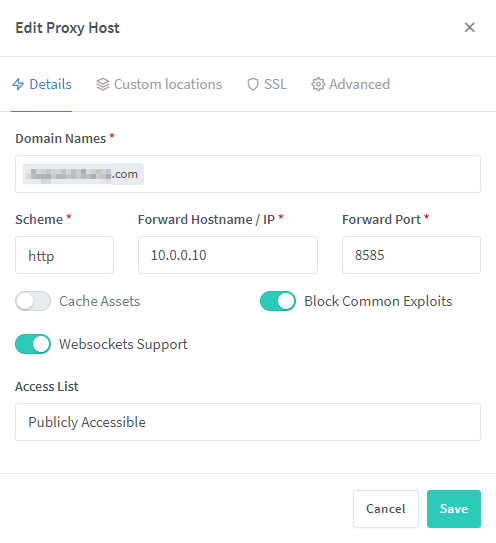
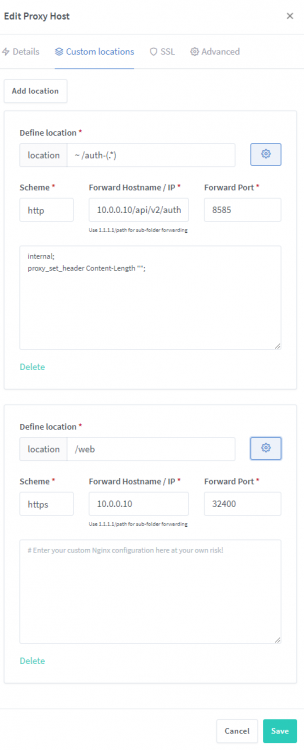
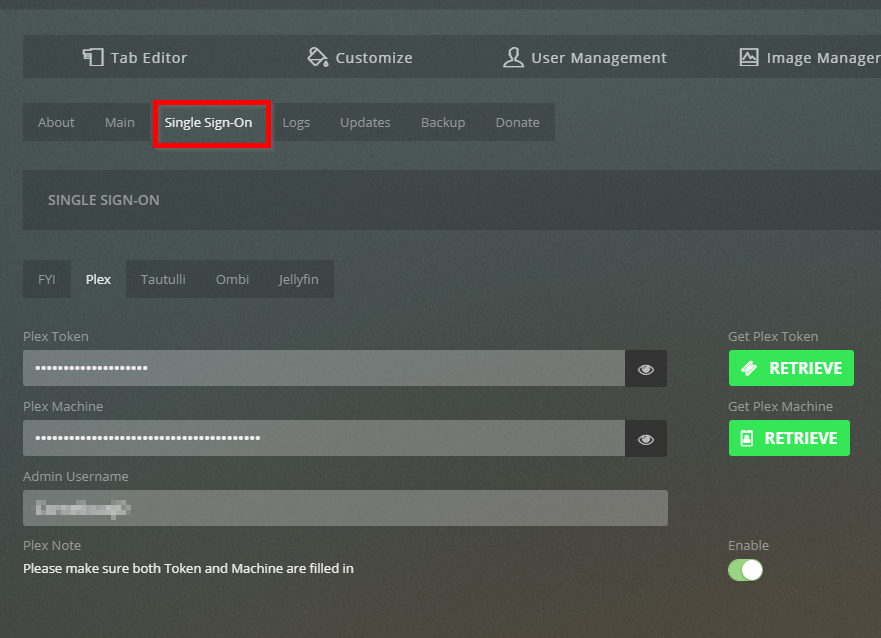
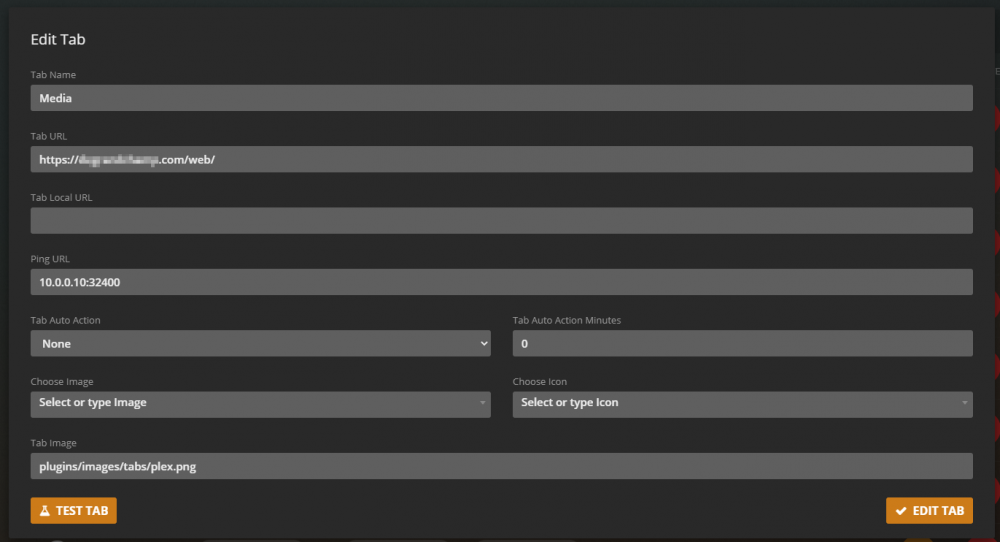
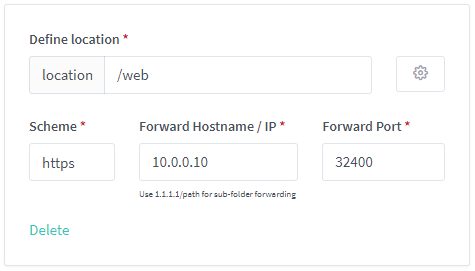
I'm tight on time right now but hope this helps. If not let me know - can work to gather more info later. Primary domain.com setup in NPM which hosts Organizr -- this should be perfectly straight forward. Next is custom locations. - first part is for organizr auth - you can ignore this part if you don't want it, and focus on the /web part at the bottom. NOTE the HTTPS part on my /web -- I needed this to get it to work correctly, and it HAD to be /web too, /plex didn't work for me here at all. Organizr SSO settings. Media/Plex tab settings. Happy to try and help more if this doesn't do it for you - but replicate this exactly first and if it's still erroring out let me know.
-
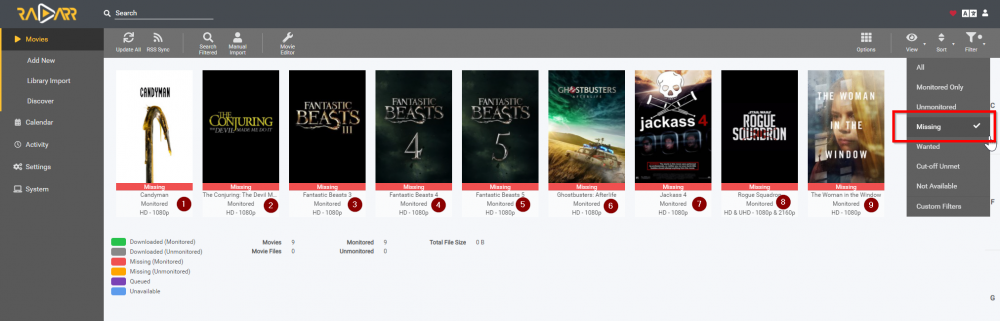
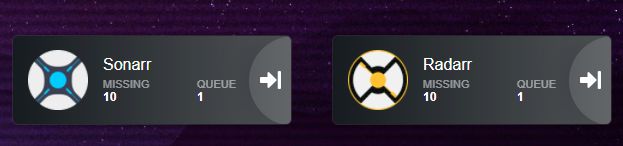
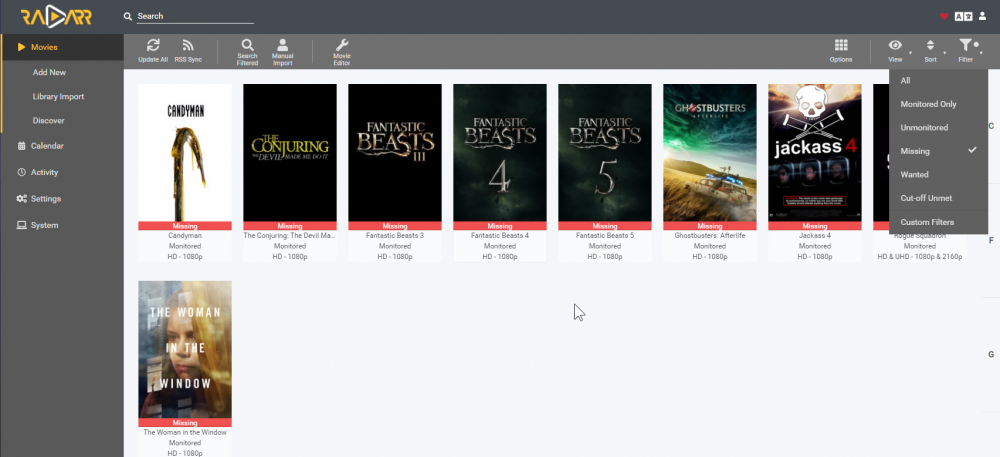
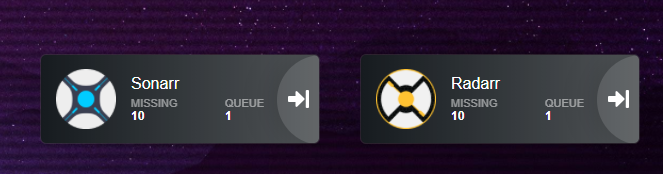
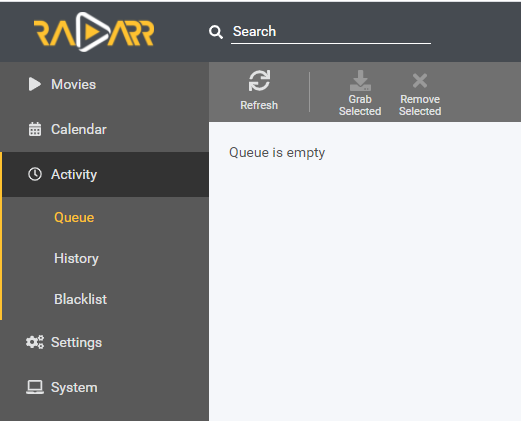
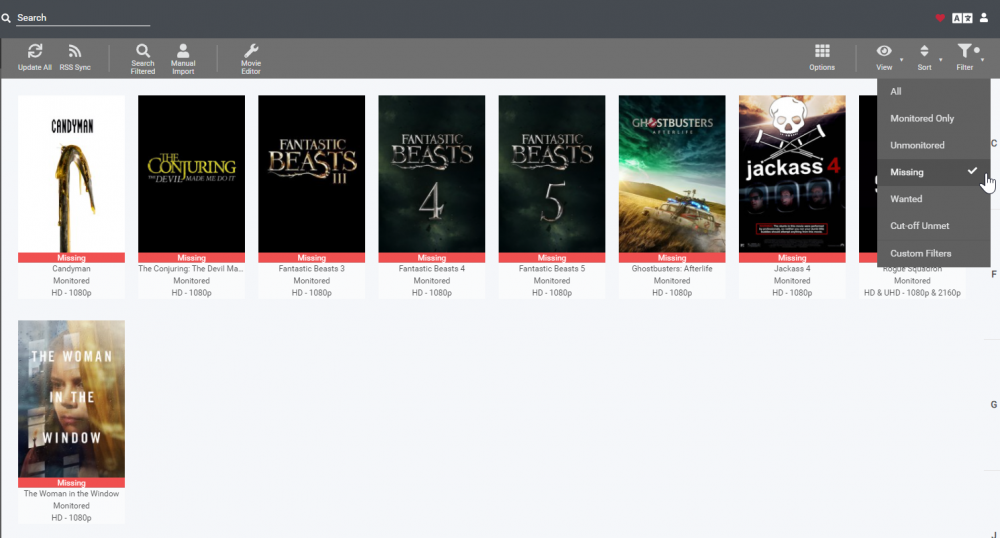
Yep, I've tried both restarting radarr and heimdall too, and clearing cache and reloading - still shows the same thing after I did that a few days back. Since it stayed for a few days I figured I'd post here. What's interesting is only NINE missing movies show up, but the heimdall page shows 10 missing with 1 in queue. Interestingly enough though without doing any of this restarting/incognito, etc, and just refreshing the page now today, it's showing 10 missing with ZERO in queue now. So the queue is correct but the missing count is still wrong. Am I missing something about the correct way to filter to "missing" in this new version of Radarr? Thanks in advance!
-
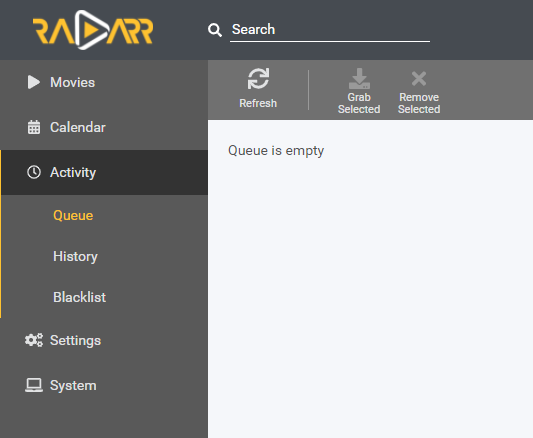
X-posted this to Heimdall since that's where the "1 queue" shows up at but... Having an odd issue where Radarr is being reported as having 1 item in the queue, however my queue in Radarr is empty and all missing movies are currently unrelased still. This has been going on for a few days now, can't figure out what is still stuck in the queue anywhere? Screenshots below. Thanks in advance!
-
Hey all, having an odd issue where Radarr is being reported as having 1 item in the queue, however my queue in Radarr is empty and all missing movies are currently unrelased still. This has been going on for a few days now, can't figure out what is still stuck in the queue anywhere? Screenshots below. Thanks in advance!
-
The more I look into this, the more it's just a nextcloud thing... Everyone that uses it at any sort of scale seems to have problems with speed. For now I've given up and just continue to use it as a file-sync (and the rare share of a file/folder) but I've stopped using it for much else because it's so awfully slow. I have no issues personally w/ the sync features.
-
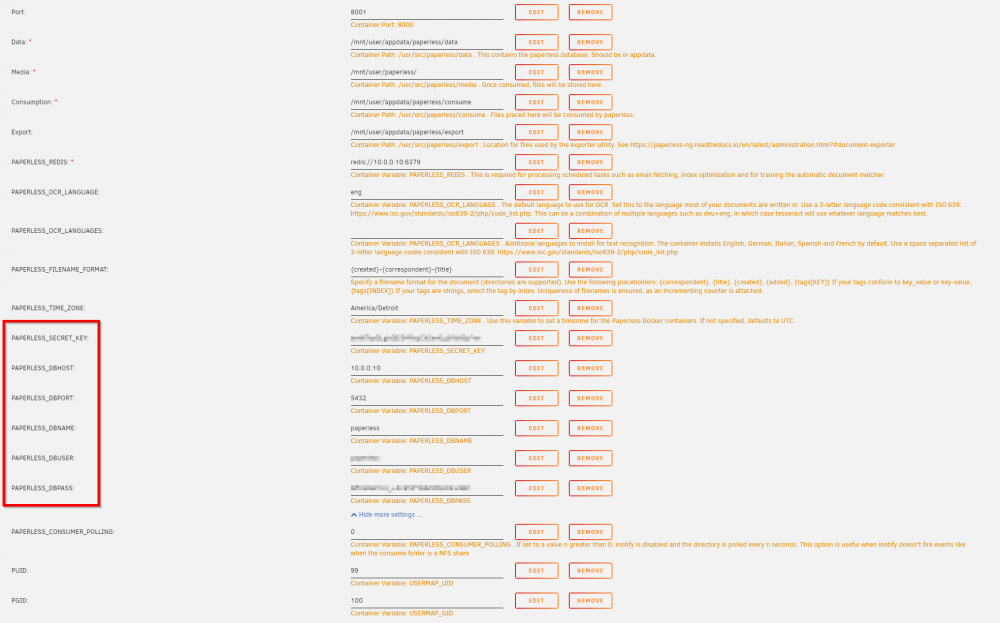
Really just want to say THANKS for bringing this template to the community. Paperless (OG) left something to be desired for me, but Paperless-ng really does what I want and has the look/feel I was after too. (Was probably just the dated look/feel of the original I guess) I opted to run with PostgreSQL isntead of the baked-in SQLite, so I ended up adding DB host/port/name/user/pass variables to mine, as well as the Secret Key -- I do believe Secret Key is important and should be included in the template for everyone. https://paperless-ng.readthedocs.io/en/ng-0.9.2/configuration.html If anyone needs it later and isn't able to figure it out from the documentation, here's the setup needed for Postgres
-
I had this issue with one specific document, it worked with others though, I think it had something to do with how the PDF was saved/malformed or something. For this one already-existing PDF I had, I just ended up printing it and scanning it back in and that worked fine. I have a scanner setup to scan via FTP to my consume folder, and use the Paperless-App to scan documents on mobile devices that upload straight into my Paperless-NG instance. I guess try some other files, or try scanning a file and putting it into your consume folder instead of the web UI's upload, see what happens with that? PS - All this is for Paperless-ng which I assume you're also talking about, the OG paperless has it's own support thread.
-
In regards to paperless-ng, I believe there should be PAPERLESS_SECRET_KEY variable setup. I'm also having an issue where uploading files via Paperless app (android) or via web UI on my mobile phone will sometimes fail to actually upload the document, which is pretty strange. I don't see anything in the running log or any .log files in appdata. Any idea where I can look to troubleshoot this more? Thanks!
-
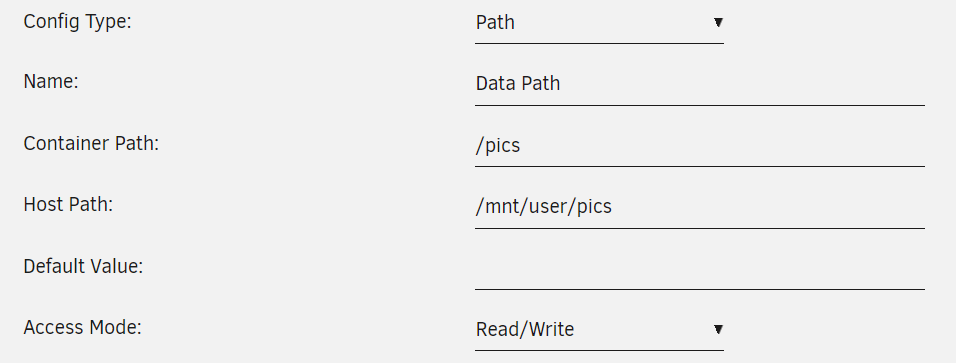
For sure! The idea though is that you would have data point to a "Stash" share and put all your media into that, but if you need access to more shares, you can add mappings like this This would be /pics inside of the container
-
You would pick one or the other, correct. NPM and SWAG are different (NPM does not contain SWAG), but they both run their reverse proxies via Nginx. SWAG is all config-file based, but can support some really advanced configs. NPM is GUI-based and keeps everything really simple. This can make some advanced configs challenging, but I've been able to work around that and have migrated from SWAG to NPM personally. If you're just getting started, I'd suggest NPM for sure. If you hit a wall with NPM and have an actual need for more advanced configs, you can easily swap over to SWAG if you ever need to.
-
I didn't really do anything? I have ~35 proxy hosts though so I had just assumed certbot was running trying to process/check renewals, so I just let it sit and it started working. Not having any other issues with it. Have you checked logs to see what might be up?
-
I am getting the same error as of today when trying to add certs. Anyone else also getting this issue? EDIT: I let the container sit for 15 minutes or so and tried again and it worked... lol
-
Glad you're enjoying it! Just an FYI - I am NOT the docker author, I know sometimes people get confused about who releases a docker template vs the actual author! @MitchTalmadge is the author of the actual container here: https://github.com/MitchTalmadge/AMP-dockerized I just put together the template to get it running on unRAID. If anyone deserves the donation it's him, not me, just want to make sure it goes to the guy that did the actual hard work
-
OpenEats does not support this. Another container that I've publisehd to CA does though, it's just called Recipes
-
So I did PM you but ended up plugging away at this today and I got it... I updated NPM's GitHub issue #40 about this. https://github.com/jc21/nginx-proxy-manager/issues/40#issuecomment-749770892 In short, /plex sitll woudn't work for me, but adding /web DID work. I think it's because the way the plex container expects /web at the end of everything that it worked like this, but regardless, it allows me to fix my issue! I now have Organizr setup with Plex OAuth, SSO across Plex, Ombi, Tautulli, and "watch on plex" buttons working, all via NPM hope this comment helps someone else in the future!
-
Awesome, thank you! I just updated the tempalte so users will get the update now and new users will see the TZ variable to fill in. Thanks!
-
Sorry to say but I just do not know the answer. This is their official container with no modifications whatsoever, so you should be able to just raise an issue on their GitHub page for cloudbeaver, and if/when they make a change to add or resolve this issue, it should take effect on your next scheduled container update, since this will pull directly from their official dockerhub build. Hope this helps!
-
Just reverse proxy the NPM interace itself at proxymanager or npm.domain.com instead. I do not believe you can access locally via HTTPS.
-
The unRAID Web UI? I wouldn't recommend opening that up. There's somethign that will help with this coming soon anways
(Small).thumb.png.b884b0484e848c502a315fc27b995f59.png)





