





KnightRdr23
Members
-
Joined
-
Last visited
Everything posted by KnightRdr23
-
The drive is there, and curiously enough is showing SMART info. The short test also passed. This is a new drive so it's currently running pre-clear. Could that be what's messing it up?
-
I found out how to update the database but when refreshing the GUI, the drive is still not in there root@nicknas2:~# update-smart-drivedb /usr/sbin/update-smart-drivedb: gpg: not found in '/usr/local/bin:/usr/bin:/bin' ('--no-verify' to ignore) Try '/usr/sbin/update-smart-drivedb -h' for help root@nicknas2:~# update-smart-drivedb --no-verify /usr/share/smartmontools/drivedb.h 7.3/5601 updated to 7.3/5610 (NOT VERIFIED) Not in smartctl database 7.3/5610
-
Is there any way to update smartctl manually? I've got 6.12.10 and it shows as smartctl 7.3/5601 however a brand new spinning disk I put in today says it is not in the smartctl database. It's a newer Seagate Ironwolf Pro ST16000NT001. I have 2 other Ironwolf Pro 16TB but they are detected, looks like Seagate made a revision change from ST16000NE000 to ST16000NT001 for the same drives. Appears there is a Smartctl 7.4 dated August 2023. Other than version update, is there some way to update the database to detect newer drives?
-
I had two Samsung Fit 32GB USB3 drives and they both failed within a year, one time I had to get Unraid support involved to get a new key since it had been less than 12 months. They just burn themselves out with consistent use and are too small to be properly cooled. Ended up going with a tried and true Kingston 16GB USB2 metal stick and it's been rock solid now for years. My coworker also had multiple Samsung Fit USB3 fail on him in about the same time period.
-
Still looking for a solution to this issue if someone can please help. Thank you!
-
I already have pihole on a separate IP and have the correct routes. My network uses pihole for all DNS. I’m not sure how that’s relevant here? I’ve rebooted Unraid several times. It always comes back with the first error I posted about withdrawing and registering address records. I do have Apple devices on my network, a lot of them.
-
pihole does not run avahi. Homebridge does and I disabled it already via the variable, the problem has not stopped. I'm not sure what to do next.
-
Now I am getting this regularly in the log but no longer the other message Apr 30 14:50:30 nicknas2 dhcpcd[1374]: br0: fe80::ea9c:25ff:fe89:a700 is unreachable Apr 30 14:50:30 nicknas2 dhcpcd[1374]: br0: soliciting an IPv6 router Apr 30 14:50:32 nicknas2 dhcpcd[1374]: br0: fe80::ea9c:25ff:fe89:a700 is reachable again Apr 30 14:50:35 nicknas2 dhcpcd[1374]: br0: fe80::ea9c:25ff:fe89:a700 is unreachable Apr 30 14:50:35 nicknas2 dhcpcd[1374]: br0: soliciting an IPv6 router Apr 30 14:50:42 nicknas2 dhcpcd[1374]: br0: fe80::ea9c:25ff:fe89:a700 is reachable again Apr 30 14:54:35 nicknas2 dhcpcd[1374]: br0: fe80::ea9c:25ff:fe89:a700 is unreachable Apr 30 14:54:36 nicknas2 dhcpcd[1374]: br0: soliciting an IPv6 router Apr 30 14:54:37 nicknas2 dhcpcd[1374]: br0: fe80::ea9c:25ff:fe89:a700 is reachable again Apr 30 14:54:40 nicknas2 dhcpcd[1374]: br0: fe80::ea9c:25ff:fe89:a700 is unreachable Apr 30 14:54:41 nicknas2 dhcpcd[1374]: br0: soliciting an IPv6 router Apr 30 14:54:46 nicknas2 dhcpcd[1374]: br0: fe80::ea9c:25ff:fe89:a700 is reachable again Apr 30 15:14:08 nicknas2 dhcpcd[1374]: br0: fe80::ea9c:25ff:fe89:a700 is unreachable Apr 30 15:14:09 nicknas2 dhcpcd[1374]: br0: soliciting an IPv6 router Apr 30 15:14:10 nicknas2 dhcpcd[1374]: br0: fe80::ea9c:25ff:fe89:a700 is reachable again Apr 30 15:14:13 nicknas2 dhcpcd[1374]: br0: fe80::ea9c:25ff:fe89:a700 is unreachable Apr 30 15:14:14 nicknas2 dhcpcd[1374]: br0: soliciting an IPv6 router
-
I did try setting that variable to 0 but it didn't stop the conflict. The system has 2 physical NIC, only one is assigned to br0 and the other is a passthrough to a VM. I also use pi-hole in docker so have a second ipv4/ipv6 IP for it to exist on my network. Perhaps that is where the double IP is coming from? I tried to run the first command you provide but I think it errored? ip -6 addr flush dev br0 && ifconfig br0 inet6 0 getaddrinfo: 0: -9 0: Resolver Error 0 (no error) ifconfig: `--help' gives usage information. I restarted avahi anyway and see the following log lines Apr 30 14:38:50 nicknas2 avahi-daemon[16278]: Got SIGTERM, quitting. Apr 30 14:38:50 nicknas2 avahi-dnsconfd[16287]: read(): EOF Apr 30 14:38:50 nicknas2 avahi-daemon[16278]: Leaving mDNS multicast group on interface br0.IPv4 with address 192.168.1.223. Apr 30 14:38:50 nicknas2 avahi-daemon[16278]: avahi-daemon 0.8 exiting. Apr 30 14:38:50 nicknas2 avahi-daemon[29972]: Found user 'avahi' (UID 61) and group 'avahi' (GID 214). Apr 30 14:38:50 nicknas2 avahi-daemon[29972]: Successfully dropped root privileges. Apr 30 14:38:50 nicknas2 avahi-daemon[29972]: avahi-daemon 0.8 starting up. Apr 30 14:38:50 nicknas2 avahi-daemon[29972]: Successfully called chroot(). Apr 30 14:38:50 nicknas2 avahi-daemon[29972]: Successfully dropped remaining capabilities. Apr 30 14:38:50 nicknas2 avahi-daemon[29972]: Loading service file /services/sftp-ssh.service. Apr 30 14:38:50 nicknas2 avahi-daemon[29972]: Loading service file /services/smb.service. Apr 30 14:38:50 nicknas2 avahi-daemon[29972]: Loading service file /services/ssh.service. Apr 30 14:38:50 nicknas2 avahi-daemon[29972]: *** WARNING: Detected another IPv4 mDNS stack running on this host. This makes mDNS unreliable and is thus not recommended. *** Apr 30 14:38:50 nicknas2 avahi-daemon[29972]: Joining mDNS multicast group on interface virbr0.IPv4 with address 192.168.122.1. Apr 30 14:38:50 nicknas2 avahi-daemon[29972]: New relevant interface virbr0.IPv4 for mDNS. Apr 30 14:38:50 nicknas2 avahi-daemon[29972]: Joining mDNS multicast group on interface br0.IPv4 with address 192.168.1.223. Apr 30 14:38:50 nicknas2 avahi-daemon[29972]: New relevant interface br0.IPv4 for mDNS. Apr 30 14:38:50 nicknas2 avahi-daemon[29972]: Network interface enumeration completed. Apr 30 14:38:50 nicknas2 avahi-daemon[29972]: Registering new address record for 192.168.122.1 on virbr0.IPv4. Apr 30 14:38:50 nicknas2 avahi-daemon[29972]: Registering new address record for 192.168.1.223 on br0.IPv4. Apr 30 14:38:51 nicknas2 avahi-daemon[29972]: Server startup complete. Host name is nicknas2.local. Local service cookie is 4006073296. Apr 30 14:38:52 nicknas2 avahi-daemon[29972]: Service "nicknas2" (/services/ssh.service) successfully established. Apr 30 14:38:52 nicknas2 avahi-daemon[29972]: Service "nicknas2" (/services/smb.service) successfully established. Apr 30 14:38:52 nicknas2 avahi-daemon[29972]: Service "nicknas2" (/services/sftp-ssh.service) successfully established.
-
nevermind... didn't stop the log lines in the Unraid log... help!
-
Well, I didn't fix the issue but found something online for how to disable Avahi in Homebridge. I'm not using it anyway. https://github.com/homebridge/docker-homebridge?tab=readme-ov-file#parameters The parameters are split into two halves, separated by a colon, the left hand side representing the host and the right the container side. --net=host - Shares host networking with container, required -v /homebridge - The Homebridge config and plugin location, required Optional Settings: -e TZ - for timezone information e.g. -e TZ=Australia/Canberra -e ENABLE_AVAHI - default is 1; set to 0 to prevent the Avahi mDNS service running in the container
-
It seems to be a conflict with the Homebridge docker container which also uses avahi. If I stop that Docker the problem stops. Any way to fix it?
-
Seeing these log lines constantly in the system log. Any idea what they are from? Apr 30 00:48:43 nicknas2 avahi-daemon[21853]: Withdrawing address record for fd4b:e720:c542:145:9e53:22ff:fe8a:5ccb on br0. Apr 30 00:49:17 nicknas2 avahi-daemon[21853]: Registering new address record for fd4b:e720:c542:145:9e53:22ff:fe8a:5ccb on br0.*. Apr 30 00:49:29 nicknas2 avahi-daemon[21853]: Withdrawing address record for fd4b:e720:c542:145:9e53:22ff:fe8a:5ccb on br0. Apr 30 00:49:50 nicknas2 avahi-daemon[21853]: Registering new address record for fd4b:e720:c542:145:9e53:22ff:fe8a:5ccb on br0.*. Apr 30 00:49:58 nicknas2 avahi-daemon[21853]: Withdrawing address record for fd4b:e720:c542:145:9e53:22ff:fe8a:5ccb on br0. Apr 30 00:50:17 nicknas2 avahi-daemon[21853]: Registering new address record for fd4b:e720:c542:145:9e53:22ff:fe8a:5ccb on br0.*. Apr 30 00:50:25 nicknas2 avahi-daemon[21853]: Withdrawing address record for fd4b:e720:c542:145:9e53:22ff:fe8a:5ccb on br0. Apr 30 00:51:04 nicknas2 avahi-daemon[21853]: Registering new address record for fd4b:e720:c542:145:9e53:22ff:fe8a:5ccb on br0.*. Apr 30 00:51:09 nicknas2 avahi-daemon[21853]: Withdrawing address record for fd4b:e720:c542:145:9e53:22ff:fe8a:5ccb on br0. Apr 30 00:51:44 nicknas2 avahi-daemon[21853]: Registering new address record for fd4b:e720:c542:145:9e53:22ff:fe8a:5ccb on br0.*. Apr 30 00:51:49 nicknas2 avahi-daemon[21853]: Withdrawing address record for fd4b:e720:c542:145:9e53:22ff:fe8a:5ccb on br0. nicknas2-diagnostics-20240430-0055.zip
-
No thoughts?
-
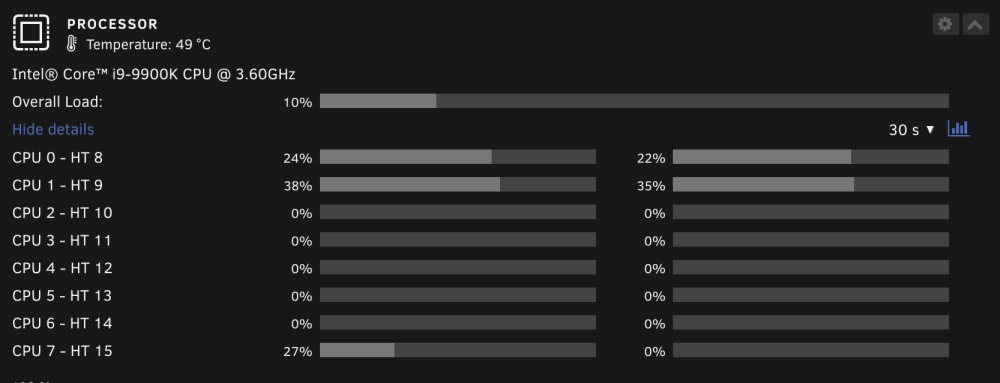
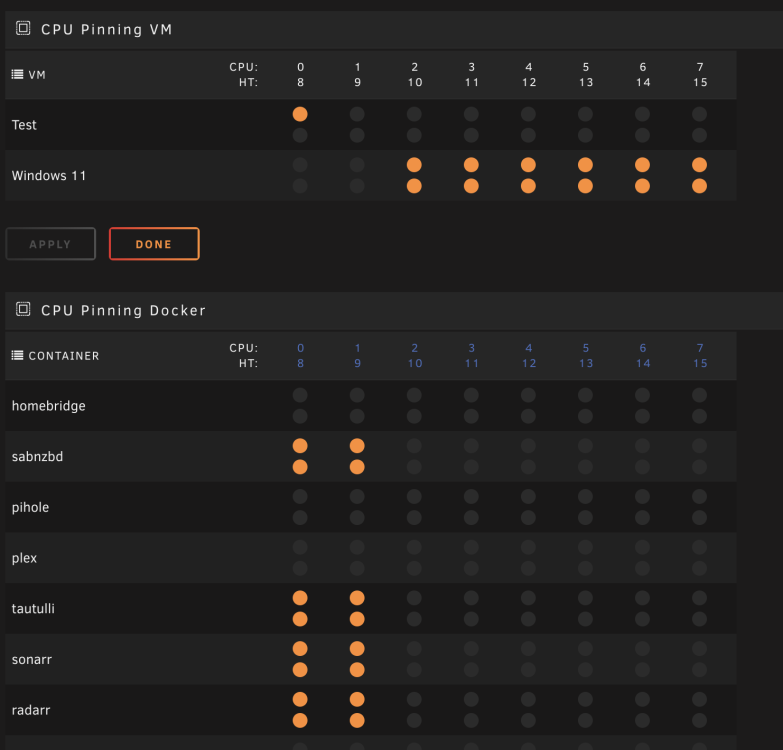
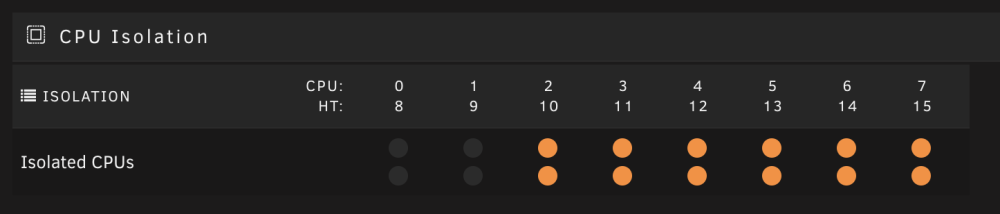
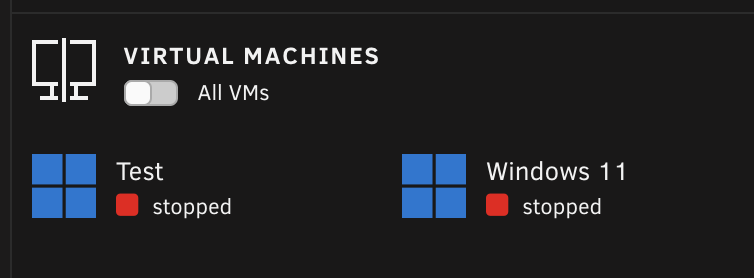
When my server is downloading something with SAB, I notice that there is activity on the last core of my server, but everything but 0-1 and 8-9 are isolated to VM and there is no VM running. I even tried to PIN the CPU to 0-1 and 8-9 in the config of Docker, yet when it's active, there is activity on thread 7 which is the first thread of the last core. I know that it's the docker because as soon as the download is done, CPU use on that core is back to zero. Why would Unraid allow usage on an isolated CPU core when the configuration both in Unraid and on Docker says that it should be limited only to 0-1 and 8-9? nicknas2-diagnostics-20240309-1509.zip
-
Actually just found this and it worked like a charm. It covers how to do it over the Internet but I don't really need that so I just configured the plugin and downloaded a WOL app from the App Store to send the magic packet to the MAC of the VM... already working, very easy!
-
Is there any way to start a VM remotely? Like for example an easy button on my phone? I use my Windows 11 VM for gaming and don't like to just leave it running 24/7 so I do shut it down when I'm done but having to login to the Unraid GUI from my phone to start the VM is a bit cumbersome. Looking for a equivalent to like a "Power Button" for a Windows VM.
-
This magically fixed itself and I'm honestly not sure how
-
If you modify a share to exclude a drive in your array, will Mover move the data off that drive? I'm suspect one of my drives may be about to fail and want to replace it proactively without relying on parity rebuild so was going to move the data off it. Thanks
-
I do understand that to continue offering new features and functionality, the company needs subscription revenue and it’s just the way of the world these days. Once Unraid hits a saturation point, not having subscription means either these folks are working for free or it dies. But I’d like to acknowledge the team also for bringing existing customers along and not forcing a subscription on us, it’s much appreciated. I’d say this is a pretty fair and equitable approach! Thank you!
-
rebooted Mac and now Unraid, .8 did not help. Password is just letters and numbers and has worked for years
-
nope it's actually quite basic and is working from other platforms such as Windows and Nvidia Shield
-
Yes that's the one Also on the version, odd my server has no banner telling me an update is available but sure enough when I go to check for updates I see .8 but it takes me out to this new flow on unraid.net. Will get to updating shortly
-
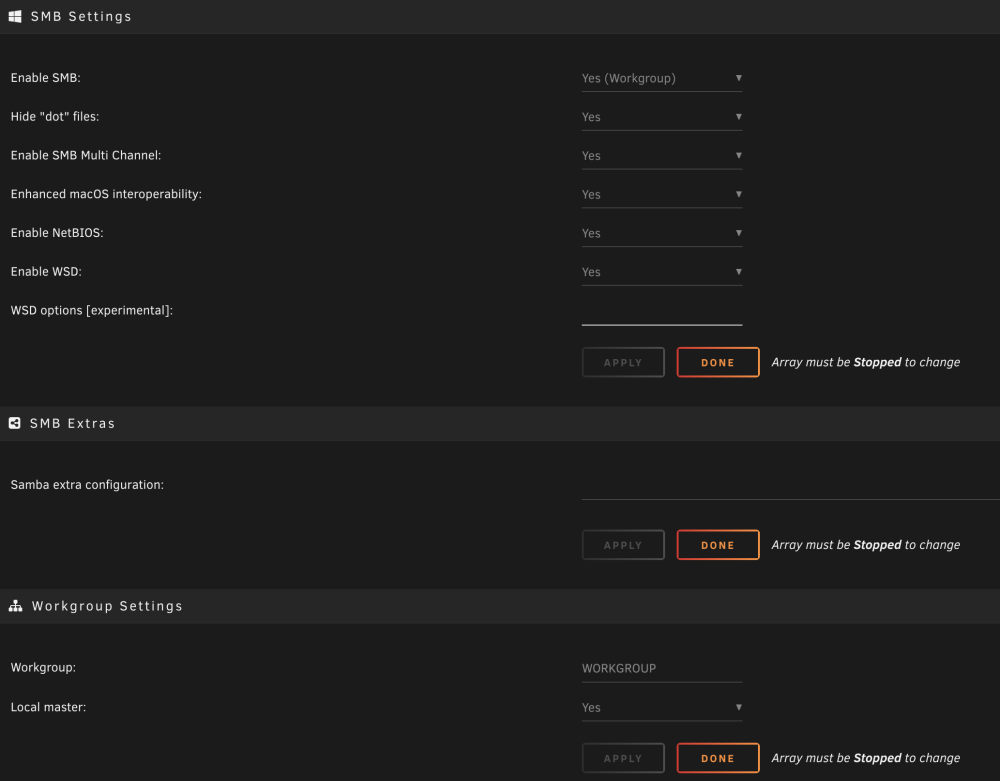
For some reason I am no longer able to connect from my Mac to Unraid shares using SMB including Time Machine. It prompts for login and I provide the username and password that has access and it keeps telling me it's wrong. I've even gone in to the Unraid console and changed the password for the user account to make sure I'm typing it right. Not sure when this started as I don't use my shares from Mac often. They seem to work from other devices like Windows, Nvidia Shield etc. Mac interoperability is enabled in SMB settings and I have not made any changes here, just normal Unraid updating. How can I get my Mac reconnected? nicknas2-diagnostics-20240218-1401.zip
-
Ok, enough time and effort and I figured it out... I needed to add virbr0 as a listening interface in network settings. Wondering if an Unraid update took that out by default. I never had to do that before to my knowledge.



