





KnightRdr23
Members
-
Joined
-
Last visited
Everything posted by KnightRdr23
-
After having two failed Samsung USB 3 mini sticks (the little nubs lol) in the same of 1 year I went with the old trusty Kingston USB 2 stick and it's been rock solid! These modern sticks just weren't meant for 24/7 runtime for sure.
-
I'm flagging this because I think it used to work properly however I could be 100% wrong. I have a 150GB sparse img file on my cache for my Windows VM. The Main tab of the UI is showing disk usage for the full size of the img file despite it's actual size. du -skh vdisk1.img 92G vdisk1.img ls -lh vdisk1.img -rwxrwxrwx 1 root users 150G Jan 23 01:57 vdisk1.img* Running a du against cache I only get 129GB used which is more accurate. root@nicknas2:/mnt/user/domains/Windows 10# du -skh /mnt/cache/ 129G /mnt/cache/ Again, I don't know if Unraid has always done the calculation this way but I don't recall my used size on cache being that high until recently with 6.10rc2. Feel free to close if this is expected behavior but perhaps it's worth looking at for enhancement. Would be good to show actual size used.
-
*** [ DIAGNOSING ]: Networking [✗] No IPv4 address(es) found on the br0 interface. [✗] No IPv6 address(es) found on the br0 interface. looks like it doesn’t have an IP assigned to itself. Did you define one in the config and make sure it’s outside your router’s DHCP scope but on the same subnet as the rest of your machines?
-
Since updating to 6.10 my Mac can no longer backup using TimeMachine. I can mount the share manually in Finder and see my backup but it hasn't been able to back up since I updated to 6.10 in November. I've tried changing the SMB settings, removing the disk and re-adding it on the Mac, nothing seems to work. Can't downgrade at the moment since I'm running Windows 11 VM and need the virtual TPIM. Logs attached nicknas2-diagnostics-20220101-1534.zip
-
Additionally, I noticed the template it using some deprecated keys: ServerIP replaced by FTLCONF_REPLY_ADDR4 ServerIPv6 replaced by FTLCONF_REPLY_ADDR6 There is also a specific key not in the template which appears to be specific to Unraid compatibility. I added it to see if it helps me. Key: IPv6 Default value: True Supported options: True/False Description: For unraid compatibility, strips out all the IPv6 configuration from DNS/Web services when false. https://github.com/pi-hole/docker-pi-hole/#running-pi-hole-docker
-
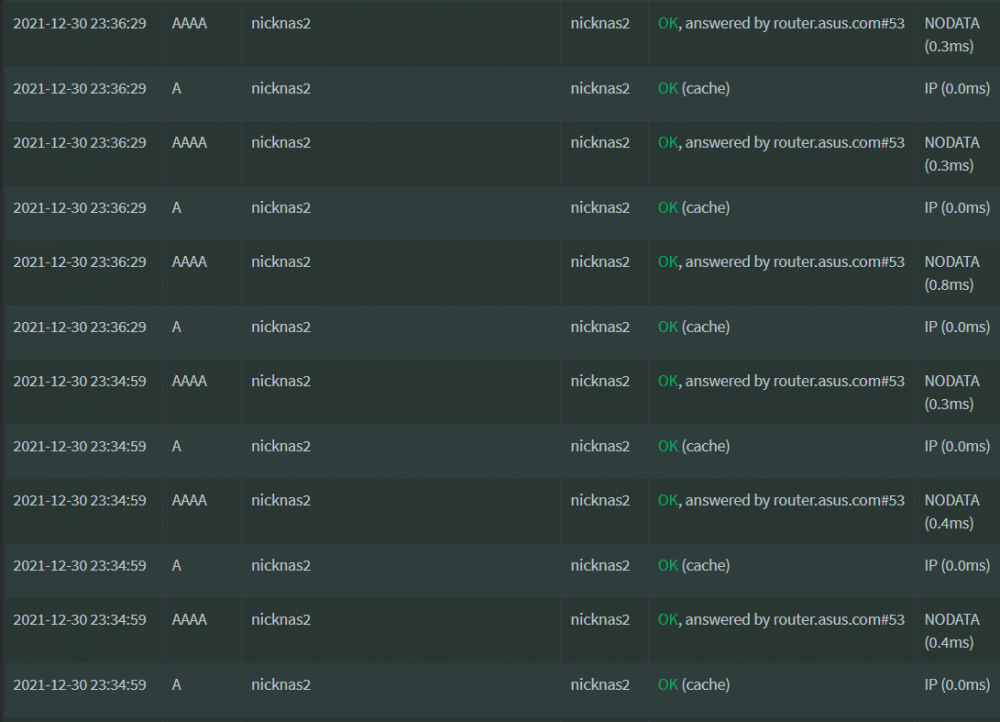
I enabled Unraid to be able to talk to custom networks defined in Docker so I could use pihole for my dockers but I've noticed it queries for itself a lot. I also noticed a lot of ipv4 and ipv6 queries even though I'm not using ipv6 even on local network. The ipv4 queries were so much that I just added the Unraid server's IP to local cache so it would stop hitting the router for it (upstream server is my router which then does DoT to Cloudflare). Is there any way to stop the ipv6 queries? I also notice that the Plex server does a lot of querying for some kind of Plex direct URL with my server's IP in it (omitted below). Any idea what this is? I ask all these questions because today my Internet failed because my ASUS router started complaining more than 150 concurrent DNS queries I assume from a single host, being the pihole. I have about 20 devices on my home network ranging from ioT to Windows 11 VM, PS5, dockers on Unraid, range of Apple devices etc. Not sure what caused the spike in DNS but just looking at all this chatter in the query log thinking it could have something to do with it. The ones for the the Unraid server querying itself seem to have many times per second.

-
never knew about that, more elegant than my approach. I just click "Add Container" from the Docker screen and pick the template
-
Did you pick "plex" from the list of templates? It's definitely maintained.
-
Yes your template is saved
-
delete the container and check the box to also remove the image then add it back. All your configs will still be there since they're stored on the host (assuming you configured everything right).
-
Delete your Plex image and pull it back down. They just updated the Linuxserver container yesterday.
-
Shouldn't matter the Plex version you pick, the fix is part of the container. Linuxserver is laying down the bits for this part, not Plex. I am currently using the linuxserver/plex repo with version latest since I am a PlexPass subscriber.
-
The Linuxserver Plex container. I did also have to delete my Plex image and re-add it but now working flawlessly on 9900K without any scripts or messing around.
-
Christmas came this year, I reported the issue to the devs and the tonemapping issue is now fixed, latest update came out yesterday. 25.12.21: - Install Intel drivers from the official repo. Update and you should be good now. I was having same issue with the Intel 9900K and had to run some script daily that would inject another driver into the container and every time the container updated it would revert and the script would put it back. Now it's officially in the container, yay!
-
Has anyone seen issues with this with 4K HDR transcoding on the fly to 1080p? I am using /tmp as my transcode directory and verified it’s working but does Plex manage the transcode bits in a first in first out fashion so it won’t overrun my system RAM? I have 32GB RAM with 16GB dedicated to a Windows VM so 16GB available to Unraid.
-
I have this user script that runs at the startup of my array. It's from when there were a lot of high write issues with the cache. I have since used the later version of Unraid to convert my cache to MBR: 1MiB-aligned and also converted my docker img to xfs. Is this script still needed or have any benefit in the latest version of Unraid 6.10? #!/bin/bash mount -o remount -o space_cache=v2 /mnt/cache
-
I'm seeing constant disk write activity in 6.10rc2 that I didn't see in 6.9. The HDD light on my tower is constantly blinking and I'm seeing constant blips in nmon for disk write activity. It's showing on the drives below. nvme1n1 vme1n1p1 nvme0n1 vme0n1p1 I run a Windows 11 VM with the main disk on the cache along with Sonarr, Radarr, Nzbget and Plex. Tried shutting them all down and still seeing the consistent write activity. Considering we've had issues in the past with high write activity on the cache I wanted to make this report at a higher priority since the issue could be back. Attaching diagnostics. nicknas2-diagnostics-20211117-2114.zip
-
11 minutes uptime after update, got my VM started on Q35-6.0 and everything looked good but system hard locked up. Fell off network, no SSH, nothing, just total lockup. Had to force reboot with power button and attached are diagnostics After reboot, VM tab had disabled itself, was off in the settings. I turned it back on and was able to start my Windows 10 VM again. I have an nvidia 1080 Ti passed to it which I noticed it had to reload the video driver after changing the VM to Q35-6.0. I'll leave it as minor for now but if I lock up again or repeatedly it'll definitely become higher priority. Update: Increasing the priority as I hard locked again within 5 minutes of starting my VM Update 2: Server hard locks within 5 mins of VM running. I even tried to change it back to Q35-5.x and no luck. I'm going to downgrade back to 6.9 until the devs can figure this out. It's definitely something with the VM. Update 3: Downgrade stopped the lockups. Attaching my VM config if it is helpful to look why it causes a system crash. nicknas2-diagnostics-20210814-1812.zip VM-Win10.txt
-
whole system locked up while installing this plugin. VMs died, GUI and SSH unresponsive. Server even dropped off my router as being connected. Had to force a reboot and when it came back CoreFreq was not installed. Posting diagnostic as requested. nicknas2-diagnostics-20210706-1749.zip
-
Worked for me! Hopefully they can bake it into the container soon
-
Wonder when this will be baked into the container? Should be easy to incorporate and publish
-
I posted on the Plex forum and gave them debug. They said it’s a known issue on newer Intel CPU and there is an experimental build available to testing. I’m not confident enough to go mucking around so not testing but at least it’s good to know they’re working it out
-
Yup!
-
Thanks, craigr I have 6.9 beta and no I did not have to change anything Sent from my iPhone using Tapatalk
-
I'll throw my 2 cents in here too, having same issue since the latest update that includes the tone mapping. If it's enabled, no hw transcode for anything 4K HDR. I have an Intel 9900K CPU and am using the linuxserver docker container. Hopefully someone finds a fix! I posted in the Plex forum too. For now I've turned off the feature.


