





KnightRdr23
Members
-
Joined
-
Last visited
Everything posted by KnightRdr23
-
Ok I think I figured out my Wireguard issue... somehow my DDNS client on router died and it wasn't keeping my DDNS name updated and ISP changed my public IP. The weird part is... Wireguard kept saying I was connected, to the old IP? How on earth would it even be able to establish a connection to a public IP I don't have anymore? Very strange.... Still need help with getting my VM to talk to the host on the virtual NIC.
-
Looking for some help... I was using my Unraid box using a 192.168.50.x subnet on my home network and decided to go back to 192.168.1.x because one of my IOT devices was having a bit of trouble and I thought that may fix it based on what I read online. Well, everything is working except now when using my VM to access my Unraid server shares with an internal NIC on a different subnet, I get connection refused trying to access anything on the server. Also, when connecting with Wireguard from my iPhone, I cannot access anything hosted on Unraid from my device. It all seemed to work until the subnet was changed. I'm fairly sure I changed everything in Unraid and the routes/networks are correct, also on my router, but something isn't right. Wondering if I need to reapply something for it to work again. Attaching diagnostics for help nicknas2-diagnostics-20231110-0123.zip
-
Since updating to the 6.12 series, my Mac can no longer backup using TimeMachine to the same share that worked previously. I can manually connect to the share, associate it in TimeMachine but when it tries to connect for the first backup, there is a connection error. Is there some special setting in 6.12 I need to flip to make this work? nicknas2-diagnostics-20230501-2153.zip
-
One of my containers (sonarr) appeared to be hung with an error in the log "object reference not set the instance of an object". I tried to restart the container but continually got a server error pop up. I then tried to stop the entire docker service and it did stop however now I cannot restart it, it fails to start. My other containers appeared to be working except this one prior to me trying to restart the docker service in the GUI. I just updated to 6.12rc2 a couple days ago from 6.11.5 nicknas2-diagnostics-20230327-0003.zip Tried to reboot server and it's not rebooting, GUI is still accessible. Log line below is repeated in the logs. Mar 27 00:12:04 nicknas2 emhttpd: Unmounting disks... Mar 27 00:12:04 nicknas2 emhttpd: shcmd (462): umount /mnt/cache Mar 27 00:12:04 nicknas2 root: umount: /mnt/cache: target is busy. Mar 27 00:12:04 nicknas2 emhttpd: shcmd (462): exit status: 32 Mar 27 00:12:04 nicknas2 emhttpd: Retry unmounting disk share(s)... Update: Server finally appears to have forced itself to reboot after a long period of time (~5-10 mins) and it started a parity check automatically on boot I assume because it detected an unclean shut down. My docker containers are running including the offending one. I had never experienced such trouble until 6.12rc2 Update2: Might be worth mentioning I switched from macvlan to ipvlan the other day because of the common problem tool telling me I had call traces for macvlan so I should switch to ipvlan. Perhaps I should switch back?
-
I've got a Windows 11 gaming VM and wanted to have a passed NIC for low latency applications like game streaming both from Nvidia cloud and also using sunshine/moonlight to stream from VM host to my Apple TV or Nvidia Shield in the living room. I also did not want to lose the raw speed of accessing the shares on the host from within the VM. I was able to configure a passthrough NIC as my main NIC and then add a virtio-net adapter using virbr0 interface. Then in the VM on the second NIC I manually configured the IP and removed the DNS and default gateway. I am able to access my host using the virbr0 default gateway IP and map the drive in Windows getting the full speed of virtio-net while all my other network connectivity is happening over the passthrough NIC. Not sure if anyone else wants to do something like but figured I'd comment that it was possible.
-
@JorgeB - After a long while I think I discovered what triggers this. If you use a raw image file for your Windows VM and use cache = none, these errors start up pretty quickly from normal use of my gaming VM. Setting the caching to writeback seems to prevent further errors. Current config for the Windows OS disk which seems to prevent the errors. Was reading something online about how not using writeback for guests like Windows can be weird with btrfs because of how Windows writes to the disk. Solution was either to do a no cow in btrfs for the folder with the disk image, or simply use writeback/writethrough cache mode. <disk type='file' device='disk'> <driver name='qemu' type='raw' cache='writeback' io='threads' discard='unmap'/> <source file='/mnt/user/domains/Windows 11/windows11.img' index='2'/> <backingStore/> <target dev='hdc' bus='scsi'/> <boot order='1'/> <alias name='scsi0-0-0-1'/> <address type='drive' controller='0' bus='0' target='0' unit='1'/> </disk>
-
Is it possible to update nvidia graphics card BIOS via unraid either through the host or when passed through to a VM. I've got an older 1080 Ti and just got a brand new Alienware GSync OLED monitor but having flickering when in GSYNC mode that wasn't present on my old monitor. A suggest was made to make sure my GPU BIOS is up to date. I found the latest for my model on techpowerup but not sure how to do it given the uniqueness of Unraid and a Windows 11 VM. Any help would be appreciated!
-
Updated from v6.10 production directly to v6.11rc4. All seems to have gone well except I have this warning right next to the Unraid logo in the web GUI Warning: parse_ini_file(/usr/local/emhttp/state/flashbackup.ini): failed to open stream: No such file or directory in/usr/local/emhttp/plugins/dynamix.my.servers/include/myservers2.phpon line552 nicknas2-diagnostics-20220903-1849.zip
-
@jonp any thoughts here? Seems to be something wrong with installing stuff from the Nerd pack
-
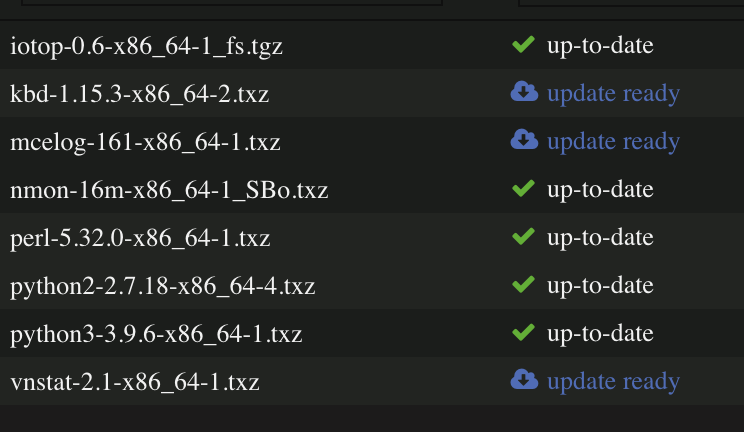
I have 3 packages that keep saying update available but won't actually update. It says they are installing and completes but then GUI still says update available. How can I fix this?
-
Tried to move everything off but my docker.img file would not move off. I am using the XFS format for the docker image. Every time it would try to move it there were errors in the log about the corruption. I ended up deleting my docker img file entirely and then I even formatted each disk using XFS in unassigned devices before deleting all the partitions again and setting the pool back up. Ran a scrub while empty and no errors found. Now moving everything back. Interesting enough though even though docker.img would not move (I even tried to stop/start array to break anything that may have it locked), docker would still start up fine if I turned it on. I know the XFS image format is newer to Unraid for Docker so could there be some weirdness with xfs docker image on a btrfs cache pool? Pulled a fresh diagnostic after rebuilding and transferring all back plus rebuilding my dockers. Update: Ran scrub after all my stuff was back the way it should be and came back clean. At least I have a good starting point now. nicknas2-diagnostics-20220331-2348.zip
-
Going back means I lose my Windows 11 VM since no virtual TPM unfortunately Sent from my iPhone using Tapatalk
-
Update, let the HCI test run overnight and still no errors at all. @JorgeB really starting to doubt this is a hardware issue and instead something with btrfs or Unraid
-
the 24 hour memtest I ran was the uefi one from the memtest site using a different stick. The Unraid one doesn’t boot uefi. I assigned 28GB to my Windows 11 VM and ran 12 copies of that HCI tool for 2000 MB each (last one was 1000 MB) and all ran to completion without error. Unraid was showing 98% system memory used and Windows showed 97% used. I also used qemu-img convert to duplicate my VM’s raw image file and deleted the old one thinking possibly some of the corruption was related to the img file. The system still shows 6 uncorrectable errors without a file path when doing a scrub but no new errors for over 24 hours. The system is definitely stable… guess next step is to try to recreate the cache pool again for the second time in a week. as I’ve mentioned, would not even known there was an error if I hadn’t looked. The machine is on 24/7 and use it for multiple tasks in Unraid plus gaming VM. No trouble other than the btrfs log lines.
-
It doesn’t. Based on what I’ve read online the output of the scrub is supposed to show the file path as well but in this case it does not. Does that mean the uncorrectable error is somewhere in free space?
-
it doesn’t, those are the log file lines from the scrub. I have 6 uncorrectable errors. Just gives the logical numbers and which device.
-
@JorgeB is there some way to tell the file that has corruption? I have 6 uncorrectable errors but the log output is not specific what file where is corrupted. I would like to find out if I can. If it's a file I can live without I'll just delete it and see if I get further corruption. I'm really thinking mover is just moving the corrupted files off and back on whenever I rebuild the cache [ 8803.054697] BTRFS error (device nvme0n1p1): bdev /dev/nvme1n1p1 errs: wr 0, rd 0, flush 0, corrupt 12, gen 0 [ 8803.057091] BTRFS error (device nvme0n1p1): bdev /dev/nvme0n1p1 errs: wr 0, rd 0, flush 0, corrupt 14, gen 0 [ 8803.058429] BTRFS error (device nvme0n1p1): bdev /dev/nvme0n1p1 errs: wr 0, rd 0, flush 0, corrupt 15, gen 0 [ 8803.059273] BTRFS error (device nvme0n1p1): unable to fixup (regular) error at logical 127944531968 on dev /dev/nvme1n1p1 [ 8803.059390] BTRFS error (device nvme0n1p1): bdev /dev/nvme1n1p1 errs: wr 0, rd 0, flush 0, corrupt 13, gen 0 [ 8803.059559] BTRFS error (device nvme0n1p1): unable to fixup (regular) error at logical 127941509120 on dev /dev/nvme1n1p1 [ 8803.060744] BTRFS error (device nvme0n1p1): bdev /dev/nvme0n1p1 errs: wr 0, rd 0, flush 0, corrupt 16, gen 0 [ 8803.061994] BTRFS error (device nvme0n1p1): unable to fixup (regular) error at logical 127941509120 on dev /dev/nvme0n1p1 [ 8803.063656] BTRFS error (device nvme0n1p1): unable to fixup (regular) error at logical 127944531968 on dev /dev/nvme0n1p1 [ 8803.064907] BTRFS error (device nvme0n1p1): unable to fixup (regular) error at logical 127948152832 on dev /dev/nvme1n1p1 [ 8803.065907] BTRFS error (device nvme0n1p1): unable to fixup (regular) error at logical 127948152832 on dev /dev/nvme0n1p1 I was looking online and it says you can use btrfs-inspect-internal to resolve logical blocks to path/file names however this utility does not seem to be included in Unraid. The dmesg logging doesn't seem to include sector or path info like I see online that it should, only the logical number and device
-
Cross posting here as recommended. I am running v6.10rc4. almost 24 hours and 15 passes on memtest the machine is totally stable. I don’t have any other noticeable issues other than seeing the btrfs corruption in the disk log. Running Plex and such with Docker and a Windows 11 VM with the C drive on the cache. isn’t there any other option besides btrfs? I feel like it causes so many problems and I’ve seen numerous posts online about stability issues especially in a raid configuration. can someone help? Want to make sure I am not on a path to lose the data on cache. I’ve already rebuilt the cache by moving everything off with mover, deleting and recreating the pool then putting it all back. Fresh pool started producing corruption errors within 24 hours. Additional note here, after finishing memtest I booted up normal but didn't start my Windows 11 VM for a few hours. Now I started it up and am using it and the errors are popping in the log. Could my img file just be corrupt and using mover to move it on or off the array is just bringing the corruption along. Is there an effective way to copy the contents from the img file to a new one? My Windows 11 VM has been operating fine. thanks
-
+ 1,000,000 also! I have SO MANY problems with btrfs. I just want my cache to be a simple raid 1 array with a more universally supported file system liks xfs or ext4.
-
Trying to execute either short or extended SMART tests on my NVME drives in the cache. The buttons immediately change back to "start" and nothing actually start however when clicking either short or extended, the opposite start button grays out. Exiting the page and coming back just leaves both "Start" options back again and nothing actually happened. nicknas2-diagnostics-20220327-1440.zip
-
So I updated to v6.10rc4 a couple days ago and am noticing BTRFS errors in my cache log. I thought perhaps my cache was going bad so I rebuilt it using the standard method of using mover to get everything off, reformat, and put everything back with mover. I was not initially seeing read/corrupt errors last night after doing this but am again today. Cache is operating fine it seems as Docker and VMs are working but I am concerned about what I see in the logs. The 2 NVME I'm using are Samsung 960 Pro 512GB and are a little over 4 years old but only 152TBW, they are warrantied for 5yr/400TBW. Not sure if this is an Unraid issue since it just started after rc4 and rebuilding the cache did not clear the errors. Attaching new diagnostics. nicknas2-diagnostics-20220327-1440.zip
-
I was going through the process of rebuilding my cache this evening and noticed that when I brought the array back online from offline (had done this a few times this evening) that about 75% of the time the GUI would complain that there is something wrong with my flash drive by displaying a banner across the top of the screen. The array did start up fine, the warning banner went away and there are no errors in the flash drive disk log. Wondering if there is some bug where it's not waiting long enough for the USB drive to initialize before displaying the banner? I'm using a slower USB 2.0 Kingston drive simply for stability and reliability. Attaching diagnostics here. Reporting simply because the message was quite unnerving nicknas2-diagnostics-20220326-2357.zip
-
I think I saw something about Plex downloads going entirely into the transcode folder. If you’re doing like 4K HDR stuff bigger than 32GB you’ll blow out the RAM and it won’t work
-
You don’t need those parameters in the Docker container, just map the container /transcode to /tmp on host and point Plex to /transcode. side note, I had issues with this because on a longer transcode Plex would exhaust system RAM so I scripted something to create a subfolder of /tmp with 8GB of my RAM as a ramdisk so Plex can’t use more than a certain about of RAM. I have 32GB with 16GB given to a VM. Giving 8GB to Plex keeps it from overrunning the available memory. So I use /tmp/PlexRamScratch on Unraid mapped to /transcode in container. This is the script I put into User Scripts plugin to run at first start of the array only. #!/bin/bash mkdir /tmp/PlexRamScratch mount -t tmpfs -o size=8g tmpfs /tmp/PlexRamScratch
-
Those Samsung fits do NOT last. They're too small and run too hot for 24/7 operation and burn out within a year. You absolutely need a full size stick and I recommend sticking with USB 2 as USB 3 speeds appear to generate more heat and lead to more burn out.

