InfInIty
Members
-
Joined
-
Last visited
Everything posted by InfInIty
-
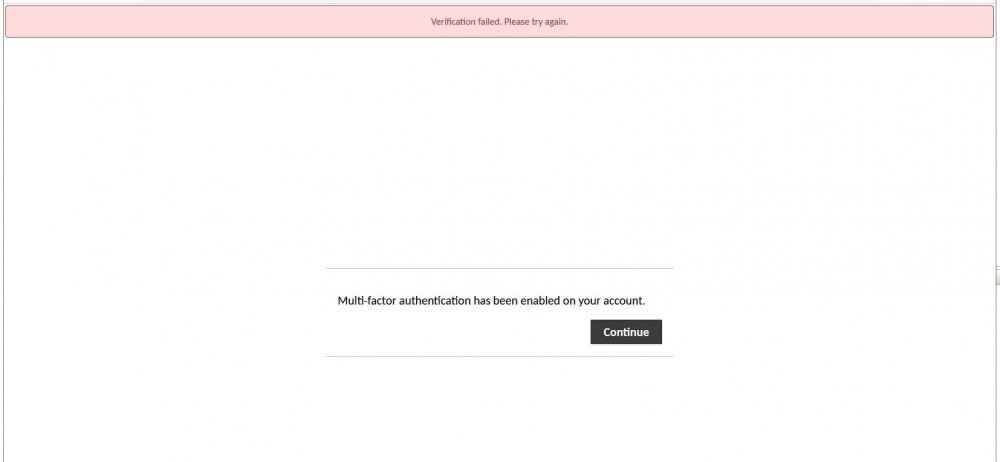
I would bet this has been answered before, but I was unable to find it. I just loaded up this docker with the TOTP option enabled. I go to login with the default guacadmin account, and it pops up with Multi-Factor authentication has been enabled on your account, with just a continue button. I click that button and it tells me verification failed. How do I get past this?
-
Yea I got some conflicting information on that, so thought it might be better just to use upstream DNS that stops that kinda of traffic. I will give that a shot though. I would still like to know if its possible to change the upstream DNS to one of those as well though.
-
I am trying to figure out how to set the upstream DNS for these dockers to be a "Family Safe" server. So 1.1.1.3 or openDNS's version. It appears pihole is functioning as I want it to, but can still get to sites the kids should not be able to get to when using it.
-
Ok I got the connection imported. IOS seems to think I am connected, but the unraid plugin does not see a handshake, and I have no access to anything on my network.
-
So I went through the documentation here. https://unraid.net/blog/wireguard-on-unraid I am now trying to add an IOS client, and whenever I scan the QR code, it says invalid QR code, The Scanned QR Code is not valid WireGuard Configuration not sure where to go from here, any ideas?
-
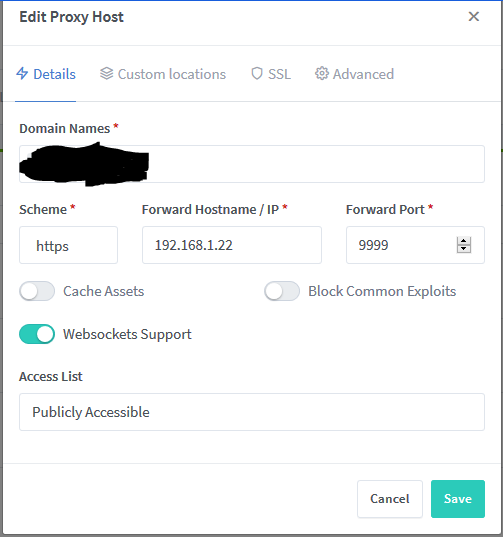
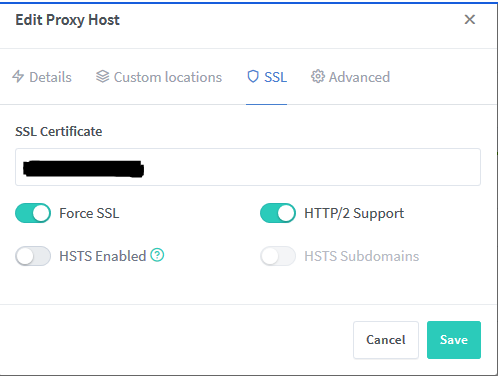
Here are screen shots of my config Here is the error when trying to access the page.
-
Anyone had any luck getting guacamole to work through the manager. I am getting 502 error when i go to the url?
-
Anyone, would really love to get this up and going.
-
So I cannot seem to get this connecting to Plex. It just says it could not connect to plex. Here is what I am putting into the GAPS config https://192.168.1.22:32400/web/index.html standard port and just the raw token, no URL on it. Here is what the log says. I have set secure connections to preferred. Not sure what else to try.

-
I tried to update nextcloud through the web updator, and now all i get is step 6 is running please refresh the page later. I have tried to research fixing this, but have not had much luck. Has anyone here had to do that?
-
I did that, the errors are gone in the log, but nothing sent to the discord channel for the webhook. I will double check that the URL is correct. Now in the log it just says parameter discord = the last 2 sections of the webhook. it stripped out the https://discord.gg/api/webhooks or whatever comes before it.
-
Here is a better error message out of the filebot docker log [amc] Argument[1]: File does not exist: discord=https:/discordapp.com/api/webhooks/jl;sdkmfaoivoiawejnfoiajnef last part of that URL removed for privacy reasons.
-
I am trying to get the AMC script to report to discord with the custom options, i have a friend who got push bullet to work, but i would like to get discord working. Not sure why this does not work. i do see the following error several times in the log, but nothing directly related to discord ls: write error: broken pipe

-
Does this docker have a folder monitoring feature yet?
-
Is anyone else not able to login to icloud. I get an error connecting to icloud server, whenever i try and sign in.
-
So not sure if this is place to ask this, but going to ask anyway. I work for an MSP and we use OpenDNS at our office and for most of our clients. While my domain is not explictly blocked, it appears that OpenDNS seems that they are malware and by policy in openDNS that just redirects to a different page. Edge will just straight to the redirect. Firefox said is was a potential security issue, and if you advance then you get the redirect. I can try chrome, but curious if anyone else runs into this. It could be due to my domain redirection. My top level domain points to a duckdns instead of straight back to my IP as i do not have a static ip from my ISP.
-
Has this been stable for you? I use Coppit's container, but every once in a while it flakes out and i have to rebuild it.
-
I have done that. The URL works. from the IOS app i can login and everything, just uploading files fails.
-
So I have completely rebuilt my unraid server since then I have it running through the nginx proxy manager, and it seems everything is working as it should. Windows desktop app works, uploading files through the web app work. The IOS app I just get error timed out everytime i try and upload a file.
-
I figured this out, need to do http instead of https on the proxy config. Is anyone running nextcloud through this. I can login and everything just fine, but get time outs anytime I try and upload a file. uploads via the webui seem to work fine. From IOS i just get timeouts.
-
Has anyone gotten Ombi to work through this docker? I have gotten Unifi, and nextcloud working, but Ombi, i just get a bad gateway error.
-
So I switched over to the Nginx proxy manager, but still having the same issue. Did you set the system up with a maria DB database? SO I have the issue of adding apps, and an issue with larger files failing to upload from IOS. namely video files. photos seem to be going up fine.
-
That fixed it. I just copied all the text, made a file called ca.plg on my /boot/packages directory. Then loaded that file Thanks.
-
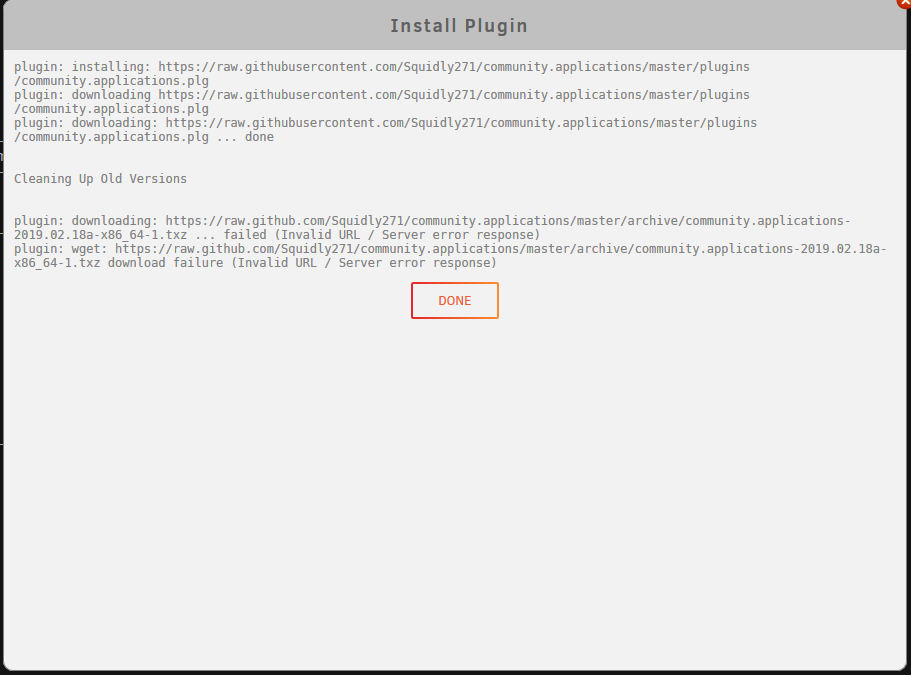
Yea when i click it on my machine I see the text, but when i past the link into the URL it doesnt work. I guess I could just copy the text and make my own file on unraid and load it that way. So i just tried that. The URL in the .plg file to download seems to be the issue. if you go to that URL you get an error, if you change it from raw.github to raw.githubusercontent.com there is not file there. @Squid Any idea whats going on?
-
When i use that link i get the same cannot download error