





Janddy
Members
-
Joined
-
Last visited
Everything posted by Janddy
-
Hi, last night my cache drive disappeared off my server. It was working fine during the day and the server hasn't physically been touched or moved in weeks. I restarted the server but the cache drive didn't come back after reboot. It's not appearing in the main page, dockers are gone, and shares that use only the cache drive are gone. Can anyone help me work out what the issue is with the cache drive? Has the drive gone bad and should I throw it out, or is it still usable? I have attached my diagnostics after the reboot. I also have diagnostics from before the reboot and can upload if that would be helpful. Thanks in advance. tower-diagnostics-20211014-0925.zip
-
Thanks for that. Cache didn't come back after reboot so I will make a new thread.
-
Hi, I am getting an error message when I go to the CA app store that tells me to post here. It says: I also have error messages on the docker tab: There is one of those for each docker installed and also all my docker containers aren't working. I assume it is related as both errors mention line 331. Any idea what's gone wrong? tower-diagnostics-20211014-0000.zip
-
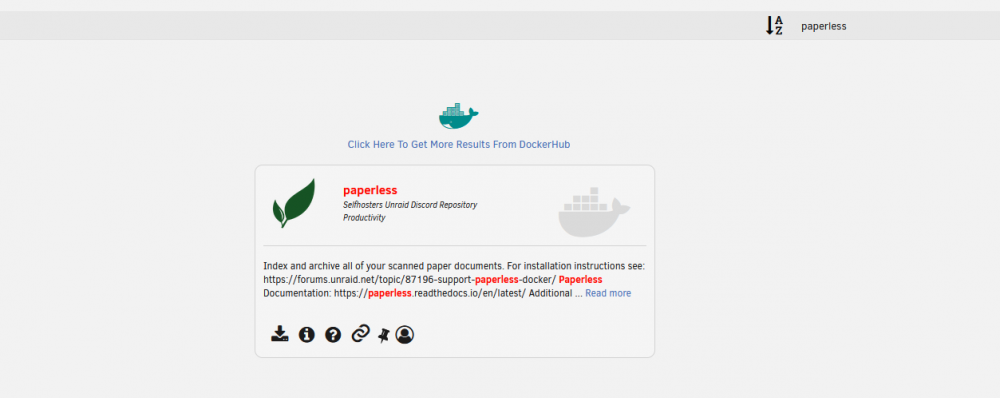
Hi, I want to install paperless-ng but it appears the template is no longer in the CA App store? When I search for paperless I only see the old paperless, and when I search paperless-ng I get nothing. I can see it if I click "get more results from DockerHub" but then the template has no pre-filled variables and paths. Has it been removed for a reason? Or am I doing something wrong?
-
I didn't figure it out but it seems to be working a lot better now. Maybe I was wrong or just confused about it overwriting itself, I'm not sure. But I'm not having any problems with it all now.
-
Thanks for that @Richamc01, I've managed to get it working after a bit of messing around. Looking at your config made me realize I forgot to change the server_name from bookstack.* to janddybookstack.* to match my duckdns subdomain (it's not janddybookstack, but you get the idea). Once I made that change the reverse proxy was working, but the page wasn't loading correctly. I remembered reading something about that before and sure enough, I scrolled up and @klogg had the answer: Removing https:// from the APP_URL in the .env file fixes the problem, but restarting the container seems to overwrite the manual change and puts the https:// back in. Weirdly, even after the https:// is back in the file, loading the page still works. However It didn't work when I tried it on my phone at first, but then I removed the https:// again and it worked on my phone from then on. Maybe it's cached in each device's browser or something? Not a huge deal, but if anyone knows how to stop the .env file from being overwritten on restart that would be cool. Anyway everything is 99% functioning now so thanks @Richamc01 and @klogg for the assist and thanks to the linuxserver team for the docker
-
That's good to hear. I think I only have my own subdomain - something similar to janddybookstack.duckdns.org. Your config file would be great if you don't mind.
-
Is it possible to use duckdns for reverse proxy with bookstack? I followed gilbn's guide but when I got up to the Nginx section it didn't seem to work. I noticed in the comments of the code that I had to copy into the 'default' file in the swag appdata that it said Does that mean the entire reverse proxy won't work, or just that specific feature won't work? Sorry I'm not very familiar with web stuff like Content-Security-Policy. I have swag reverse proxy set up for multiple other containers using duckdns and I have also have bookstack running fine locally. I understand if the solution is to just buy a domain but I wanted to see if it was possible to do it the way I have everything else set up first.
-
I finally managed to figure out what was causing this issue. My PIA password included the apostrophe symbol: ' which I guess was interfering with the docker code somehow - maybe ending the openvpn file early based on the "unexpected end of file" in the log. Changed my PIA password and all was good. It was odd though that I've been using this password for a few years and it only started causing problems recently. Oh well, just glad it's fixed. Hopefully this helps someone if they have the same issue.
-
Hi, since about a week ago my deluge docker has stopped working and I'm not sure how to fix it. When I start the docker, the logs have these errors: 2020-10-03 13:44:13,427 DEBG 'start-script' stderr output: /root/openvpn.sh: eval: line 73: unexpected EOF while looking for matching `'' /root/openvpn.sh: eval: line 74: syntax error: unexpected end of file After a minute the docker seems to be using 100% of my CPU and RAM, other dockers start crashing and the Unraid web-ui goes non-responsive. I have tried removing the docker (and also removing the image) and reinstalling. I also tried rolling back to an older version from 2 months ago which gave me a different error: 2020-10-03 14:03:00,929 DEBG 'start-script' stdout output: [warn] Exit code '52' from curl != 0 or no response body received [info] 7 retries left [info] Retrying in 10 secs... I also followed the instructions to upgrade to PIA Nextgen thinking that might be the problem, but no change. Does anybody know what the problem is and how I can fix it? Thanks in advance
-
Yes appdata is listed on the shares tab and I can browse to it in windows explorer. The default in Settings - docker is /mnt/user/appdata/ so I'll change the source to that when I set back up.
-
Ok thanks, the source must exist then because the backup ran this morning. Does that mean there is an issue with my source setting, since it backed up nothing? Should it have been /mnt/user/appdata/ instead of /mnt/cache/appdata/?
-
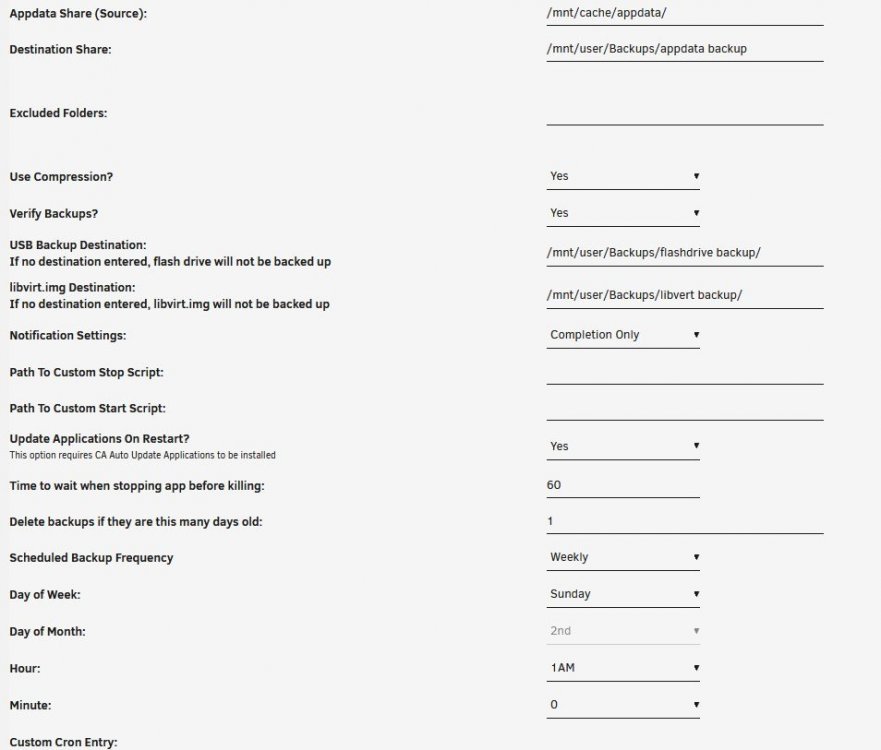
One of my pooled cache drives died recently (single / JBOD configuration) so I unallocated it, thinking I could just format the other drive without losing anything because I had my appdata backed up and I could just reinstall my dockers. But when I restored the appdata there was nothing there. I then checked my backup folder and sure enough, there's a backup folder there with a date of today, but it was empty. I may have to accept that I'll have to reconfigure all of my dockers, but I would like to find out what I did wrong to make the backup not work. Here are my settings: If I had to guess it would be that the "delete backups if they are this many days old" setting deleted the last good backup (I don't know why it was set to 1 day), and then the backup this morning failed because the cache drive was already dead. Does that sound right? Does anything else look wrong? Is there any hope for getting my appdata back?
-
That did it, thank you. All set up and working well now. I will resist the urge to experiment with settings I don't understand in future. Thanks for all you do binhex!
-
I just installed Jackett and was setting it up but then I mistakenly changed the setting to not allow external connections (stupid, I know). It immediately kicked me out of the Web UI and I can't access it again. I tried reinstalling the container (with and without a server reboot), and I tried accessing it from the web UI directly on the server but that also didn't let me in. Is there any way I can either reset all settings back to default and start again, or somehow change the external connections setting from command line or in the docker settings? Sorry if this is obvious, I'm quite new to this and I can't find any instructions or relevant info on google.



