





_0m0t3ur
Members
-
Joined
Everything posted by _0m0t3ur
-
I would recommend using Wireguard instead of OVPN, assuming you have PIA for your VPN provider.
-
Not seeing the issues you describe. Switched to Wireguard from OVPN and have been happier with the performance. I do notice the initial connection time to the VPN to be longer when starting SAB.
-
thanks.
-
@binhexseeing this in the SABnzbdvpn logs: Warning: `/config/wireguard/wg0.conf' is world accessible did a search for this on your github vpn page but didn't see a match. have you seen this before? is there anything i need to do about this? thanks.
-
so does privoxy only work if the vpn is enabled?
-
just switched to wireguard and seeing a huge speed improvement. pia has a page about port forwarding on the nextgen network here you might want to look at.
-
SIO just put out a new video about testing speeds which I haven't had a chance to watch but looks interesting.
-
Oh. Good to know. I have a 400 Mbps connection and used to get a solid 50 MB/s download speed on PIA overnight. Now, lucky to get half that.
-
On Spectrum. Overall I've noticed a slower surfing experience. I think this might be more related to COVID work/school from home.
-
Toronto.
-
i'm seeing the same behavior. i used to 40-50 megabytes per second in the evening/over night; and during the day 15-25. now during the day 6-12; evening/over night max 25.
-
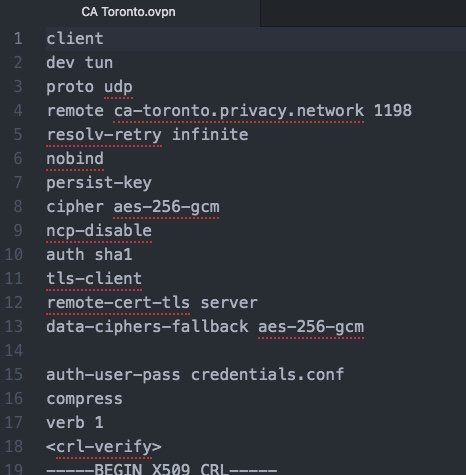
this is what i had (excepting line13); had a working SAB. updated SAB. received AUTH_FAILED and this below: DEPRECATED OPTION: --cipher set to 'aes-256-gcm' but missing in --data-ciphers (AES-256-GCM:AES-128-GCM). Future OpenVPN version will ignore --cipher for cipher negotiations. Add 'aes-256-gcm' to --data-ciphers or change --cipher 'aes-256-gcm' to --data-ciphers-fallback 'aes-256-gcm' to silence this warning. so added line 13; instantly worked.
-
to be clear, i had the exact settings from Q22 in ovpn file working for Toronto. then i updated today to the latest SAB which broke it. i then monitored the sab logs and followed the recommendation.
-
Update: i just updated binhex-sabnzbdvpn to the latest, which broke my vpn connection. got an error message saying to add "aes-256-gcm" to fallback. so, despite the recommendation in Q22 to remove "data-ciphers-fallback aes-256-gcm," i added back "data-ciphers-fallback aes-256-gcm" to the ovpn file and was instantly able to login. your milage may vary.
-
FYI - the PIA "openvpn-strong-nextgen" files stopped working for me today. checked the logs. then, reverted to the "openvpn-nextgen" linked by binhex in Q19 here, then followed Q22. worked fine. initially the "openvpn-nextgen" didn't work for me, but the "openvpn-strong-nextgen" did. your mileage may vary.
-
Using the "openvpn-strong-nextgen" files from PIA and only adding the line "data-ciphers-fallback aes-256-gcm" to the OVPN file in use worked instantly. In other words, copy ctyke's shown above.
-
removed calibre. deleted the appdata. reinstalled. but changed the host path for container "/books" to "/mnt/disk2/media/books" and it works, instead of "/mnt/user/media/books".
-
thank you for looking at this. helps to have fresh eyes. i haven't done anything different. filled in all the paths, ports, etc. the problem arises with The Calibre Welcome Wizard, after successfully logging into guac. when i change the container library path from "/config" to "/books" the database either just plain fails or is corrupted. if i choose repair, it doesn't work. but if i choose the default "/config" then it works.
-
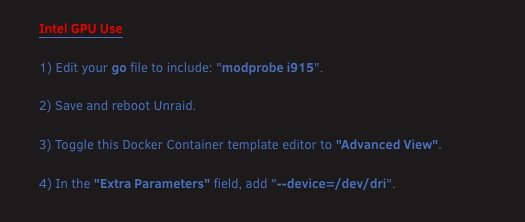
it shows the content of my "/media" share, including the subfolder "books"./mnt/user/media/books/and that makes sense. for some reason, i cannot get calibre to let me either make the database at "/books" or move it there after. any suggestions?looking at the default paths in the linuxserver.io calibre container, calibre puts a copy of the books in the calibre llibrary located in the appdata folder, so what is the purpose of container path "/books,"I was curious whether Intel Quick Sync is available in Unmanic, as I have it installed in unRAID and enabled in Plex with fantastic results. Searching this thread I didn't find what I was looking for, but when installing Unmanic, I noticed that the info for enabling Intel Quick Sync in Unmanic is noted. Here are the steps; Note: for a step-by-step guide for enabling Quick Sync and editing the Go file, look at the first post here in the Plex Hardware Acceleration Guide, by @lotetreemedia. Though QuickSync (/dev/dri) is working for Plex and Handbrake, so far I'm unable to get Unmanic to use Quick Sync. Anyone else get it working?
 Installed the update a couple days ago which solved the problem. Thank you.


