





_0m0t3ur
Members
-
Joined
Everything posted by _0m0t3ur
-
Perhaps this git will be of some help. Look at the second to last comment. https://github.com/nextcloud/server/issues/15299
-
The first post of this thread offers an easy way to update Nextcloud by command line. I've resorted to only updating via command line ever since problems started (within the last few months or so) with updating via the GUI updater.
-
The Nextcloud webui updater was giving me grief. So, I updated via the command line using the guide from post #1 of this thread; it worked perfectly. I'm going to use the command line moving forward.
-
A fairly large array using shucked drives.

-
Curious what the timeline is for moving this docker from v2 to v3?
-
Ran CHKDSK but no errors. So ran FirstAid in Mac OS and it scanned and fixed the file system. Unraid back up and running on 6.7.2. Thanks for your help.
-
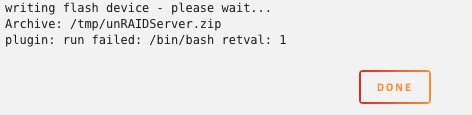
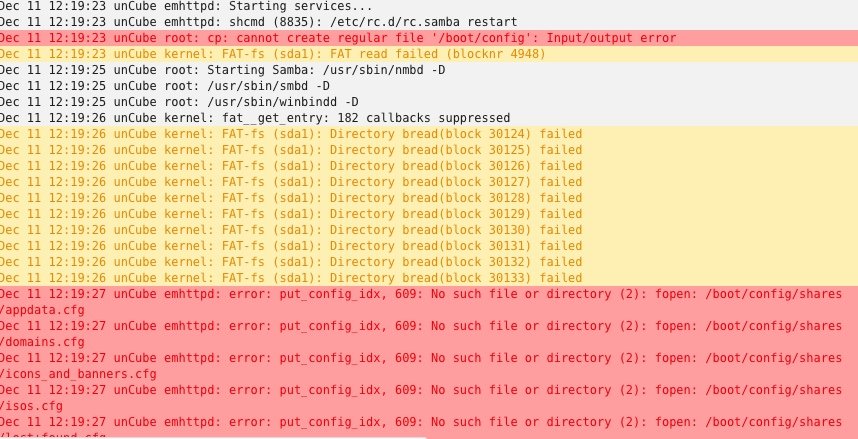
I updated all dockers and plugins. Ran the Update Assistant for added verification. Got the all clear. Attempted to update but got this error: I have not rebooted. Unraid still shows the option to Upgrade to 6.8.0. Unraid is attempting to start services. The logs show scrolling errors:
-
Another NZBHydra2 update came through. Deleted existing docker. Deleted appdata. Cleared browser cache. Reinstalled. Reconfigured. Working fine.
-
I just updated binhex-NZBHydra2 to the latest. Now no access to the webui and other dockers cannot communicate with binhex-NZBHydra2. The binhex-NZBHydra2 docker log shows failed database migration and "Migration V1.21__LINK_SEARCHENTITY_TO_INDEXERSEARCHENTITY.sql failed". Anyone else having any issues after upgrade?

-
First off, thank you! Read the FAQ, and the execution of the pre-clear, while CL, seems very straight forward. I've installed and will give this a try with some used disks I picked up recently.
-
Do you get any output at all in the web browser with “domain.duckdns.org” in place?
-
I'm having the same 0kb update issue with a handful of lio docker containers for about a week.
-
Thanks for all your hard work! I really appreciate these updates. My server is updated to v6.7.1, with no problems detected.
-
Also, reverted back to 2.3.8-1-01, and all is working.
-
Thanks, Binhex!
-
I'm having the exact same issue. Literally, binhex-SABnzbvpn, binhex-NZBHydra2, and binhex-sonarr were working fine. After I updated SAB this afternoon, same message as above and no communication between Hydra2, Sonarr, and SAB. I did not make any configuration changes. And I checked all settings in each app to confirm.
-
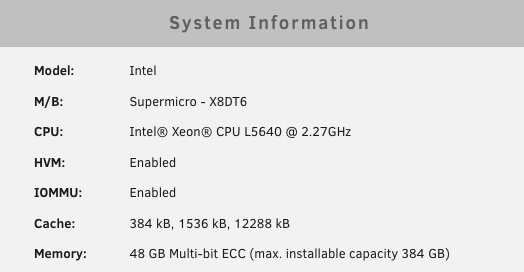
Upgraded to dual Xeon, so here's where I'm at now.
-
If you have IPMI, then you can use the IPMI plugin. Sent from my iPad using Tapatalk
-
Thank you for looking at this. I definitely run unBalance exclusively. Sent from my iPhone using Tapatalk
-
Curios what the verdict is with unBalance and empty folders.
-
Thank you. I really appreciate this, as your plugin is kind of my goto.
-
Log attached. After posting, I read through more posts and saw the updates this version made. I can only report the timeline as I know it. As for "not enough space", I know that my target had 2.79TB free, and I was only trying to move 5 or 6 empty folders. In my case "media" is my top level share. Media share settings handles whether "media" shows up on any "x" disk. I'm having problems with the lower level folders. Specifically, when moving folders with content, the folder with content gets moved to the target but an empty folder of the same name is left behind on the source disk. Also, if I try to move the empty folders, I get the error message that the target has too little space. But if I then choose a bunch of folders with GB's of data, they move just fine to the same target, but again the empty folders are left on the source disk. One last thing, at some point recently I received a message in unBalance after performing the initial "plan" to update permissions via the Fix Common Problems Docker Safe New Perms, which I did before completing the operation. Thank you for looking at this.
-
unBalance (2018.09.18a - 5.4.0) unRAID (6.6.0) When I move a folder from one disk to another, an empty SHOW/MOVIE folder is left on the source disk. How can this be prevented? Directory Structure: /Media/Series/<FOLDER FOR SHOW> Split level: Top twp directories. Note: this behavior started with unBalance 5.4.0, and also occurred on unRAID 6.5.3. If I re-run the move, it will remove the empty folders. But only one will get removed, so I have to run it one time for each empty folder. But if I navigate to the share via the network, I can only see one folder with the data in it, or an empty folder if the folder was originally empty to start with, which occurs sometimes when a program creates a folder anticipating data. UPDATE: When I try to move an empty folder this line appears in the logs: "PLANNING: The following items will not be transferred, because there's not enough space in the target disks:" BUT...the target has 2.79TB free.
-
provisioning continued to fail, even after entering the custom option in pfsense dns resolver. finally, i had the idea to log out of pfsense and then log back in again. after doing so, provisioning completed successfully. i spent a good amount of time setting up ssl login on my unraid server. after searching the unraid forum and not finding a solution, i was able to get provisioning to finally work. the main thing with everything else set correctly was logging out/in of pfsense (above). so i thought i should share this. here are the steps to setup provisioning on your unraid server with pfsense as your firewall/router: Static ip/dns in unraid: 1. click on "settings" tab. 2. turn docker off by clicking on "docker" and setting "enable docker" to NO, and then click "apply", then click "done". 3. turn vm off by clicking on "vm manager" and setting "enable vms" to NO, and then click "apply", then click "done". 4. click "network settings" and check the following: ipv4 address assignment: <set this to "static" after the other settings are confirmed as follows> ipv4 address: <should be the local ip address of your unraid server> ipv4 default gateway <should be the ip address of your pfsense router> ipv4 dns server assignment: <set this to "static" after the other setting is confirmed as follows> ipv4 dns server <should be the ip address of your pfsense router> Provisioning: 1. in unraid go to "settings" tab. 2. click on the system settings "identification". 3. be sure that "use ssl/tls" is set to AUTO. 4. then login to pfsense. 5. go to "services" then "dns resolver". 6. scroll to the bottom of the screen and click on "display custom options". 7. in the custom options box type or paste the following: server: private-domain: "myunraid.net" 8. click save. 9. click apply. 10. log out of pfsense. then log back in to pfsense again. 11. in unraid go to "settings" tab, then click on "identification". 12. scroll down the page and click "provision".
-
Not sure what's taken me so long to find this thread, but it's one of the best docker support threads I've seen. Thanks on a number of levels: thanks for this thread; thanks for supporting unRAID and it's users with your Docker containers. Hopefully my donation helps a little.

