





salora
Members
-
Joined
-
Last visited
Everything posted by salora
-
Hi I successfully installed big sur. trying sonoma. I did all the steps above but i am stuck at part 5 it does not go further the efi command lines. i always go back to uefi shell not the recovery screen. any tips? thanks
-
hi y'all so i have set up my unraid server to go to sleep, that part goes well. when i wake it up by wol or with the power button on the tower it start up and just shutdown right after. I have attached the syslog of the whole wake up shutdown process. If anyone can help me with that I thank you best regards syslog.txt
-
all right thanks will do
-
thank you but i cannot start a new topic in that section
-
so i have set up my unraid server to go to sleep, that part goes well. when i wake it up by wol or with the power button on the tower it start up and just shutdown right after. I have attached the syslog of the whole wake up shutdown process. If anyone can help me with that I thank you best regards syslog.txt
-
Proxmox debate set asside it is not the job of the virtualisation software to handle backup. I am sys admin and at work i don’t ask vmware to handle my backups i have veeam for that. So at home i don’t ask unraid to backup my vm’s. the free veeam agent can handle that for example. That being said snapshots are a great feature
-
hi, i posted it in the feature request but might as well put it here : maybe it is already in the work, but I watched the uncast "Unraid Story" and heard about multiple pools and new features added to the mover like moving data across pools. So i was wondering can we have a third storage option to a share? like I have nvme as principal storage, a zfs Z1 ssd pool as secondary and the hdd array as third. so i can move daily from the nvme to the ssd pool and have great speed read/write and then monthly move data from the ssd pool to the array for long term stored files. like i said maybe it is in the work one way or another but that would be awsome thanks team for the good work here
-
Hi Y'all maybe it is already in the work, but I watched the uncast "Unraid Story" and heard about multiple pools and new features added to the mover like moving data across pools. So i was wondering can we have a third storage option to a share? like I have nvme as principal storage, a zfs Z1 ssd pool as secondary and the hdd array as third. so i can move daily from the nvme to the ssd pool and have great speed read/write and then monthly move data from the ssd pool to the array for long term stored files. like i said maybe it is in the work one way or another but that would be awsome thanks team for the good work here
-
Greetings everybody, so I have the same issue as others here, so I stayed with 6.7.2 hoping that maybe 6.8.1 would solve this unfortunatly not, so besides the workaround (that may induce a loss in performance), will this be fixed ? or we shall wait for unraid 6.9? thank you regards
-
Hi binhex, I already tried removing the docker image, it did'nt do the trick :( So I tried option 2 remove everything and it's working :) So back to normal thanks a lot for your support best regards
-
I have this when I try to pull the docker image from scratch Command: root@localhost:# /usr/local/emhttp/plugins/dynamix.docker.manager/scripts/docker run -d --name='binhex-radarr' --net='bridge' -e TZ="Europe/Paris" -e HOST_OS="unRAID" -e 'UMASK'='000' -e 'PUID'='99' -e 'PGID'='100' -p '7878:7878/tcp' -v '/mnt/disks/Transcend/home/DL/':'/data':'rw,slave' -v '/mnt/user/media/films/':'/media':'rw' -v '/mnt/user/appdata/binhex-radarr':'/config':'rw' 'binhex/arch-radarr' c6a03b3b37833dfb7723288e1abf1a5a3dd2a660ff0ed6448133033310531f83 /usr/bin/docker: Error response from daemon: oci runtime error: container_linux.go:265: starting container process caused "exec: "/usr/bin/tini": stat /usr/bin/tini: no such file or directory". The command failed.
-
hi binhex its : /config ->/mnt/user/appdata/binhex-radarr as it always has been because it's in the template I did not changed it the only thing that has changed is that I updated unraid to 6.5.3 thanks for your support regards
-
I don't think so, the settings did not change since I started the unraid server 4 month ago, and it goes wrong after the last containers update the settings are attached regards
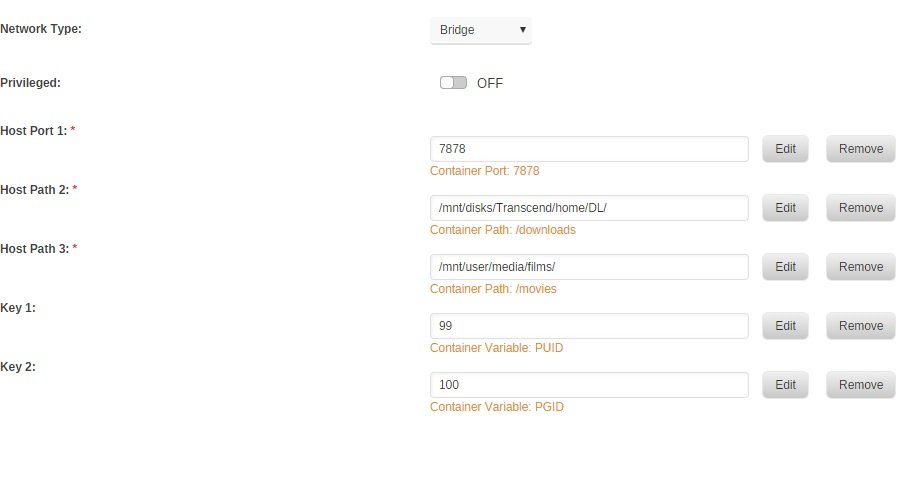
-
Well now it's binhex-sonarr that gives me the same error "container_linux.go:265: starting container process caused "exec: \"/usr/bin/tini\": stat /usr/bin/tini: no such file or directory" working well with sonarr linuxserver container though, so I really don't understand what's going on here
-
I tried to start from scratch a new container and got the same error, is there an update or maybe a rollback so I don't get the latest release which cause trouble? the only way I found was to setup a regular linux/server radarr container and copy/paste the content of the binhex appdata folder thank u regards
-
hi binhex, I've this error with radarr "container_linux.go:265: starting container process caused "exec: \"/usr/bin/tini\": stat /usr/bin/tini: no such file or directory" can you please assist me to fix? regards
-
Please be aware this will not work with unraid gui boot up and you will not see the boot sequence of unraid after the bzroot command line !! so you will not be able to do anything on unraid except with the web interface! I gathered infos here http://vfio.blogspot.fr/2016/07/intel-graphics-assignment.html https://www.redhat.com/archives/vfio-users/2016-September/msg00031.html
-
first i'm running this on a gigabyte b150m-ds3h motherboard with a i3 kabylake with hd630 this should work for you guys because your cpu is seen the same way as mine by unraid I collected informations on various sites and put it together to make it work ! first thing is to have igd enable and primary graphic in the bios nothing auto ! This work for me only with seabios and I440fx no ovmf no Q35 even for linux vm's graphic card need to be seen in iommu groups as 00:02.0 and sound as 00:1f.3 you need to break the iommu groups and isolate the devices from the host with this in syslinux configuration kernel /bzimage append pcie_acs_override=downstream vfio-pci.ids=8086:a170 modprobe.blacklist=i2c_i801,i2c_smbussnd_hda_intel video=efifb:off,vesafb:off initrd=/bzroot replace 8086:a170 with what correspond to your sound card , mine is : [8086:a170] 00:1f.3 Audio device: Intel Corporation Sunrise Point-H HD Audio (rev 31) for windows create your vm with vnc and no sound card and install windows like that, download intel hd 630 drivers and enable RDP. shutdown, change your vm settings to include video and audio cards, start and connect with rdp, at this point passthrough was working but at bad resolution with rdp session install intel hd 630 Drivers and voila ! for open elec follow this guide but i did it with a standard openelec distro not a custom
-
it's working very well, except on windows 10 even if the passtrough is working got error 43 on the video driver but why bother with windows
-
it is an I3 but it' s a kaby lake but it come with igd hd630 so it should work
-
In case someone is still insterested I have it working with an intel Kaby lake, both openelec (linux) and windows
-
ok found it what was missing was that : MONITOR ups@localhost 1 root password master
-
hi, this is the upsmon.conf, it's a fresh install of the plugin MONITOR [email protected] 1 master SHUTDOWNCMD "/sbin/poweroff" POWERDOWNFLAG /etc/nut/no_killpower NOTIFYFLAG ONBATT SYSLOG+EXEC NOTIFYFLAG ONLINE SYSLOG+EXEC NOTIFYCMD "/usr/sbin/nut-notify"
-
I can say that auto is written in the ups.conf but I can't find the auto conf script you're talking about anyway when I try to lauch the service manually I got this /etc/rc.d/rc.nut start Writing nut config Updating permissions... Network UPS Tools - UPS driver controller 2.7.4.1 Network UPS Tools - Generic HID driver 0.44 (2.7.4.1) USB communication driver (libusb 1.0) 0.9 Using subdriver: MGE HID 1.43 Network UPS Tools upsd 2.7.4.1 fopen /var/run/nut/upsd.pid: No such file or directory listening on 0.0.0.0 port 3493 Connected to UPS [ups]: usbhid-ups-ups Network UPS Tools upsmon 2.7.4.1 fopen /var/run/nut/upsmon.pid: No such file or directory /etc/nut/upsmon.conf line 1: invalid directive MONITOR [email protected] 1 master Using power down flag file /etc/nut/no_killpower Fatal error: insufficient power configured! Sum of power values........: 0 Minimum value (MINSUPPLIES): 1 Edit your upsmon.conf and change the values. So is that the problem? where an dhow do I configure the power value? thx
-
Yes that's what I did exactly but nothing displays under nut details and nut setting status is still stopped but the log says : May 8 16:16:35 Serveur usbhid-ups[1179]: Startup successful May 8 16:16:36 Serveur upsd[1188]: listening on 0.0.0.0 port 3493 May 8 16:16:36 Serveur upsd[1188]: Connected to UPS [ups]: usbhid-ups-ups May 8 16:16:36 Serveur upsd[1189]: Startup successful

