





paperblankets
Members
-
Joined
-
Last visited
-
The solution was to Delete and recreate my custom docker network. Stop all containers docker stop $(docker ps -a -q) Remove the custom network docker network rm <YOUR_NETWORK_NAME> Recreate the network docker network create -d macvlan --subnet=<YOUR_SUBNET> --gateway=<YOUR_GATEWAY> -o parent=br0 <YOUR_NETWORK_NAME> Restart unraid For me unraid was quite unhappy. It failed to mount an unassigned device, which caused the docker engine to fail to start. Restart a 2nd time. Restart each container After this my network existed as expected (same as before), but the docker network was now accessible from br0. Unraid managed containers: I had to edit each container, change it's network to none, and then back to my custom docker network (Only one save). Compose managed containers: I had to down each stack, and then I could up it again. Some stacks with complex network configurations had additional fiddling. After the above steps, I can reach containers on my custom docker network from their br0 forwarded ports/as expected. Other notes! I see this in my logs: kernel: bridge: filtering via arp/ip/ip6tables is no longer available by default. Update your scripts to load br_netfilter if you need this. May 16 11:03:11 ms I wonder if it's related to the behavior change, or if after some part of unraid updating I just had to recreate my docker networks.
-
Enabling bridging did work (I thought that was on the whole time), I could set ipvlan. Starting docker with ipvlan set was still not accessible from my host network, setting it back to macvlan also didn't fix my access. Since I thought bridging was enabled before now, I now wonder if other network settings might be different than what I originally set them to. I also wonder if something with tailscale could be causing this (these are not tailscale enabled containers, but I know some changes happened between host and tailscale networking recently)
-
I'm unable to set the type to ipvlan temporally. I'll try to dig into why that is the case this evening.

-
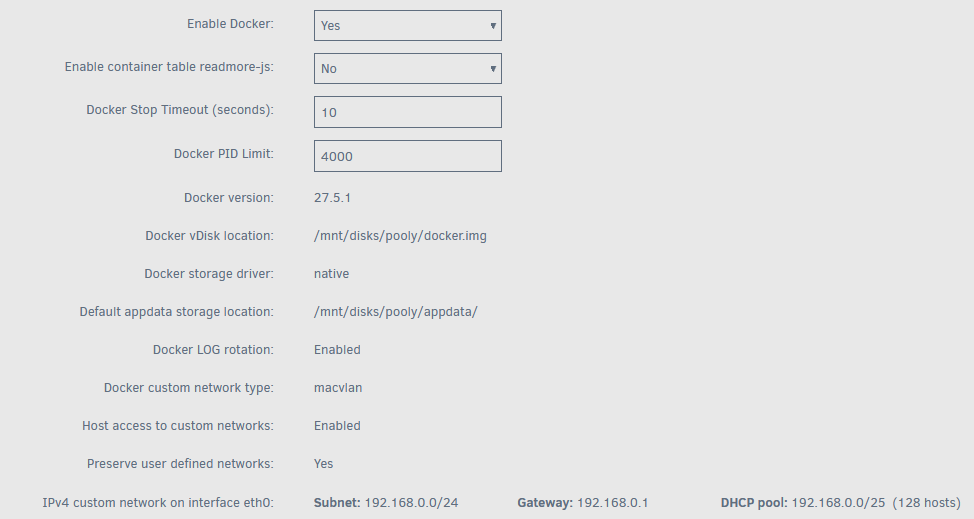
I have updated to 7.1.2, and I am not able to communicate with my containers anymore between my host and docker network. I can read logs and exec into containers fine. Docker settings: I use macvlan Host access to custom networks is Enabled Preserve user defined networks is still Yes I see this note: https://docs.unraid.net/unraid-os/release-notes/7.0.0/#issues-using-docker-custom-networks I attempted to set `DHCP pool: 192.168.0.0/25 (128 hosts)`, but I am still not able to access anything on my docker network from my host network. Containers of network type host are working fine. I have attached my diagnostics. My docker network still looks as I expect/is bridged to my host. docker network inspect docker [ { "Name": "docker", "Id": "", "Created": "2023-07-04T10:08:33.990677046-05:00", "Scope": "local", "Driver": "bridge", "EnableIPv6": false, "IPAM": { "Driver": "default", "Options": {}, "Config": [ { "Subnet": "172.18.0.0/16", "Gateway": "172.18.0.1" } ] }, "Internal": false, "Attachable": false, "Ingress": false, "ConfigFrom": { "Network": "" }, "ConfigOnly": false, "Containers": {...}, "Options": {}, "Labels": {} } ] What does "Not able to connect" mean? Trying to access a particular container via the host network: curl -v 192.168.0.244:8989/health * Trying 192.168.0.244:8989... * connect to 192.168.0.244 port 8989 from 192.168.0.244 port 40552 failed: No route to host * Failed to connect to 192.168.0.244 port 8989 after 1497 ms: Could not connect to server * closing connection #0 Trying to access that container from another container in the same docker network: curl -v 172.18.0.28:8989/health * Trying 172.18.0.28:8989... * Connected to 172.18.0.28 (172.18.0.28) port 8989 > GET /health HTTP/1.1 > Host: 172.18.0.28:8989 > User-Agent: curl/8.5.0 > Accept: */* > < HTTP/1.1 302 Found < Content-Length: 0 < Date: Wed, 14 May 2025 23:15:41 GMT < Server: Kestrel < Location: http://172.18.0.28:8989/login?returnUrl=%2Fhealth < * Connection #0 to host 172.18.0.28 left intact Please let me know if you have any ideas. ms-diagnostics-20250514-1756.zip
-
@bmartino1 Well you helped me get to the root(s) of the issue! #1 I had an expired key for MakeMKV. I resolved that. #2 The disk I have been testing is not detected on my other players. I should have tested the disk to start with. It could be the unmount would resolve this (The issue I thought I was having) issue. I will await the next time AMD has an issue with my reader, and test that method again. That's good to know, I will make sure both are passed through, I don't believe I have both passed through currently.
-
That solution unfortunately is not working. I used `lsusb` to identify the bus and device. Checked `/sys/bus/usb/devices/` and grabbed the hub 'id' (7-7.2:1.0). ran `echo '7-7.2:1.0' | sudo tee unbind` ran `echo '7-7.2:1.0' | sudo tee bind` Started arm container, `/dev/sr0` device is identified just as it was before, if I put a disk in the tray and close it the following error occurs: Dec 11 18:06:20 3ef4700793ce ARM: [ARM] Entering docker wrapper Dec 11 18:06:20 3ef4700793ce ARM: [ARM] Not CD, Blu-ray, DVD or Data. Bailing out on sr0 For whatever reason a full restart of unraid is going to resolve this issue. The rebuild is only 80% done though so I have time to try some other things if anyone has any ideas. It's being passed as a device/properly (but only sr0, no other devices). I can reproduce this in unraid managed containers, or just in compose (If I come across more examples of discussions of this (a restart making the disk drive work again) online I will edit the initial post).
-
Hi there, I'm posting in the hopes there is a way to properly reset, or reinitialize usb to sata optical devices that typically map to `/dev/sr*` without a restart of unraid. If you have used ARM or Ripper, and have a usb based optical drive you have likely come across posts like this (https://github.com/jlesage/docker-makemkv/issues/82#issuecomment-956159077) that describe a bad state, where your optical disk is mounted and accessible on the unraid host: *@*:~# lsscsi ... [1:0:0:0] cd/dvd HL-DT-ST BD-RE WH14NS40 1.05 /dev/sr0 ... Reporting properly, but when passed into a container, the drive cannot detect a disk. Ripper: 10.12.2024 19:26:38 : No disc inserted, checking again in 1 minute. ARM results in whats described in this thread: https://github.com/automatic-ripping-machine/automatic-ripping-machine/issues/1060 Running arms main ripper script returns a seemingly functional disk: *@*:/home/arm# python3 /opt/arm/arm/ripper/main.py -d sr0 [2024-12-11 01:36:34,967] INFO ARM: __init__.<module> Setting log level to: INFO [2024-12-11 01:36:35,216] DEBUG ARM: job.parse_udev pyudev: CURRENT_TAGS: :uaccess:systemd:seat: [2024-12-11 01:36:35,216] DEBUG ARM: job.parse_udev pyudev: DEVLINKS: /dev/disk/by-id/usb-HL-DT-ST_BD-RE_WH14NS40_0000000001CD-0:0 /dev/cdrom /dev/disk/by-path/pci-0000:49:00.0-usb-0:7.2:1.0-scsi-0:0:0:0 [2024-12-11 01:36:35,216] DEBUG ARM: job.parse_udev pyudev: DEVNAME: /dev/sr0 [2024-12-11 01:36:35,216] DEBUG ARM: job.parse_udev pyudev: DEVPATH: /devices/pci0000:40/0000:40:03.6/0000:46:00.0/0000:47:0c.0/0000:49:00.0/usb7/7-7/7-7.2/7-7.2:1.0/host1/target1:0:0/1:0:0:0/block/sr0 [2024-12-11 01:36:35,216] DEBUG ARM: job.parse_udev pyudev: DEVTYPE: disk [2024-12-11 01:36:35,216] DEBUG ARM: job.parse_udev pyudev: DISKSEQ: 121 [2024-12-11 01:36:35,216] DEBUG ARM: job.parse_udev pyudev: ID_BUS: usb [2024-12-11 01:36:35,216] DEBUG ARM: job.parse_udev pyudev: ID_CDROM: 1 [2024-12-11 01:36:35,216] DEBUG ARM: job.parse_udev pyudev: ID_CDROM_BD: 1 [2024-12-11 01:36:35,216] DEBUG ARM: job.parse_udev pyudev: ID_CDROM_BD_R: 1 [2024-12-11 01:36:35,216] DEBUG ARM: job.parse_udev pyudev: ID_CDROM_BD_RE: 1 [2024-12-11 01:36:35,216] DEBUG ARM: job.parse_udev pyudev: ID_CDROM_BD_R_RRM: 1 [2024-12-11 01:36:35,217] DEBUG ARM: job.parse_udev pyudev: ID_CDROM_BD_R_SRM: 1 [2024-12-11 01:36:35,217] DEBUG ARM: job.parse_udev pyudev: ID_CDROM_CD: 1 [2024-12-11 01:36:35,217] DEBUG ARM: job.parse_udev pyudev: ID_CDROM_CD_R: 1 [2024-12-11 01:36:35,217] DEBUG ARM: job.parse_udev pyudev: ID_CDROM_CD_RW: 1 [2024-12-11 01:36:35,217] DEBUG ARM: job.parse_udev pyudev: ID_CDROM_DVD: 1 [2024-12-11 01:36:35,217] DEBUG ARM: job.parse_udev pyudev: ID_CDROM_DVD_PLUS_R: 1 [2024-12-11 01:36:35,217] DEBUG ARM: job.parse_udev pyudev: ID_CDROM_DVD_PLUS_RW: 1 [2024-12-11 01:36:35,217] DEBUG ARM: job.parse_udev pyudev: ID_CDROM_DVD_PLUS_R_DL: 1 [2024-12-11 01:36:35,217] DEBUG ARM: job.parse_udev pyudev: ID_CDROM_DVD_R: 1 [2024-12-11 01:36:35,217] DEBUG ARM: job.parse_udev pyudev: ID_CDROM_DVD_RAM: 1 [2024-12-11 01:36:35,217] DEBUG ARM: job.parse_udev pyudev: ID_CDROM_DVD_RW: 1 [2024-12-11 01:36:35,217] DEBUG ARM: job.parse_udev pyudev: ID_CDROM_DVD_RW_RO: 1 [2024-12-11 01:36:35,217] DEBUG ARM: job.parse_udev pyudev: ID_CDROM_DVD_RW_SEQ: 1 [2024-12-11 01:36:35,217] DEBUG ARM: job.parse_udev pyudev: ID_CDROM_DVD_R_DL: 1 [2024-12-11 01:36:35,217] DEBUG ARM: job.parse_udev pyudev: ID_CDROM_DVD_R_DL_JR: 1 [2024-12-11 01:36:35,217] DEBUG ARM: job.parse_udev pyudev: ID_CDROM_DVD_R_DL_SEQ: 1 [2024-12-11 01:36:35,217] DEBUG ARM: job.parse_udev pyudev: ID_CDROM_MRW: 1 [2024-12-11 01:36:35,217] DEBUG ARM: job.parse_udev pyudev: ID_CDROM_MRW_W: 1 [2024-12-11 01:36:35,217] DEBUG ARM: job.parse_udev pyudev: ID_CDROM_RW_REMOVABLE: 1 [2024-12-11 01:36:35,217] DEBUG ARM: job.parse_udev pyudev: ID_FOR_SEAT: block-pci-0000_49_00_0-usb-0_7_2_1_0-scsi-0_0_0_0 [2024-12-11 01:36:35,217] DEBUG ARM: job.parse_udev pyudev: ID_INSTANCE: 0:0 [2024-12-11 01:36:35,217] DEBUG ARM: job.parse_udev pyudev: ID_MODEL: BD-RE_WH14NS40 [2024-12-11 01:36:35,217] DEBUG ARM: job.parse_udev pyudev: ID_MODEL_ENC: BD-RE\x20\x20WH14NS40\x20 [2024-12-11 01:36:35,217] DEBUG ARM: job.parse_udev pyudev: ID_MODEL_ID: 55aa [2024-12-11 01:36:35,217] DEBUG ARM: job.parse_udev pyudev: ID_PATH: pci-0000:49:00.0-usb-0:7.2:1.0-scsi-0:0:0:0 [2024-12-11 01:36:35,217] DEBUG ARM: job.parse_udev pyudev: ID_PATH_TAG: pci-0000_49_00_0-usb-0_7_2_1_0-scsi-0_0_0_0 [2024-12-11 01:36:35,217] DEBUG ARM: job.parse_udev pyudev: ID_REVISION: 1.05 [2024-12-11 01:36:35,217] DEBUG ARM: job.parse_udev pyudev: ID_SERIAL: HL-DT-ST_BD-RE_WH14NS40_0000000001CD-0:0 [2024-12-11 01:36:35,217] DEBUG ARM: job.parse_udev pyudev: ID_SERIAL_SHORT: 0000000001CD [2024-12-11 01:36:35,217] DEBUG ARM: job.parse_udev pyudev: ID_TYPE: cd [2024-12-11 01:36:35,217] DEBUG ARM: job.parse_udev pyudev: ID_USB_DRIVER: usb-storage [2024-12-11 01:36:35,217] DEBUG ARM: job.parse_udev pyudev: ID_USB_INTERFACES: :080650: [2024-12-11 01:36:35,217] DEBUG ARM: job.parse_udev pyudev: ID_USB_INTERFACE_NUM: 00 [2024-12-11 01:36:35,217] DEBUG ARM: job.parse_udev pyudev: ID_VENDOR: HL-DT-ST [2024-12-11 01:36:35,217] DEBUG ARM: job.parse_udev pyudev: ID_VENDOR_ENC: HL-DT-ST [2024-12-11 01:36:35,217] DEBUG ARM: job.parse_udev pyudev: ID_VENDOR_ID: 174c [2024-12-11 01:36:35,217] DEBUG ARM: job.parse_udev pyudev: MAJOR: 11 [2024-12-11 01:36:35,217] DEBUG ARM: job.parse_udev pyudev: MINOR: 0 [2024-12-11 01:36:35,218] DEBUG ARM: job.parse_udev pyudev: SUBSYSTEM: block [2024-12-11 01:36:35,218] DEBUG ARM: job.parse_udev pyudev: SYSTEMD_MOUNT_DEVICE_BOUND: 1 [2024-12-11 01:36:35,218] DEBUG ARM: job.parse_udev pyudev: TAGS: :uaccess:systemd:seat: [2024-12-11 01:36:35,218] DEBUG ARM: job.parse_udev pyudev: USEC_INITIALIZED: 1566889546703 [2024-12-11 01:36:35,218] INFO ARM: main.<module> ARM is trying to write a job to the empty.log, or NAS**.log But ARM can't find a disk it seems. Opening/closing the tray results in the "Not CD, Blu-ray, DVD or Data. Bailing out on sr*" error linked above. I'm asking about this, because I have 4 disks to rebuild and I'm just over 50% through the first one (See screenshot), it's a huge pain to restart the whole sever when the optical disk decides to stop working. If anyone has any ideas how to reinitialize the disk it would be a big help. Things I have tried and others online have tried: Restart the docker containers - No impact/the issue is on the host (Or in a dependency like makemkv/outside the scope of the ripping tools) Disconnect, and reconnect the usb drive

-
hi @ich777! I am not using this container, this thread just came up in my yearly search to see if anyone has apparmor working on Unraid. Unraid is the only environment I use that does not have SELinux enabled.
-
I know this is quite old but I would love to have app armor properly running and shipping on a future release of unraid. Based on this thread getting no discussion in 2 years though I'm guessing most unraid users just don't care though.
-
paperblankets changed their profile photo
-
This seems pretty close to a public disclosure that diagnostics had sensitive information in it before now. Re unraid forums: Maybe the unraid team should be sending a message to anyone with a *-diagnostics-*.zip attachment upload suggesting users delete attachments if they are leaking credentials (or just if they don't require support anymore)? Otherwise the forums are kind of open season for bad actors to go harvest vpn credentials from unsuspecting users. Does unraid have a timeline of how long ps.txt has been included in diagnostics? Is it every diagnostic upload or is it a subset of configurations?
-
I'm having this issue right now. How did you unassign the pool devices to delete the pool? Nov 22 16:13:11 ms emhttpd: Retry unmounting disk share(s)... Nov 22 16:13:16 ms emhttpd: Unmounting disks... Nov 22 16:13:16 ms emhttpd: shcmd (1773): /usr/sbin/zpool export cache Nov 22 16:13:16 ms root: cannot open 'cache': no such pool Nov 22 16:13:16 ms emhttpd: shcmd (1773): exit status: 1 Even trying to stop my array is having issues... Edit: After a few reboots (or just being on the correct screen at the correct time (I was prompted to format the zfs disk and all is well now).
-
Hi there, This might be documented somewhere and I missed it, if you try to run appdata backup when the docker service is not running you get weird results. Unraid Version 6.12.13 Plugin Version: 2024.11.21 Logs: [22.11.2024 13:58:03][ℹ️][Main] 👋 [Click and drag to move] WELCOME TO APPDATA.BACKUP!! :D [22.11.2024 13:58:03][ℹ️][Main] Backing up from: /mnt/user/appdata, /mnt/disks/<diskname>/appdata [22.11.2024 13:58:03][ℹ️][Main] Backing up to: /mnt/user/appdata_backup/ab_20241122_135803 [22.11.2024 13:58:03][⚠️][Main] There are no docker containers to back up! [22.11.2024 13:58:03][ℹ️][Main] Backing up the flash drive. [22.11.2024 13:59:04][ℹ️][Main] Flash backup created! [22.11.2024 13:59:05][ℹ️][Main] Checking retention... [22.11.2024 13:59:05][ℹ️ [Click and drag to move] ][Main] DONE! Thanks for using this plugin and have a safe day ;) [22.11.2024 13:59:05][ℹ️][Main] ❤️ [Click and drag to move] The plugin can't connect to the docker socket, and just skips backing up any containers, but it still creates the backup, and deletes your old backups. 😬 Thanks for maintaining such a critical plugin!
-
Did new cables work for you?
-
I'm on a temporary motherboard/cpu with fewer PCI-e slots while my motherboard is RMAed, I suspect quite a few plugins are angry about hardware changes (In particular a GPU is missing so it makes sense the plugin is unhappy I guess).
-
Fresh diags after reboot Edit: Attachment removed due to ps.txt credential leak https://docs.unraid.net/unraid-os/release-notes/6.12.14/ `/mnt/user` is still linked, and the server is not manifesting errors at the moment. I'm mostly posting the diags in case they are useful for resolving the root issue. I will follow up if I notice any more issues, let me know if I can provide any useful info.


