





comet424
Members
-
Joined
-
Last visited
-
oh ok . reason i ask was years before we had the ai like what 6 7+ years ago i had asked and when i did my research it btrfs was still growing but was a better but xfs was just realiable all these years i find btrfs seems to be reliable i do get those out of space issues and took me a week to balance a single 14 drive but from what the ai i passed my 8+ drives of the btrfs data said all my drives are now with no issues of wrong reporting free space or allocation and set all at 2 i dont really understand all that as i still use to ntfs of fat32 lol... but the other ais said btrfs cant protect from bitrot or data corrupt it needs a mirror for data corruption parity cant protect you from that.. but i thought parity since i have 2 parity drives 16tb protected me but i also do back up to 2 other servers used to do 3 servers but with price of hard drives i been juggling what to backup and increase my main server to keep it at 16tb or less or id need 3 drives bigger to replace my 2 16tb parity drives.. so i was getting confused as i thought i was doing good.. but since with a.i now i figured id ask it and thats how i was feeling i had done the wrong thing since it said unraid is not ment to use btrfs for arrays. unless all the talk is old talk years past.. as i know if you try to correct it.. it will say your absouletly correct newer versions of unraid or what not... so i figured i come here and ask a real human cuz i dont wanna just relie on google a.i as its not perfect.. and i was getting overwhelemed telling me i had a bad setup etc and is todays unraid better with btrfs? and protect against data corruption i dont do the space invader xfs snap shot of a btrfs i tried but i needed the hard drive and he never finished his videos of the one he did a cliffhanger on part one back in 2024 never did part 2 like he said .. that was on i think data backups.. but ya since hard drives so much high priced i didnt try his snapshot of the array. to play with it.. i know i did bugger up learning datasheets for appdata on my 2nd unraid box and i deleted a datasheet thinking i just cleaning up things old copies and i wiped it all out.. so i think to learn datasheets not to do it on a fullying working backup servers if i had a spare unraidbox learn on it.. so i had to rebuild all that .. always learning but ya i figured id ask so ill keep it then the btrfs
-
so i been running for several years 100+tb for my array and 2 parity drives when i was asking the google if i should keep or convert 2 different google ai.s give 2 different answers first one says keep btrfs and helped me setup once a month scripts to run balance on the drives to keep them working well.. and says its good for bitrot second and eventually 3rd google ai tells me you want to convert the entire array to xfs as its faster not slow.. if you want bit rot protection you use dynamix file integretary addon.. and btrfs cant protect from data corruption where xfs can... since a.i isnt perfect.. id like info from you the unraid community from your input since your smarter if i need to convert or stay when i try more google ai chat they say xfs is king for arrays and btrfs is king for pools but really isnt pool just the same as an array just a bunch of disks anyways too and the first ai helped me write a user script to balance and scrub things monthy.. but the 2nd ai said its not good for parity drives etc... so i kinda confused which is right and which isnt.. and it liked the scripts for the pools one but here its in 1 user script to run once a month #!/bin/bash # Description: Handles 100% of BTRFS maintenance (Balances, NVMe Pool blocks, and Bit-Rot checks). echo "=== Starting Automatic BTRFS Monthly Maintenance ===" # 1. Loop through and run a fast, filtered balance on all BTRFS array disks for disk in /mnt/disk*; do if [ -d "$disk" ] && btrfs filesystem df "$disk" &>/dev/null; then echo "------------------------------------------------" echo "Balancing Array Disk: $(basename $disk)" btrfs balance start -dusage=10 -musage=10 "$disk" fi done # 2. Loop through and run a fast, filtered balance on all BTRFS cache pools (safely skips your XFS cache drive) for pool in /mnt/*; do if [[ ! "$pool" =~ /mnt/disk[0-9]+$ ]] && [[ ! "$pool" =~ /mnt/user$ ]] && [[ ! "$pool" =~ /mnt/user0$ ]] && [[ ! "$pool" =~ /mnt/addons$ ]] && [[ ! "$pool" =~ /mnt/disks$ ]]; then if [ -d "$pool" ] && btrfs filesystem df "$pool" &>/dev/null; then echo "------------------------------------------------" echo "Balancing Cache Pool: $(basename $pool)" btrfs balance start -dusage=10 -musage=10 "$pool" fi fi done # 3. Kick off a Bit-Rot Check (Scrub) on all Array drives and your NVMe Pool echo "------------------------------------------------" echo "=== Starting Server-Wide Bit-Rot Check (Scrub) ===" # Scrub the array drives in the background together for disk in /mnt/disk*; do if [ -d "$disk" ] && btrfs filesystem df "$disk" &>/dev/null; then echo "Starting Bit-Rot Scrub on Array Disk: $(basename $disk)..." btrfs scrub start "$disk" fi done # Target your NVMe RAID1 pool specifically for a self-healing Bit-Rot Scrub echo "Starting Bit-Rot Scrub on NVMe Pool (unraid_files)..." btrfs scrub start /mnt/unraid_files echo "------------------------------------------------" echo "=== All Maintenance Tasks Initiated Successfully! ===" echo "The balances are finished, and the bit-rot checks are now running safely in the background."
-
i cant seem to update from 7.3.2 i keep getting across all my unraids something went wrong and since the release page doesnt seem to work for me where i can manually download teh zip file i stuck.. as also my scripts to upgrade from 1 location and update all the unraids at once doesnt 100% always work
-
hi i been noticing an issue i cant seem to figure out... i orginally had it backing up to the cache drive but since it would fill my 1tb in no time and mover doesnt run till midnight and backp runs like 4am this was bad situation so i set it to copy to the array directly but i find issue with backing up voliumio vm and home assistant vm.. i guess it might backup but it never restarts it.. windows vms seem to start back up as i have it set once a week for a backup but HA and VOL will not restart the show logs doesnt show everything.. just a small section.. but here is the log section for the home assistant 2026-10-26 06:05:14 information: 1. Home Assisant can be found on the system. attempting backup. 2026-10-26 06:05:14 information: creating local 1. Home Assisant.xml to work with during backup. 2026-10-26 06:05:14 information: /mnt/user/Backup Files/Unraid/Tardis/VMs/1. Home Assisant exists. continuing. 2026-10-26 06:05:14 information: skip_vm_shutdown is false. beginning vm shutdown procedure. 2026-10-26 06:05:14 information: 1. Home Assisant is running. vm desired state is shut off. Domain '1. Home Assisant' is being shutdown 2026-10-26 06:05:29 information: performing 20 30 second cycles waiting for 1. Home Assisant to shutdown cleanly. 2026-10-26 06:05:29 information: cycle 1 of 20: waiting 30 seconds before checking if the vm has entered the desired state. 2026-10-26 06:05:59 information: 1. Home Assisant is running. vm desired state is shut off. 2026-10-26 06:05:59 information: cycle 2 of 20: waiting 30 seconds before checking if the vm has entered the desired state. 2026-10-26 06:06:29 information: 1. Home Assisant is running. vm desired state is shut off. 2026-10-26 06:06:29 information: cycle 3 of 20: waiting 30 seconds before checking if the vm has entered the desired state. 2026-10-26 06:06:59 information: 1. Home Assisant is running. vm desired state is shut off. 2026-10-26 06:06:59 information: cycle 4 of 20: waiting 30 seconds before checking if the vm has entered the desired state. 2026-10-26 06:07:29 information: 1. Home Assisant is shut off. vm desired state is shut off. can_backup_vm set to y. 2026-10-26 06:07:29 information: actually_copy_files is 1. 2026-10-26 06:07:29 information: can_backup_vm flag is y. starting backup of 1. Home Assisant configuration, nvram, and vdisk(s). sending incremental file list 1. Home Assisant.xml sent 9,045 bytes received 35 bytes 18,160.00 bytes/sec total size is 8,928 speedup is 0.98 2026-10-26 06:07:29 information: copy of 1. Home Assisant.xml to /mnt/user/Backup Files/Unraid/Tardis/VMs/1. Home Assisant/20261026_0400_1. Home Assisant.xml complete. sending incremental file list e1d9a5b2-2b0d-6ec0-8eca-dc5c20d6fad5_VARS-pure-efi.fd sent 131,246 bytes received 35 bytes 262,562.00 bytes/sec total size is 131,072 speedup is 1.00 2026-10-26 06:07:29 information: copy of /etc/libvirt/qemu/nvram/e1d9a5b2-2b0d-6ec0-8eca-dc5c20d6fad5_VARS-pure-efi.fd to /mnt/user/Backup Files/Unraid/Tardis/VMs/1. Home Assisant/20261026_0400_e1d9a5b2-2b0d-6ec0-8eca-dc5c20d6fad5_VARS-pure-efi.fd complete.
-
hi i had issues with doing ssh with user script i was just doing another script with ssh... i guessing its the same issue? this works ssh -p "22" -o StrictHostKeyChecking=no hassio@"192.168.0.12" "bash -lc 'python3 /config/ha-cleanup.py --run=3 --yes'" this doesnt work #!/bin/bash # Set your Home Assistant IP and port (default SSH add-on port is 22, host port is 22222) HA_IP="192.168.0.12" HA_PORT="22" # SSH into Home Assistant and execute the python script ssh -p "$HA_PORT" -o StrictHostKeyChecking=no hassio@"$HA_IP" "bash -lc 'python3 /config/ha-cleanup.py --run=3 --yes'" is it the same issue i have before where you cant seem to pass variables and there is no fix why this happens in user scripts?
-
plus i have 10 more users at least to add on but since the custom shares doesnt work like it worked before i need something simple for users i guess i need some program that creates a shares for each user... i guessing its probably some windows or novel netware feature.. where each user gets tehre own directory with the read writes like i have setup each user can only access the share in the custom... is there another program you know of does this so like if you had 100 users then there be 100 remote user shares connected to 100 unraid user accounts probably need now windows Server to mount each share to a remote share under my Family Files share.. as the custom share did that fine but now i need to transisiton i was trying to edit the custom-shares.conf file and the json file on the flash drive to add folders but then it wiped out everything... when i deleted it then they came back.. so he put some kinda lock on things
-
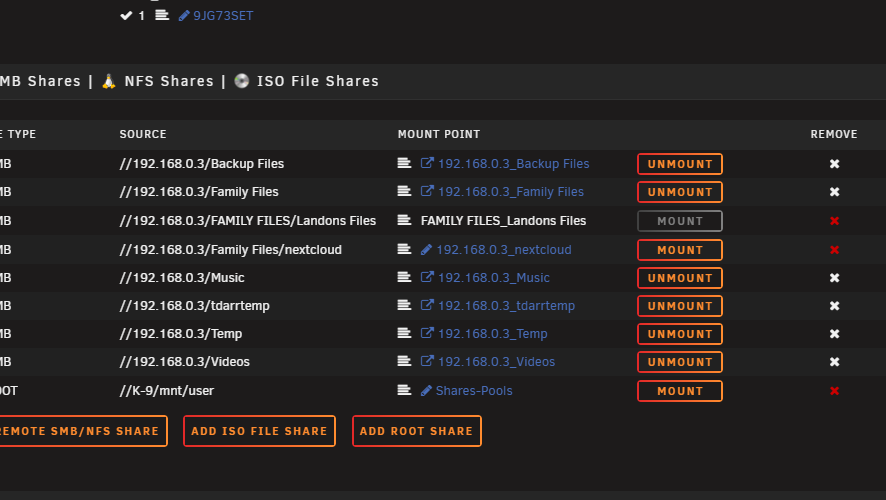
i did try 192.168.0.3 as the server and Share I used Family Files/nextcloud and i get it to be blue but i cant mount it i get error Device '//192.168.0.3/Family Files/nextcloud' failed to mount. Check the syslog for details. and the sys logs show Aug 26 19:52:38 K-9 kernel: CIFS: VFS: cifs_mount failed w/return code = -13 Aug 26 19:52:38 K-9 unassigned.devices: Remote Share '//192.168.0.3/Family Files/nextcloud' failed to mount. Aug 26 19:53:08 K-9 kernel: CIFS: VFS: \\192.168.0.3 Send error in SessSetup = -13 Aug 26 19:53:08 K-9 kernel: CIFS: VFS: cifs_mount failed w/return code = -13 Aug 26 19:53:08 K-9 unassigned.devices: Remote Share '//192.168.0.3/Family Files/nextcloud' failed to mount. Aug 26 19:53:19 K-9 kernel: CIFS: VFS: \\192.168.0.3 Send error in SessSetup = -13 Aug 26 19:53:19 K-9 kernel: CIFS: VFS: cifs_mount failed w/return code = -13 Aug 26 19:53:19 K-9 unassigned.devices: Remote Share '//192.168.0.3/Family Files/nextcloud' failed to mount. Aug 26 19:53:27 K-9 kernel: CIFS: VFS: \\192.168.0.3 Send error in SessSetup = -13 Aug 26 19:53:27 K-9 kernel: CIFS: VFS: cifs_mount failed w/return code = -13 Aug 26 19:53:28 K-9 unassigned.devices: Remote Share '//192.168.0.3/Family Files/nextcloud' failed to mount. Aug 26 19:53:32 K-9 kernel: CIFS: VFS: \\192.168.0.3 Send error in SessSetup = -13 Aug 26 19:53:32 K-9 kernel: CIFS: VFS: cifs_mount failed w/return code = -13 Aug 26 19:53:32 K-9 unassigned.devices: Remote Share '//192.168.0.3/Family Files/nextcloud' failed to mount. Aug 26 19:56:40 K-9 kernel: CIFS: VFS: \\192.168.0.3 Send error in SessSetup = -13 Aug 26 19:56:40 K-9 kernel: CIFS: VFS: cifs_mount failed w/return code = -13 Aug 26 19:56:40 K-9 unassigned.devices: Remote Share '//192.168.0.3/Family Files!!Letters' failed to mount.
-
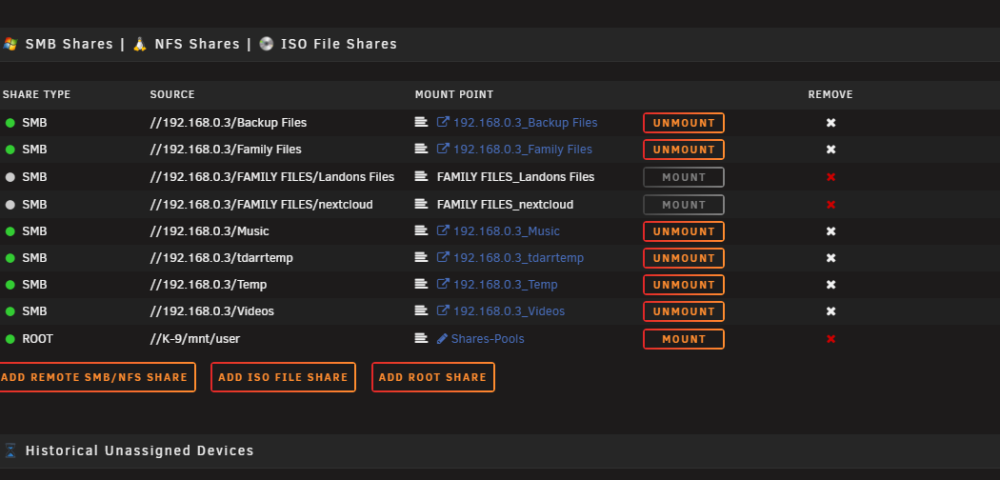
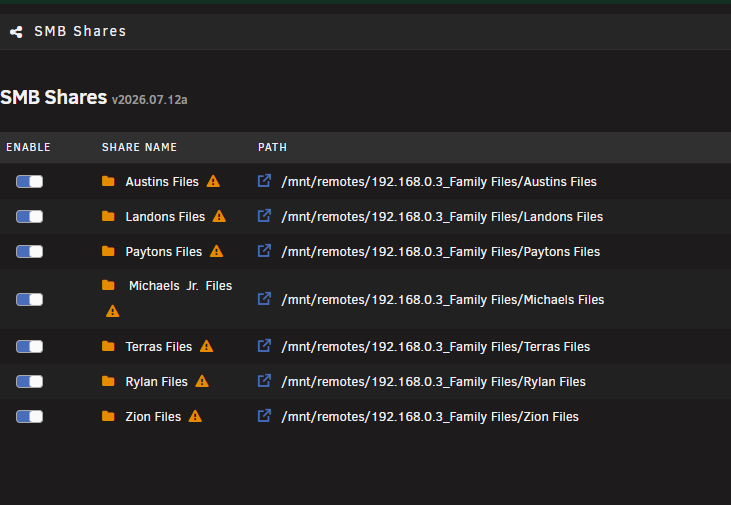
@dlandon i dont think i doing it right.. as what i had before was working fine till the programer had to break it so i cant do what i did before so i tried what you said kinda as i was kinda confused.. what i did was add server 192.168.0.3/Family Files and then i tried Share Folder Landons Files but it went white i not sure if thats because i already have the share already.. and i dont know how you mount a remote share to point to the remote share as it asks for the ip address of the server.. but this is what i have .. as i need to add more users and the custom shares was a good program but not so much now since the reason i liked it is now locked out .. so i dont get it.. and he didnt provide instructions how to do what is grand fathered in how you do it in UD shares.. so i lost
-
@zapbranagann hi i trying to add a couple remote shares but i get error message This path is managed by Unassigned Devices (/mnt/disks, /mnt/remotes), which already provides SMB for it. Use a path under /mnt/user instead.and i dont really understand what its talking about as i need a share called 'Home Videos' and points to /mnt/remotes/192.168.0.3_Family Files/!Home Videos/ and 'Pictures' and points to /mnt/remotes/192.168.0.3_Family Files/!Pictures/ so i not sure why i cant do it and dont truly understand the error or how the UD page can create those links to show up as custom Samba Shares so i confused i also need to add more user shares like 'Michelles Files' and points to /mnt/remotes/192.168.0.3_Family Files/Michelles Files/ 'Larrys Files' and points to /mnt/remotes/192.168.0.3_Family Files/Larrys Files/ 'Jason Files' and points to /mnt/remotes/192.168.0.3_Family Files/Jasons Files/ i install this app to be able to do this stuff... if i can no longer do this.. is there a way to down grade older version or alter this smb shares code to remove the lock out so i can do what i need it to do what are the work arounds now that i need to make these work now?
-
has the nvidia driver broke... it was working last week.. yesterday my jellfin stopped working after a reboot found nvidia driver cant find my video card.. i tried to re download update.. it says its downloading but actually its not downloading anything... after a long time it says cant download... i uninstalled the plugin rebooted.. reinstalled the plugin i check my pfsense and the unraid server is not downloading the nvidia driver... is there something broken in the past week.
-
im unable to login on the admin page... i keep getting invalid admin token, please try again ive tried to re add the admin_token in the template and paste the admin token there... didnt work i re edited the config.json and re pasted the admin token there.. saved and re started but still wont let me back in.. did vault warden corrupt from last updates? i can still log in using my browswer account.. but i cant login with the token page is there a way to fix this
-
and do you guys know why copying 100gb from nvme to the sata ssd i get fluxuations from 9mbs.s to like 200mb/s it doesn stay at a constant 500 600 mb/s is it if the ssd is on a sata port or if its on the hba card... is there a way to boost it to 500... as its 1 single file yet slow copying from nvme to sata.. i watching it by doing rsync --progress * /mnt/cache_drive/Backup\ Files its averaging around 25-39mb/s i just copying my homeassistant vm 100gb and its turned off .. so i should be zipping copying or is only cache drives fast when its from another computer on the network copying to unraid not unraid nvme to cache drive..
-
and even if i set min to 100gb space and even if i say i have a 500gb file i still want it set to 100gb so it only leaves 100gb on each drive and then moves to the next drive if it has 500gb to handle file ok copy if no move to the next file but still a min of 100gb left on each drive to maximize drives and just keep filling the next drive till there is 100gb free.. and thats how i though i have things working
-
or is it possible to get mover to move twice? so mover moves regular files at a certain time like midnight but then appdata and VMS backup to the cache drive.. but as soon its done mover activates and moves to the array to keep things fast...even though i experiencing piss poor slow speed
-
so i set my Backup Files share to just Array not cache drive.. but its not what i wanted either maybe can help so i found backing up my 100gb home assistant vm took 30 min or so not 3 or 4 min to copy from nvme to Sata SSD thats the cache drive.. i wonder if at the time its backing up mover is running same time? as i find it copys god awful slowly i should be getting like 500mbs and i find when i copy the 100gb file i get like 32mb or or less a second... so i not sure 100% how to make it fast and not clash mover and vm and appdata backups

