





nekromantik
Members
-
Joined
-
Last visited
Everything posted by nekromantik
-
Hi Anyone on here got auto fan controller working on a Dell T20? Unraid does not detect any PWMs.
-
Thanks both. Will check splashtop. I am not running Windows VM so cant use RDP.
-
Is clipboard sharing between PC and KVM VM on Unraid not possible?
-
thanks will try that
-
sure Import failed, path does not exist or is not accessible by Sonarr: /Media/Downloads/Colony.S03E11.Disposable.Heroes.1080p.WEBRip.6CH.x265.HEVC-PSA.mkv deluge sonarr

-
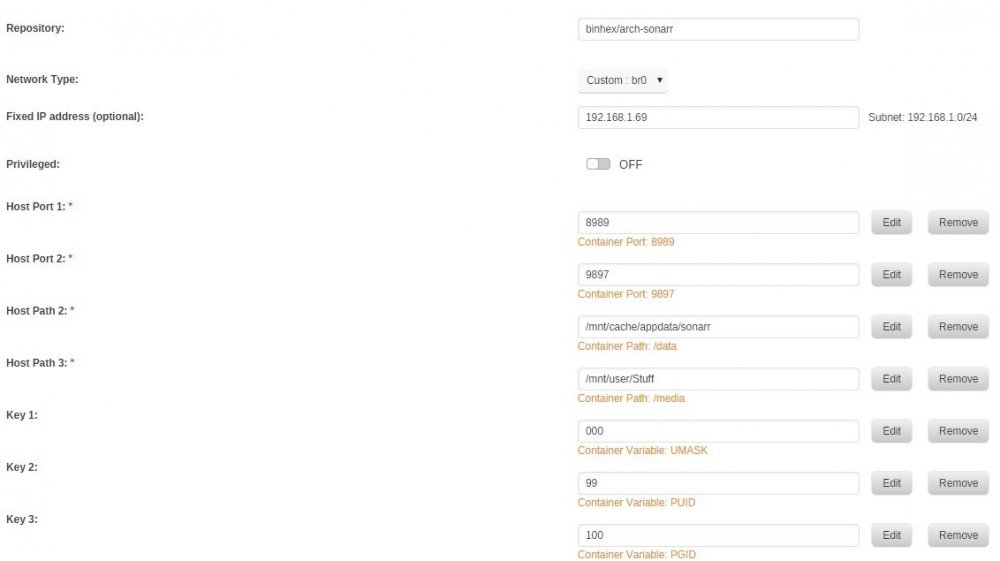
Getting Import failed, path does not exist or is not accessible by Sonarr: on all downloads from Deluge. I got the mappings to both Deluge and Sonar to the same path on Unraid for Media and Data respectively. I can log into Sonarr container and move the file as nobody fine so not a permission issue. Any pointers?
-
Re ran with debug on attached log to recap this is cant access web ui from anything other then container itself. its not networking as I can access privoxy from other containers and LAN which is on same container as deluge so networking is fine unless its the IPtables messing 8112 up. supervisord.txt
-
Someone else had same issue on bihex image you based it off. This was back in 2016 so should been fixed. I am pretty good with linux networking but this stumps me. I will try binhex latest and see if issue happens still. edit: same issue on binhex docker image. if I switch to bridged rather then custom bridge I can access web UI from LAN but cant from other containers. i have nginx container as reverse proxy that I want to use to access deluge UI from external sources so need container to container working.
-
@binhex I am using the delugevpn-flexget container which was based on your delugevpn container. I am however seeing the same issue some people had back in 2016 where VPN was connected but you can only access webGUI from localhost and nowhere else on your network. The person fixed it by adding masquared rule to iptables and you said you was gonna go see what you can do to fix and stop leaks. was this fixed? as I am seeing same issue. any suggestions? supervisord.txt edit: I did notice the listen address in core.conf is the tun0 address and not eth0. this could be the issue?
-
hi so I got this running on a custom br0 interface with static IP. however I cannot access the UI on port 8112 anywhere on my network, only works from container itself. i noticed the iptables rules allows from 192.168.1.0/24 as source and destination and also allow 8112 as input from eth0 so not sure why I cant access from anywhere. edit: I did notice the listen address in core.conf is the tun0 address and not eth0. this could be the issue? 2018-07-15 00:21:48.419484 [info] Starting Supervisor... 2018-07-15 00:21:48,835 CRIT Set uid to user 0 2018-07-15 00:21:48,835 INFO Included extra file "/etc/supervisor/conf.d/delugevpn.conf" during parsing 2018-07-15 00:21:48,839 INFO supervisord started with pid 6 2018-07-15 00:21:49,842 INFO spawned: 'start-script' with pid 98 2018-07-15 00:21:49,846 INFO spawned: 'flexget' with pid 99 2018-07-15 00:21:49,848 INFO spawned: 'deluge-script' with pid 100 2018-07-15 00:21:49,851 INFO spawned: 'deluge-web-script' with pid 101 2018-07-15 00:21:49,855 INFO spawned: 'privoxy-script' with pid 102 2018-07-15 00:21:49,856 DEBG 'start-script' stdout output: [info] VPN is enabled, beginning configuration of VPN 2018-07-15 00:21:49,856 INFO success: start-script entered RUNNING state, process has stayed up for > than 0 seconds (startsecs) 2018-07-15 00:21:49,856 INFO success: flexget entered RUNNING state, process has stayed up for > than 0 seconds (startsecs) 2018-07-15 00:21:49,856 INFO success: deluge-script entered RUNNING state, process has stayed up for > than 0 seconds (startsecs) 2018-07-15 00:21:49,856 INFO success: deluge-web-script entered RUNNING state, process has stayed up for > than 0 seconds (startsecs) 2018-07-15 00:21:49,856 INFO success: privoxy-script entered RUNNING state, process has stayed up for > than 0 seconds (startsecs) 2018-07-15 00:21:49,860 DEBG 'deluge-script' stdout output: [info] Deluge config file already exists, skipping copy 2018-07-15 00:21:49,862 DEBG 'flexget' stdout output: [info] Starting Flexget daemon... 2018-07-15 00:21:49,863 DEBG 'deluge-script' stdout output: [info] VPN is enabled, checking VPN tunnel local ip is valid 2018-07-15 00:21:49,863 DEBG 'flexget' stdout output: Creating config.yml from template. 2018-07-15 00:21:49,869 DEBG 'privoxy-script' stdout output: [info] Privoxy set to disabled 2018-07-15 00:21:49,870 DEBG fd 31 closed, stopped monitoring <POutputDispatcher at 22965530039792 for <Subprocess at 22965530811208 with name privoxy-script in state RUNNING> (stderr)> 2018-07-15 00:21:49,870 DEBG fd 27 closed, stopped monitoring <POutputDispatcher at 22965530040944 for <Subprocess at 22965530811208 with name privoxy-script in state RUNNING> (stdout)> 2018-07-15 00:21:49,870 INFO exited: privoxy-script (exit status 0; expected) 2018-07-15 00:21:49,870 DEBG received SIGCLD indicating a child quit 2018-07-15 00:21:49,880 DEBG 'flexget' stderr output: cp: cannot stat '/config.yml': No such file or directory 2018-07-15 00:21:49,881 DEBG 'flexget' stderr output: chown: cannot access '/home/nobody/.flexget/config.yml': No such file or directory 2018-07-15 00:21:49,881 DEBG 'flexget' stderr output: chmod: cannot access '/home/nobody/.flexget/config.yml': No such file or directory 2018-07-15 00:21:49,881 DEBG 'flexget' stdout output: Using userdefined Flexget-webui password of password 2018-07-15 00:21:49,887 DEBG 'start-script' stdout output: [info] VPN config file (ovpn extension) is located at /config/openvpn/AirVPN_Sweden_UDP-443.ovpn 2018-07-15 00:21:49,898 DEBG 'start-script' stderr output: dos2unix: converting file /config/openvpn/AirVPN_Sweden_UDP-443.ovpn to Unix format... 2018-07-15 00:21:49,937 DEBG 'start-script' stdout output: [info] Default route for container is 192.168.1.1 2018-07-15 00:21:49,940 DEBG 'start-script' stdout output: [info] Adding 8.8.8.8 to /etc/resolv.conf 2018-07-15 00:21:49,943 DEBG 'start-script' stdout output: [info] Adding 37.235.1.174 to /etc/resolv.conf 2018-07-15 00:21:49,946 DEBG 'start-script' stdout output: [info] Adding 8.8.4.4 to /etc/resolv.conf 2018-07-15 00:21:49,949 DEBG 'start-script' stdout output: [info] Adding 37.235.1.177 to /etc/resolv.conf 2018-07-15 00:21:49,957 DEBG 'start-script' stdout output: [info] Adding 192.168.1.0/24 as route via docker eth0 2018-07-15 00:21:49,958 DEBG 'start-script' stderr output: RTNETLINK answers: File exists 2018-07-15 00:21:49,958 DEBG 'start-script' stdout output: [info] ip route defined as follows... -------------------- 2018-07-15 00:21:49,959 DEBG 'start-script' stdout output: default via 192.168.1.1 dev eth0 2018-07-15 00:21:49,959 DEBG 'start-script' stdout output: 192.168.1.0/24 dev eth0 proto kernel scope link src 192.168.1.75 2018-07-15 00:21:49,959 DEBG 'start-script' stdout output: -------------------- 2018-07-15 00:21:49,979 DEBG 'start-script' stdout output: [info] iptable_mangle support detected, adding fwmark for tables 2018-07-15 00:21:50,020 DEBG 'start-script' stdout output: [info] Docker network defined as 192.168.1.0/24 2018-07-15 00:21:50,097 DEBG 'start-script' stdout output: [info] iptables defined as follows... -------------------- 2018-07-15 00:21:50,100 DEBG 'start-script' stdout output: -P INPUT DROP -P FORWARD ACCEPT -P OUTPUT DROP -A INPUT -i tun0 -j ACCEPT -A INPUT -s 192.168.1.0/24 -d 192.168.1.0/24 -j ACCEPT -A INPUT -i eth0 -p udp -m udp --sport 443 -j ACCEPT -A INPUT -i eth0 -p tcp -m tcp --dport 8112 -j ACCEPT -A INPUT -i eth0 -p tcp -m tcp --sport 8112 -j ACCEPT -A INPUT -i eth0 -p tcp -m tcp --dport 3539 -j ACCEPT -A INPUT -i eth0 -p tcp -m tcp --sport 3539 -j ACCEPT -A INPUT -s 192.168.1.0/24 -i eth0 -p tcp -m tcp --dport 58846 -j ACCEPT -A INPUT -p udp -m udp --sport 53 -j ACCEPT -A INPUT -p icmp -m icmp --icmp-type 0 -j ACCEPT -A INPUT -i lo -j ACCEPT -A OUTPUT -o tun0 -j ACCEPT -A OUTPUT -s 192.168.1.0/24 -d 192.168.1.0/24 -j ACCEPT -A OUTPUT -o eth0 -p udp -m udp --dport 443 -j ACCEPT -A OUTPUT -o eth0 -p tcp -m tcp --dport 8112 -j ACCEPT -A OUTPUT -o eth0 -p tcp -m tcp --sport 8112 -j ACCEPT -A OUTPUT -o eth0 -p tcp -m tcp --dport 3539 -j ACCEPT -A OUTPUT -o eth0 -p tcp -m tcp --sport 3539 -j ACCEPT -A OUTPUT -d 192.168.1.0/24 -o eth0 -p tcp -m tcp --sport 58846 -j ACCEPT -A OUTPUT -p udp -m udp --dport 53 -j ACCEPT -A OUTPUT -p icmp -m icmp --icmp-type 8 -j ACCEPT -A OUTPUT -o lo -j ACCEPT 2018-07-15 00:21:50,101 DEBG 'start-script' stdout output: -------------------- [info] Starting OpenVPN... 2018-07-15 00:21:50,159 DEBG 'start-script' stdout output: [info] OpenVPN started 2018-07-15 00:21:50,660 DEBG 'flexget' stdout output: 2018-07-15 00:21 CRITICAL manager Failed to find configuration file config.yml 2018-07-15 00:21 INFO manager Tried to read from: /, /home/nobody/.flexget, /home/nobody/.config/flexget 2018-07-15 00:21:50,660 DEBG 'flexget' stderr output: Could not instantiate manager: No configuration file found. 2018-07-15 00:21:51,255 DEBG 'flexget' stderr output: Could not instantiate manager: Config `/home/nobody/.flexget/config.yml` does not appear to be a file. 2018-07-15 00:21:51,292 DEBG fd 11 closed, stopped monitoring <POutputDispatcher at 22965530004152 for <Subprocess at 22965530811856 with name flexget in state RUNNING> (stdout)> 2018-07-15 00:21:51,292 DEBG fd 16 closed, stopped monitoring <POutputDispatcher at 22965530845912 for <Subprocess at 22965530811856 with name flexget in state RUNNING> (stderr)> 2018-07-15 00:21:51,292 INFO exited: flexget (exit status 1; not expected) 2018-07-15 00:21:51,292 DEBG received SIGCLD indicating a child quit 2018-07-15 00:21:51,808 DEBG 'deluge-script' stdout output: [info] Deluge not running [info] Deluge listening interface IP 0.0.0.0 and VPN provider IP 10.x.xx.xx different, marking for reconfigure [info] Attempting to start Deluge... 2018-07-15 00:21:52,124 DEBG 'deluge-script' stdout output: [info] Deluge listening interface currently defined as 10.x.x.x [info] Deluge listening interface will be changed to 10.x.x.x [info] Saving changes to Deluge config file /config/core.conf... 2018-07-15 00:21:52,379 DEBG 'deluge-script' stdout output: [info] Deluge started 2018-07-15 00:21:52,677 DEBG 'deluge-web-script' stdout output: [info] Starting Deluge webui...
-
Got that fixed. Switched to DNS validation via Cloudflare instead. much easier as no need to open port 80 anymore. thanks
-
Got that issue fixed. It was not ISP blocking, it was router not forwarding 80 so changed to 8080 on container and forwarding from 80 to 8080. But now I am getting 404 not found error when it tried to validate. here is log [s6-init] making user provided files available at /var/run/s6/etc...exited 0. [s6-init] ensuring user provided files have correct perms...exited 0. [fix-attrs.d] applying ownership & permissions fixes... [fix-attrs.d] done. [cont-init.d] executing container initialization scripts... [cont-init.d] 10-adduser: executing... usermod: no changes ------------------------------------- _ () | | ___ _ __ | | / __| | | / \ | | \__ \ | | | () | |_| |___/ |_| \__/ Brought to you by linuxserver.io We gratefully accept donations at: https://www.linuxserver.io/donations/ ------------------------------------- GID/UID ------------------------------------- User uid: 99 User gid: 100 ------------------------------------- [cont-init.d] 10-adduser: exited 0. [cont-init.d] 20-config: executing... [cont-init.d] 20-config: exited 0. [cont-init.d] 30-keygen: executing... using keys found in /config/keys [cont-init.d] 30-keygen: exited 0. [cont-init.d] 50-config: executing... Variables set: PUID=99 PGID=100 TZ=Europe/London URL=nekromantik.io SUBDOMAINS=www,nextcloud EXTRA_DOMAINS= ONLY_SUBDOMAINS=false DHLEVEL=2048 VALIDATION=http DNSPLUGIN= [email protected] STAGING= Backwards compatibility check. . . No compatibility action needed 2048 bit DH parameters present SUBDOMAINS entered, processing SUBDOMAINS entered, processing Sub-domains processed are: -d www.nekromantik.io -d nextcloud.nekromantik.io E-mail address entered: [email protected] http validation is selected Generating new certificate Saving debug log to /var/log/letsencrypt/letsencrypt.log Plugins selected: Authenticator standalone, Installer None Obtaining a new certificate Performing the following challenges: http-01 challenge for nekromantik.io http-01 challenge for nextcloud.nekromantik.io http-01 challenge for www.nekromantik.io Waiting for verification... Cleaning up challenges Failed authorization procedure. www.nekromantik.io (http-01): urn:ietf:params:acme:error:unauthorized :: The client lacks sufficient authorization :: Invalid response from http://www.nekromantik.io/.well-known/acme-challenge/M7U5BloCEAFN4O9RC8nGjDfF5R_xrIfpQ35lDaKE1x8: "<html> <head><title>404 Not Found</title></head> <body bgcolor="white"> <center><h1>404 Not Found</h1></center> <hr><center>" IMPORTANT NOTES: - The following errors were reported by the server: Domain: www.nekromantik.io Type: unauthorized Detail: Invalid response from http://www.nekromantik.io/.well-known/acme-challenge/M7U5BloCEAFN4O9RC8nGjDfF5R_xrIfpQ35lDaKE1x8: "<html> <head><title>404 Not Found</title></head> <body bgcolor="white"> <center><h1>404 Not Found</h1></center> <hr><center>" To fix these errors, please make sure that your domain name was entered correctly and the DNS A/AAAA record(s) for that domain contain(s) the right IP address. ERROR: Cert does not exist! Please see the validation error above. The issue may be due to incorrect dns or port forwarding settings. Please fix your settings and recreate the container
-
So docker logs show it cant connect to port 80 for validation. Its not my router as other ports I have forwarded from WAN work. Does the container run iptables so blocking all incoming connections?
-
hi on the instructions it states to forward port you using for this container to the docker host in your router. i have got the container listening on specific ip on bridgemode and my router can see this IP for the container. so got forwarding configured. however nginx does not seem to start at all. i have a custom config in site-config running netstat shows nginx not running any ideas?
-
Thanks that is good. Sent from my Pixel 2 XL using Tapatalk
-
Great container! One question though, if the VPN goes down does Deluge connect normally via your router then? If so then is it possible to add a kill switch to this so that if openvpn is down then traffic goes out or in.

