





UhClem
Members
-
Joined
-
Last visited
-
I don't think it's a cable problem. There are (suggestive) indications. in the syslog, that your problem with your Disk3 is due to a flaky SATA port (ata6) on your motherboard (chipset). I would swap connections at the motherboard between Disk3 and another DiskN. If the problems DO "transfer" to DiskN (and stay on ata6), that does eliminate Disk3 and its cable, and nails it to the board. If not, ... Disclaimer: not an Unraid user (just like fun problems)
-
Odd ... Your reported symptoms (only writing is slow; and speed @ 10-20 MB/sec) are precisely indicative of a drive's write-caching disabled. But, there's no arguing with your test result (-W saying w.c. is ON) [assuming that /dev/sdb IS one of the two slowpokes] Back to "Plan A" ... maybe Squid & others can see something from your Diagnostics [upload].
-
You need to enable write cache (on those drives). See man hdparm
-
Can't be two jmb585 without a PCIe switch (or a very bizarrely configured [chipset] M.2 slot with "self-bifurcation"). More likely ONE jmb585; and one jmb575 port multiplier. Cute, still ...
-
Depends where you buy them 😀 [Link] $22 vs $80 ?? ... [Inflation is everywhere. Is this the "exception that proves the rule"?]
-
Yes. In addition to having the x16/x0 or x8/x8, it even provides for bifurcating the (2nd) x8 to x4/x4, allowing 2 NVMe's to feed off the slot. And there is also a X4 (x16 mechanical) slot (plus 2/3 x1 slots). But it's not a budget mobo (like the MSI one)--I'd expect that a mobo with similar functionality and flexibility could be found at an intermediate price point. I'm not familiar with the MB scene nowadays, so I have no recommendation.
-
I completely agree ...but (for a 2 SAS port card) ONLY if the HBA is given 8 lanes AND never an expander [ie max # drives is 8]. Given that the proposed case has 15 x 3.5, I want to allow for growing into that. [Also, given that case, I'm confused by OP's OP ?? ] I see 2 GPUs in that list, plus mention of a 10G NIC. Also, looking to the future, it's a good idea to provide for additional NVMe's--a real boon for speeding up many workflow scenarios. Sounds like a tight "budget" for slots and lanes. Toward these ends, I would want to use a Gen3 HBA since it offers the option of 3200+ M/s bandwidth using ONLY 4 lanes; and Gen3/SAS2 HBAs are only a few $ more than Gen2/SAS2 these days [frugality ON].
-
Don't get a mobo w/all 16 (CPU) PCIe lanes going to a single x16 slot. Look for boards that (at least) offer the option of (2 slots as) x16/x0 OR x8/x8. Also, don't waste potential bandwidth by using Gen2 HBAs in a Gen3 ecosystem.
-
You do NOT want a Mobo with the PCIe config like that MSI you linked. It has all 16 of the CPU's PCIe lanes going to ONE of its x16 slots. (The other two x16-wide slots, one of them x4 lanes & the other x1 lane, are connected to the chipset.) Nothing wrong with the Z390 chipset itself, but look for a mobo that allocates the CPU's 16 lanes among two slots, either as x16/x0 (when that 2nd slot is empty) OR as x8/x8 (when both are occupied). Even better, but I've never seen it!!, would be three CPU-connected slots, configured as: x16/x0/x0 or x8/x8/x0 OR x8/x4/x4.
-
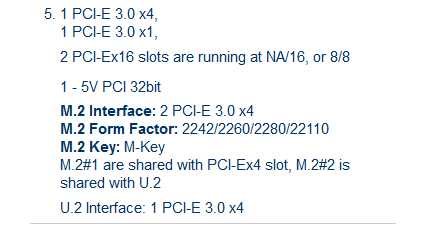
Yeah, that's why I put shares in "". (Since that is the word that Supermicro uses on their X11SCA product page [Link] (see attached) It is really either/or. [I.e., one will be disabled.]
-
Note that you are going to lose your M.2 #1 ("shares" the x4 slot). See your MB manual.
-
The (unique/specific) C246 chipset on your own [3Server] motherboard is flaky. (You should get a direct replacement.) The best documentation (readily available) for the issue is the output of: grep -e "ATA-10" -e "AER: Corr" -e "FPDMA QUE" -e "USB disc" syslog.txt Use the syslog.txt from the 20210930-0723 .zip file. It has all 4 HDDs throwing errors. The "ATA-10" pattern just documents which HDD is ata[1357].00 . I'm pretty sure there are also relevant NIC errors in there, but I'm networking-ignorant. Note that all of these errors emanate from devices on the C246. Please examine a syslog.txt from your test-run on your Gen10 MS+; that box also uses the C246, but its syslog.txt will have none of these errors. Attached is the output from the above command (filtered thru uniq -c, for brevity). c246.txt
-
Understood. Given the ~20 (non-empty) reviews [mostly Russia/E. Eur], the product is as-advertised and functions properly; only negative appears to be seller's (lack of padded) packaging. I'm sure the community will welcome your report. Mazel tov.
-
I have some 4TB's that do 200 MB/s (typical 4TBs max ~150-160); typical 8TBs ~200; 12TBs ~240; 16TBs 260+ . [ Kafka wrote: "Better to have and not need, than to need and not have." ] 170+ orders & 60+ reviews (@4.8/5) [for what it's worth ??]
-
Weird indeed! BUT it is not a cable issue, nor a disk issue. It is a flaky motherboard, specifically the Intel C246 chipset. (your syslog.txt files are gory with details) [ not an Unraid user ; but enjoy weird problems ]


