Abigel
Members
-
Joined
-
Last visited
Everything posted by Abigel
-
And how can i give the docker container a diffrent IP-Address ?
-
this works: This not: The address is in the right network and the address is also still free


-
I don't see something that can help me to set password protection: # make sure that your dns has a cname set for nextcloud # assuming this container is called "letsencrypt", edit your nextcloud container's config # located at /config/www/nextcloud/config/config.php and add the following lines before the ");": # 'trusted_proxies' => ['letsencrypt'], # 'overwrite.cli.url' => 'https://nextcloud.your-domain.com/', # 'overwritehost' => 'nextcloud.your-domain.com', # 'overwriteprotocol' => 'https', # # Also don't forget to add your domain name to the trusted domains array. It should look somewhat like this: # array ( # 0 => '192.168.0.1:444', # This line may look different on your setup, don't modify it. # 1 => 'nextcloud.your-domain.com', # ), server { listen 443 ssl; listen [::]:443 ssl; server_name nextcloud.*; include /config/nginx/ssl.conf; client_max_body_size 0; location / { include /config/nginx/proxy.conf; resolver 127.0.0.11 valid=30s; set $upstream_nextcloud nextcloud; proxy_max_temp_file_size 2048m; proxy_pass https://$upstream_nextcloud:443; } } Another question: Let's encrypt network settings go over bridge 192.168.3.3, I add Dokuwiki for example in the config with the same bridge IP 192.168.3.3 then it works (both over bridge). If I give Dokuwiki an own address like 192.168.3.4 it doesn't work. Why can't Let's encrypt the requests just forward them to another IP?
-
Which is the proxy conf data ?
-
Is it possible to protect the complete access to selected subdomains with a password ? e.g. at the domain test.de that on nextcloud.test.de you can only access the login interface of Nextcloud with a password ?
-
Sorry Text formulated before the last post and then sent later. How can i stop nginx service in the container ? service nginx stop dont work: "bash: service: command not found"
-
Hi, is there already a solution for nginx Error?: "[error] lua_load_resty_core failed to load the resty.core module..."
-
The newest Version 6.6.7 Okay i will wait till it works officially
-
Hi I followed the instructions, adjusted the configs, generated the key and created users with the correct description. But nothing happens when I press Start in the Proftpd Gui and now I also have an error in my unRAID log, which doesn't go away when I uninstall the plugin nginx: 2019/03/15 14:05:45 [error] 11217#11217: *1789648 connect() to unix:/var/tmp/sftp.sock failed (111: Connection refused) while connecting to upstream, client: 192.178.5.67, server: , request: "GET /dockerterminal/sftp/ws HTTP/1.1", upstream: "http://unix:/var/tmp/sftp.sock:/ws", host: "192.178.5.11"
-
Okay thanks, i will test it with the only option.
-
Hi The Cache Setting by the Appdata Share is on prefer, then it is on the SSD or not? For Cache i use a SSD
-
My Nextcloud is very slow There is nothing in the Nextcloud-Log. What can i do to speed up my nextcloud?
-
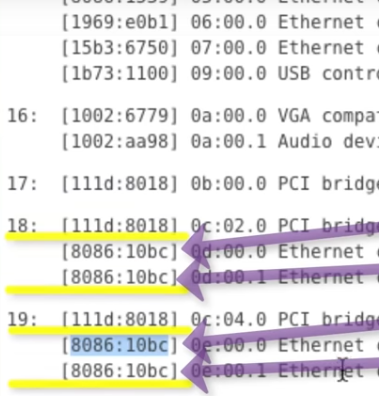
Hi, relate to Part 3 install and basic config. I have two networkcards. One in the mainboard and one in the pcie slot. But all Ports have the same ID. What is the solution to continue the tutorial if you can't take the ID like in the video, because they all have the same ID ? I don't want to buy a new networkcard..
-
many thanks! it hasn't completely solved my problem because not everything is recognized and OneNote Not my solution ist. But I have come much closer to the solution, thank you very much.
-
Okay My goal is to have my handwritten notes recognized by the search in the PDF document. I study and take a lot of notes. I took photos of my notes and had hoped that I could search for words in the document if I only wanted to read a certain word. Unfortunately, it doesn't work very well for me. Maybe it's my handwriting. Is it possible to train the program in my handwriting? Could it be that I write in German? For example the documents in the attachement. Is there any way to get to my destination? If necessary also with other software? input.pdf output.pdf
-
After i updatet some Apps, i get an internal Server Error. Can i disable all apps with one command ?
-
I have test it with block capitals but it doesnt work. Nothing is detectet as Word
-
Hi i have choose en OCR_LANGUAGES'='enu' but this comes: Reading package lists... ---- Installing Tesseract Langauge: en via tesseract-ocr-en Reading package lists... Building dependency tree... Reading state information... E: Unable to locate package tesseract-ocr-en when i choose OCR_LANGUAGES="enu" it works but in the docker run command it is written like OCR_LANGUAGES'='' thanks for your help! Can the program recognize handwriting?
-
Sorry, I hadn't seen it on the smartphone, looked like a signature. root@localhost:# /usr/local/emhttp/plugins/dynamix.docker.manager/scripts/docker run -d --name='ocrmypdf-auto' --net='bridge' -e TZ="Europe/Berlin" -e HOST_OS="Unraid" -e 'OCR_OUTPUT_MODE'='MIRROR_TREE' -e 'OCR_ACTION_ON_SUCCESS'='NOTHING' -e 'OCR_PROCESS_EXISTING_ON_START'='1' -e 'OCR_LANGUAGES'='' -e 'OCR_NOTIFY_URL'='' -e 'OCR_VERBOSITY'='' -e 'USERMAP_UID'='99' -e 'USERMAP_GID'='100' -v '/mnt/user/pre/':'/input':'rw' -v '/mnt/user/after/':'/output':'rw' -v '/mnt/user/appdata/ocrmypdf-auto':'/config':'rw' 'quay.io/cmccambridge/ocrmypdf-auto' 0d96f4947c0a21a2527ecf4c484b993859d7d9ca73c1c437989167d580d50da6
-
I use no command, only install the plugin
-
2019-01-08 16:27:42 - Processing complete in 3.820000 seconds with status 3: /input/test.pdf There is no File What is the problem ?
-
same problem
-
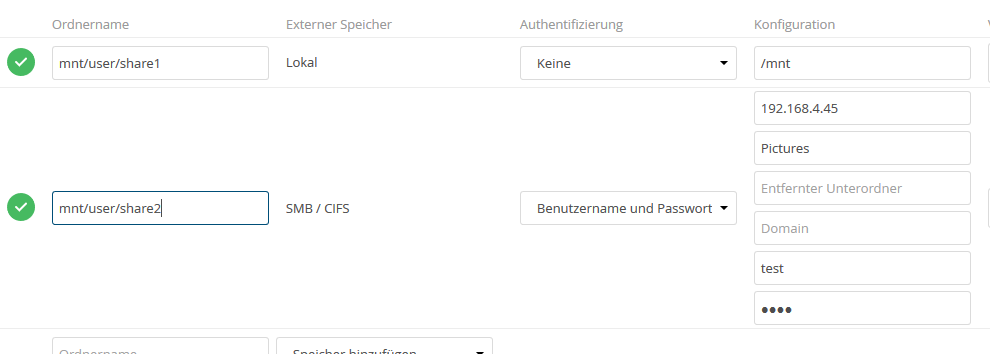
Hi, i try to connect an external storage to nextcloud. But It's just an infinitely long loading screen Here you can see my configuration