





CaptainTivo
Members
-
Joined
-
Last visited
Everything posted by CaptainTivo
-
Ok, I have the answer: I can't do what I wanted, that is, keep my current flash drive and put a newly purchased key on it. Instead I have to get a new flash drive, copy the contents of my old flash drive, minus the key, and then Unraid will offer to "bond" my new key to the flash drive. Oh well.
-
Thanks but that is not my problem. I have a working flash drive that I intend to keep (I just replaced it last year). All I want to do is replace my current working key with the one I just bought. I think I need the web interface to request that the Unraid web site generate a the key using the activation code that I received from Unraid. But if you currently have a working key, the UI will not offer to generate one, so I am stuck.
-
Hello, I have been running Unraid since 2012 when my friend and I took advantage of a 2-for-1 sale and he purchased 2 Pro licences. After all these years, I thought it was about time to throw some more money at Unraid since I have definitely got my money's worth out of it, so I purchased a new Pro licence. The problem is, I don't see how to install it. Going to Tool/Registration, I see that it is registered to my friend (he paid for it) and that it is replaceable, etc. but there seems to be no way to change the licence. So my question is simple: how do I change keys from my current license to the one I just purchased? Thanks.
-
Right. I had actually forgotten that this was a feature of Unassigned Devices. Thanks.
-
I want to back up my Flash to my PC using User scripts. In the "SMB Shares | NFS Shares | ISO File Shares" section on the main page of the GUI I clicked "Add Remote SMB/NFS Share" and filled in the information. On the PC, I opened "Properties/Sharing/Advanced" , checked "Share this folder" and then clicked "Permissions" and set permissions for Everyone to Full Control, Change and Read. But when I attempt to write a file to that folder on the UnRaid server, I get an error: root@Tower:/mnt/remotes/EMERALD_FLASH backup# touch foo "touch: cannot touch 'foo': Permission denied" I'm sure this is some obscure "feature" of Windows networking but an hour of googling came up empty Any ideas as to how to fix this? Thanks.
-
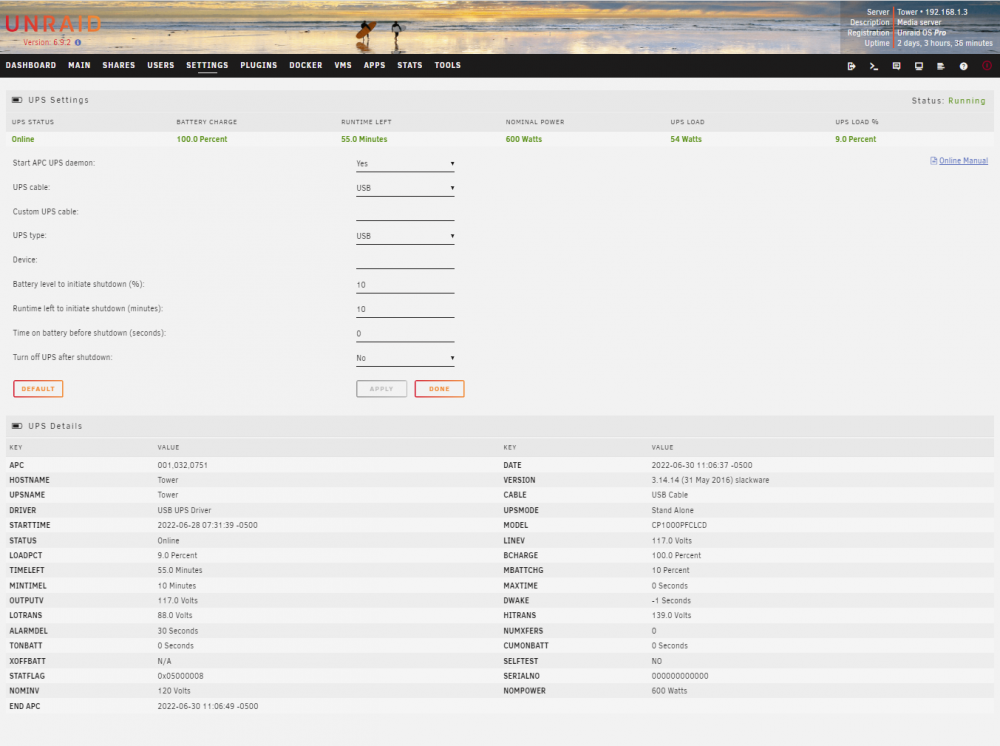
Thanks for the advice but I would still like an answer to my original question. I think I have set the parameters such that it should shut down in 10 minutes or when the battery has 10% left. It is shutting down IMMEDIATELY on power outage. What I am missing? This is what the help text for the "Time on battery before shutdown" parameter reads: "If during a power failure, the UPS has run on batteries for time-out many seconds or longer; apcupsd will initiate a system shutdown. A value of zero disables this timer. If you have a Smart UPS, you will most likely want to disable this timer by setting it to zero. That way, your UPS will continue on batteries until either the % charge remaining drops to or below Battery level or the remaining battery runtime drops to or below minutes."
-
Hello all, I have an APC BX1000M UPS that powers my Unraid box. I have configured the UPS settings to wait until there are 10 minutes left in the battery before it shuts the system down. The other day, we had a 2 minute power outage and the Unraid server shut down immediately! Apparently, I am doing something wrong. Here is the UPS Settings page. Note that "Time on battery before shutdown" is set to zero. This is supposed to disable this timer. Can anyone shed light on this? Thanks!
-
It always worked for me. I just turned off caching on all my shares and shut down my dockers. That last is not necessary if your dockers only use the cache drive but not as a cache, if you know what I mean. The precautions are there so that the mover is not copying files to shares while you are doing the scatter/gather. I always use the "dry-run" option so that I can see the rsync commands that it generates. I have never had it refuse to run.
-
It's because the developer chose to use https and did not provide a valid certificate for authentication. Simply click "Advanced" and then "Proceed to Tower (or whatever your servers name is )" You can safely ignore the warnings in this case (dont do it on the open internet, though)
-
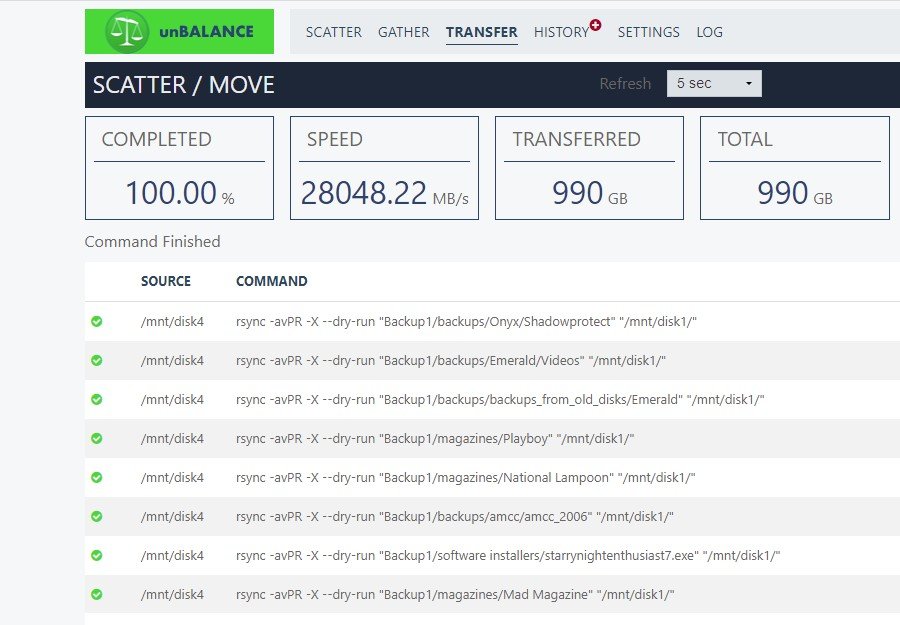
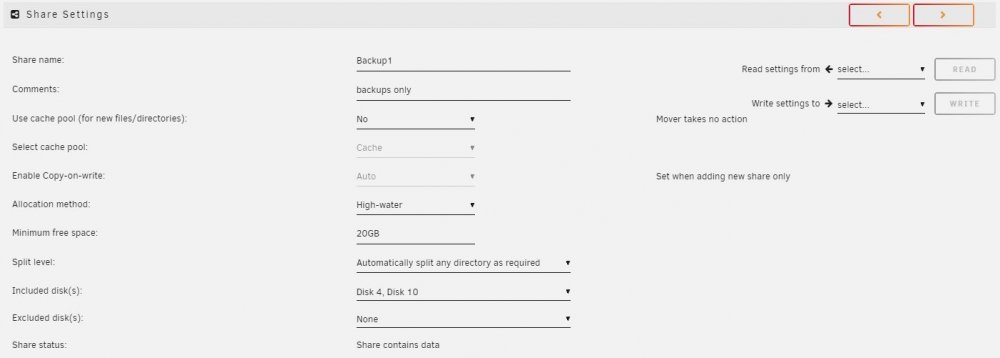
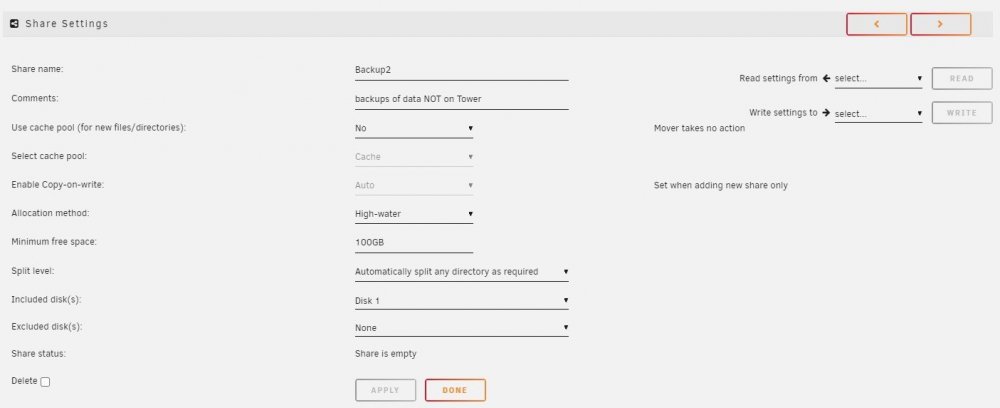
I submitted this question to the Unbalance group but I think it's not really a question about Unbalance. So I thought I would try a wider audience. What I am trying to do is move some directories (and the directories and files in them) from one disk to another. One disk is in one share and the other disk is in another share. The problem is that Unbalance wants to copy starting from the top level directory. I think this will actually "add" this disk to the share, not what I want to do. Here are the details: I want to do something but I am not sure that Unbalance is the right tool Here is what I want. I have two shares: Backup1 - consisting of only 2 disks (disk4 and disk10) Here is the definition of Backup1 Backup2 - consisting of one disk (disk1) I want to move some (but not all) files from disk4 to disk1, that is, from share Backup1 to share Backup2. When I set up Unbalance and run the dryrun I get this: So it will copy files from /Backup1/backups/ ... on disk4 to /Backup1/backups/... on disk1 This is not what I want. I want the files copied to /Backup2/backups/... on disk1 So, can just run this Unbalance command and then just change the name of directory Backup1 to Backup2 on disk1 like so: cd /mnt/user/disk1 mv Backup1 Backup2 Does this automagically make the files available only on the Backup2 share? I confess that even after using Unraid for over a decade, I still don't fully understand how the shares work. I *think* that any directory at the top level of *any* disk creates a share but I may be wrong. Any help from the experts would be greatly appreciated. Thanks.
-
I want to do something but I am not sure that Unbalance is the right tool Here is what I want. I have two shares: Backup1 - consisting of only 2 disks (disk4 and disk10) Here is the definition of Backup1 Backup2 - consisting of one disk (disk1) Here is the definition of Backup2: I want to move some (but not all) files from disk4 to disk1, that is, from share Backup1 to share Backup2. When I set up Unbalance and run the dryrun I get this: So it will copy files from /Backup1/backups/ ... on disk4 to /Backup1/backups/... on disk1 This is not what I want. I want the files copied to /Backup2/backups/... on disk1 So, can just run this Unbalance command and then just change the name of directory Backup1 to Backup2 on disk1 like so: cd /mnt/user/disk1 mv Backup1 Backup2 Does this automagically make the files available only on the Backup2 share? I confess that even after using Unraid for over a decade, I still don't fully understand how the shares work. I *think* that any directory at the top level of *any* disk creates a share but I may be wrong. Any help from the experts would be greatly appreciated. Thanks.
-
Right. Thanks.
-
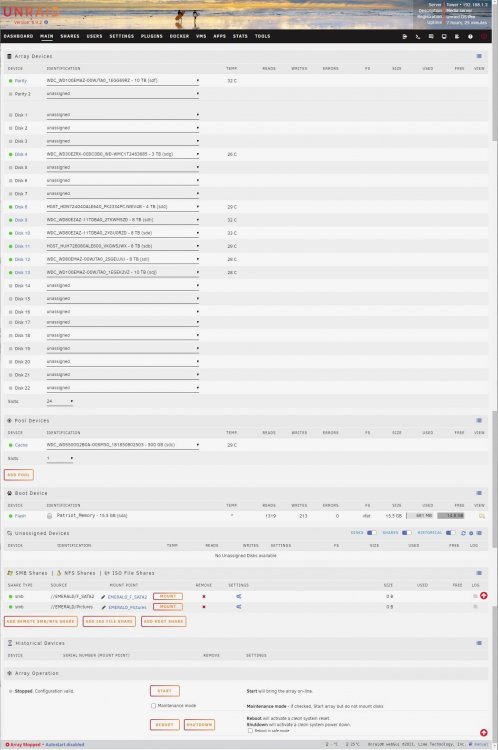
Ok. I was wrong. I just looked at the screen shot that I made when it happened and the array was actually not started. It just showed a list of all the drive slots listing the drive numbers that are populated and the one drive that was missing. So, parity should be good and can just start the array now, right? Here's a screen shot of main now (after shutdown, re-attaching the disk and booting).
-
I made a mistake and have a quick question: I forgot to stop automatic array start on boot and I accidentally booted with a drive not connected. Of course, it said "Disk missing" and did not start. I have since re-connected the drive but I can't remember if, once Unraid has found a drive missing, that it must rebuild parity. Will it notice that the drive is now connected and assume parity if valid? Is there any way to tell it to trust the parity? Or should I just reboot and let it rebuild parity? Thanks.
-
Hello all. I have made a HUGE mistake and I'm hoping for some guidance here. I installed the Mariadb docker in 2015 and have used it run my Kodi database since then. In December, I broke the cardinal rule: If it ain't broke don't fix it (especially if you don't understand it) I updated the docker to Ver 15.1 Distrib 10.5.13-MariaDB. Immediately, my Fire TV (Android) Kodi clients would crash on entry. Strangely, my Windows PC Kodi clients worked fine so I did not immediately suspect Mariadb as the cause. After many blind alleys from advice on the Kodi forums, I found this in one of the logs: 2022-02-16 13:43:52.824 T:16591 ERROR: SQL: [MyVideos116] An unknown error occurred Query: SELECT * FROM streamdetails WHERE idFile = 1191 2022-02-16 13:43:52.824 T:16591 ERROR: GetStreamDetails(1191) failed 2022-02-16 13:43:52.825 T:16591 ERROR: SQL: [MyVideos116] An unknown error occurred Query: SELECT type,url FROM art WHERE media_id=3458 AND media_type='movie' 2022-02-16 13:43:52.825 T:16591 ERROR: GetArtForItem(3458) failed 2022-02-16 13:43:52.825 T:16591 ERROR: SQL: [MyVideos116] An unknown error occurred Query: SELECT type,url FROM art WHERE media_id=0 AND media_type='set' 2022-02-16 13:43:52.825 T:16591 ERROR: GetArtForItem(0) failed So I knew it was a database problem but otherwise not very helpful. After more poking around I ran this query on HeidiSQL: select routine_name from information_schema.routines where routine_type='FUNCTION' and routine_schema = '%s'; SQL Error (1558): Column count of mysql.proc is wrong. Expected 21, found 20. Created with MariaDB 100134, now running 100513. Please use mariadb-upgrade to fix this error So, I did not realize that an update might actually be incompatible with a current database. Can someone tell me what to do next? 1. Should I just run "mariadb-upgrade"? If so, how, exactly? 2. Should I attempt to find and re-install the last working version? Unfortunately, I don't actually know what that version was nor how to find out. 3. Should I just dump the database and the re-import it? Would that fix the problem? Bearing in mind that I really have no experience with this, I originally followed a recipe from the Kodi forums and it has worked for over 6 years without flaw. Thanks for any help for this undeserving wretch 🙂
-
Ah. I had not realized until now that there even was more than one version. I had set this up when I upgraded to version 6 Unraid in 2018 and this must have been the default in user apps then? Anyway, here is another question: can I simply switch to the official container or will this mess up the database? Also, I found this: https://forum.kodi.tv/showthread.php?tid=360717&pid=3020992#pid3020992 He has the same error that I have. So, apparently updating the mariadb docker does not automatically convert the database. I find it odd that updates to a program like this would not be backwards compatible with existing databases but whatever. The solution for him was to run mysql_update but I am at a lost to see what good that did since hhe also dropped the databases and essentially re-created them from scratch. Anyway, thanks for your help.
-
Mgut, thanks for your reply. Here is what I did. 1. I stopped the mariadb application. 2. Clicked on the icon and selected "Edit" 3. Clicked "basic View" to select "Advanced View" 4. pasted "--skip-innodb-read-only-compressed" into the "Post Arguments" field. 5. Click the "Apply" button This takes me to the "Update Container" page which has this message: Removing container: mariadb Successfully removed container 'mariadb' Command: root@localhost:# /usr/local/emhttp/plugins/dynamix.docker.manager/scripts/docker create --name='mariadb' --net='bridge' -e TZ="America/Chicago" -e HOST_OS="Unraid" -e 'PUID'='99' -e 'PGID'='100' -e 'MYSQL_ROOT_PASSWORD'='hunter' -p '3306:3306/tcp' -v '/mnt/user/appdata/mariadb':'/config':'rw' 'linuxserver/mariadb' --skip-innodb-read-only-compressed fbb8d5298685a6cf20a0ae12c1bac659abb34288f1777e0296e110b3aa1b184a The command finished successfully! 6. clicked the "Done' button. which takes me back to the "Docker Containers" page 7. clicked the mariadb icon and selected "Start" Unfortunately, this did not work. In fact, the Kodi app on my PC now hangs. Here is the log file: 2022-02-20 10:11:50.823 T:58056 NOTICE: Running database version Addons27 2022-02-20 10:11:50.824 T:58056 NOTICE: Running database version ViewModes6 2022-02-20 10:11:50.824 T:58056 NOTICE: Running database version Textures13 2022-02-20 10:11:52.863 T:58056 ERROR: Unable to open database: MyMusic72 [2002](Can't connect to MySQL server on '192.168.1.3' (10061)) 2022-02-20 10:11:54.906 T:58056 ERROR: Unable to open database: MyMusic71 [2002](Can't connect to MySQL server on '192.168.1.3' (10061)) 2022-02-20 10:11:56.936 T:58056 ERROR: Unable to open database: MyMusic70 [2002](Can't connect to MySQL server on '192.168.1.3' (10061)) 2022-02-20 10:11:58.965 T:58056 ERROR: Unable to open database: MyMusic69 [2002](Can't connect to MySQL server on '192.168.1.3' (10061)) 2022-02-20 10:12:01.007 T:58056 ERROR: Unable to open database: MyMusic68 [2002](Can't connect to MySQL server on '192.168.1.3' (10061)) 2022-02-20 10:12:03.050 T:58056 ERROR: Unable to open database: MyMusic67 [2002](Can't connect to MySQL server on '192.168.1.3' (10061)) 2022-02-20 10:12:05.091 T:58056 ERROR: Unable to open database: MyMusic66 [2002](Can't connect to MySQL server on '192.168.1.3' (10061)) 2022-02-20 10:12:07.133 T:58056 ERROR: Unable to open database: MyMusic65 [2002](Can't connect to MySQL server on '192.168.1.3' (10061)) This would seem to indicate that the database server is not running, but the Unraid page shows that it is. I then clicked the mariadb icon and selected "Logs". Here are the last lines from that log: [cont-init.d] 10-adduser: exited 0. [cont-init.d] 30-config: executing... [cont-init.d] 30-config: exited 0. [cont-init.d] 40-initialise-db: executing... [cont-init.d] 40-initialise-db: exited 0. [cont-init.d] 90-custom-folders: executing... [cont-init.d] 90-custom-folders: exited 0. [cont-init.d] 99-custom-files: executing... [custom-init] no custom files found exiting... [cont-init.d] 99-custom-files: exited 0. [cont-init.d] done. [services.d] starting services [services.d] done. ifelse: fatal: unable to exec --skip-innodb-read-only-compressed: No such file or directory [cmd] --skip-innodb-read-only-compressed exited 127 Caught SIGTERM signal! cat: /var/run/mysqld/mysqld.pid: No such file or directory [cont-finish.d] executing container finish scripts... [cont-finish.d] done. [s6-finish] waiting for services. 220220 10:21:35 mysqld_safe Logging to '/config/databases/fbb8d5298685.err'. 220220 10:21:35 mysqld_safe Starting mariadbd daemon with databases from /config/databases [s6-finish] sending all processes the TERM signal. [s6-finish] sending all processes the KILL signal and exiting. the line "ifelse: fatal: unable to exec --skip-innodb-read-only-compressed: No such file or directory:" Does this mean I did not add the option to the correct box (Post Arguments) field? It seems like the "docker create" command does not see it as an option. Also, weirdly, when I select "Stop" from the mariadb icon, an error box pops up with a large circle with and X in it and the message "Execution Error Container already started" What does that mean? Anyway, I clicked "OK", went back and deleted the option line "--skip-innodb-read-only-compressed" and restarted the docker and the Kodi app on the PC works again. As you can see, I am no expert on dockers nor on database managers. I read the post on the Kodi forum that you referred to and did not really understand it. The original poster wrote: His original problem is also not the same as mine. He says: This indicates that his Android TV updated itself to a newer version of Kodi. I don't know of any way this can happen. You have to sideload Kodi to get it run on Android and this is a manual operation. The messages in the log file are the same ones that I get. Kodi does not seem to be able to connect to the database server. I also don't understand his solution: So he thinks that mariadb was somehow updated to a new version. This seems to indicate that an update to mariadb caused the problem and that he reverted to an earlier version and that solved the problem. Unclear. If so, then I guess I still need to find a way to revert to an earlier version of mariadb. Again, thanks for any help you can give.
-
Hi, Not sure if this is right place to ask this, if not, please tell me where 🙂 So, I have been running the Kodi/Xbmc database on the Mariadb docker on Unraid since version 6 dropped. I have both PC (Windows) and Android (Fire TV) clients that use the database to find movies and TV. This all worked fine until I updated Mariadb in December. Instantly, the Android clients now show "unknown error" to queries in their logs. The PC clients still worked fine. Here is a fragment of the Kodi log file: 2022-02-19 13:25:22.154 T:7641 NOTICE: Running database version Addons27 2022-02-19 13:25:23.029 T:7641 NOTICE: Running database version ViewModes6 2022-02-19 13:25:23.568 T:7641 NOTICE: Running database version Textures13 2022-02-19 13:25:23.614 T:7641 NOTICE: MYSQL: Connected to version 10.5.13-MariaDB-log 2022-02-19 13:25:23.627 T:7641 ERROR: SQL: [MyMusic72] An unknown error occurred Query: SELECT idVersion FROM version I asked the Kodi people and did not get much help. I don't understand why the Kodi apps on the PCs don't get errors and the Android apps do. So I thought I would just try to install an older version of Mariadb on Unraid and see if that fixed the problem. I did a bit of searching but I have yet to find a recipe for finding the older version and then installing it on unRaid. Any help is much appreciated.
-
My current unRaid server is running on an ancient AMD Athlon II X2. I just acquired a used PC. It has a Gigabyte GA-Z77M-D3H-MVP motherboard with a Core i7-3770K processor and a Geforce GT-740 GPU card and I would like to move my UnRaid server to this card. I understand that moving an UnRaid installation to a new computer is pretty easy but I thought I would get advice anyway. 1) I would like to pass the the GPU through to a VM. How do you get UnRaid to use the Intel integrated graphics instead of the GPU? 2) Is there anything else I need to do to move the installation? Can I just install my LSI SAS 9211-8i, move the disks and boot it up? 3) the PC currently has a Windows 10 installation on it. Is there any way I can convert that into a VM and run after I make the switch? 4) Is there anything else I should know or watch out for? Thanks.
-
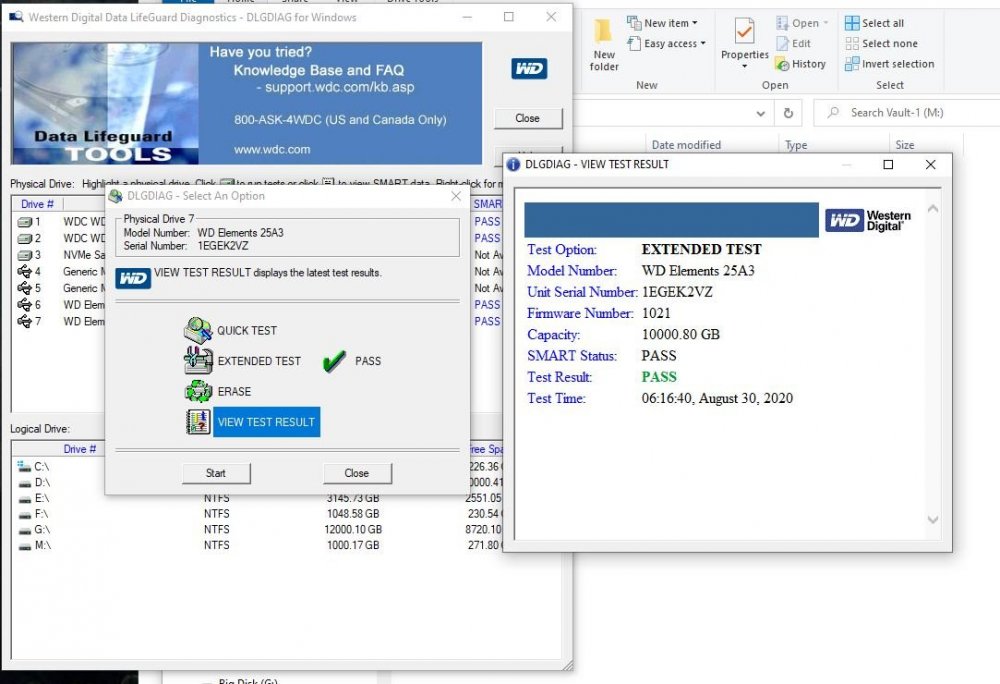
Shucked a 10 TB WD100EMAZ from a WD Easystore from Best Buy. I tried to run pre-clear and it failed 50% in. I put the drive back into the case attached it to my PC and ran the WD Lifeguard extended diagnostics test (13 hours) and it passed. So I tried again and this time pre-read failed at 30% in. The log shows that the dd command failed to open the drive. (log attached). I used pre-clear on an identical disk 6 months ago and it worked fine. Can someone tell me if this disk is bad or is my system starting to get flaky? It has been rock solid for over 9 years (with new disks and Unraid updates). Thanks. preclear_log.txt
-
Too bad. Still, probably more trouble to add than it's worth. Thanks.
-
Since parity rebuilds take so long (24 hours for me), if I start a rebuild and then subsequently stop the array and/or power off the server, does the parity rebuild continue where it left off or does it have to restart? Thanks.
-
OK. How do I determine which user is running UnBalance? I am simply running it from the Plugins page. In addition, I have tried to find out how to use Linux style logins with UnRaid but have been unsuccessful. I have created new users but have only been able to login as root. I have been told elsewhere on this forum that "users do not really work on UnRaid" which does not make sense to me since UnRaid is built on top of Linux, but hey...
-
Hi, I'm using Unbalance to copy files from a disk I am going to remove from the array (and keep the data for archiving). Using Scatter, the planning says there is an issue with permissions and recommends that I run "Docker Safe Permissions" to fix. I also got email with this: There are some permission issues: 1 file(s)/folder(s) with an owner other than 'nobody' 0 file(s)/folder(s) with a group other than 'users' 1 folder(s) with a permission other than 'drwxrwxrwx' 0 files(s) with a permission other than '-rw-rw-rw-' or '-r--r--r--' Check the log file (/boot/logs/unbalance.log) for additional informatio I looked into the log file but it does not say which files need to be fixed. If it did, I could just run chmod on it. I have used UnBalance to do this on three other disks and I have already run Docker Safe New Permissions. Shouldn't it have fixed all the problems on all the disks? unbalance_log.txt
-
Hmm. I don't see why that would help security, but good to know. I set up the scripts in user scripts and we'll see what happens. Thanks.


