RogueWolf33
Members
-
Joined
-
Last visited
Everything posted by RogueWolf33
-
The firmware has to be above 6.x from what I have read:
-
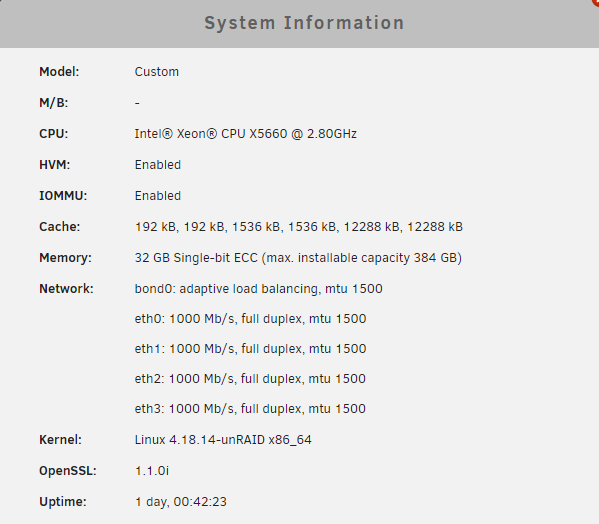
Good Evening Unraiders, I am an owner of an HP ProLiant DL380 Gen 7 Original configuration: 2 x Intel Xeon CPU X5660 6 Core 32 GB ECC Ram P410i Smart Array RAID controller 1x 4 TB Mechanical Parity HDD 6 x 1 TB SSD (Various Makes and Models) - Yes I know it is not currently supported by Unraid. As of yet, I have had minimal problems with my setup 4x Onboard 1 GB NIC 1x Integrated ILO NIC (Doesn’t matter for this documentation) Upgraded components P410i has been disabled and upgraded to P420 Smart Array RAID controller Added a 4-port intel Gigabit NIC controller card because why not, I was in there, and I had it laying around. Can use it for VM's or something. Consider this: Out of the box, The HP Smart Array controllers offer no IT or HBA mode through their firmware. (At least in the 7th Gen) In order to see any attached disks. RAID 0 virtual disks need created out of each disk and those are mapped in turn to Unraid to create your array. Each time a new drive was added, or if ever needed, replaced, the system would need rebooted so that a new drive can be placed and built in the RAID controller as a RAID 0 virtual disk. I have seen documentation indicating that users were having trouble getting their devices in HBA mode So I thought I would share my experience in hopes it might help someone. My System is a seasoned Unraid setup and had a buildup of Data. I am writing this with that perspective. If you are building new, simply do not create any virtual disks and skip the backup portion of this documentation. ***I assume no responsibility for the steps outlined in this documentation. It worked for me and took a bit of research. Please be sure you do the same and are confident you have a solid understanding before proceeding if you have data you are concerned with losing. I assume no responsibility for damaged hardware or lost data if you choose to follow these steps.*** Prep Steps: 1. Download HP Service Pack for ProLiant. I used Production Version G7.0 for my setup. This worked just fine. (Google the MD5 for your Service Pack for ProLiant if you do not have a contract or warranty with HP. Mine was: 064177d26c939f8dc60c6aefa0799bcf I was able to find a download. You can also search the SHA256.) 2. Download HP USB Key Utility 3. For the P420 Smart Array, be sure your firmware is 6.6.8 or above. Mine was 8.5 and worked just fine. I have not tried this for the P410i. 4. Using an expendable thumb drive, Run the HP USB Key Utility and select the downloaded ISO for the HP Service Pack for ProLiant Steps Taken: 1. Screenshots of shares and dockers for posterity sake 2. Backup all data from shares to a drive on my PC 3. Install "CA Appdata Backup/Restore v2" plugin on my Unraid server 4. Run a backup of the AppData folder and copy the share created from this backup onto drive on my PC 5. Confirm all data has been backed up. There is no turning back from this step if you have a preconfigured Unraid server. 6. In the Unraid server under Tools>New Config Select all disks and clear configuration **THIS WILL ERASE ALL OF YOUR DATA** 7. Reboot the Unraid server and pull your USB drive out so not to boot to the OS again. 8. Insert the created HP Service Pack for ProLiant thumb drive 9. Hit F8 on bootup to enter the HP Smart Array Firmware for your controller. Please note the Slot Number for your Controller it will be needed. 10. Delete all Virtual Disks from the firmware. Exit RAID controller BIOS and continue bootup to HP Service Pack for ProLiant. 11. Select "Interactive Firmware Update Version XXX" 12. Accept the EULA and click "Next" 13. On your Keyboard press Ctrl - Alt - D - B - X (This will bring up a Linux Bash shell) 14. Type command: hpssacli controller slot=2 modify hbamode=on forced (Replace Slot number with the slot number noted in step 9) 15. Reboot and replace your Unraid USB removing your HP Service Pack for ProLiant USB 16. If you received no error entering the command, you configure no virtual drives, and Unraid sees disks listed with Manufacturer information, You know these steps worked. Configure your array in Unraid. 17. Replicate all shares. 18. Copy back data to the original file locations 19. Restore AppData folder. Currently as I write this documentation, I am in the data restoration phase. My disks were detected without issue, My Parity is rebuilding, and I am restoring all data. I am confident I should be able to get away with restoring all settings. I will update any successes or failures once the data is all restored. That's it! I hope this helps someone moving forward. Happy Raiding! Additional Resources: How to turn HP Smart array raid controller to HBA Mode https://www.youtube.com/watch?v=JuaezJd4C3I Configure the controller for HBA mode (Pass-through) https://systemausfall.org/wikis/howto/Disable%20HP%20Proliant%20Hardware-RAID "delete any existing configured array in the Smart RAID controller setup obviously, you should rescue the data before, if you need it enter the setup via F8 during bootup as soon as you see the greeting message of the P420i controller upgrade the RAID controller firmware (3.x is not sufficient; 6.6.8 works; see the end of this page) Acquire the ssacli package for configuring the RAID controller manually: Option A: use the HP Service Pack download the HP Service Pack for your server astonishingly this requires a running support contract with HP alternatively search for the MD5 checksum given in the download descriptions of HP e.g. teimouri.net blogs about and shares the Service Packs from HP regularly mount the ISO and copy the appropriate file for your system: hp/swpackages/ssacli-*.rpm (either i386 or x86_64) Option B: download the packages from the HP repositories see the Debian Wiki or the direct link from HP boot the server with a minimal or a real system install the ssacli package from one of the sources above: using the Service Pack ISO package: rpm -i --nodeps ssacli-*.rpm otherwise: use your regular package manager enable the HBA mode (pass-through) for the controller: For Smart-array controller starting with P, e.g. P420i: ssacli controller slot=0 modify hbamode=on For HBAs starting with H, e.g. H240: ssacli controller slot=0 modify raidmode=off verify the result (if required): ssacli controller slot=0 show you may safely remove the ssacli package again The above configuration change is permanent, until you reconfigure the controller again (e.g. with hbamode=off)." Service Pack for ProLiant (SPP Gent 8.1) https://support.hpe.com/hpsc/swd/public/detail?swItemId=MTX_ff582daf008c4f529c4d6c28f6#tab3 USB Key Utility for Windows: https://support.hpe.com/hpsc/swd/public/detail?swItemId=MTX_360731071b404454b454390208 Backup and Restore Dockers: https://forums.unraid.net/topic/81233-unraid-671-easy-way-to-backup-and-restore-specific-dockers/
-
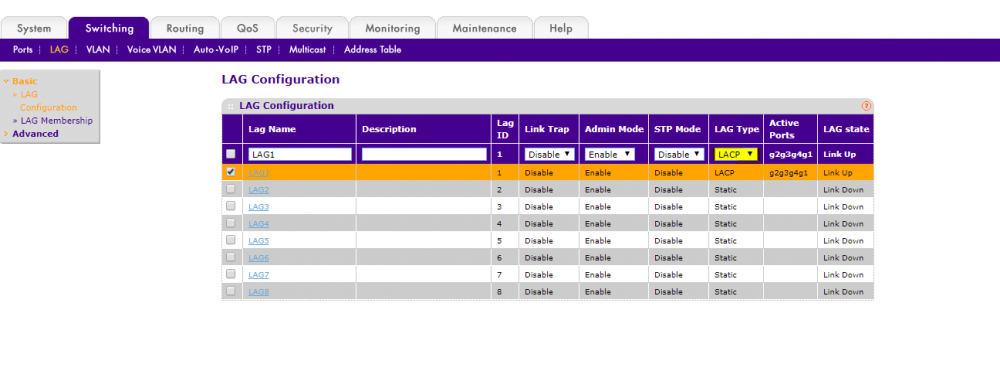
Right, So as I was looking for where to reboot my switch, I was hit with a power outage that rebooted all my network equipment for me. The solution it seems was that I required the LAG to be switched to the LACP standard. The key was the 802.4ad designation in the bond driver from within Unraid. Research revealed: IEEE 802.3ad Dynamic link aggregation (802.3ad, LACP) Creates aggregation groups that share the same speed and duplex settings. Utilizes all slave network interfaces in the active aggregator group according to the 802.3ad specification. This mode is similar to the XOR mode above and supports the same balancing policies. The link is set up dynamically between two LACP-supporting peers. Both the switch and Unraid must be configured with the 802.3ad standard in order for LAG to work. From within the netgear switch I describe, you must select the Lag which will allow you to change from Static to LACP. This will allow your Netgear switch to use your Unraid LAG. I am putting this solution and screenshot here for anyone else that may run into a similar issue.
-
I may have just answered my own question. It seems that the switch needed to be configured in with LACP rather than a static LAG. Currently everything seems to be running as expected. I am going to reboot my switch to be sure.
-
Good afternoon everyone, I have recently acquired a Negear GS748Tv4 switch which has Link Aggregation capability. I have frequently considered this in a constant pursuit to optimize my configuration and see how different technologies work. I have discovered with my Bond, I can switch it to option 4 (802.4ad) which seems to be meant to compliment the Link Aggregation technology in my Negear switch. However, when I have all 4 of my ports bonded on the Unraid server, and I turn on Link Aggregation in the switch on the ports the Unraid server connect to, I Lose connectivity. Once I disable LAG again, I restore connectivity. I am curious, Is this technology not meant to be configured both on the switch and in Unraid? Or should the technology be able to be enabled both on the switch and Unraid and I should look further into configuring LAG on the switch as I may not fully understand how to impliment the LAG and allow communication to the rest of the switch? Please let me know any experience anyone may have with this. Thanks
-
I can see this thread is quite old and I am wondering if there may be some updated information regarding how SSD's are handled in an array. Currently I attempt to run this command to determine the style of TRIM my devices are using and the data is limited. I can only assume this has to do with the built in HP controller I am using. I have attempted to switch the SMART controller type from "Automatic" to the HP Specific type of controller listed but this does not help. I fear that I am unable to determine this information due to the RAID controller blocking the query. Is there a vendor or an SSD controller type list that might be able to be referenced before purchasing SSD's for an array? This is currently the only information I get back from the hdparm command: /dev/sdb: SG_IO: bad/missing sense data, sb[]: 70 00 05 00 00 00 00 0a 00 00 00 00 20 00 00 00 00 00 00 00 00 00 00 00 00 00 00 00 00 00 00 00 ATA device, with non-removable media Standards: Likely used: 1 Configuration: Logical max current cylinders 0 0 heads 0 0 sectors/track 0 0 -- Logical/Physical Sector size: 512 bytes device size with M = 1024*1024: 0 MBytes device size with M = 1000*1000: 0 MBytes cache/buffer size = unknown Capabilities: IORDY not likely Cannot perform double-word IO R/W multiple sector transfer: not supported DMA: not supported PIO: pio0 Any information is appreciated. Thanks so much!
-
This mentions parity, I agree. However, if the Parity drive is still Mechanical and the array drives are SSD, I only see a write hit if I am not mistaken. I am currently attempting to confirm that my drives support DZAT to be sure I will not run into issues in the future. I appreciate you putting me on this track so I can ensure I do not run into any issues.
-
Currently i've had no trouble that I can pinpoint to an actual configuration problem, But to clarify, nope, I have all SSD as the Array. A single 4 TB HDD Parity for now. The object is to update to full SSD eventually. The HDD/SSD mix was in the Array but I have recently upgraded all drives to SSD. Not a hundred percent clear on what the issue would be with that. (Besides performance limitations due to the parity drive but I plan on upgrading that as well) Where would the sync errors come from in an SSD prominent system? Is there a lack of TRIM in Unraid? I am not clear on what is being conveyed.
-
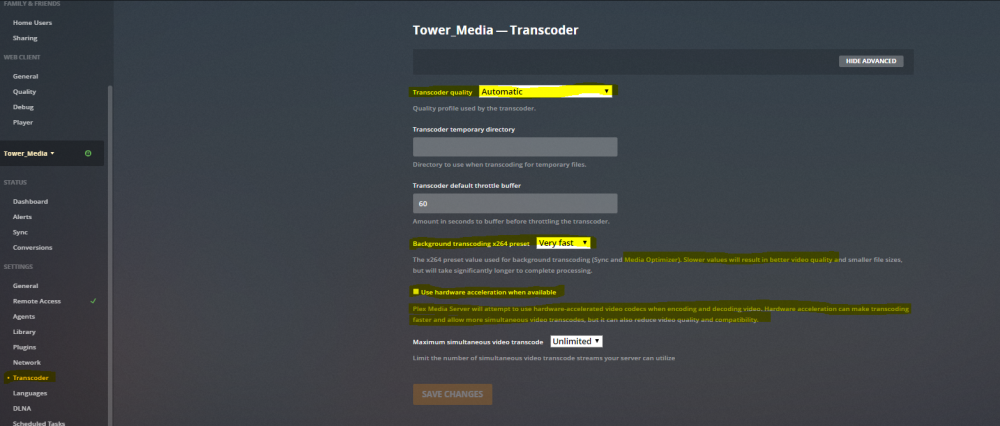
Well, If it were me, I would look at the settings in the web ui of the transcoder to start. There are some optimization settings there. You mention you are trying to do 5k, that's pretty intensive. I'd start my search here:
-
Good Lort you guys! Talk about emasculating a guy! I currently only have 6 TB. I am happy to report it is all SSD (With the exception of Parity) As cost drops, I will be upgrading systematically. This is my first unraid server but seeing all of your builds has certainly sparked some ambitions in me!

-
I will give it a shot. Thank you!
-
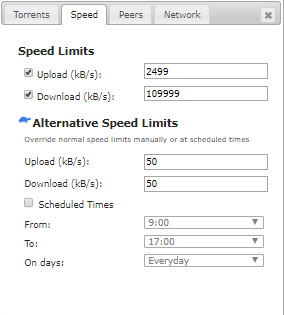
This seems to be a lengthy thread but I wanted to see if anyone could offer some insight. I am currently trying to throttle my bandwidth so I do not saturate my network or my server. Currently when I download something large, The rest of my dockers take a hit in performance. Transmission does not seem to use the settings I am using to throttle my bandwidth to help alleviate this saturation. Has anyone else experienced this behavior? Am I doing something wrong?
-
It's my first time. Be gentle.