





JasonK
Members
-
Joined
-
Last visited
Everything posted by JasonK
-
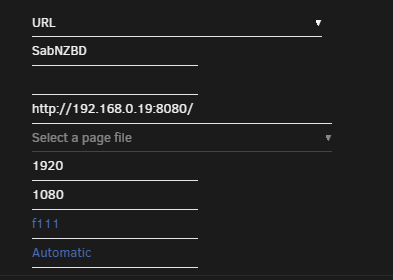
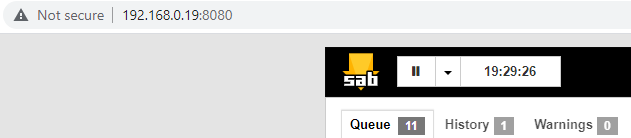
Yeah - that's what you'd mentioned previously, however, I'm not accessing my server via HTTPS. As such, I was surprised when someone mentioned being able to get it to work and why I had to ask how they did it: ...doesn't work. (ip is internal ip of my server, the port is the port for the app/docker for the webui going to it when clicking the docker webui menu entry works fine. Ah well - was hoping Thanks
-
You were able to get a CustomTab to show SabNZBDs window properly inside the tab? What did you do to make that work? Could you show a screencap of your customtab settings for it? Thanks!
-
youtube-dl-material Is there a way to rate limit the download speeds? i.e. can I set it to 1MB/sec max or is the only option to let it take what it can take? I couldn't find anything in the settings inside the app. edit: added the -r option in custom args: Saved the setting. However, when trying to download, the following is showing in the log: 2021-01-13T16:34:25.163Z ERROR: Error while retrieving info on video with URL https://www.youtube.com/c/TED/videos with the following message: Error: Command failed with exit code 2: node_modules/youtube-dl/bin/youtube-dl -i --dump-json -o video/%(title)s.mp4 --write-info-json --print-json -f bestvideo+bestaudio --merge-output-format mp4 --write-thumbnail -r 250K https://www.youtube.com/c/TED/videos 2021-01-13T16:34:25.163Z ERROR: Usage: youtube-dl [OPTIONS] URL [URL...] youtube-dl: error: invalid rate limit specified Asny idea why it's reporting invalid rate limit? per the github docs for youtube-dl, -r 250K should be fine.

-
Im connected to toronto without issue (with strict port forwarding set to off) - torrents happily transferring. have been for a couple days now.
-
this isn't anything new.
-
lol - I'll send you a tinfoil hat too
-
Not even able to get into the browser - this log file entry seems to be making it where things can't even display: Internal error: Could not resolve keysym XF86FullScreen
-
awful service? seems their support has been fairly responsive, and positive, in regards to the folks posting here...
-
No - but the torrent client works best with port forwarding operable.
-
until you have updated files you're trying to backup.
-
Hey folks. Trying to start m,y Firefox docker that I've used for a while. It's not letting me connect to it. It's throwing the following error in the logs: Internal error: Could not resolve keysym XF86FullScreen Last time I started the docker (back in July) log doesn't show any issues. I installed a duplicate firefox container from scratch and it works...but I don't want to lose the plugins, open tabs, etc, from the one that isn't working... Any ideas? @Djoss
-
Hmm - I don't have an issue with the webui not coming up. The appdata backup I could possibly see, but Deluge is completing torrents at various times of day, so I don't think that would cause the issue...if I knew where to look at the Deluge logs themselves to see what it says when a torrent completes and the move fails, it'd be a start
-
Yeah - it's not that - I don't have any backups pulling from the Process folder (or any subfolders). Thanks for the thought tho!
-
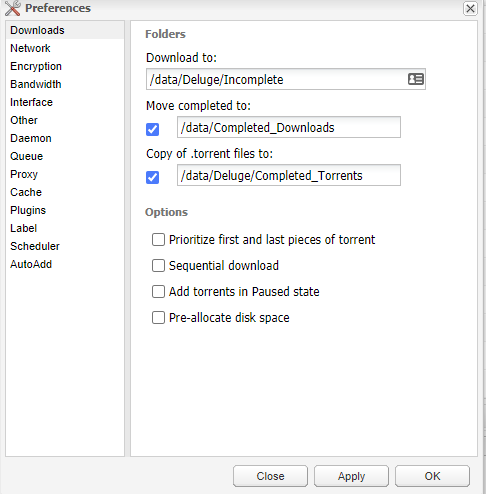
Morning everyone...I'm having a strange issue. Deluge is only moving SOME of the downloads it completes to the folder. Here's my settings in deluge: Here's the docker config: Media is the share name, Process is a folder under it. Completed_Downloads is a folder under Process. Here's a torrent that it finished downloading): And here it is sitting in the Incomplete: The video file in question is complete - plays end to end without issue. Any ideas? Sometimes it works, sometimes it doesn't. I'm not sure where to go looking for the deluge log file. Clicking on Logs from the docker icon menu for the docker only shows system type logs with no log info about transfers, moves, etc. Thanks!



-
Quick note - the 192.168.0.65 is an internal IP on my network - and is actually a VM running on unraid - could it be some weird networking issue within unraid preventing it from communicating? 0.19 is the ip of the server. The server does have a default gateway set to 0.1 (my router)...hmmm.... I can get to it without issue from other computers, my phone, etc, all on the same network.
-
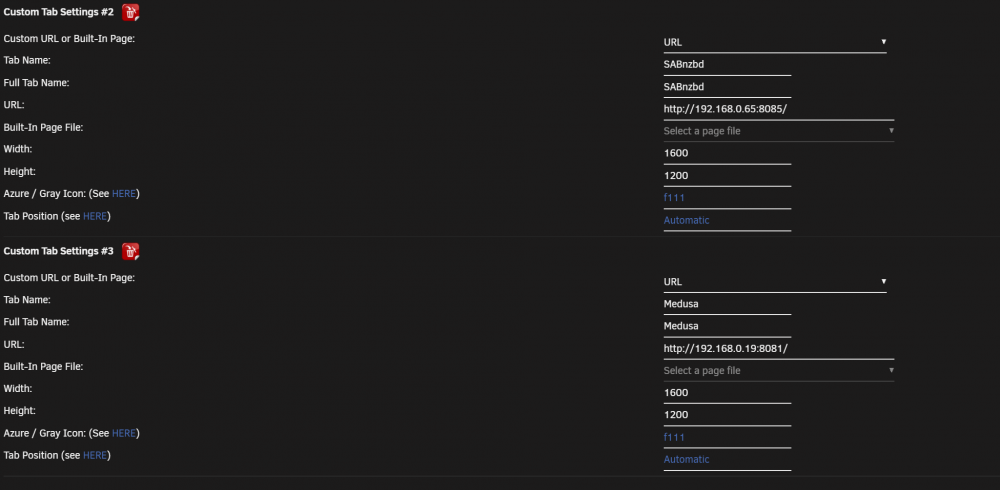
Apologies - I just right clicked on the link in the bar in the dash. Here's the config from the plugin showing there's a port (medusa also has a port as you see and it works - which is working as mentioned earlier):
-
im not using a reverse proxy. this is all internal traffic only
-
Getting the same type of thing when using a URL to my SABnzbd docker (http://192.168.0.19/SABnzbd) But it's working properly with my Medusa docker (http://192.168.0.19/Medusa)
-
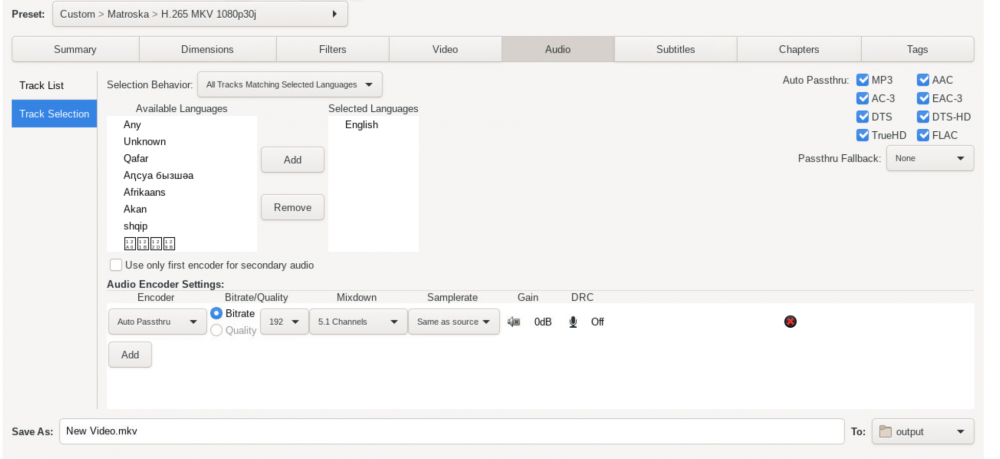
I have Handbrake passing through all audio: I'm using the jlwsage docker from the community applications https://hub.docker.com/r/jlesage/handbrake/ I'mm only using CPU to transcode - no vid card
-
Just tried that: Get the same white box.
-
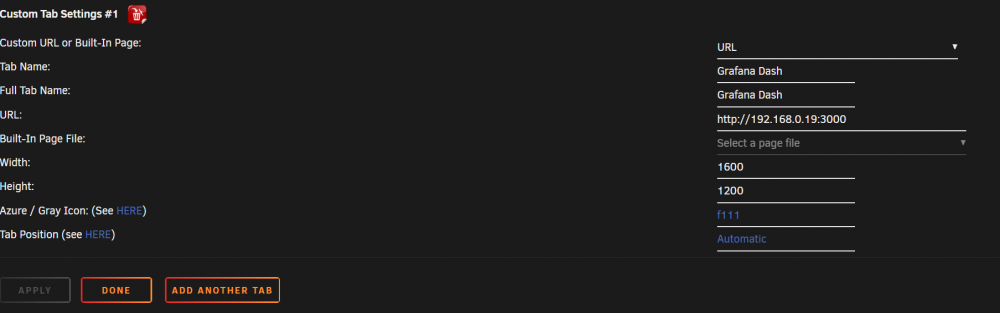
Hey Squid...I'm trying to have a custom tab point to my grafana dash. Server is NOT accessed via HTTPS. I add the tab, have it go to the URL, save, when I try to go I get this: This is the URL in question: http://<serverip>:3000/d/000000001/unraid-system-dashboard?orgId=1&refresh=30s Works fine when put into a browser tab on any browser on my system. Any thoughts?
-
I've just gone with the Handbrake docker with a preset that passes through all audio channels, etc, present...some movies I have with subtitles i need to have and while unmanic works fine for most things, it seems to have issues unless you want to remove subtitles (see my earlier error report). Handbrake is pretty much the same speed at converting
-
Nope - as I don't want to remove the subtitles
-
Hey everyone. Doing some testing and I'm getting the following errors on a test video. Happens regardless if I tell it to process audio or just copy it to the converted file: [matroska,webm @ 0x557de5bedfc0] Could not find codec parameters for stream 2 (Subtitle: hdmv_pgs_subtitle (pgssub)): unspecified size Consider increasing the value for the 'analyzeduration' and 'probesize' options [matroska,webm @ 0x557de5bedfc0] Could not find codec parameters for stream 3 (Subtitle: hdmv_pgs_subtitle (pgssub)): unspecified size Consider increasing the value for the 'analyzeduration' and 'probesize' options [matroska,webm @ 0x557de5bedfc0] Could not find codec parameters for stream 4 (Subtitle: hdmv_pgs_subtitle (pgssub)): unspecified size Consider increasing the value for the 'analyzeduration' and 'probesize' options [matroska,webm @ 0x557de5bedfc0] Could not find codec parameters for stream 5 (Subtitle: hdmv_pgs_subtitle (pgssub)): unspecified size Consider increasing the value for the 'analyzeduration' and 'probesize' options Input #0, matroska,webm, from '/library/movies/The Lord of the Rings - The Two Towers (2002).mkv': Metadata: encoder : libebml v1.3.0 + libmatroska v1.4.0 creation_time : 2013-05-14T23:32:04.000000Z Duration: 03:55:18.65, start: 0.000000, bitrate: 18284 kb/s Any ideas? Searching online came up with this solution, but since we can't type in additional commands for unmanic to pass along to ffmpeg... Adjust -probesize and/or -analyzeduration. The files I was testing were in fact damaged. But if anyone faces this problem, setting -probesize and -analyzeduration to 100 and 10000000 for example might help. From a popular comment by @DiverseAndRemote.com my solution was ffmpeg -analyzeduration 2147483647 -probesize 2147483647 -i /path/to/video.mp4 2147483647 is max_int
-
Nevermind. Reading through the issues list on github, the app author explicitly stated that he wouldn't add support for importing recipes. Thanks for the work tho!




