





mweis
Members
-
Joined
-
Last visited
-
here is my mail.log ???? [2021-02-15 13:05:20,175] [ERROR] [paperless_mail] Rule 123 Exchange.paperless 123: Error while processing rule: Response status "OK" expected, but "NO" received. Data: [b'[BADCHARSET (US-ASCII)] The specified charset is not supported.'] Traceback (most recent call last): File "/usr/src/paperless/src/paperless_mail/mail.py", line 172, in handle_mail_account total_processed_files += self.handle_mail_rule(M, rule) File "/usr/src/paperless/src/paperless_mail/mail.py", line 214, in handle_mail_rule for message in messages: File "/usr/local/lib/python3.7/site-packages/imap_tools/mailbox.py", line 100, in fetch nums = tuple((reversed if reverse else iter)(self.search(criteria, charset)))[limit_range] File "/usr/local/lib/python3.7/site-packages/imap_tools/mailbox.py", line 61, in search check_command_status(search_result, MailboxSearchError) File "/usr/local/lib/python3.7/site-packages/imap_tools/utils.py", line 54, in check_command_status raise exception(command_result=command_result, expected=expected) imap_tools.errors.MailboxSearchError: Response status "OK" expected, but "NO" received. Data: [b'[BADCHARSET (US-ASCII)] The specified charset is not supported.']
-
thanks for the container, is working fine for me, but the mailchecker checks and says everything is fine but is not importing any documents. are there any hints what to to?
-
i have no clou, i tried several versions now, i am not able to connect the nvr to the unifi account to get control. what version is working?
-
hello, can anyone gimme a hint how i can use jdownloader docker with a secure vpn connection?
-
i just wanted to start fresh from the scratch, i installed the docker the webui start, it says server not found?=??? _ () | | ___ _ __ | | / __| | | / \ | | \__ \ | | | () | |_| |___/ |_| \__/ Brought to you by linuxserver.io We gratefully accept donations at: https://www.linuxserver.io/donate/ ------------------------------------- GID/UID ------------------------------------- User uid: 99 User gid: 100 ------------------------------------- [cont-init.d] 10-adduser: exited 0. [cont-init.d] 40-chown-files: executing... [cont-init.d] 40-chown-files: exited 0. [cont-init.d] 50-gid-video: executing... [cont-init.d] 50-gid-video: exited 0. [cont-init.d] 60-plex-update: executing... Docker is used for verisoning skip update check [cont-init.d] 60-plex-update: exited 0. [cont-init.d] 99-custom-scripts: executing... [custom-init] no custom files found exiting... [cont-init.d] 99-custom-scripts: exited 0. [cont-init.d] done. [services.d] starting services Starting Plex Media Server. [services.d] done. any hints?
-
i cant find the app for onlyoffice inside nextcloud
-
yeh i ticked it. but one more question, why does this docker only work in bridge mode? i have a bridged-vlan on unraid for own subnet, if i choose this, the docker doesnt start correctly.
-
i installed nc15 but cant find the only office app in the appstore, is there a way to install this app manually?
-
nat rule yeh
-
i created the port forward rules for teamspeak. what firewall rules should i add?
-
how should i config this in pfsense? Simple Port forwarding or is there a better way?
-
yep i already figured this out, but also the onlyoffice docker can only be runned in host mode so i actually have no solution for this
-
okay fine, can u explain this just a bit more detailed?
-
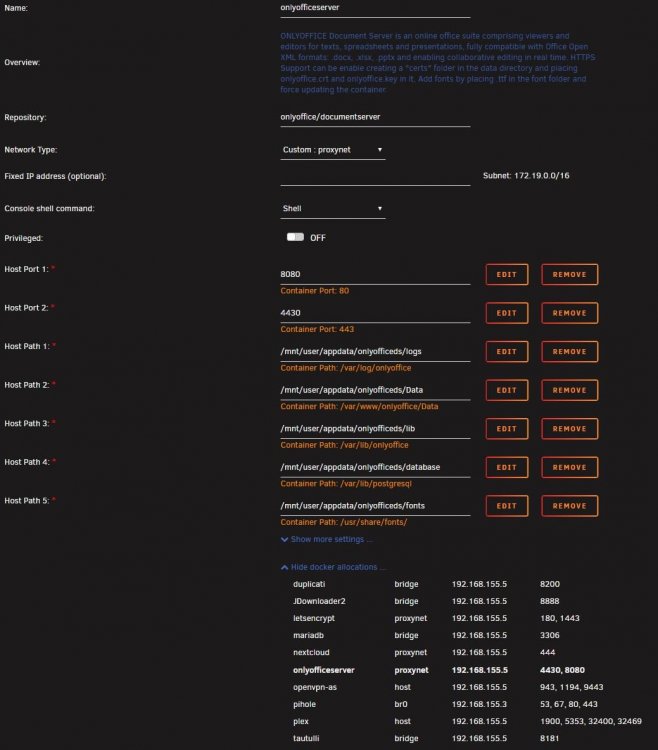
see files attached

-
yeah but i think i should be able to open the ui through the docker-ip also shouldnt i?

