





widdefmh
Members
-
Joined
-
Last visited
Everything posted by widdefmh
-
I just updated from version 6.12 to 7 and I have preserved setting enabled in Docker!! I had docker containerns running on a specifik VLAN and after upgrade all those containers can not start. I tried to update Plex container because of this issue (thought it would need an update to work or something) and the whole container disappeared!! I certainly don't hope the data of it is gone.. This just happened and I have not been able to see how much of a loss it is. I have several very important containers running on another VLAN that is now not working at all right after the upgrade. Such a disaster upgrade! This just causes a lot of extra work and time! EDIT: Looks like the preserved setting suddenly was set to off. I can see the VLANS in the docker settings, but can still not see them in the container configs. Can not choose the correct VLAN for the container.
-
Well, I removed the other 2 pools and created a completely new pool with a new name.. I ONLY added one of the crucial ssd discs to the new pool. The number of slots were set to 1. When running btrfs fi usage -T /mnt/crucialmx500ssd I get the following result AGAIN: btrfs fi usage -T /mnt/crucialmx500ssd Overall: Device size: 1.82TiB Device allocated: 6.06GiB Device unallocated: 1.81TiB Device missing: 0.00B Used: 2.38GiB Free (estimated): 929.32GiB (min: 929.32GiB) Free (statfs, df): 929.32GiB Data ratio: 2.00 Metadata ratio: 2.00 Global reserve: 3.25MiB (used: 0.00B) Multiple profiles: no Data Metadata System Id Path RAID1 RAID1 RAID1 Unallocated -- --------- ------- -------- -------- ----------- 1 /dev/sdb1 2.00GiB 1.00GiB 32.00MiB 928.48GiB 2 /dev/sdc1 2.00GiB 1.00GiB 32.00MiB 928.48GiB -- --------- ------- -------- -------- ----------- Total 2.00GiB 1.00GiB 32.00MiB 1.81TiB Used 1.16GiB 31.78MiB 16.00KiB This has to be a bug. Unraid adds both of my Crucial MX 500 discs to the pool even when the slot is only set to 1 and only 1 disc is selected. Now one of the drives is an unassigned device and I could even mount it as a unassigned device. It is still a part of the pool as stated above.
-
Well, did this not go as I wanted. I could not add both devices to the same pool without increase the slots to 2. Now I can not remove the disc I added to the pool. Can not restart the array when removing one of the discs. I changed the share appdata to another disc and ran mover.. But nothing happens.. How can I move all appdata (docker containers) to another disc so I don't loose everything on the disc pool? Will remove the cache pools and start over, but I have to move the data in the pool...
-
Yeah, I answered on the comment you had that I should not change the number of cache slots. I can not add two discs to the pool when it is set to 1, as it is now. It is set to 1, but still I have two discs in the pool.. This is not shown in the gui, both discs are in their own pools.. I did set up the pools long time ago and the server has been rebooted several times since then. This is really weird because I can not recall that I have put them in the same pool. Can Unraid be confused if two identical discs is used? I saw they had the same UUID.. In this case two identical discs is used and it is only with those 2 cache pools I have problems.. I have more pools and they work just fine with no confusion..
-
And the thing about not changing the numer of cache slots. Both cache slots are set to 1, so I really have to change it in order to put both in the same pool... I did set up the pools long time ago and the server has been rebooted several times since then. This is really weird because I can not recall that I have put them in the same pool. Can Unraid be confused if two identical discs is used? I saw they had the same UUID.. In this case two identical discs is used and it is only with those 2 cache pools I have problems.. I have more pools and they work just fine with no confusion..
-
Thanks a lot! (despite my unwillingness to share the complete diagnostic file ) I am running version 6.9.2 of Unraid. Just curious, how did they end up in the same pools? I have not defined them that way.. I have, from the very beginning put them in separate pools..
-
btrfs fi usage -T /mnt/crucial1ssd/ Overall: Device size: 1.82TiB Device allocated: 6.06GiB Device unallocated: 1.81TiB Device missing: 0.00B Used: 2.41GiB Free (estimated): 929.31GiB (min: 929.31GiB) Free (statfs, df): 929.31GiB Data ratio: 2.00 Metadata ratio: 2.00 Global reserve: 3.25MiB (used: 0.00B) Multiple profiles: no Data Metadata System Id Path RAID1 RAID1 RAID1 Unallocated -- --------- ------- -------- -------- ----------- 1 /dev/sdb1 2.00GiB 1.00GiB 32.00MiB 928.48GiB 2 /dev/sdc1 2.00GiB 1.00GiB 32.00MiB 928.48GiB -- --------- ------- -------- -------- ----------- Total 2.00GiB 1.00GiB 32.00MiB 1.81TiB Used 1.17GiB 33.06MiB 16.00KiB btrfs fi usage -T /mnt/crucial2ssd/ Overall: Device size: 1.82TiB Device allocated: 6.06GiB Device unallocated: 1.81TiB Device missing: 0.00B Used: 2.41GiB Free (estimated): 929.31GiB (min: 929.31GiB) Free (statfs, df): 929.31GiB Data ratio: 2.00 Metadata ratio: 2.00 Global reserve: 3.25MiB (used: 0.00B) Multiple profiles: no Data Metadata System Id Path RAID1 RAID1 RAID1 Unallocated -- --------- ------- -------- -------- ----------- 1 /dev/sdb1 2.00GiB 1.00GiB 32.00MiB 928.48GiB 2 /dev/sdc1 2.00GiB 1.00GiB 32.00MiB 928.48GiB -- --------- ------- -------- -------- ----------- Total 2.00GiB 1.00GiB 32.00MiB 1.81TiB Used 1.17GiB 33.06MiB 16.00KiB I see that both discs are in both pools, but they ar not configured that way in the gui? EDIT: The pools are named crucial, not corsair as I wrote above. Thought it was Corsair
-
I have shared some info about the pools and the affected share above. I don't want to share info about my network, ip:s vlan config. That is a security risk and should not be published on the net.
-
corsair1ssd pool: diskFsType="btrfs" diskComment="" diskWarning="" diskCritical="" diskUUID="89157aa0-b41f-477c-902a-c6be5473c397" diskShareEnabled="yes" diskShareFloor="0" diskExport="e" diskFruit="no" diskSecurity="public" diskReadList="" diskWriteList="" diskVolsizelimit="" diskCaseSensitive="auto" diskExportNFS="-" diskExportNFSFsid="0" diskSecurityNFS="public" diskHostListNFS="" diskId="CT1000MX500SSD1_2016E29B8E7E" diskIdSlot="CT1000MX500SSD1_2016E29B8E7E" diskType="Cache" diskSpindownDelay="-1" diskSpinupGroup="" corsair2sdd: diskFsType="btrfs" diskComment="" diskWarning="" diskCritical="" diskUUID="89157aa0-b41f-477c-902a-c6be5473c397" diskShareEnabled="yes" diskShareFloor="0" diskExport="e" diskFruit="no" diskSecurity="public" diskReadList="" diskWriteList="" diskVolsizelimit="" diskCaseSensitive="auto" diskExportNFS="-" diskExportNFSFsid="0" diskSecurityNFS="public" diskHostListNFS="" diskId="CT1000MX500SSD1_1946E227AF74" diskIdSlot="CT1000MX500SSD1_1946E227AF74" diskType="Cache" diskSpindownDelay="-1" diskSpinupGroup="" I see that they have the same diskUUID.. But differens diskId and diskIdSlot..
-
I don't want to share the complete zip. Contains info that I don't want to share with the whole world, sorry.
-
Nope they are not in the same pool. What files from the diagnostic do you need? They have never been in the same pool. It is 2 Corsair MX 500 discs and the first disc is in Corsair1ssd pool and the other is in Corsair2ssd pool. Both pools are set to have 1 disc. I can see the following in the corsair share config: # Generated settings: shareComment="..." shareInclude="" shareExclude="" shareUseCache="only" shareCachePool="corsair2ssd" shareCOW="no" shareAllocator="highwater" shareSplitLevel="" shareFloor="0" shareExport="e" shareFruit="no" shareCaseSensitive="auto" shareSecurity="private" shareReadList="" shareWriteList="..." shareVolsizelimit="" shareExportNFS="-" shareExportNFSFsid="0" shareSecurityNFS="public" shareHostListNFS="" # Share exists on corsair2ssd,corsair1ssd Share exists on corsair2ssd,corsair1ssd. That is strange.
-
I have two pools, the first is named Corsair1ssd and the second pool is named Corsair2ssd. I have a share called Corsair.mx500.1tb which has the following settings: Use cache pool (for new files/directories): Only Select cache pool: Corsair2ssd Despite the above settings the files in the share is written to both Corsair1ssd and Corsair2ssd pools? Why is that?? With the setting above it shoould only write to Corsair2ssd pool.... Edit: Also... My appdata-folder is set to only write to Corsair1ssd pool, but is written to both discs anyway.. Really weird..
-
Looked weird, but Squid had an explanation in the above answer🙂
-
Thanks for the link, had missed that information. Then I can safely installera the socker container.
-
I have the linuxserver/unifi-controller on one of my unraid-boxes and are about to move the controller to another unraid server I have. But it looks I cant find the same container I have used before? Now I can just find unifi-controller in community apps from linuxserver's repository. It does not look the same as the one I have right now. Much more configruation in the one i found now. And the repository does not looks like it is linuxserver/unifi-controller , this one has lscr.io/linuxserver/unifi-controller ? Is it the right container?
-
The instructions is not that informative when installing syncthing.. The instructions says: -v /data1 Data1 -v /data2 Data2 But what is Data1 and Data2??? Please, make a better explanation rather than just describe it as data1 and 2. Sorry, but you can rather left the description out rather than print the same again.
-
Try it and please comment how it went. I have also ran the MSI Util and checked my GPU in that software. For me, it is like night and day in performance. I really can't tell that my OS is virtualized. Works great! EDIT: Worth to mention is that I'm running Unraid 6.9 Beta 22 where cpu governor is set to On Demand by default instead of power save. This will probably fix some performance issues as well. If you don't run Unraid 6.9, download TipsAndTweaks plugin and change cpu governor to On demand if that isn't the current mode.
-
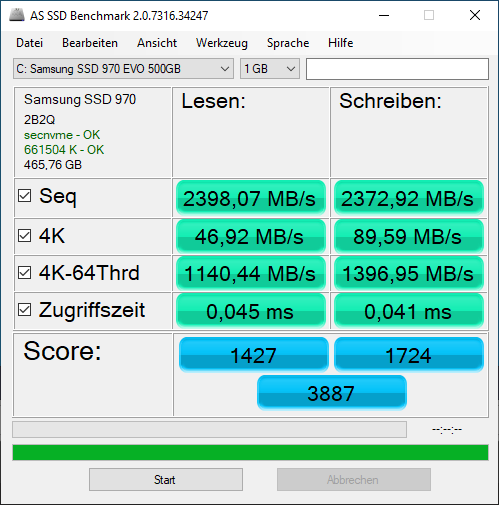
Well, after a lot of googling I can answer my own question. For me, this did the trick: To my domain tag, add xmlns:qemu='http://libvirt.org/schemas/domain/qemu/1.0' so it looks like this: <domain type='kvm' xmlns:qemu='http://libvirt.org/schemas/domain/qemu/1.0'> And in the end om the domain tag (in the bottom of the xml), add this: <qemu:commandline> <qemu:arg value='-cpu'/> <qemu:arg value='host,kvm=off,hv_relaxed,hv_spinlocks=0x1fff,hv_vapic,hv_time,hv_vendor_id=Microsoft'/> </qemu:commandline> After adding this I get the following results in AS SSD: Very close to bare metal performance!! And my vm is blazing fast! Can't tell I'm running in a vm or bare metal! I get a warning in the logs: This family of AMD CPU does not support hyperthreading(2) but does not seem to have an effect, I have also tweaked the following tag: <clock offset='localtime'> <timer name='rtc' tickpolicy='catchup'/> <timer name='pit' tickpolicy='delay'/> <timer name='hpet' present='yes'/> </clock> where i changed hpet to yes to get the cpu down a bit in idle mode. Hope this can help anyone else that have performance issues in a vm and where the vm feels slow and sluggish. Like night and day here now.
-
Now I've also installed Samsung NVME driver and the io performance is still really poor. The vm is good in other terms, but I need to fix this io performance issue... Every tip is appreciated! Edit: Ran AS SSD and here is what I got: Read / Write: SEQ: 2352,81 MB/S 2322,20 MB/S 4K: 16,96 MB/s 21,22 MB/s 4K-64Thrd: 636,29 MB/s 640,93MB/s Acc.time: 0,174 ms / 0,184 ms Score: 889 / 894 Total: 2234 Running the same hardware baremetal got this results: Read / Write: SEQ: 2767,36 MB/S 2411,06 MB/S 4K: 49,44 MB/s 98,08 MB/s 4K-64Thrd: 1192,80 MB/s 2145,23MB/s Acc.time: 0,056 ms / 0,039 ms Score: 1519 / 2484 Total: 4770 Looks like the 4K read / write suffers most. Also the vm is a bit "sluggish" in the responsiveness compared to bare metal. I am passing through a Nvidia GTX 1660 Super and it works perfectly, with correct nvidia drivers installed. It's not the GPU that makes the gui feeling slow, it is something else. When running baremetal an explorer window just opens in the same millisecond as I press the button to open it, in the vm it takes 2 seconds before it is done and has opened it. As I said, I'm passing through the entire nvme controller and also the gpu to the vm, so the vm should have the best enviroment to perform well. I also don't run anything else in unraid, except unraid itself.
-
Hi! I have just installed Win 10 Pro as a VM in unraid and have done a passthrough of the entire nvme controller that my Samsung 970 Evo m2 drive is attached to. It works, but the disk performance is horrible. Do you have any tricks for fixing such performance issues when a whole controller is passed through? Windows detects my SSD as the Samsung SSD 970 EVO 500GB. Looks as it should. The storage controller is "Standard NVM Express Controller", this I'm not really sure about.. I have a ASUS Rog Strix B350-F and I don't know how to install another driver as I can't installl the motherboards drivers because this is in a VM and a virtual bios.. Help?
-
Wow, this thread started in february 2018 and this is still an issue. I have the exact same issue with my Sandisk and Kingston usb drives. Stuck at syncing filesystem. The manual way works, to copy the files and run the make_bootable.bat, but why isn't this issue fixed by Limetech?? This bug is over 2 years old and will probably scare new users away.
-
Checked with the AMD card again and did pass through on it for a couple of minutes ago. Worked like a charm! Worked out of the box in mac os 👍👍 A little weird startup screen (several small windows) but when it had started i got correct resolution and everything is fast. Chrome / brave works perfectly as well without weird graphic bugs 👍🙂
-
Can maybe be that, tried it last night and might have missed something. Will try again. Got yellow warning/errors in the log but got the same warning/errors with nvidia and started anyway but with weird graphics.
-
Okey, I don't think my RX 580 suffer from it because I have powered up and shut down vms with that card set to passthrough without any problems at all. How do I enable it in Macinabox? Just pass through it did not work, did not got any picture on the screen.. Tried to boot up my Win 10 vm right after and it worked.
-
Ah okey, I see. Will look for that. In the video it looked so easy to get it working, just pass a card through.. Is it easier with AMD-cards? As said, I have a RX 580 in the server as well.

