CoZ
Members
-
Joined
-
Last visited
Everything posted by CoZ
-
Well this is DAMN strange. I've changed nothing but noticed a update to the docker container a few days ago. I updated the container and left it alone. I started it today to come back and try and figure out how to get past the error message I was getting... started the WebGUI and all my HDD data was there. I hate and love when stuff like this happens lol
-
Yup, I didn't touch the api endpoint. I only changed the webgui port.
-
Yup I copied and pasted the term that shows up when you login to the WebGUI the first time. I can see it go down the list and detect all my HDDs and then fails at the end with that error message above. No idea what it means or, why.
-
No one has any idea about this error still? INFO[0000] Generating WWN type=metrics INFO[0000] Sending detected devices to API, for filtering & validation type=metrics 2020/10/01 12:54:07 ERROR: Post http://localhost:8080/api/devices/register: net/http: request canceled while waiting for connection (Client.Timeout exceeded while awaiting headers)
-
Well, I can help you out (even though no one has responded to why mine is not working) Apparently you can NOT change the API endpoint of the scrutiny UI which you have done. The port has to stay 8080
-
Well I got this error message when I ran the "scrutiny-collector-metrics run" in the dockers CLI: 2020/09/29 23:13:22 ERROR: Post http://localhost:8080/api/devices/register: net/http: request canceled while waiting for connection (Client.Timeout exceeded while awaiting headers) I changed the WebUI port to 8085 but other than that, everything was left 'default'. Any ideas?
-
Yup, my Footer shows F but everything else is in C - I guess you're right though. Everyone is pretty much used to C temps for hardware. I still find myself googiling the conversion rate from C to F just to make sure my temps aren't too high...
-
I searched this topic for the keyword: Fahrenheit but no results came up. I find it strange that I'm the only one that would ask how to change the temp readings from C to F?
-
That's what I was inquiring about, if that was possible to continue to add folders to the container template. And.... this is also what I was thinking as well. I'm going to try it - what's the WORST that could happen? So I added another path, guess I just have to wait for Sonarr to grab an episode for that particular path and see if it gets "picked up" So far, so good. I thought for sure the docker would implode after hitting apply.... but it did not.
-
So I can continue to add "/mnt/user/Media/TV Shows NAS/TVSHOWNAME" to the same line? For some reason I don't think that will work. I (and I think the OP) want to add MORE TV Show folders to the container. For instance, have multiple TV show folders instead of just the TV Show Library. Right now I've pointed the "Library Movies" to another TV show instead of the Movie library. When I grab a new movie or TV show I want encoded, I have to go back into editing the container and point it directly to the new folder or said movie or TV Show and then when it's done, go back into the container and switch it back. I guess the easiest way to explain it would be to have multiple folders in the container: /mnt/user/Media/TV Shows NAS/Some TV Show#1 /mnt/user/Media/TV Shows NAS/Some TV Show#2 /mnt/user/Media/TV Shows NAS/Some TV Show#3

-
Probably a dumb question; can you add more paths then just the default entire "TV" or "Movie" libraries? For instance there are certain shows I don't want to encode, so I've changed the TV Library to point to an individual TV Show (I've also changed the Movie Library to point to another TV Show Folder) - so that limits me to 2 "watched" folders. I've got about 6 TV Shows that are currently active that I'd like watched, is there anyway to just add more folders for this to watch?
-
So how are they in there in the first place if an MKV container doesn't support it? I remove the non-english Subs out of the MKV via MKVToolNix, leaving only the English ones behind. It doesn't matter if the Subs are PGS or SRT, the encode still fails.
-
I got all excited thinking there was a setting I missed that allows it to ignore subtitles. I keep the PGS English subs so I can watch movies at night in the bedroom at low volume without having to hear the Wife complain about the TV Volume being too loud. So, unfortunately for me, all my movies fail to encode. It's strange that Handbrake has no such issue with SUBS.....
-
I am. The less this program has to do, the quicker it does it's job. I also have a process, load up the file in MKVToolNix, strip the unwanted Subs (different languages than English), Audio Streams (I leave the 'highest quality' audio stream in), etc..etc.. then move the video file over to the array for transcoding.
-
@bastl seems to be an issue with Ubiquiti Dream Machine's newest firmware update and NAT reflection. Just. Perfect. lol
-
Disregard. Came back here to delete the post but you already replied to it. Seems to be an issue internally on my LAN not being able to access any *.duckdns.org URLs. Dunno why. Externally everything works.
-
If I can ping my duckdns subdomains from within unRaid and Windows10 (eg: ping subdomain.duckdns.org) and it returns results but I can't access the subdomain.duckdns.org within a browser window, than it must be a Nginx Proxy manager issue, correct? I'm trying to eliminate some issues here I'm having.
-
Subtitle support would be great. Almost all of my files fail due to subs.
-
Even though I created a new "Path" Variable and set the Container Path to /config/www/gallery/galleries/ in the docker, this is still uploading photos. I'm assuming this is making duplicate copies of my photos off of my array and uploading them to the appdata/piwigo? Is there anyway to just point the docker to my Photo share and let it just pick from there to create the albums, etc?
-
That would be great but I don't think this docker can do that.... yet
-
I'd like the ability to have Fahrenheit if at all possible instead of Celsius.
-
Nice update to the Plug-In, I like the layout much better this way @b3rs3rk
-
Not that this has anything to do with the plug-in but I really wish they would let you customize the columns / rows on the dashboard a bit more. You can only move the 'tiles' up or down, not to the left and right as well.
-
No worries. Either way, power draw displayed or not, it's a great plug-in! I just wanted to make sure that it wasn't ME that screwed something up installing it.
-
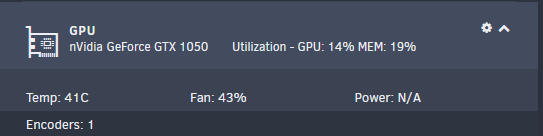
<!DOCTYPE nvidia_smi_log SYSTEM "nvsmi_device_v10.dtd"> <nvidia_smi_log> <timestamp>Sat Mar 7 18:50:00 2020</timestamp> <driver_version>440.44</driver_version> <cuda_version>10.2</cuda_version> <attached_gpus>1</attached_gpus> <gpu id="00000000:01:00.0"> <product_name>GeForce GTX 1050</product_name> <product_brand>GeForce</product_brand> <display_mode>Disabled</display_mode> <display_active>Disabled</display_active> <persistence_mode>Disabled</persistence_mode> <accounting_mode>Disabled</accounting_mode> <accounting_mode_buffer_size>4000</accounting_mode_buffer_size> <driver_model> <current_dm>N/A</current_dm> <pending_dm>N/A</pending_dm> </driver_model> <serial>N/A</serial> <uuid>XXXXXXXXXXXXXXXXXXXXXXXXXXXXX</uuid> <minor_number>0</minor_number> <vbios_version>86.07.25.00.65</vbios_version> <multigpu_board>No</multigpu_board> <board_id>0x100</board_id> <gpu_part_number>N/A</gpu_part_number> <inforom_version> <img_version>G001.0000.01.04</img_version> <oem_object>1.1</oem_object> <ecc_object>N/A</ecc_object> <pwr_object>N/A</pwr_object> </inforom_version> <gpu_operation_mode> <current_gom>N/A</current_gom> <pending_gom>N/A</pending_gom> </gpu_operation_mode> <gpu_virtualization_mode> <virtualization_mode>None</virtualization_mode> <host_vgpu_mode>N/A</host_vgpu_mode> </gpu_virtualization_mode> <ibmnpu> <relaxed_ordering_mode>N/A</relaxed_ordering_mode> </ibmnpu> <pci> <pci_bus>01</pci_bus> <pci_device>00</pci_device> <pci_domain>0000</pci_domain> <pci_device_id>1C8110DE</pci_device_id> <pci_bus_id>00000000:01:00.0</pci_bus_id> <pci_sub_system_id>8C971462</pci_sub_system_id> <pci_gpu_link_info> <pcie_gen> <max_link_gen>3</max_link_gen> <current_link_gen>3</current_link_gen> </pcie_gen> <link_widths> <max_link_width>16x</max_link_width> <current_link_width>8x</current_link_width> </link_widths> </pci_gpu_link_info> <pci_bridge_chip> <bridge_chip_type>N/A</bridge_chip_type> <bridge_chip_fw>N/A</bridge_chip_fw> </pci_bridge_chip> <replay_counter>0</replay_counter> <replay_rollover_counter>0</replay_rollover_counter> <tx_util>0 KB/s</tx_util> <rx_util>0 KB/s</rx_util> </pci> <fan_speed>43 %</fan_speed> <performance_state>P0</performance_state> <clocks_throttle_reasons> <clocks_throttle_reason_gpu_idle>Not Active</clocks_throttle_reason_gpu_idle> <clocks_throttle_reason_applications_clocks_setting>Not Active</clocks_throttle_reason_applications_clocks_setting> <clocks_throttle_reason_sw_power_cap>Not Active</clocks_throttle_reason_sw_power_cap> <clocks_throttle_reason_hw_slowdown>Not Active</clocks_throttle_reason_hw_slowdown> <clocks_throttle_reason_hw_thermal_slowdown>Not Active</clocks_throttle_reason_hw_thermal_slowdown> <clocks_throttle_reason_hw_power_brake_slowdown>Not Active</clocks_throttle_reason_hw_power_brake_slowdown> <clocks_throttle_reason_sync_boost>Not Active</clocks_throttle_reason_sync_boost> <clocks_throttle_reason_sw_thermal_slowdown>Not Active</clocks_throttle_reason_sw_thermal_slowdown> <clocks_throttle_reason_display_clocks_setting>Not Active</clocks_throttle_reason_display_clocks_setting> </clocks_throttle_reasons> <fb_memory_usage> <total>1999 MiB</total> <used>300 MiB</used> <free>1699 MiB</free> </fb_memory_usage> <bar1_memory_usage> <total>256 MiB</total> <used>2 MiB</used> <free>254 MiB</free> </bar1_memory_usage> <compute_mode>Default</compute_mode> <utilization> <gpu_util>0 %</gpu_util> <memory_util>0 %</memory_util> <encoder_util>0 %</encoder_util> <decoder_util>0 %</decoder_util> </utilization> <encoder_stats> <session_count>0</session_count> <average_fps>0</average_fps> <average_latency>0</average_latency> </encoder_stats> <fbc_stats> <session_count>0</session_count> <average_fps>0</average_fps> <average_latency>0</average_latency> </fbc_stats> <ecc_mode> <current_ecc>N/A</current_ecc> <pending_ecc>N/A</pending_ecc> </ecc_mode> <ecc_errors> <volatile> <single_bit> <device_memory>N/A</device_memory> <register_file>N/A</register_file> <l1_cache>N/A</l1_cache> <l2_cache>N/A</l2_cache> <texture_memory>N/A</texture_memory> <texture_shm>N/A</texture_shm> <cbu>N/A</cbu> <total>N/A</total> </single_bit> <double_bit> <device_memory>N/A</device_memory> <register_file>N/A</register_file> <l1_cache>N/A</l1_cache> <l2_cache>N/A</l2_cache> <texture_memory>N/A</texture_memory> <texture_shm>N/A</texture_shm> <cbu>N/A</cbu> <total>N/A</total> </double_bit> </volatile> <aggregate> <single_bit> <device_memory>N/A</device_memory> <register_file>N/A</register_file> <l1_cache>N/A</l1_cache> <l2_cache>N/A</l2_cache> <texture_memory>N/A</texture_memory> <texture_shm>N/A</texture_shm> <cbu>N/A</cbu> <total>N/A</total> </single_bit> <double_bit> <device_memory>N/A</device_memory> <register_file>N/A</register_file> <l1_cache>N/A</l1_cache> <l2_cache>N/A</l2_cache> <texture_memory>N/A</texture_memory> <texture_shm>N/A</texture_shm> <cbu>N/A</cbu> <total>N/A</total> </double_bit> </aggregate> </ecc_errors> <retired_pages> <multiple_single_bit_retirement> <retired_count>N/A</retired_count> <retired_pagelist>N/A</retired_pagelist> </multiple_single_bit_retirement> <double_bit_retirement> <retired_count>N/A</retired_count> <retired_pagelist>N/A</retired_pagelist> </double_bit_retirement> <pending_blacklist>N/A</pending_blacklist> <pending_retirement>N/A</pending_retirement> </retired_pages> <temperature> <gpu_temp>39 C</gpu_temp> <gpu_temp_max_threshold>102 C</gpu_temp_max_threshold> <gpu_temp_slow_threshold>99 C</gpu_temp_slow_threshold> <gpu_temp_max_gpu_threshold>N/A</gpu_temp_max_gpu_threshold> <memory_temp>N/A</memory_temp> <gpu_temp_max_mem_threshold>N/A</gpu_temp_max_mem_threshold> </temperature> <power_readings> <power_state>P0</power_state> <power_management>Supported</power_management> <power_draw>N/A</power_draw> <power_limit>75.00 W</power_limit> <default_power_limit>75.00 W</default_power_limit> <enforced_power_limit>75.00 W</enforced_power_limit> <min_power_limit>52.50 W</min_power_limit> <max_power_limit>75.00 W</max_power_limit> </power_readings> <clocks> <graphics_clock>1354 MHz</graphics_clock> <sm_clock>1354 MHz</sm_clock> <mem_clock>3504 MHz</mem_clock> <video_clock>1215 MHz</video_clock> </clocks> <applications_clocks> <graphics_clock>N/A</graphics_clock> <mem_clock>N/A</mem_clock> </applications_clocks> <default_applications_clocks> <graphics_clock>N/A</graphics_clock> <mem_clock>N/A</mem_clock> </default_applications_clocks> <max_clocks> <graphics_clock>1911 MHz</graphics_clock> <sm_clock>1911 MHz</sm_clock> <mem_clock>3504 MHz</mem_clock> <video_clock>1708 MHz</video_clock> </max_clocks> <max_customer_boost_clocks> <graphics_clock>N/A</graphics_clock> </max_customer_boost_clocks> <clock_policy> <auto_boost>N/A</auto_boost> <auto_boost_default>N/A</auto_boost_default> </clock_policy> <supported_clocks>N/A</supported_clocks> <processes> <process_info> <pid>9555</pid> <type>C</type> <process_name>/usr/lib/plexmediaserver/Plex Transcoder</process_name> <used_memory>289 MiB</used_memory> </process_info> </processes> <accounted_processes> </accounted_processes> </gpu> Just 'forced' a HW transcode via Plex. Using the CLI watch nvidia-smi shows that it's using the GPU. However, the plug-in on the dashboard reflects no change as far as power draw: