





CoZ
Members
-
Joined
-
Last visited
Everything posted by CoZ
-
I'm assuming the Power:N/A will switch to something once an encode is happening?
-
I'm lucky I can figure out the GUI, much less a CLI lol
-
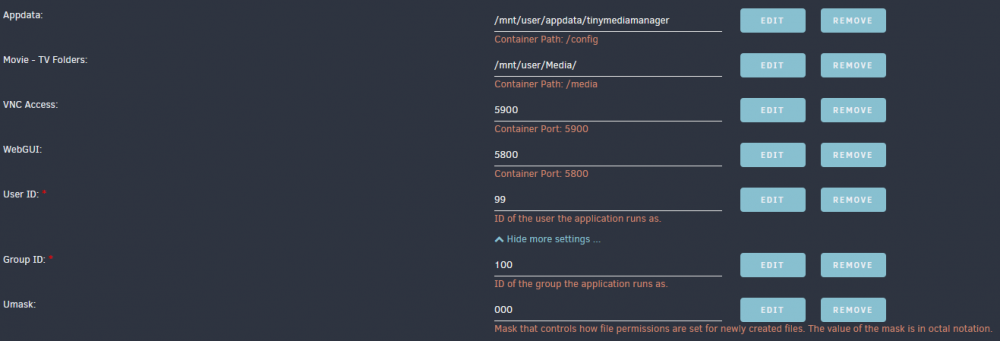
I pretty much just copied / pasted everything that was in the Krusader docker and slapped it into the TMM docker. For future reference, in case anyone else has the same issue, these settings allowed me to delete the .tobedeletedTMM folder off of the array regardless if the Docker container is started/stopped etc
-
That was indeed missing out of the docker all together. I've since added them but haven't had a chance to test out if that was the issue. Thank you though. It would be nice if there was an option to move those .tobedeleted folders to somewhere else other than the /Movies & /TVShows shares or, just disable that feature entirely.
-
Yup, that's checked - to delete on every shutdown. Except, it won't delete. Stopping the docker / restarting the docker - makes no difference, it won't go away. I'm also unable to delete the folders from my networked shares using Win10,etc. Some kind of 'permission' error. Only way to delete 'em manually is by launching Krusader via VNC
-
Am I searching for this in Community Apps? Github? DockerHub?
-
Has anyone figured out how to get it to NOT make the 'recycle bin' folders on your /MNT array? For instance under my /Movie and under /TV Shows I have folders called .deletedByTMM Either restarting the Docker doesn't remove them. Stopping the docker and starting the docker doesn't remove them. I see no way in the options of TMM to remove/disable the recycle bin/trash option. I can't delete them off the share either. The only way to delete them is via Krusader.... and then they just re-populate the next time I edit / change something.
-
Thanks for the explanation. I will be leaving it 'as is' then.
-
Thanks. Enabled it, selected one of the failed movies and got this error: [matroska,webm @ 0x152de0e5d180] Could not find codec parameters for stream 2 (Subtitle: hdmv_pgs_subtitle (pgssub)): unspecified size Consider increasing the value for the 'analyzeduration' and 'probesize' options So, it doesn't like movies with Subtitles in them or something?
-
Except for that one TV series that failed to convert (and I've no idea why it failed) I'm now having the same issue when I point it to a specific movie folders. The past four movies I've tried to encode to HEVC have failed. No explanation given other than the generic: " No FFMPEG command log recorded for this task. " I've been (so far) only about to convert one movie on my array. One has been successful, the other 4 have failed with that error. Has anyone figured out a way to "clear" the failed jobs out of the history? There are check boxes next to the completed/failed jobs but checking them does nothing.
-
I was under the assumption that quality wise CPU Encoding by far trumps NVIDIA encoding. Although the NVENC may be a ton faster, I read it is 'sloppy' as far as it's compression algorithm. By using a CPU encode, the results, while slower, produce a far higher quality encode.
-
So I finally had my first error - but I think perhaps it's due to the actual codec that the original file is encoded in more so than the program (I'm not re-encoding the audio, just the video). The whole series had failed. The only error is: No FFMPEG command log recorded for this task. Which really doesn't say much as to why it failed. Anyone have any ideas? Video ID : 1 Format : AVC Format/Info : Advanced Video Codec Format profile : [email protected] Format settings : CABAC / 4 Ref Frames Format settings, CABAC : Yes Format settings, Reference frames : 4 frames Codec ID : V_MPEG4/ISO/AVC Duration : 52 min 17 s Bit rate mode : Variable Bit rate : 28.5 Mb/s Maximum bit rate : 32.7 Mb/s Width : 1 920 pixels Height : 1 080 pixels Display aspect ratio : 16:9 Frame rate mode : Constant Frame rate : 23.976 (24000/1001) FPS Color space : YUV Chroma subsampling : 4:2:0 Bit depth : 8 bits Scan type : Progressive Bits/(Pixel*Frame) : 0.574 Stream size : 10.4 GiB (87%) Default : Yes Forced : No Color range : Limited Color primaries : BT.709 Transfer characteristics : BT.709 Matrix coefficients : BT.709 Audio ID : 2 Format : DTS XLL Format/Info : Digital Theater Systems Commercial name : DTS-HD Master Audio Codec ID : A_DTS Duration : 52 min 17 s Bit rate mode : Variable Bit rate : 4 134 kb/s Channel(s) : 6 channels Channel layout : C L R Ls Rs LFE Sampling rate : 48.0 kHz Frame rate : 93.750 FPS (512 SPF) Bit depth : 24 bits Compression mode : Lossless Stream size : 1.51 GiB (13%) Title : DTS-HD MA 5.1 Language : English Default : Yes Forced : No
-
So I got a warning message from my Fix Common problems plugin this morning telling me that the original plug-in (Dark Theme) should be removed. So I did that..... and then all hell broke loose. I couldn't see ANYTHING on the GUI of unRaid after removal. Everything was white on white on white. You might want to put a disclaimer in there to set up your factory default colors BEFORE removing the Dark Theme plugin. lol Also, where are more theme colors for the new plug-in?? I've been on NORD forever now.
-
They are running device management "Blackberry UEM profile" that is pretty much tied into the whole device. App installs are restricted, cellular data is monitored, etc...etc... Even if it inhibits the snooping a bit, I'm happy. Hence the reason for the questions. I'm not trying to circumvent the whole thing, just if they no longer see what's being browsed, etc...etc... fine with me.
-
I've been messing with this for a little bit, and I THINK I've got the hang of it. I'd just like a little hand-holding on one specific thing. I've got a iOS device from work and it's 'locked' down by the company. They monitor everything on this, inbound and outbound. The only VPN that I've been able to install is Wireguard. So I've successfully created a Remote Tunneled Access via the Wireguard / Unraid settings for the iOS device. That is what I need for the company to NOT see any data, correct? Will I still be able to access the unRaid GUI / Local LAN using that or is this strictly for 'masking' data to and from the internet? Also, I'm running a PiHole docker container at 192.168.86.103. I put that in the DNS Servers on the iOS device and I have no connectivity. If I take it out and put a generic 8.8.8.8 I can browse the Internet albeit with Ads though. What am I doing wrong wit that?
-
Strange. I'm transcoding to RAM and I've completed 397 transcodes and not one error.
-
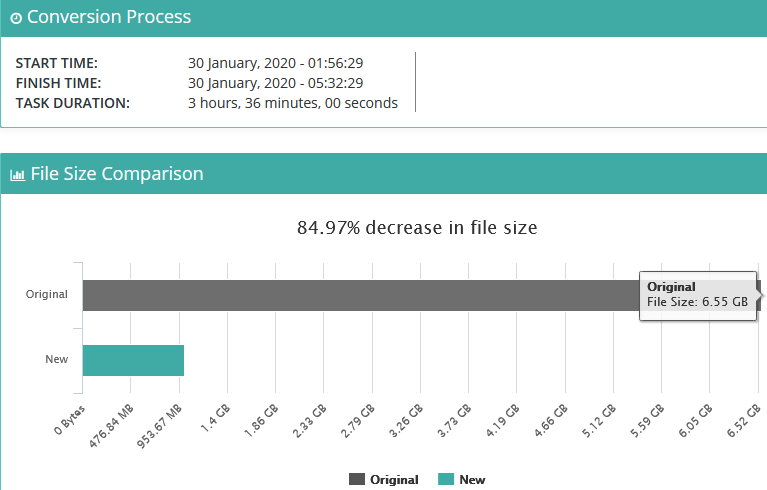
The more I use this container, the more amazed I am at the results it produces. I started off with a 'disposable' TV show that I didn't really care about what happened to it let it run through all the seasons. I saw, on average, a 70% decrease in file size(s). The screenshot below is the most impressive result by far in the size decrease. I've manually mapped the TV Shows that I want encoded. I just wait for one show to complete, re-map the container to point to a different show and start it up again. I'm only running two workers and transcoding to RAM instead of the SSD or Mechanical drive. I've noticed ZERO difference in quality. I took a backup of a TV Episode, let the docker run it's course then played them side by side and really couldn't see a difference. Granted, not exactly a technical or scientific approach. LoL I'm not sure if I want it to touch my Battlestar Galactica episodes that I treasure dearly but, for stuff like 'Friends' and 'Knight Rider' etc.... I can't see any negative with using this. Truly amazing work on the part of the DEV.
-
HAHAHAH..... YUP! That entire season is in HEVC. I'm foolish. Sorry. I pointed to that TV Show because I wasn't worried about 'losing it' in case something screwed up. I'll try a different one now that is NOT already HEVC. /facepalm Wouldn't you know it, switched it to a different TV show / season and the two workers have taken off and started converting. ....sorry ... all
-
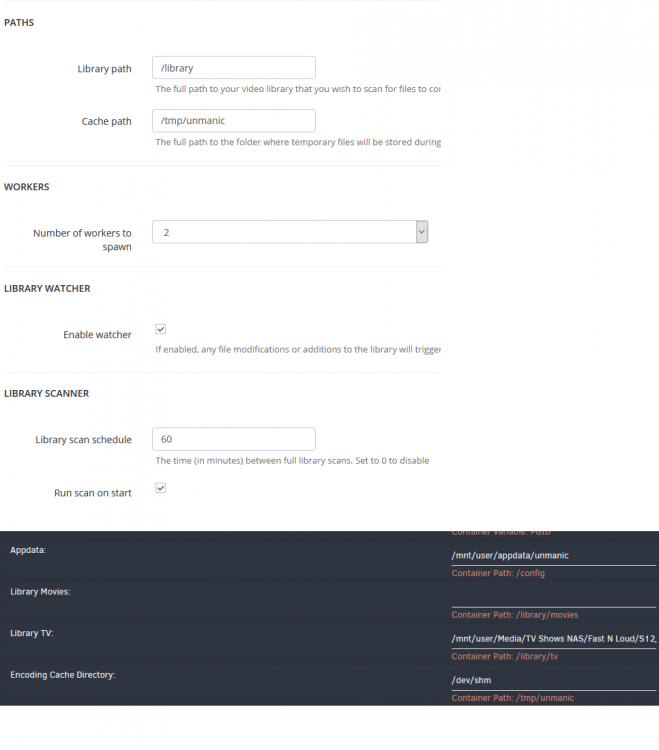
This is how it's mapped / set up currently:
-
I've checked it and nothing. Restarted the docker, nothing. Left it unchecked, nothing. Restarted Docker, nothing. Removed a video file from the directory, to my local desktop, deleted the file, moved the file back, started/stopped the docker, nothing.
-
Strange. I've even drilled down to the "Season" folder in the docker container setup. I've got two workers enabled - nothing is happening. They must be on strike or something? lol
-
If I've got TV Shows under separate sub-folders, would I have to point this container to each individual sub-folder that I want 'watched'? Right now I have my array set up as: /mnt/Media/TVShows/TVSHOWNAME/S01 And on down the line. As it stands now, this is doing nothing. So if I point (as a test) to /TVShows/TVSHOWNAME I would have to drill down even deeper and select the actual Season Sub-folder as well in order to get anything to initiate?
-
Running sensors in CLI results in this: Error: File /etc/sensors.d/sensors.conf, line 4: Undeclared bus id referenced Error: File /etc/sensors.d/sensors.conf, line 6: Undeclared bus id referenced sensors_init: Can't parse bus name I've run the 'sensors-detect' first but this still shows up.
-
Thanks @dee31797 for clearing that up. The S.O. can suffer the anguish of having to hit the "skip" button then. LoL
-
So this will only process .ts files? I just stumbled on this and I'm currently using HDHomeRUN. The device records to the array in .MPG, not .TS




