





Kimosabe
Members
-
Joined
-
Last visited
Everything posted by Kimosabe
-
Any ideas as to what do I need to do to see a passed through NVME? I have the drive VFIO bound and I have it selected in the VM template under "Other PCI Devices", but my Sequoia VM can't see it. I tested the same drive passed through on my Windows 11 VM, and it worked fine.
-
For the sake of reducing drive spin up time, I'm looking to group my more active files (primarily those that are hard-linked) on one or two drives. Share directory assignment doesn't work since my folder hierarchy is built with hard-links in mind. Does anyone have any suggested apps or automated methods for trying to accomplish this?
-
I’m probably mistaken with how permissions would work and such, but I assumed a default destiny could be set similar to how an installation destination isn’t required for the plugin application itself. Similar to when installing a docker container (from community apps)- Pre-select a default unraid folder (appdata or system), but allow it to edited.
-
If I installed the new plugin but never set a "Backup destination", will my app data still backup? If so, where? I can't find anything noting a default backup location.
-
Does anyone know if it's possible for a script to detect individual docker's "Autostart" setting? If so, you could create a script that only starts all dockers with the setting enabled.
-
Just to provide an update on this problem- it ended up being a faulty CPU as JorgeB suggested. I successfully RMA'd my 5950x a few weeks back (meaning it failed their testing), and I haven't seen the errors since installing the replacement CPU.
-
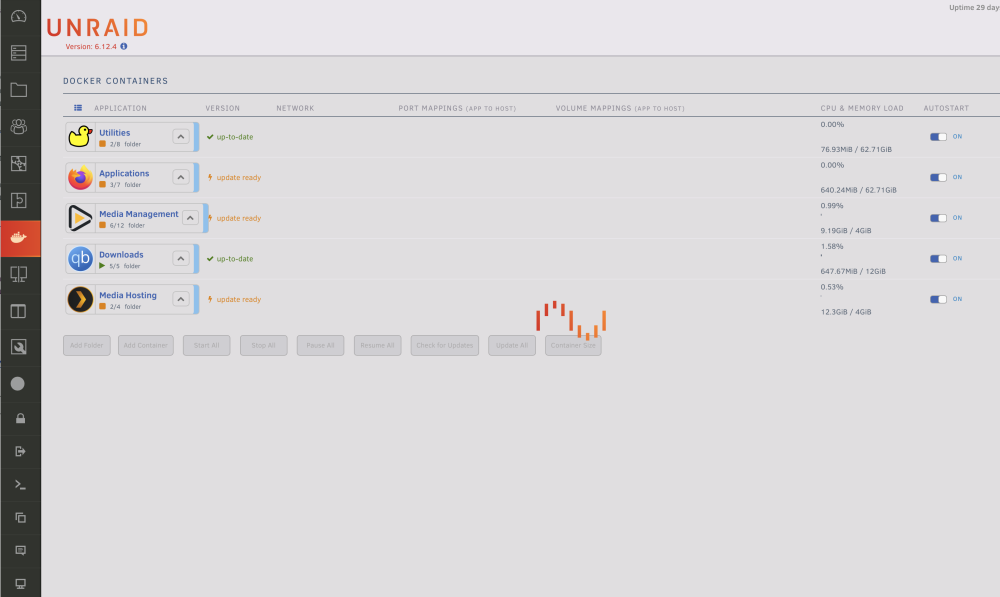
This issue seems to have began after installing GluetunVPN, and it only affects the dockers I have network traffic routed directly through it. Randomly (but more often than not it’s after the weekly automated AppData backup) my torrent’s stop seeding and I can’t access my Firefox docker webui. All I have to do to correct the problem is to open up the docker tab in Unraid, and refresh the webpage. I never get any errors in the log, but the only sign that something is wrong is the constant “loading” animation on the screen. I’ve attempted to add a longer Autostart delay to the dockers after Gluetun, and I rebuilt my entire docker file (swapped to a directory). Neither have solved the problem.
-
Unfortunately BIOS is already up to date, but I did have this error popup in my log. Think it's related?
-
Hey did you ever have any luck with solving this? I randomly started been getting the same warning with my 5950x a couple months back.
-
I disabled the RAM overclocking, but unfortunately I'm still receiving the 'Machine Check Events' error (most recent diag attache). Unfortunately I don't have a second CPU on hand to try, so you have any suggestions on how I can test the health of this CPU? As for the disk errors (for anyone else seeing this problem)- I resolved this with a new PSU. Apparently my previous PSU had one of it's rails failing. diagnostics-20230808-0941.zip
-
Thank you for the response. Would you suggest I test for CPU failure? I've attached a zip of the full diagnostics (which was downloaded at the same time as the previously attached syslog file). diagnostics-20230522-1711.zip
-
Any suggestions?
-
I'm not sure if these two items are correlated, but I just woke up to a MCE error in fix common problems, and also a disabled parity drive due to read errors. I was having read errors with multiple drives a couple weeks back, so I did extensive RAM testing, but it ended up being resolved (I think?) by moving my HDD sata power plugs to a different PSU rail. Now this single drive comes comes back with more errors (the system disabled it). May 20 08:07:38 Osgiliath kernel: mce: [Hardware Error]: Machine check events logged May 20 08:07:38 Osgiliath kernel: [Hardware Error]: Deferred error, no action required. May 20 08:07:38 Osgiliath kernel: [Hardware Error]: CPU:1 (19:21:0) MC12_STATUS[Over|-|-|AddrV|PCC|SyndV|UECC|Deferred|Poison|Scrub]: 0xc765ffc883007f37 May 20 08:07:38 Osgiliath kernel: [Hardware Error]: Error Addr: 0x0000000000000000 May 20 08:07:38 Osgiliath kernel: [Hardware Error]: IPID: 0x0000000000000000, Syndrome: 0x0000000000000000 May 20 08:07:38 Osgiliath kernel: [Hardware Error]: Bank 12 is reserved. May 20 08:07:38 Osgiliath kernel: [Hardware Error]: cache level: L3/GEN, tx: DATA Any ideas? syslog.txt
-
Just some feedback- This gave me 50-60 fps on average at 1440p with almost everything set to ultra in Windows 11. Unfortunately, enabling Hyper-V within windows broke display output to my second monitor. so it's not a feasible solution for me... but it did get the game going at least! Keeping the XML adjustments but DISABLING Hyper-V within windows does not allow the game to launch. My passed through VM hardware- 3950x (8 isolated cores), 6800xt, 32gb RAM, SSD (bare metal).
-
Make any progress on getting this issue resolved on 6.9.x? Or you still running 6.8.3?
-
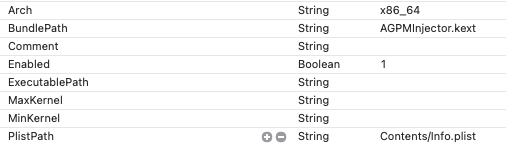
Could someone please post the original OpenCore "config.plist" for the "Big Sur" install? I'm trying to check out the "AGPMInjector.kext" settings SpaceInvader used.
-
I recently upgraded to 6.9.2 and oddly enough- all was working well for the first couple days. Then randomly this network problem arose once again (with no server changes done on my end between then and now). This has been an issue from 6.9.0+ (issue exists in 6.10.0 rc-1 when I tested that as well). I experienced this the first time I upgraded to 6.9.1 and was unable to fix the issue. I've spent HOURS searching and troubleshooting to no avail. Below are my thorough notes on such. I've attached my diagnostics along with a LatencyMon test result (done in my Windows 10 VM). Just trying to cover all possible bases, so here's my VM XML's as well. Windows 10 VM XML - https://pastebin.com/UnD7D4vU Big Sur VM XML - https://pastebin.com/Y1Xd7ZCi ------------------------ Problems • Intermittent slow/unresponsive Unraid webUI • Extremely slow dockers ○ Deluge § <650 KiB/s instead of 7 MiB/s ○ SABnzbd § <500 KiB/s instead of 14 MiB/s □ Without VPN enabled- right after starting this docker, I see full speed (14 MiB/s) and then a steady decline until it reaches it's current slow amount (<500 KiB/s) • Intermittent slow/unresponsive internet in VMs, and games have high FPS but certain aspect of the game stutter (offline games function 100%) ○ https://www.reddit.com/r/VFIO/comments/phechz/vm_gaming_high_fps_but_stutter_every_15_seconds/ ○ https://www.reddit.com/r/unRAID/comments/phec5i/69x_vm_gaming_high_fps_but_stutter_every_15/ ○ https://forums.unraid.net/topic/113331-69x-vm-gaming-high-fps-but-stutter-every-15-seconds-affecting-in-game-unitscharacters-but-nothing-else/?tab=comments#comment-1031327 • GUI Mode Black Screen with blinking cursor (probably not network related, but it's still a current issue I can't get resolved) ------------- Attempted Fixes 1. Updating to 6.10.0 rc-1 a. No effect (now restored to 6.9.2) 2. Baremetal boot from VM drive (W10) a. Baremetal functions 100% without issue 3. Boot in SAFE mode a. No effect (tested dockers and VM's) 4. Boot Legacy a. No effect (now restored to UEFI) 5. Disable Dockers a. No effect (dockers now restored) i. https://forums.unraid.net/topic/104194-691-any-screen-with-docker-data-extremely-slow/ 1) Others with docker problems a) https://forums.unraid.net/topic/100031-69-docker-causing-slow-networking/ b) https://forums.unraid.net/topic/105466-docker-slow-after-upgrading-to-69/ c) https://www.reddit.com/r/unRAID/comments/m1am0l/unraid_6_9x_docker_containers_will_not_start/ 6. Delete/rename network.cfg and network-rules.cfg in the flash drive and reboot a. Won't boot to network access, attempted to access GUI mode and will not complete boot (files now restored) i. https://forums.unraid.net/topic/107759-network-issues-after-upgrade-to-692/ 7. Deleted "/config/vfio-pci.cfg" and "/config/vfio-pci.cfg.bak to attempt correcting GUI mode issue a. Hangs at "vfio-pci 0000:0e:00.0: vgaarb: changed VGA decodes: olddecodes=io+mem,decodes=io+mem:owns=io+mem", for GUI, but network is accessible with no improved results. (All items now restored from backup) i. https://forums.unraid.net/topic/101444-unraid-not-booting/ 8. Replace “GO” file from /config/ with default file from downloaded 6.9.2 package a. No result (file restored from backup) i. https://forums.unraid.net/topic/104929-solved-no-web-gui-after-upgrade-from-683-to-691/ 9. Disable RAM X.M.P. profile in BIOS a. No result (setting now restored) 10. Change Unraid Network setting -> SSL/TLS from "Auto" to "No" a. No result (setting restored) i. https://forums.unraid.net/topic/104448-unraid-691-web-interface-down/ 11. No "GPU Stats" plugin, no "Nvidia Driver" plugin. a. https://forums.unraid.net/topic/105885-constant-crashes-since-updating-to-69x/ b. https://forums.unraid.net/bug-reports/prereleases/690-rc2-gui-mode-blinking-cursor-gt-710-r1271/ 12. Change BIOS settings -> Advanced CPU Settings -> a. "C-State" -> "Disabled" b. "Power Supply Idle" -> "Typical Current Idle" i. No results (settings now restored) 1) https://www.reddit.com/r/unRAID/comments/od7ehp/upgrading_to_692_from_682_crashing/ command.center-diagnostics-20210907-1920.zip LatencyMon Results (Windows 10 VM).txt
-
You ever manage to solve this issue?
-
I've done all performance improving steps I could find (from that thread and many elsewhere), but I'm pretty sure I've narrowed it down to being a network issue. I had this problem when I first upgraded on release, and quickly reverted. I didn't realize until recently that it's the same problem so I'll revive my previous thread I started at that time. I appreciate your help regardless, though!
-
I'm having a really odd issue with any version of 6.9.x... When gaming in either my Mac or Windows VMs, I have high FPS but the game's units/characters stutter every 1.5 sec or so. The weird part is that the camera, screen movement, and mouse are all flawless. It's only the characters that stutter. I've attached videos below for examples. I'm using passed through hardware- 3950x and 6800xt (I've also tried a gtx 1080 with the same exact results)(This happens with both a 6800xt and a GTX 1080, but the issue goes away if I go back down to 6.8.3.) Overwatch - https://imgur.com/a/0hDXfOV Heroes of the Storm - https://imgur.com/jJl7B79
-
Same issues here. I've tried a multitude of different bios and (unraid) network settings to no success. If you happen to find a solution, please update us.
-
Oh awesome! I'll give it a try when I have some time this afternoon. I'm interested in converting to ALAC, myself. Decided it's finally time to move my library to Lossless, and i'm still committed to iTunes (unfortunately) for the time being. I read through your previous script and it was pretty thorough with available options and processes, so I can imagine it was quite a headache keeping it up to date.
-
Thanks for the quick response. I'll try messing around with my file paths in order to force it to re-download all my current content. Now to attempt learning 'beets' for the auto encoding! For those that come across this in the future- randomninjaatk's docker-amd seems to be functioning fine while being ported through my binhex-delugevpn docker. I used Spaceinvader One's video as a guide to do so.
-
I'm not sure how much influence Lidarr has on the script's download process. Is it possible to implement a proxy? or will it take advantage of a proxy already setup in LIdarr? And does the script have the capability to upgrade current media to a higher profile like it would do with a standard download client? I've tried testing it with Lidarr's settings with no success so far. (I'm using your newest container- AMD)
-
Awesome video as always. There's been some thoughtful contributions added to the script in your Reddit post, allowing the running VM to automatically shut down (gracefully) and reboot to the targeted VM. My main question doesn't pertain to the actual video topic, but I was curious how you're able to passthrough a Nvidia Pascal card (gtx 1080ti) successfully to Catalina? I've been stuck on High Sierra for far too long while waiting for the release of "big Navi". EDIT: For those that come across this post in the future- Spaceinvaderone replied to someone asking the same question on his Patreon page.


