Joly0
Members
-
Joined
-
Last visited
Everything posted by Joly0
-
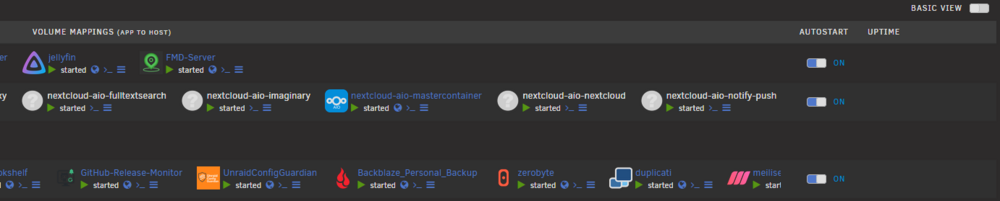
Hope you can see that here. That is a full screen screenshot from left to right and there is the scrollbar at the bottom. And containers on the right edge ar cut off here: This was not the case before. There was no scrollbar, containers were just hidden when there were too many. Its not even all containers showing, the meilisearch container in the bottom row is not even the last in that folder, there are still 2 more containers


-
For some reason after the latest update the folders in the docker tab (not sure about the vm tab, i dont use that) are basically full width, adding a scrollbar at the bottom. This was not the case prior to this udpate
-
Something else that is kinda annoying is, that i cannot scroll up or down in the cli itself. I can only scroll through my inputs, but i cannot see earlier repsponses
-
Yes, works. For some reason after installing the claude command was not there (installed it 2 days ago; always showed claude as not available command), but now its working as it should. Another thing i noticed, not sure if its a bug or intended, i do not have gemini cli installed, only claude. When i create a new workspace it shows in the popup on top "claude", so i assumed it would use calude then. But when i created the workspace i got the error, that gemini-cli was not installed. I had to remove the workspace, create a new one and click on "claude" separetely to make the workspace use claude. The "claude" button also gets a yellow-ish border were before its grey. Though when i create a new workspace in the same tab as before, i do not ahve to select claude again.
-
Hey, cant seem to find a way to add mcp server to cli´s (in my case claude, which would usually be done with `claude mcp add`). Is there a way?
-
Hey, not that i have anythign against you or your templates (they are very well done, gj on that :D ) but you might have noticed that i already maintain templates for open-webui https://github.com/Joly0/docker-templates/blob/main/templates/open-webui.xml and ollama https://github.com/Joly0/docker-templates/blob/main/templates/ollama.xml and why you didnt just create a PR for those templates? The thing is, CA regularly blacklists duplicate templates and two templates creates confusion https://www.reddit.com/r/unRAID/comments/1riwnhc/which_ollama_you_choosing_ollama_or_ollama/ Also wanted to mention rule 16 here https://forums.unraid.net/topic/87144-ca-application-policies-privacy-policy/
-
Looks good by the way
-
I did not claim anything, i just noticed, that you added a license, but all good if you have already added a notice. Its not liek i am scanning your repo 24/7. Also, it appears to me, that you might have misunderstood my initial questions or i might have asked them in a way that you could interpret as rude. Just to clarify, this was not and is not my intention and i am sorry if my questions were not well written and i apologize for it. I am not against you or the project that you are trying to take over. I am also not against you vibe-coding this project to continue developing it. I just wanted to clarify that maintaining an open-source project is more than just prompting an ai to do stuff and it makes a difference if you know how to code from the beginning and use ai to help you code or if you have zero to low knowledge in any programming language and use ai as your only source of truth. So my initial questions wasnt against you or against vibe-coding in itself, but just wanting to know what experience you have in coding in general and maintaing an open-source project.
-
I would also like to add another thing to the input i am giving here: You cannot just add your license to the codebase and call it a day. That license is not legally binding and infact its not even allowed (would count for me aswell as i did the PR) per copyright law. Infact folder.view and folder.view2 are "all rights reserved" projects (wasnt even allowed for VladoPortos to fork it in the first place). There are only 3 options you have that would make the license hold: 1. You have fully rewritten the code and no original code is left in there, than you can re-license the code 2. You add a notice that only your own code (and contributions) are covered by the MIT license. 3. You ask all original creators and contributors for permission to change the license (so scolcipitato, VladoPortos and all the contributors). Just wanted to tell you that, as i just saw you added a license. Was in a same situation a while ago and just wanted to share what i know.
-
Because VladoPortos, unlike you, has a GitHub account with actual projects he (atleast from looking at it) built and the changes he did to Folder.View2 were to this day 23 commits in a timespan of a few months, compared to your 104 in a few weeks. Don't get me wrong. I am not trying to talk down the work you have done so far. As I said initially, it's good that this project is taken care of by someone. It's just that people (me included) could be or are concerned that you don't quite know what you are doing if you just approve claude's work and that this project could be left alone in the foreseeable future and will again need a new dev. Of course there is a reason I created that PR and don't use that option, because it doesn't make sense. That update column (atleast in my opinion) serves a helpful purpose and especially when having mixed folders (which I do as you can see in my PR) that information text from that column is quite useless. Also, as I wrote in my PR, the fix is not solely for the compose plugin (answering one of your questions later here), but for example also the same problem with "container-managing-containers" like nextcloud-aio. Also, just to add to my first point as a good example of what could go wrong in an AI written application that the dev doesn't know what he is doing: https://www.reddit.com/r/selfhosted/s/cYAXggzFoo I am not saying you should stop, or that something like this could happen (I mean, if you don't add hundreds or thousands of useless features, this can't happen at all), but AI written stuff is still far from perfect (and I know that, having to work with AI is my day to day job...). And to add something positive: It's quite honest from you disclosing that you used Claude for this project. Not many are that honest :)
-
Hey Mate. Cool to see the plugin being developed again. Just here asking two things though. First, you mentioned you co-authored using Claude, could you elaborate a bit more what that means in your case? Did you write any code, or did you just approve claude's code? Do you know and can write the programming languages that folder.view(2) is written in? Looking at you GitHub repo it doesn't look like you have much experience in programming at all? How can one make sure you will continue developing this tool? Second, nonetheless to my questions from First I would still like to mention here that I have an open PR over at the folder.view2 repo https://github.com/VladoPortos/folder.view2/pull/21 that I would like to see merged. You mentioned you didn't change that much (although 104 commits indicate otherwise), so it should be pretty easy to bring my changes over to this repo (you should be able to bring over my changes to your repo, without me having to open a pr at your repo). Of course this would only matter if you really want to continue supporting this plugin in the long-term (it's annoying that we already need a v3 here) and if you are even interested in the changes I did in my PR.
-
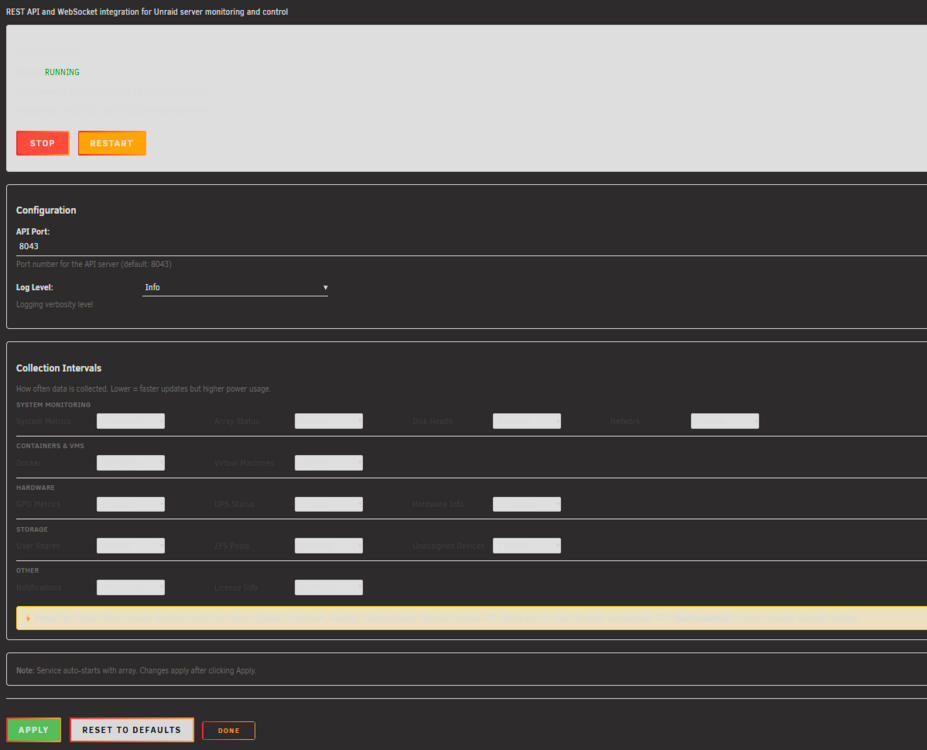
Also there seems to be some problem with dark theme unraid:
-
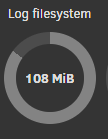
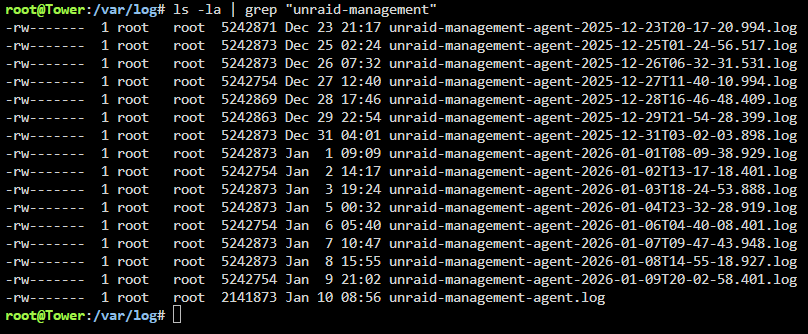
Hey, i got this message from "Fix common problems" today and noticed that /var/log is over 100MB in size I checked the log folder and noticed this: As you can see, the unraid-management-agent fills my /var/log folder every day with a 5MB file, which in general is not that large, but it adds up and is currently consumes 80MB of /var/log. When i looked into the log files, i noticed that it spammed the same stuff over and over again for thousends of lines. I have attached the latest log file for analysis. unraid-management-agent-2026-01-09T20-02-58.401.log

-
Hey @primeval_god can you provide a rough timeframe when you will have time to look at my PR? Its been open for nearly 5 months and imo fixes/improves and important part of the plugin.
-
So i think by smallest and alphabetically should be sufficent for me, in normal order and reversed. Maybe also newest/oldest would be nice aswell. Not sure if random would be of any help (for me), but might be worth implementing aswell if it isn't to hard to add :)
-
Yes, something like that would be nice. Not sure for the "Other Files" if moving smallest would be the best, some configurability here would be appreciated, but a simple approach would be sufficient as a middle step. Btw, would it be possible (just a general question), to adjust this priority? So I could configure that tv shows are moved first, then other files and last movies or so?
-
Hey, thanks for the response. So re-configuring the cron schedule seems to have fixed the problem. I am not sure what happened, in the logs I can only see, that the automated run was last time executed 25.07.2025. But it seems to be starting now again properly. Will have to check if my it runs tonight. Another question, is it possible to configure additional paths? Would be nice for more generic stuff to have the option
-
Hey, i really like the Plugin, but the plugin doesn't run on schedule for me. I still have the same settings as shown in my first post here, so nothing changed, it's still though not working. Tried updating, but nothing either. I just noticed it, because my storage on a disk was filling up over the threshold, and I was wondering, why this happened with the script, and then notices it didn't run automatically since I configured it after first installation
-
Hey, thanksfor the very comprehensive guide, it is very detailed, well written and will be very helpful If I may ask for something: it would be extremely useful for future plugin devs, if limetech would provide something like a template plugin that one could use with many features integrated and documented, especially now when unraid moves to responsive webui the changes are huge and a "common ground" or "best practice" example would be great. I have started on developing a very complex plugin and at the beginning I had a lot of struggles with basic stuff, because every plugin Dev did it differently (I looked into various github repos of plugins and tried to figure out what is how done and why). So a best practices demo plugin would be extremely useful. So how to align buttons in a dd, how to create tables that are responsive (normal width and wide width), how different menus work, how for example file picker works or can be implemented, how tooltips for options work, dropdown menus, etc. Just a few things off of my head now that I know I struggled with varying degrees. Maybe also how to stucture a plugin according to best practices, etc. Would be awesome. Besides that, you guys are doing a phenomenal job, can't wait for 7.2 release
-
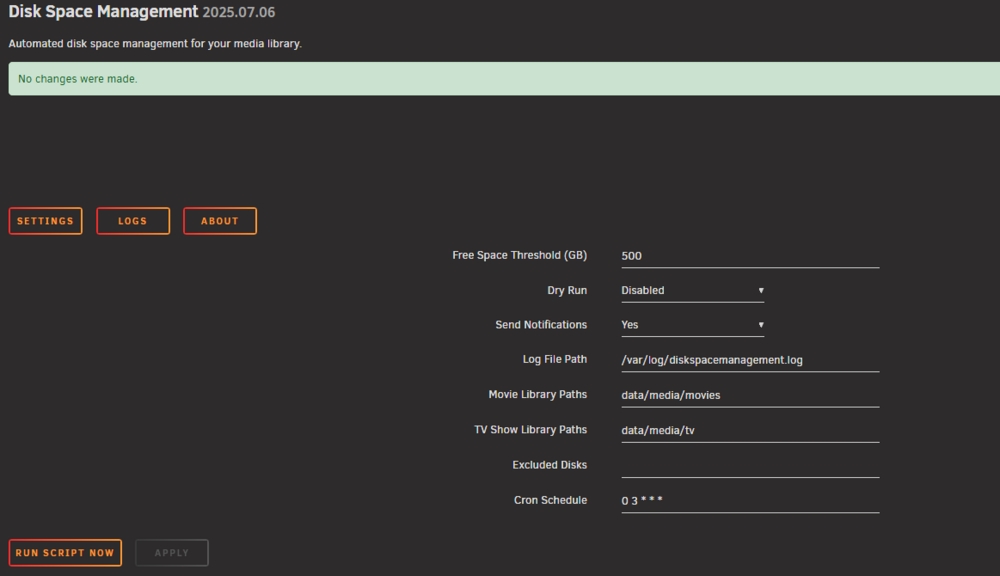
Yes, i have the default path configured: Nothing there


-
Hey, cool plugin. I just tried it out and noticed, that the log file is not created nor written to at all. I also checked the script that should move the stuff, but there is nothing either. The variable with the path is initialized at the beginning, but the variable nor the file itself is used anywhere in the script. Otherwise, cool plugin. I like it
-
So have you had time yet to look at this? Its been a good while and you dont reply on github, therefore i ask here
-
So, can you merge my PR please?
-
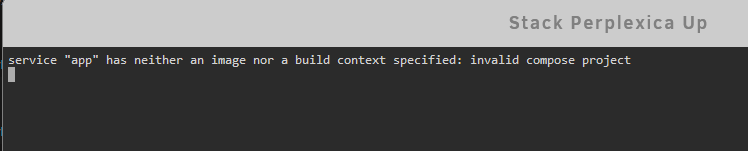
No, it doesnt:
-
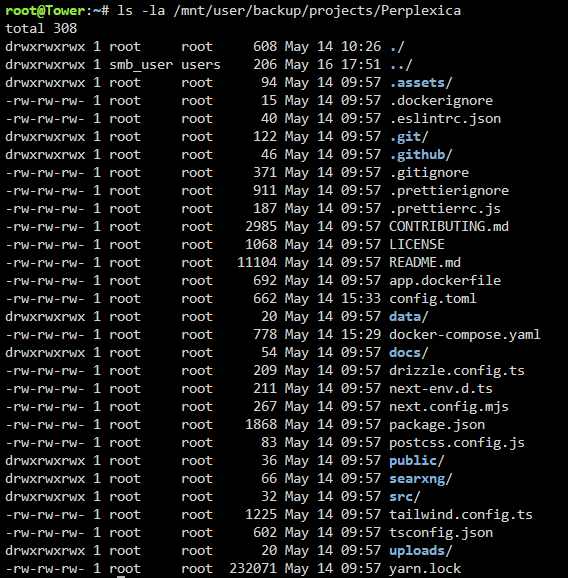
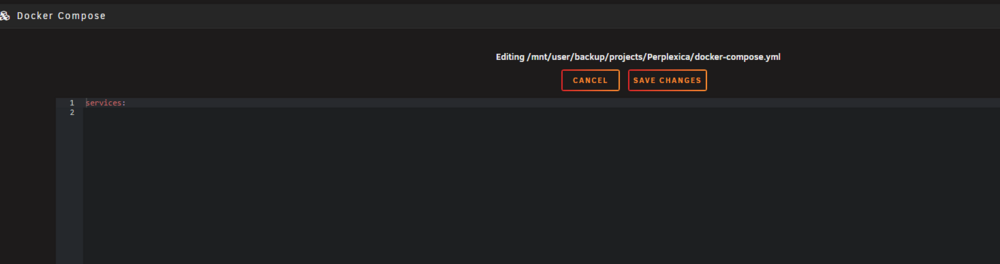
See here the perplexica path without my patch: As you can see, the stack and the project files are correct, just the plugin expects an docker-compose.yml file, while perplexica ships a file named "docker-compose.yaml".