





wisem2540
Members
-
Joined
-
Last visited
Everything posted by wisem2540
-
Hey guys, I have not used unraid in about 5 years. I still have my old one that was infected with ransomware actually (haha) then I moved to hosting with Hetzner and Gdrive. Right now I have 120TB of content. I have found some used 10, 12, 15, and 18TB drives, So in theory, I could probably get away with less than 20 drives. So here's what im thinking. I need a case, and I like norcos with the SAS backplanes alot. Ive seen people use netapp shelfs, I like this idea, but I feel like they would be power hungry and loud. I know unraid has probably come a long way in the last 5 years. My last build was 10 drives with 1 parity drive. Moving forward ill be looking for maximum Fault Tolerance. What's available now for parity and disaster recovery? So my requirements would be. 1. Front load (maybe top load) drive caddys 2. Enough space for Cache with fault tolerance 3. Multiple parity drives 4. 150TB initial build
-
Hey guys. Little back story, I used unRAID for years and then through a series of unfortunate events while relocating for work I got ransomware I didn't really have the upload bandwidth to support Plex anymore, so I took the opportunity to lease a hetzner server with synchronous gig. I've been using that for about 4 years Now I have fiber in my area and am considering moving everything back in house. Looks like not much has changed with unRAID from a hardware recommendation perspective. I found some refurbished 18T drives that should work fine and I'll use a similar Norco to my last one. Need to store roughly 130TB. The only changes I'll make are probably dual parity, and some kind of cache fault tolerance The question is, how easy is it to migrate that much data from a Google team drive with service accounts? What kind of download limits am I looking at? And should keep Google for $12 per month as a disaster plan? In that case I'd be looking for bidirectional sync, which I believe rclone supports
-
still seeing this. Right now I have ombi offline. It is basically unusuable
-
Hello, I just installed Ombi over the weekend and have noticed that sometimes logging on or clicking "Request" on a movie will cause the web interface to hang. Has anyone else seen this? Any logs I can provide, I would be happy to.
-
Hey all, Seems like for a while now, CP has been backing up 0 files. I dont know if I missed an upgrade or something. Any help would be appreciated. Attached backup history history.txt
-
I found the "my.service.xml" file in the conf folder of the crashplan container, but I can't find the "ui.info" file? Where is the "ui.info" file located?
-
Minutes makes much more sense...especially if you factor in the time between my initial post and when I posted the snippet. Thanks for that.
-
Here is a snippet of the smart data from unraid. Let me know what you think SMART Attributes Data Structure revision number: 10 Vendor Specific SMART Attributes with Thresholds: ID# ATTRIBUTE_NAME FLAG VALUE WORST THRESH TYPE UPDATED WHEN_FAILED RAW_VALUE 1 Raw_Read_Error_Rate 0x000f 114 099 006 Pre-fail Always - 67489640 3 Spin_Up_Time 0x0003 093 087 000 Pre-fail Always - 0 4 Start_Stop_Count 0x0032 098 098 020 Old_age Always - 2747 5 Reallocated_Sector_Ct 0x0033 100 100 036 Pre-fail Always - 0 7 Seek_Error_Rate 0x000f 072 060 030 Pre-fail Always - 19735809 9 Power_On_Hours 0x0032 012 012 000 Old_age Always - 77170 10 Spin_Retry_Count 0x0013 100 100 097 Pre-fail Always - 0 12 Power_Cycle_Count 0x0032 100 100 020 Old_age Always - 55 If you are referring to the VALUE, rather than RAW VALUE, then it 12, and that does not seem right either.
-
One my older Seagate 2TB drives is showing a RAW value of 77086, if my math is correct, this thing is almost 9 years old. Am I looking at the right value here? I am curious to see some people who have been at this a while and how old some of their drives might be. 9 years seems pretty long for an HDD these days. If I am right, I don't even wanna know what I paid for this thing 9 years ago
-
I've done this, and am having no luck getting the console to connect. I continue to get an 'unable to connect to backup engine'. My console shows version 4.4.1 - I don't know how to find out if the engine is the correct version. When I looked at the ui_info file initially it was set to the loopback 127.0.0.1, not 0.0.0.0, so I've tried that, the 172.17.42.1, as well as my unraid IP 192.168.x.x I should note that I've had the Crashplan docker running for some time (a year or so?), and I've only just now tried the -Desktop container to try and manage it. I can see online that the backup was recently run, so I know that part is working. I haven't had a way to manage this in some time - I used to have another linux server that would connect to it, but that quit working awhile ago and I didn't have time to figure it out then as long as it kept running. But now with the ease of docker I want to get it back up and functional. I'd be happy to remove the container and start over with new crashplan /config directory, but I'm not confident on how to retain my crashplan ID - I have a lot of data backed up on crashplan central, and several friends backing up to me. I've also done the "turn it off & turn it back on" approach: Stop both the CrashPlan and CrashPlan-Desktop dockers Update the CrashPlan docker, give it is a few minutes Update the CrashPlan-Desktop docker Any thoughts/direction? ***EDIT*** Thanks to LEIFGG's signature link!! I found my issue was in the my.service.xml file - it was listening on 127.0.0.1. I changed it to 0.0.0.0 as suggested, restarted everything, and it's all working well. Thanks!! Thank you! You solved this issue for me! http://lime-technology.com/forum/index.php?topic=44190.0 It was driving me NUTS
-
gfjardim, On your GUI container for Crashplan, the Crashplan app does not launch for me. What am I missing?
-
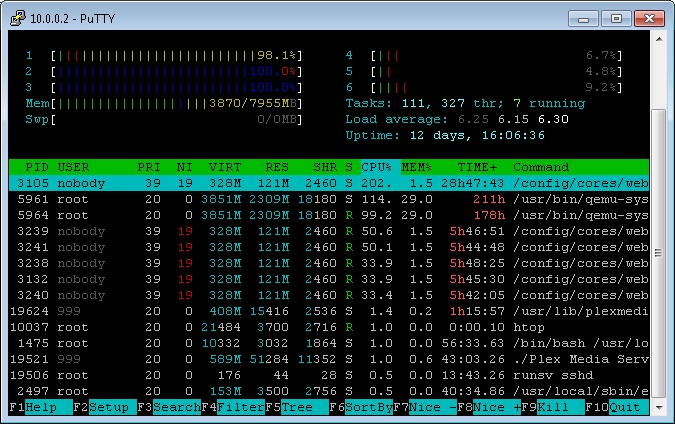
Good. If you wanna see how its working, run htop from a telnet session. Screenshot attached
-
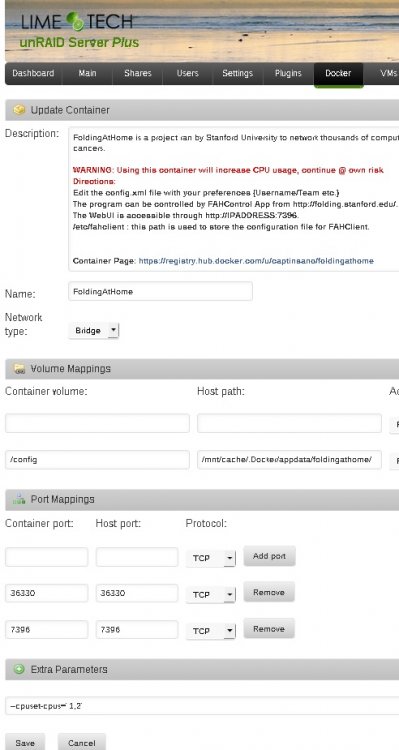
Here is a screenshot from my system
-
Check out the edit I made to my previous post. This config goes right into the Container Config. You dont have to touch folding@home at all
-
I believe the universally accepted way to is use "CPU Pinning" with the F@H docker container. I gave F@H 3 of my 6 cores, and my CPU bounces between 40-60 percent. Is that what you are looking for? EDIT: Actually I lied... I am only using 2 cores. This line goes into "Extra Parameters" in "Advanced Settings" --cpuset-cpus="1,2" Keep in mind that CPU Count starts at 0. In my case, Core 0 is being used for a VM. So I have a 6 core CPU. Core 0 - VM Core 1,2 - F@H Core 3,4,5 - Plex Since 0,3,4,5 should really never been at 100%, unraid still works fine. You will find though that 1 and 2 will be at 100 most of the time. All clear?
-
@Darqfallen Some score!! Good job! What are the specs of your unRAID machine? You much be flying through the work units to get that score (417268 at time of post) with that few work units done (42 at the of post). You are averaging 9935 points per work unit, that is amazing!! I am only averaging 155 by comparision!! (My CPU: AMD Athlon 64x2 Dual core 4600+ 2.41GHZ) @everyone Incase anyone is interested (I was, I just read it) here is how points are calculated!! Also Team unRAID is doing great everyone!, with only 8 named members we are in the 96th percentile of all Folding@Home Teams ie: We doing better than 95% of all the teams registered with Folding@Home. Thanks to all, hopefully more unRAID users will join us! The Capt. Add me to the list. My 10,000 points arent much....but climbing at 1900 per day
-
So I may have uncovered the source of the issue. I have a windows 7 VM running. If I shut it down, and set boinc to 50% CPU, all works fine. Now, its worth mentioning that the unraid dashboard bounces all over the place, but HTOP shows a nice even 50%. However, as soon as I fire up my VM, CPU goes crazy again and BOINC crashes like before. Traditionally, the VM does not use much, if any CPU, and its all on Core 0. But, it does use memory, and boinc seems to use alot as well. Could this be a result of my machine running out of RAM? I have 4GB only, and the VM allocates 2GB
-
For what its worth, Folding@Home is working great with 3 pinned CPUs
-
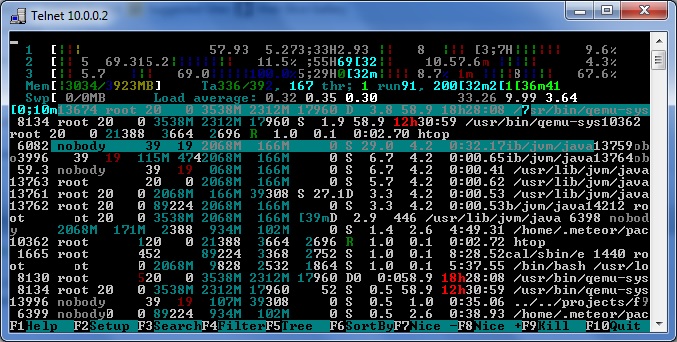
here are screenshots of Htop. Trurl - So you see in the GUI the same as I do. However, when mine happens, I can barely navigate through unraid menus, and like i said before, BOINC RDP disconnects. aptalca - I have tried the 50% setting. It seems to make no difference. Can you post a screenshot of your settings?
-
Trurl - are you actually subscribed to a project? My issue starts after I add my first project Squid - I will try this. However, I suspect it is accurate because when the cpu spike happens, I lose connection to the boinc rdp session
-
I found advanced view and set it to no more than 50% on multicore CPUs and still no difference
-
Yes you are correct. I was just coming back to report that. So I set Boinc to use no more than 50% of CPU in the preferences. Started it again and my CPU still went to 100%
-
So after some googling, I discovered that the correct syntax appears to be --cpuset-cpus=5 I put this in my extra param field and started the container again. My CPU still goes to 100% Any thoughts?
-
not sure if it makes a difference, but --cpuset has been deprecated. You should be using --cpuset-cpus Right, I mentioned that in my previous post. By this do you mean --cpuset-5 or --cpuset-cpus=5 or something else? I guess I am not clear on the syntax
-
I am trying to use BOINC from aptalca. When I fire it up and add a project to commut CPUs to, my utilization (according to dashboard) is 100% So I decided to try CPU pinning I have put --cpuset=5 and I have tried --cpuset-5 in the extra param field...still my CPU goes to 100% I have a 6 core CPU, so 5 should be the last core. Do you have to assign them in order?

