





SpencerJ
Administrators
-
Joined
Everything posted by SpencerJ
-
This is a test of white text on a black background. This is a test of black text on a white background.
-
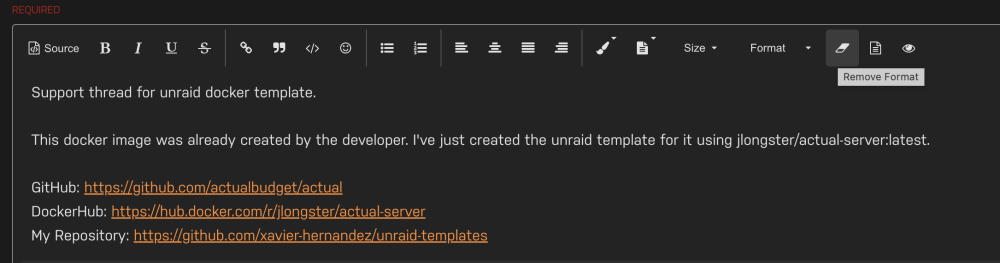
Fixed via "Remove Formatting". I fixed these by clicking the remove format button. I think I know what's happening. I believe default pasting somehow changed so when people Copy/Paste content, it's leaving the background color in place and affecting the Dark/Light theming vibes. Standby as I search to change these settings.....
-
Do you have links for these? Not much I can do for manual changes but will test other solutions in the themes (although, to my knowledge, nothing was changed from our end).
-
Fixed NP. I will make a post to mods/Devs soon to see if anyone wants wiki edit access.
-
Removed.
-
I changed to "Multi-Lang Forums". Is this any better for you? IMG_2434.pdf I 'm not finding a way to disable this but will keep looking. Also, there's a 'mobile footer' that I enabled that can show a couple of icons static at the bottom. Is this useful to you? IMG_2435.pdf Note: above photos are off an iphone 13.
-
We are seeking an established DevOps Engineer to support, improve, and maintain mission-critical infrastructure at Lime Technology, creators of Unraid OS. This position is best suited for someone who can work independently on a wide variety of given tasks with minimal direction. Strong communication, collaboration, and documentation skills are a must. In this role, you will focus on configuring and maintaining cloud infrastructure, proactively monitoring systems for performance and security issues, and collaborating with development teams to troubleshoot and resolve issues. You'll have a broad array of responsibilities that cut across both development and DevOps. This is a fully remote position. The right candidate is located in North America or has the ability to collaborate with the team for at least 4 hours each day between 8am - 5pm PST. You must have on-call availability to troubleshoot during system downtime. We would greatly prefer to hire from the Unraid community. Please see the full job announcement here: https://unraid.net/blog/devops-engineer Want to apply? Please do so via this link.
-
I will look into making this more mobile friendly. Which phone are you using?
-
ty for testing.
-
We've adjusted some settings to be less strict. Can you all re-test when you get a chance?
-
what are the file sizes you are attempting to upload?
-
Test

-
Thanks- looking into this.
-
-
Dear Unraid Community, I wanted to take a moment to wish farewell to Eric Schultz @eschultz, who is leaving the company for other adventures. Eric has been an invaluable member of our team and played a critical role in the growth and success of the company and Unraid. He has always been willing to go above and beyond to ensure that our technology and systems run smoothly and efficiently. On behalf of everyone at the company, I would like to thank Eric for all his hard work, dedication, and contributions to the team and company. All the best, Spencer
-
thanks for bringing the intrigue 👀
-
Welcome to the friendliest server community around! Tl;dr version: Be nice and cordial. Don't be a jerk or post anything illegal. This forum is where our users can collaborate, learn, and provide input on new developments from Lime Technology and its partners. We have a strong team of community moderators, devs, and Lime Technology employees who strive to help as many people as possible. Participating in this forum means agreeing to the following community guidelines and rules. These guidelines and rules must be agreed and adhered to to use this forum. Moderators and Lime Technology staff will enforce the community guidelines at their discretion. Anyone who feels a posted message doesn’t meet the community guidelines is encouraged to report the message immediately. As this is a manual process, please realize that it. may take some time to remove, edit or moderate particular messages. Rules and Community Guidelines To ensure a safe, friendly and productive forum, the following rules and guidelines apply: Be respectful. Respect your fellow users by keeping your tone positive and your comments constructive and courteous. Respect people's time and attention by providing complete information about your question or problem, including product name, model numbers and/or server diagnostics if applicable. Be relevant. Make sure your contributions are relevant to this forum and to the specific category or board where you post. If you have a new question, start a new thread rather than interrupting an ongoing conversation. Remember this is mostly user-generated content. You'll find plenty of good advice here, but remember that your situation, configuration, or use case may vary from that of the individual sharing a solution. Some advice you find here may even be wrong. Apply the same good judgment here that you would apply to information anywhere on the Internet. The posted messages express the author's views, not necessarily the views of this forum, the moderators, or Lime Technology staff. As the forum administrators and Lime Technology staff can’t actively monitor all posted messages, they are not responsible for the content posted by users and do not warrant the accuracy, completeness, or usefulness of any information presented. Think before you post: You may not use, or allow others to use, your registration membership to post or transmit the following: Content which is defamatory, abusive, vulgar, hateful, harassing, obscene, profane, sexually oriented, threatening, invasive of a person’s privacy, adult material, political, religious based, or otherwise in violation of any International, US or State level laws is expressly prohibited. This includes text, information, images, videos, signatures, and avatars. Also: "Rants", "slams", or legal threats against Lime Technology, another company or any person. Hyperlinks that lead to sites that violate any of the forum rules. Any copyrighted material unless you own the copyright or have written consent from the owner of the copyrighted material. Spam, advertisements, chain letters, pyramid schemes, and solicitations are prohibited. (Note: we have an Unraid Marketplace Board that includes a Good Deals section and a Buy, Sell, Trade section, and they have their own rules.) You remain solely responsible for the content of your posted messages. Furthermore, you agree to indemnify and hold harmless the owners of this forum, any related websites to this forum, its staff, and its subsidiaries. The owner of this forum also reserves the right to reveal your identity (or any other related information collected on this service) in case of a formal complaint or legal action arising from any situation caused by your use of this forum. We appoint volunteer moderators to help us manage our Forums and the activity within them (“Moderators”). Moderators are not paid by us and are not affiliated with Lime Tech in any way. Nothing in these Terms of Service will in any way be construed to constitute a Moderator as an agent, employee or representative of Lime Tech. Each Moderator will indemnify and hold Lime Tech harmless against any claims that may arise in connection with the acts or omissions of such Moderator, and you agree and acknowledge that Lime Tech is not liable for any claims related to or arising out of Moderators’ acts or omissions. You hereby release and forever discharge Lime Tech, its affiliates, employees, agents and successors from any and all claims, demands, liabilities, damages, actions, causes of action or suits of any kind or nature whatsoever, which you now have or may hereafter have, known or unknown, arising out of or in any way relating to the acts and omissions of Moderators, any activity occurring on the Forums, or your engagement or participation within the Forums (the “Release”). This Release shall not be in any way construed as an admission by either party that it has acted wrongfully with respect to any party of person, or that it admits liability or responsibility at any time for any purpose, or that either party has any rights whatsoever against the other party. Please Note: When you post, your IP address is recorded. Repeated rule violations or egregious breach of the rules will result in accounts being restricted and or banned at the IP level. The forum software places a cookie, a text file containing bits of information (such as your username and password), in your browser's cache. Cookies are ONLY used to keep you logged in/out. The software does not collect or send any other form of information to your computer. Lime Technology may, at its sole discretion, modify these Rules of Participation from time to time. For Unraid OS software, website and other policies, please see our policies page! If you have any questions, please contact support.
-
Please check the changes made.
-
Should be back up @Frank1940
-
Sure thing. It's been going up and down and we're looking into it. It will show up here as well: https://status.unraid.net/
-
Please contact support!
-
Hello! I would be happy to merge PR's here: https://github.com/unraid/lang-zh_TW Unfortunately, I don't speak Chinese but would be happy to review any changes you suggest!
-
it looks like your certificate is up to date with the new ones. You should be good to go!
-
Please contact support with the email you used to purchase and we can look up the order for you.
-
I have replied to your support ticket.




