






Marshalleq
Members
-
Joined
-
Last visited
Everything posted by Marshalleq
-
What part of RAISE would you think replaces trim? I can't see anything even slightly related in there.
-
No sure if you're running ZFS or not - but if not, I think spin down will work, assuming you're not hit by one of those SAS spin down issues. If you are, I do believe ZFS will largely keep your disks up and rely on their internal idle mechanisms for power / heat reduction.
-
Did some testing and znapzend is definitely starting at boot, so something is stopping it at some later point, or perhaps it's intermittently starting at boot on both my servers. So looks like logs will be key.
-
So just checked in on it today and it's stopped again. Comparing the last snapshot to the last reboot I can see that they are indeed correlated. So this is frustrating. @steini84 I have attached diagnostics which should include any startup errors and when it did eventually start manually (just now). Will have a look through them again too and post back. Perhaps the auto start 'touch' method outlined at the beginning of this post no longer works? Of note, this is happening on both my unraid systems. skywalker-diagnostics-20210106-1501.zip
-
I would always install trim on all SSD's. I think it's highly worth and and have never had an issue. I followed your link but it didn't make immediate sense to me what you mean. Just install trim I reckon.
-
Hi, as far as I know yes. Provided of course you have the unraid zfs plugin installed. I assume you won't have to upgrade the versions of zfs on the disks first, I would certainly try not to in case you need to go back to ZFS on freenas. The main thing is that you gotta import your pools normally, but I'm pretty sure the plugin will do that automatically. If not, I think it's something like zpool import -a or similar.
-
I may have found the problem, it appears the upgrade to RC2 or RC1 renamed the disks and left the USB boot drive with the name of a pre-existing raid array disk i.e. the usb disk drive is now named disk1. Unfortunately unraid decided to put a backup share therefore, onto the usb drive and periodically an application would try to send data there filling up the USB drive. Why it was empty when I looked I don't know, so there's some doubt in my mind, but this looks like the likely culprit. Edit - Nope this is incorrect, I was confusing between two USB devices, one that is now a dummy array and another that is the boot device. Geez, sometimes you just need more coffee. But, for the first time now for some reason znapzend started working again so don't know why that is yet.
-
@steini84 Had a quick look by running it manually. I'm getting an out of space error, but actually there's a ton of space on the device, 47G actually - see below. I'll try a few things to see if I can start it. Also, the log has no details since the last successful backup, which was 21 December. znapzend --logto=/var/log/znapzend.log --daemonize Warning: unable to close filehandle GEN0 properly: No space left on device at /opt/znapzend-0.20.0/lib/ZnapZend.pm line 827. znapzend (5197) is running in the background now.
-
I've got the auto boot on file 'touched' into the appropriate directory, but it's not auto booting. Could be an RC1 thing I guess? Anyone else got this issue?
-
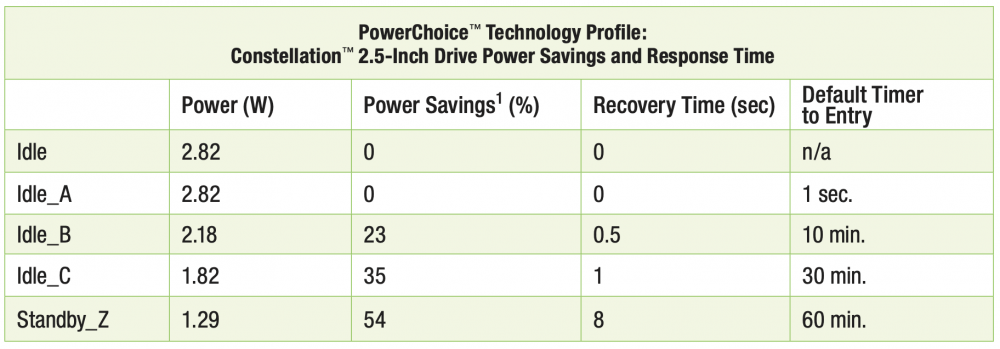
I get the feeling this drive power down isn't as much of an issue now. 75% less consumption with the newer drives.
-
True and yeah you have really brought the whole idea into reality and we are all very grateful for that
-
Hey! You know I wasn't even looking at who I was replying to - didn't realise it was you lol. So you're saying you don't want to have to go through all the dockers and repoint their host paths to a new location? It takes a little while but wasn't too bad. This article was meant to be a sort of 'not saying it's for everyone, but hey I went all ZFS and this is what I found'. The number one thing I notice is all the sluggish stuff gone. I think we don't realise the impact of all those drive spin downs and whatnot sometimes. I'm also quite happy that if I ever get the hump with it, I can move it to TrueNAS scale or proxmox. The only disadvantages are lack of drive power downs and flexibility of drive expansion really. Thanks for the RC2 update.
-
Even when I did run unraids array, I always ran VM's and dockers on ZFS without difficulty, just point them at the path and set the default path in the settings. Making shares is quite different though. You have to use the samba extra config in settings, but that is one of the simplest configs existing in the linux world IMO. We do you want them in /mnt/user? I've never ever put them in there, even pre-ZFS. Just copy them to ZFS and point everything there. The main thing right now is there are certain (less used) functions that require the array to be stopped in order to change. That DOES require VM's and dockers to be stopped unfortunately, though ZFS continues to run I think. But because the array in my case is a dummy array on a usb stick, it is much, much faster to do (like 5 seconds or so). This is actually part of what I was writing about. The sluggish problems of unraid disappear. Yeah that sounds good.
-
I guess it was a long article and I may not have been the clearest, but I didn't set out for having all my storage in the fast zone, it was a punt that has worked out much better than I imagined. And the main point is that the sluggish parts of unraid are no longer sluggish. I'm not sure what you mean by second point, but ZFS does continue to work without the array, and I don't need to stop the unraid array since it's just running on a usb stick with nothing on it. So VM's and dockers run fine. They all run off ZFS though.
-
Yeah, I used to run it that way, but right now the performance aspects of using ZFS will keep me from going back there for a while. I really forgot what proper storage was meant to perform like. I mean, I know unraid has it's place and it's idea is really well tailored to a certain market, but it really does have some performance related challenges that you sort of learn to live with after a while. I just hope that there will actually be a way to run it without starting the unraid array. I don't want ZFS to just be a supported option for a single disk inside the unraid array, that'd suck. Hopefully they will allow us to set up in either fashion and not restrict us to the original unraid array.
-
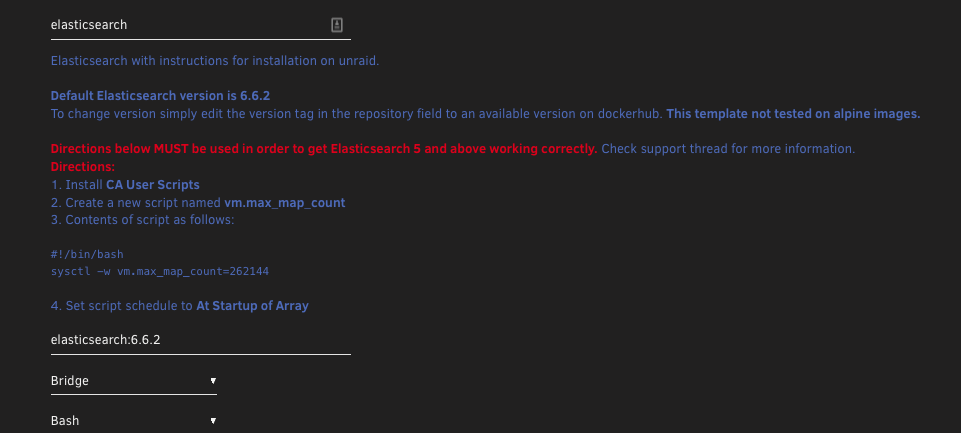
Hey, anyone else experiencing non-responsive user scripts in rc1 of 6.9? I'm finding I can't edit one at all that I've just created, can't delete it etc either. On top of that I can't schedule any of the default ones. Haven't tried rebooting, but that seems a bit extreme. <<Edit>> Actually I think the script I added below was causing it (deleted manually at console), but oddly I didn't even get to run the script, just using the name below was enough so full stops or underscores? Seems unlikely. Either way, just renaming it to something basic got me going.
-
Hey, I just wanted to share my experiences with ZFS on unraid now that I've migrated all my data (don't use the unraid array at all now). The big takeaway is the performance improvements and simplicity are amazing. And I'm not just talking about Unraid's Achilles heel - throughput - more details below. Why Due to ongoing stability issues I couldn't track down, I ended up buying an IBM P700 with twin xeons and 96GB RAM. This I thought would cover my production software such as nextcloud, Plex, Wordpress and so on, (the things that have customer facing service). The big challenge was that the disks remained on the other box and so stability issues on that would impact my production instance. The P700 only has 4 official 3.5" disk slots and some 5.25" I could use if desired to increase that (I didn't). Solution My solution was to sell the multitude of 8TB disks I have and buy (through a deal on an auction site) some 6 month old 16TB EXOS disks. This gives 48TB usable which is more than enough and 4.5 years remaining on warranty. Decision time on to whether to make the array ZFS or unraid included weighing up the loss of individual disks powering down, multi-size disks in an array and the easier expansion (compared to ZFS). Benefits It was a big decision in a way, but now I'm reaping the somewhat unexpected benefits of having improved performance, a production box with storage and a play box which does GPU passthrough, back end automation and such that can be rebooted without issue. One of the most surprising benefits was the increased speed of Plex Library scanning. This was not something I was expecting, nor thought was possible at all. On the unraid array it would take a significant amount of time to complete a manual scan of the library. On ZFS, the scan is sub 5 seconds! I can only guess this is some clever in memory directory caching contained within ZFS. I must go and read up to find out about that. Things I've noticed so far include: Seriously fast directory scanning e.g. plex No spin up delay Faster throughput General system responsiveness improvement Only four drives which are more modern don't use much if any more power being spun up more Other optional benefits are obvious: Variable cluster sizes for optimised storage / speed (e.g. media dataset can have 1MB while documents dataset can have 8k) NVME read caching algorithm enables VM's to be performantly run from HDD rather than SSD if desired Can migrate away from Unraid to something else if desired and keep my disk pool as is. E.g. Proxmox / FreeNAS / TrueNAS Scale. Throughput Snapshots Compression Encryption Send Receive / backup option Super reliable CoW file system unlike BTRFS in my opinion Best in class data integrity, Unraid's array can't even come close to that Downsides Upgrade options are more limited, can either add an extra mirror, or upgrade all 4 to larger when eventually that is needed With a lot of drives, the power bill may be more expensive due to lack of individual drive power down, but newer helium filled drives reduce this requirement and given I've gone from 11 drives to 4 this is unlikely to be an issue Something cool that happened was while migrating data one of the drives got unplugged accidentally (dodgy cable). When I noticed it, I just shut down the system, rebooted and it automatically resilvered the drive in 3minutes back to known good state. If this had been unraid (or any other array) it would have had to write the whole 16TB again. You gotta love ZFS. Anyway, that's my thoughts so far. Oh yes, to get around the requirement that Unraid won't start Docker or VM's without an unraid array started, I just pointed it at a cheap usb drive and put the array on that. It works well and have been doing that for a few months now with no issues. My hope is this requirement will change in the next version of unraid. Marshalleq
-
I have fairly consistently had problems with the networking GUI in unraid. I wrote some rather frustrated post about it some years back, but got shot down and didn't come back to it. But post upgrade to 6.9 beta 1, I had a related issue, though in this case I can see why it might have happened. As per this post today, my 10G Nic is not recognised in 6.9 beta 1. Fix common problems started alerting me about not being able to communicate with GitHub. However other things 'seemed' to be working OK so I figured it was a fix common problems issue. However, upon later investigation (much of the system wasn't working e.g. docker versions were 'not available' in the GUI and other odd tell tale signs like extremely slow raid shutdown) I found docker.cfg still had the missing NIC called br4 which was not in the GUI but the system was still attempting to route traffic through. Removing via the GUI these more obvious routes did not help until eventually I edited the network.cfg directly and took the extra card out. But to round out the post a bit, what has been challenging with the GUI in the past is things like 1 - Unraid adding a second gateway when the NIC is on the same subnet (IMO there should only be one gateway per subnet) and even if two gateways are acceptable e.g via prioritisation: 2 - Why was unraid sending all traffic out the non-primary card? 3 - Changing interface rules so that the primary card is first does not seem to not take effect properly i.e. the interface descriptions and I think even IP addressing doesn't move and the whole thing gets confusing. So not to go on about that too much, but it does make it hard to figure out exactly what is happening so I can post intelligently about it. Now that I have two unraid licences (one a sort of half dev box) perhaps I can add some value here. Anyway, the fix for me was below. It would be nice if unraid could detect that a card had been removed and update the network.cfg as a result. Given the challenges mentioned above, I expect those are making that difficult to achieve. As per below everything from IFNAME[1]="br4" I removed except for last line which I assumed needed to be SYSNICS="1". The Unraid networking GUI is a mostly functional thing that meets most of the needs of it's customer base. But it would be great to see an item on the roadmap for an upgrade of it to something a little more modern in terms of it's interface and how it interacts with the system. Thanks for reading. # Generated settings: IFNAME[0]="br0" DHCP_KEEPRESOLV="yes" DNS_SERVER1="192.168.43.3" DHCP6_KEEPRESOLV="no" BRNAME[0]="br0" BRNICS[0]="eth0" BRSTP[0]="no" BRFD[0]="0" DESCRIPTION[0]="Onboard" PROTOCOL[0]="ipv4" USE_DHCP[0]="no" IPADDR[0]="192.168.43.10" NETMASK[0]="255.255.255.0" GATEWAY[0]="192.168.43.3" METRIC[0]="1" USE_DHCP6[0]="yes" MTU[0]="1454" VLANS[0]="1" IFNAME[1]="br4" BRNAME[1]="br4" BRSTP[1]="no" BRFD[1]="0" DESCRIPTION[1]="QNAP_10G" BRNICS[1]="eth4" PROTOCOL[1]="ipv4" USE_DHCP[1]="no" IPADDR[1]="192.168.43.12" NETMASK[1]="255.255.255.0" GATEWAY[1]="192.168.43.3" METRIC[1]="2" MTU[1]="1454" VLANS[1]="1" SYSNICS="2" obi-wan-diagnostics-20201219-0920.zip
-
Hi, this is a new 10G card I got on a whim and was pleased to see it was supported and working well. However I upgraded the other day and now it is not detected (doesn't even show up in the kernel that I can see dmesg / lspci etc. It's the single port version listed here: https://www.qnap.com/en/product/nic-marvell-aqtion (QXG-10G1T) Also the official drivers are here: https://www.marvell.com/support/downloads.html I assume this just got forgotten in the newer builds with the latest kernel? Thanks for any help you can provide. obi-wan-diagnostics-20201219-0920.zip
-
Yeah, it seems fairly obvious to avoid the unraid raid mount for a differing brand i.e zfs raid mount - we don't know how the secret sauce of unraid raid really works. Anyway, either way, you can put it straight under /mnt, that's what I do. And just ignore it in the fix common problems if you have that come up. So /mnt/data /mnt/data1 or /mnt/Samsung500G are good examples. Coming from windows about 15 years ago, it took me a while to figure out what I should call these things. That's what I came up with after talking to an ex linux admin.
-
Updated one box - working great so far thanks @steini84 I'm liking I can be on stable builds again too.
-
Did you read the beta 35 notes? It seems that there's some new methods for deploying drivers and modules. They actually include in tree AMD GPU too. At first I was thinking this was going to save the day - then I realised we still have to compile it against the new kernel right? I've found these particular new Unraid beta's to be the worst betas I've ever used for some reason, so I think I'll stay away until they at least put the new linux kernel in.
-
Something I noticed the other day. I think it let's you roll back one version and if one version ago happened to be stable, then you were in luck. But for me, to get stable on, I had to download it manually. I'd say this is a bug, but maybe it's always been like that.
-
I've recently been wondering about the speed of rebuild's / checks on USB. I have a 5 bay USB 3 box that came from a QNAP. It's seen in unraid. But I think it will be too slow.
-
Thanks - I actually installed a new version of 6.8.3 on my USB using the Mac install tool, which in the process wipes the usb stick. I copied over no config and installed ZFS from the App Store and somehow that ended up with the beta4 version of zfs. So I don't know. Anyway a bit of a learning for me! I have to wonder what is on that disk that's so problematic - I only created it recently. I have a suspicion it may have a duplicate mount point or something.



