






Marshalleq
Members
-
Joined
-
Last visited
Everything posted by Marshalleq
-
I use /mnt/x y z I've just reformatted the key and this time not copied the config. It was all working fine until I added ZFS. I note that only the beta of ZFS is now being offered not stable, which I think is a huge mistake given it's the stable 6.8.3 I have installed. @steini84 perhaps you could implement something so that stable / next can be chosen for ZFS. Anyway, I'm back to believing it's a ZFS issue. I don't know why it is. I'm going to try the community kernel and see if that sheds any light. Community Kernel (Unraid Kernel Helper) same result (using my normal config though, but I did prove it did this with none of my config also). This is a nightmare. The only thing I can say for sure is it only appears when ZFS is installed. But earlier known good versions of ZFS also exhibit the behaviour.
-
I managed to downgrade to beta 3 on 6.8.3. Same things happening so I guess it's co-incidence. Not really what I want to hear, but sadly co-incidence must mean I have bigger issues. No idea what though at this point.
-
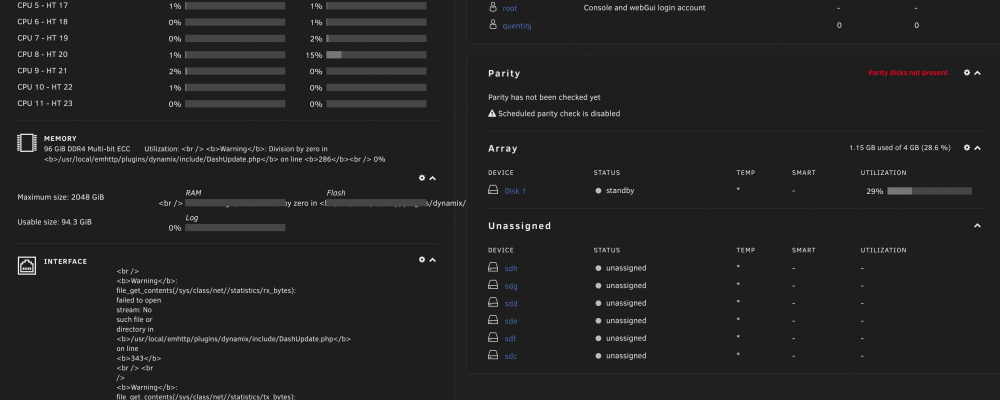
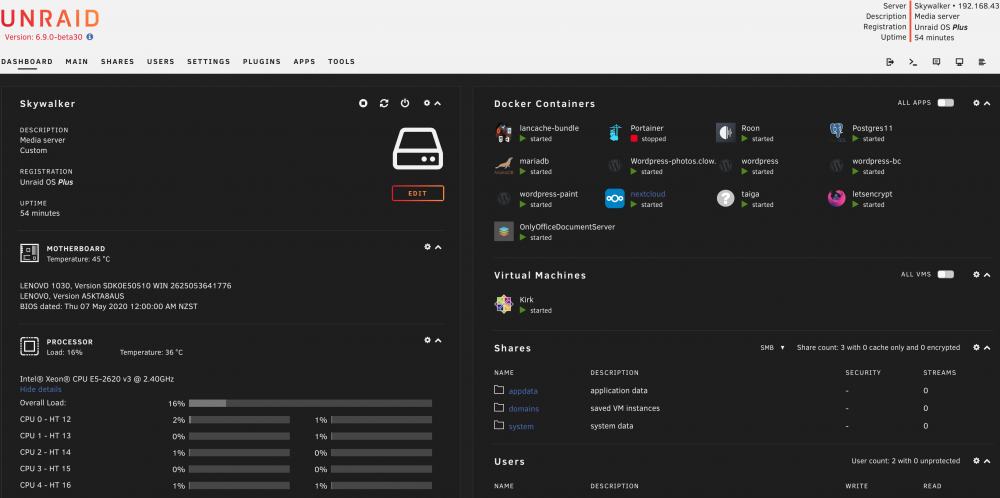
@steini84 Are you sure something in the new build of ZFS beta4 isn't overwriting parts of the system it shouldn't? I've even got it complaining I've got less that 2G of memory in the GUI, yet in the console it's saying I have 96. Check out my main screen. I've done a memory test too just in case. Check out how docker and VM tabs are missing, but actually they're running. Weird scripting / coding language showing up in the GUI.
-
Upgrade to beta 4 has completely borked my system. That's my current technical assessment anyway. It took me ages to figure that out too. All sorts of errors about missing shared libraries, and also doing odd things like removing the docker and virtual machine menus from the Unraid GUI, also noticed it's telling me docker can't start because VT-d is missing - well it's a dual Xeon I don't think so. So far I don't recommend any of these betas and regret using them at all. I've tried to downgrade to beta 3 using the above method which is saying ZFS modules are not loaded so something is not right. This is all happening at a time when I have no time. But I need it to run. If I had the time I would reformat and downgrade to stable ZFS. ZFS beta HIGHLY NOT RECOMMENDED on UNRAID is my current opinion. The funny thing is that ZFS itself is running in the background - even when the menus are missing docker and vm's are running too (or were at least). It's also causing other issues like randomly not being able to boot from USB stick. My guess is that like the other assumption it's more of an issue to do with the implementation of ZFS as per how it's attached to unraid. But I don't know. Even the nerd pack is throwing up errors with this installed. It's possible it's something else I haven't thought of, but when I disable ZFS everything else starts to run normally again. Painful!
-
From what I've read, this xattr=sa setting, extensively reduces the array from doing writes to files on disk, instead writing to inodes. If this is always the way it has worked (and I believe it is), changing this is only like to be a workaround of some other thing, impacted by lots of writes such as when creating a new VM image. I had thought this was probably kernel related, but it doesn't happen on 6.8.3 and 6.9 if I recall. Either way, I'm not convinced this is the end of it.
-
I'm really worried it's ZFS causing all this - I just don't understand why creating a VM would trigger it. I have to say I wish I'd not accepted the new ZFS version and upgraded the pools - it will be challenging to sort out. I think it's enough to upgrade an OS, but keep the filesystem stable @steini84 from the attached syslog, would you agree it's ZFS? If so, I might need some help to log a ticket upstream i.e. around how you've packaged it. Started a ticket here - I'm sure it's ZFS now. I would appreciate if you could take a look and add any commentary - I'm concerned they'll complain about it being unraid and about it being a beta of unraid. Thanks. obi-wan-diagnostics-20201013-1953.zip
-
So I'm quite frustrated with this new beta, they're unusual a lot more stable by now - (the Unraid one and maybe the zfs rc - though I'm not sure). I'm still getting this issue and other randomness. As part of that testing, I'd like to downgrade to Unraid stable and keep the latest ZFS. The instructions for that are mentioned above, except it didn't seem to work for me. I think what's happening is when you reboot, it does it's auto update or whatever and makes it the lower version again? My process was to downgrade the kernel, remove the older zfs versions, copy the above files from dropbox where the old ones were, reboot again. Thoughts?
-
There is a statistic somewhere - ZFS needs so many gigabytes of memory per gigabytes of deduped data. That's why it isn't worth it. You're trading disk space for ram. Not sure on specifics, but you should be able to find it without too much searching.
-
Yes it sounds about right. I don't think you will have issues like that, though I'm actually not sure what the default mode is for file permissions in unraid now that I think about it. There is actually a plugin that fixes permissions automatically which I forgot to mention, I'm sorry I'm rushing out to work again, but it might be part of the fix common problems plugin. Just don't run it on your dockers unless you're sure, sometimes those can be a little different I'm told - though I think that's perfectly resolvable. Not sure why one is working and not the other, seems like everything is the same. Make sure they've both got user accounts created through the gui. Make sure they're both in the write list and you are connecting via smb. Sorry gotta run.
-
Make sure the folder has permissions of nobody.users. Then set the share in smb extras like you have done with user permissions that you want. You've left out who has access to the share. Sorry, I would post you an example, but I'm about to leave for first day on a new job.
-
This is where the target market of the two products you mention is slightly different. Unraid doesn’t do ACLs instead it uses share based security. Granted you could probably Jerry rig something but it’s going to be on you. By default everything is set to be nobody.users for this reason because it’s targeted at the home user as a primary market. Sent from my iPhone using Tapatalk
-
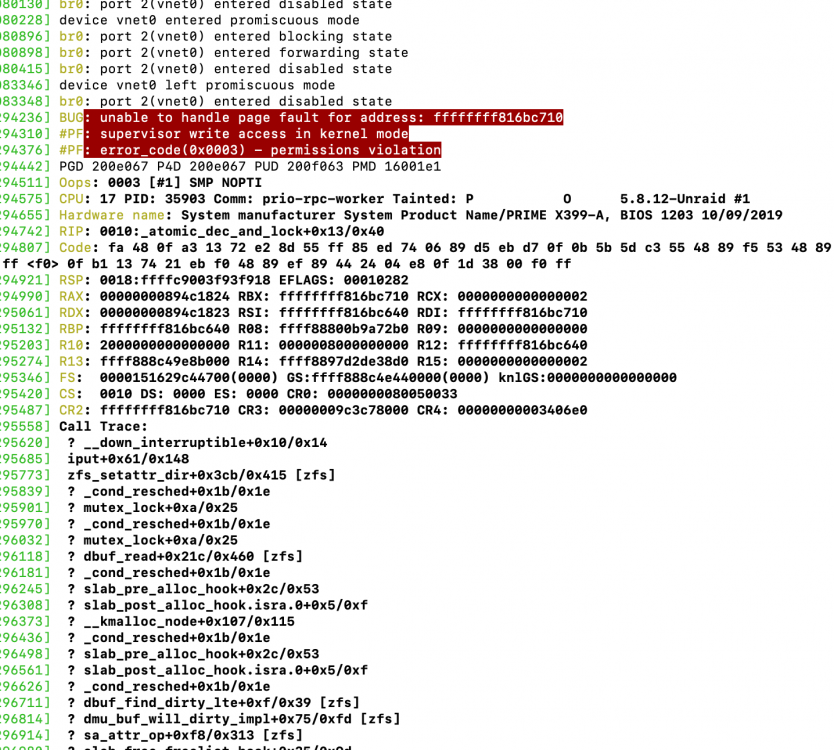
Hey, @steini84I just noticed that I couldn't delete something from a ZFS drive and after multiple attempts decided to look at dmesg, which looked rather alarming. I don't know if this is the latest zfs or if it's the latest beta 29 kernel. But posting in here first as we're not likely to get much in the way of ZFS support without a strong case and testing from the unraid guys. I have just recently tested my memory, which would be my first thought and it could still be of course, but because of that I'm thinking new kernel or the zfs update that came to match. I repeatedly get these results by starting a rancherOS vm, with the standard linux64 template. Logs attached, I'm hoping I'm not the only one TBH. obi-wan-diagnostics-20201001-1724.zip
-
I think they’ve renamed it to Swag. Sent from my iPhone using Tapatalk
-
Nice, thanks for the info. It's a bit of a catch-22, nobody wants to buy the hardware unless they know it's supported and will work as it's still quite expensive. I've just purchased a second machine (may or may not be unraid), it's a ThinkStation P700 dual xeon. It happens to have thunderbolt built in, but being IBM, it's some kind of add on cable to buy. And it's thunderbolt 1 - even that's better than USB though.
-
It's not just speed that make TB3 useful. I'd really like to be able to use a cheap SFF computer and attach a portable disk array such as one of these next to it. There are not many elegant case designs around with proper hot swap capability, drive status indicators at the front. Most seem to top out at about 4-6 bays, have plastic drive bays, no status lights, poor cooling and such and on top of that be quite expensive. This would be a great addition for unraid. I also like the idea of being able to run one cable from my Unraid box in the cupboard, to my screen, keyboard, monitor and headphones. On top of that, it's a cheap 10G network card from my Mac, except it's 40G not 10! Thunderbolt gives the advantage of not having to use the long standing always poor cousin of transports (USB) so that you can support ALL the protocols required by the storage. Anyone ever tried to get trim support running over USB? Also, did you see the speed of transfer you can get in that link above? Pretty awesome. When USB4 does come along, I suspect, the thunderbolt driver will still need to exist separately anyway. Now that the Licencing of thunderbolt is open and it's based on a standard port, I very much believe TB will become the standard in a few years.
-
I honestly don't know what's happening here, except it's the second time this has happened. I tried quite a lot last time, this time I just tried re-creating the VM without recreating the disks. However that didn't work. The symptom is that twice now, after some time (e.g. a month or two) perfectly running Windows 10 gaming VM, no longer displays on a plugged in monitor with pass through GPU. I do suspect it's running in the background, however if I change the GPU to VNC, there is no option to view the VM via VNC in the properties of the VM. Last time, I just created the whole VM including disk again to get it working. I don't really want to do that again to be honest so will try harder this time! Anyway, attached diagnostics in case it helps with anything. obi-wan-diagnostics-20200921-1738.zip
-
Lots of questions in this thread, but not many answers. I'd answer a few, but I don't know the answers either.
-
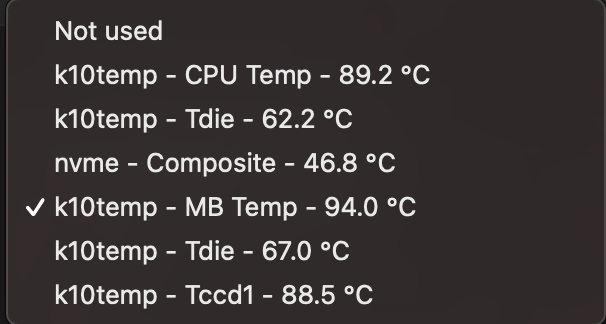
Trying a different approach - this is what I now get on the beta - which would you choose for CPU and MB? It all went west since unraid beta. Not really sure what to choose anymore. I have Threadripper 1950x. I can assure you it can't operate at 89 degrees.
-
I just noticed something a little unexpected when trying to track down which drive says it's overheating. I have notifications set up over telegram. I receive an overheat message for one drive, with serial number listed, but on the unraid screen it lists as /dev/sdi and on the telegram screen it lists as /dev/sdj See attached screenshots and debug. To my reading the serial numbers match and even the disk, just not the device. Hopefully it's just the notification system that's wrong as the alternate option would be quite worrying. obi-wan-diagnostics-20200910-0907.zip
-
I'm aware there's a view that this is not happening and it could be a plugin. Unfortunately I can't easily boot into safe mode, so I've taken a different approach. Firstly I've resolved all the GSO errors by changing a linux VM to Machine 5.0. This enables us to actually read the logs without hunting through rubbish. Second I spin down all the drives. I visually note that they have spun down and remain spun down. I refresh the main page to ensure that they haven't spun up in the background. I note some activity comes in and spins up a single drive, OK all good so far. I again refresh the main page to ensure drives have not spun up in the background. I view the logs, clearly showing when the drives spun down. Still good. Within 5 minutes, all drives have spun up again. I check the system log. There is no record of anything spinning up the drive. Perhaps it's in another log. I have downloaded the logs within 1 minute of the drives spinning up, thus there is not much to have to delve through to make it easier. Maybe this will help the few of us whom still remain with this problem and whether it's specific to our setups or not. obi-wan-diagnostics-20200830-1425.zip
-
Hi everyone, I'm running the latest beta of unraid and noticed (like I see someone else has commented) that the temperatures on my AMD Threadripper 1950x / Asus X399-A Prime board are reporting much, much higher. E.g idle temps are circa 90 degrees c. Obviously this is not correct. I posted in the beta forum and the only response I got was that Unraid doesn't handle temperatures, which I think is quite incorrect to be honest. What I understand is, the plugin reports the temps provided by either, the built in sensor drivers, or the injected sensor drivers in the case where they're not included with the kernel or packages. My understanding was that in the newer kernel, the relevant drivers for my hardware are now included, and I can see that more sensor options are now available in the Dynamix plugin. Previously I had to input it87 into the dynamix plugin to get it to work. I have rolled back to stable and can confirm the temperatures go back down to circa 60 degrees c at idle. Can anyone help me by a) Advising / confirming if this is likely dynamix plugin issue or kernel issue, b) giving me something to go back to the beta thread with? One thing I'm wondering is if there are now correct drivers in the kernel, perhaps the plugin logic needs to be changed. This I'm basing on that AMD used to have some weird 27 degree offset and perhaps the plugin has something to compensate for that that's playing up, though it seems to be doing it backwards TBH. Logs attached. Many thanks, Marshalleq obi-wan-diagnostics-20200828-0850.zip
-
That LuaJIT version / OpenResty's is normal. At least I've had it forever and it doesn't seem to impact anything, so you've probably just not noticed it before. At a wild guess - have you tried ports? Is unraid on 443 and 80 still? Obviously you can't have both letsencrypt and unraid on the same ports.
-
I think this is due to their upgrades breaking things. Because I have ZFS snapshots I was able to roll it back and force it to stay on an older version. Not what I really wanted to do, but saved me the time of fixing it up. So not much help, but it might help to point you in the right direction.
-
Of course, BTRFS / XFS / ZFS doesn't really mattter too much regarding performance if compared on the same hardware, but if putting your VM's on slow HDD's ZFS helps with that in the form of cache. My decision to switch to ZFS was due to three failures surrounding BTRFS, which have never happened with the same hardware on XFS or ZFS, and ZFS has the advantage of recovering from corrupted data as well as lost drives. Running VM's on HDD for me is just because my SSD is not mirrored and the HDD's have more space - so it works well as a solution for me. The L2ARC is amazing for that.
-
Hey - yeah it's quite a lot to learn isn't it! I don't see l2arc benefitting your VM's if it's already entirely on an SSD and you don't have anything faster other than RAM. However, if you've got a lot of spare RAM, then the good news is you can increase your L1ARC (which is actually more efficient than L2 anyway) and use that. Essentially the arc, is a clever ZFS only read cache that performs a lot better than standard read caches. What this means is for things that are on disk and meet the eligibility criteria, they will be read from ram (or l2arc if you have it) instead of from disk. So in that sense, changing your VM's to ZFS on an SSD may get you a slightly greater performance, once they're up and running. I like the persistent l2arc idea, because this should also then apply to newly started VM's as well. For me I had an INTEL 128GB NVME drive and set up the l2arc to use that. To get stats on how well the arc is working you can use arc_stats or arc_summary in the console and check the cache hit ratio. Typically I find my l1arc to be at 100% and my l2arc to be at around 70% which is very decent. My setup is: 1TB INTEL Enterprise SSD x1 with ZFS (mostly docker and unimportant VM's) 2x8TB Seagate Enterprise Capacity HDD's in a ZFS Raid 1 pool (Various Data, VMS and important dockers) 1x128GB NVME drive (L2arc). If you come across something called a ZIL - ignore it, in my experience it's very unique cases and mostly it will actually slow your system down unless you know what you're doing. I also have znapzend for backups for the things on the SSD since I only have one of them. Znapzend is another plugin that utilises ZFS replication which is more performant and clever than even rsync. Hope that helps a little!



