Everything posted by LoudRex
-
Yeah, I set my network to bridge and not as shown in the video to proxynet. So setting your network type of the docker to bridge would work.
-
I've installed guacamole via my docker. And I am trying to get it behind a revers proxy via NginxProxyManager. That step fails me until now. I have set it to the other ip address internally 192.168.2.163, that is the ip where i set Guacamole to and locally that ip address works. But now Ive set that ip and standard port 8080 as in docker to my NginxProxyManager but, when I am opening it on my subdomain/domain, I get 502 Bad gateway. What could be the problem here? Am I right to post the problem here, or do I need to ask this in the NginxProxyManager thread? I really not know. Hope you'll can help me. I've set up guacamole behind a reverse proxy via this video:
-
Thanks a thousand times @wgstarks, I removed Host Port 3 and re-created it on 8811, and yes it woks now! I'm such a noob using docker, so mega much thanks! So obvious and although so unclear!!!!!! Thanksssss! 🤪
-
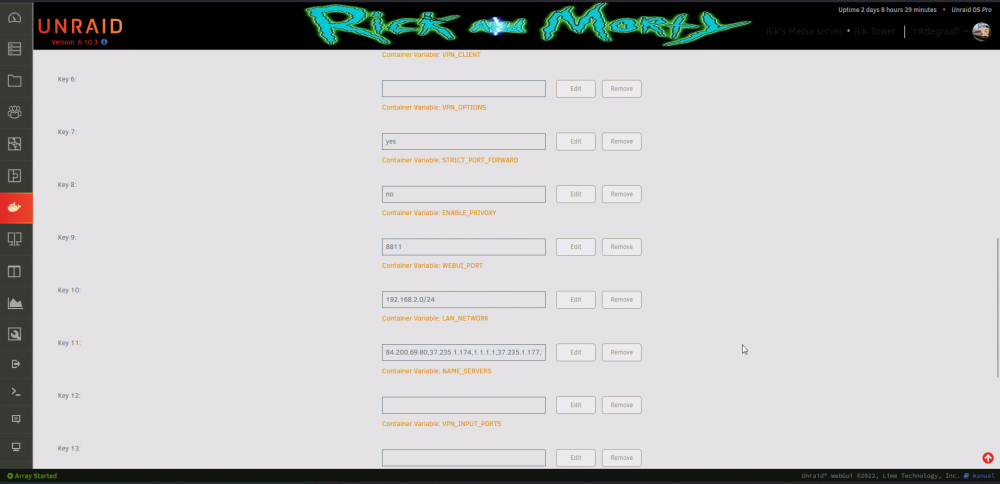
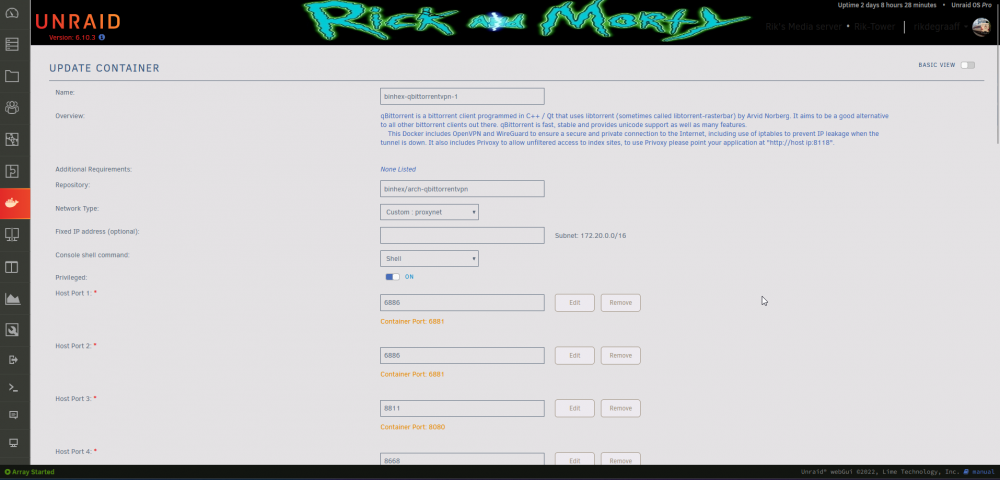
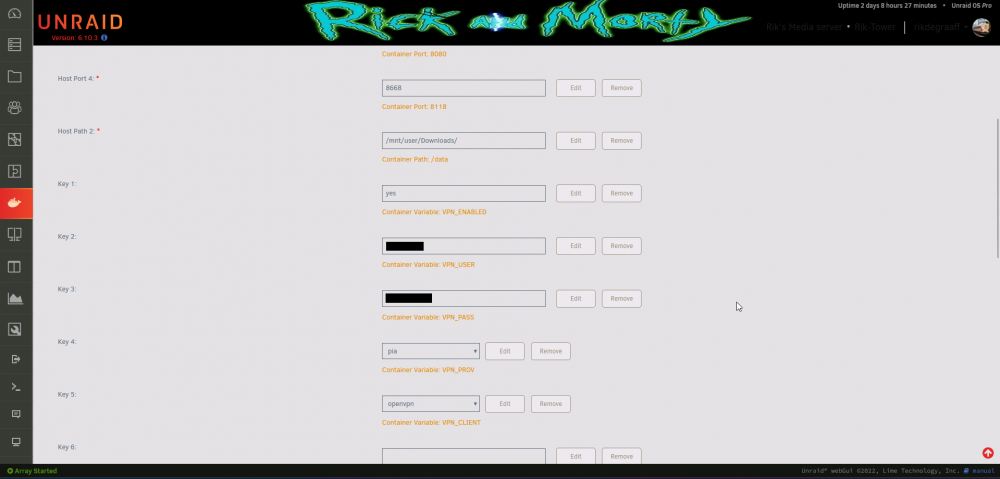
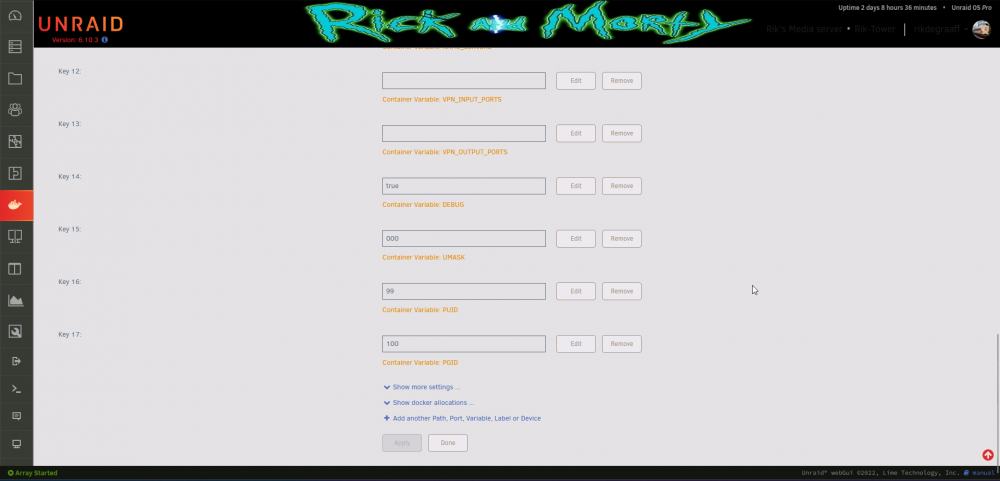
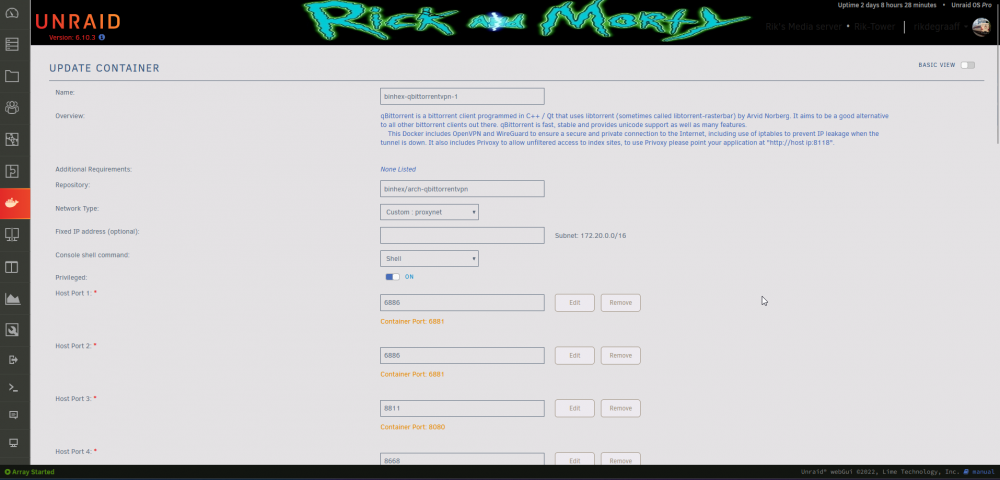
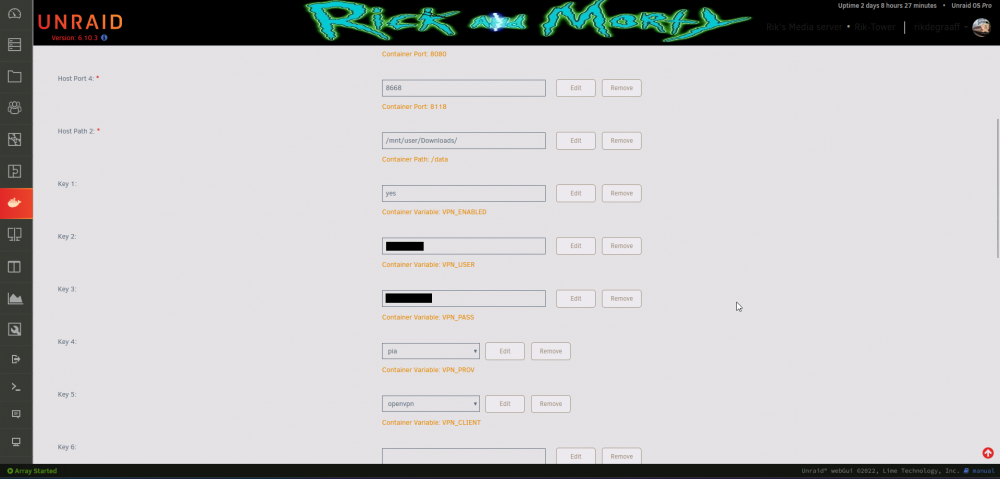
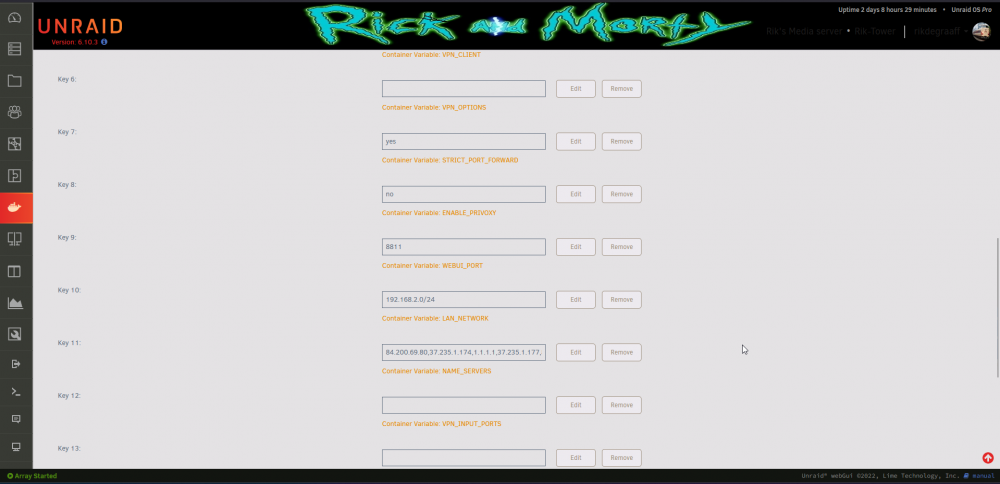
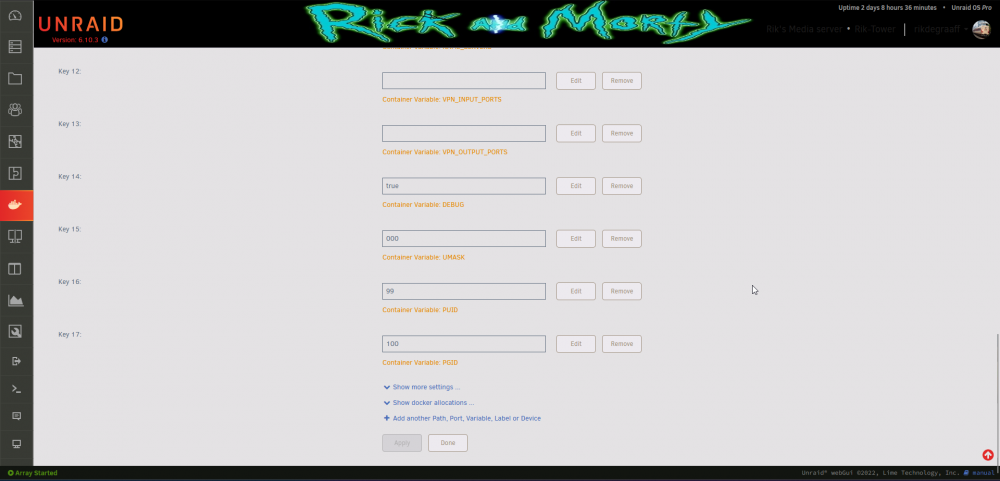
Already posted this question here, but @JonathanM told me to ask it here also: Hello all, I am the whole afternoon/evening busy with getting a second image of the same docker template, binhex-qbittorrentvpn, up and running. I did change all the standard ports to different ports, all folder associations also to new folders, but I still cannot reach my webUI. Here are the template settings, adjusted by me: The image is running, openvpn configuration files are supplied in the new folder, and the only thing that doesn't work is the webUI. I put in <server-ip>:8811 as that is set to the new webUI port. The docker log of that new image also says "[info] qBittorrent process listening on port 8811". So what is it that I cannot reach the qBittorent webUI on above ip address and port. FYI; the 1st docker image of qbittorrent does work like a charm... Some help is much appreciated. Thanks!
-
Thanks for the link @JonathanM. Is it a good thing to post my question there too? Because, my first docker image runs flawlessly but the second instant not... Hope to hear to post there or not (and that is why is in first instance post it in this category...).
-
Hello all, I am the whole afternoon/evening busy with getting a second image of the same docker template, binhex-qbittorrentvpn, up and running. I did change all the standard ports to different ports, all folder associations also to new folders, but I still cannot reach my webUI. Here are the template settings, adjusted by me: The image is running, openvpn configuration files are supplied in the new folder, and the only thing that doesn't work is the webUI. I put in <server-ip>:8811 as that is set to the new webUI port. The docker log of that new image also says "[info] qBittorrent process listening on port 8811". So what is it that I cannot reach the qBittorent webUI on above ip address and port. FYI; the 1st docker image of qbittorrent does work like a charm... Some help is much appreciated. Thanks!
-
Thanks @JonathanM for the information: It is about the docker image from Djoss, so that is my next stop. Greetings, Rik Edit: I've solved it, my router was reset a few days ago and missed one port setting for port 443, added that port to my router config again and ka-ching! Solved!
-
Sorry for the doublepost, but I changed the topic big time. So not a kick up, but just other problems, I think. Hope someone can help me. Thanks.
-
Hi all, I have a problem with my unRAID machine. The docker NginxProxyManager stopped working since this afternoon, and the local webUI's all work, only the subdomains aint working. I've rebooted the server and now I got the following notification: Your server has detected hardware errors. You should install mcelog via the NerdPack plugin, post your diagnostics and ask for assistance on the Unraid forums. The output of mcelog (if installed) has been logged More Information Dunno what that means, other than something isn't working right because I can only access the webUI's of my dockers in my local network and not via the domains set via NginxProxyManager. I alredy re-installed NginxProxyManager a several times, but still only the local addresses work. I think that the server is okay, but that there is an error with above docker... My error I get from typing in my domains are ERR_CONNECTION_TIMED_OUT. But when I type in my public ip I get: Congratulations! You've successfully started the Nginx Proxy Manager. If you're seeing this site then you're trying to access a host that isn't set up yet. Log in to the Admin panel to get started. Powered by Nginx Proxy Manager So that seems to work. But typing the domains still errors out with the error mentioned above. Hereby attached the diagnostics from 8:42 PM local time, CET. diagnostics-20220708-2042.zip I've edit this post because I think nothing is wrong with the hardware of my server, but just with one docker image. Text edited is bold, as you can see above.
-
Done, now a 403 forbidden error, forbidden to move from my nextcloud desktop app (Win 11). That is weird, do I need to chmod something..? Or what causes the ""403 Forbidden" to "MOVE /x/x/x/" (Sabre\DAV\Exception\Forbidden\)" - error? Jeez, it won't stop throwing errors at me........ EDIT: Now after a fresh install and reboot of the Desktop app Nextcloud on my Windows 11 machine it is syncing again. ETA until full sync 2 hours 19 minutes, hoping that all the files will sync without any problems... Last EDIT: It's working now, first on Win 11 my desktop client keeps freezing and not responding, now I downloaded Nextcloud desktop v2.3.3 ans everything synced perfectly! Thanks for all the support.
-
Okay I did. Now another problem, I have the error 413 Entitiy too big. I've edited it in NginxProxyManager via the corresponding file 6.conf in my folder /appdata/NginxProxyManager/nginx/proxy_host/ using the client_max_body_size 0; option adding that to my 6.conf file. Whereas 6.conf is my file to my Nextcloud proxy host file. Is that all I should do to remove the 413 error? Or are there some other files that I need to edit for solving that error? Thanks for all the help so far.
-
If I point my container to 2443 or some other port, do I need to change that at more places? And if yes, at which file do I need to change the port also?
-
Sorry, my bad. Yes I added a trusted domain to the config.php so that I can get in via the reverse proxy. Can you tell me what is wrong with that? I'm a little worried about it, right now... Thanks in advance. Sent from my POCO F1 using Tapatalk EDIT: I am now following the video and will edit the files as necessary. EDIT2: I followed the video until 24:12 minute and cannot proceed, as I cannot find the proxy-confs folder in my NginxProxyManager appdata folder... I assume it is safe now, right @Vitor Ventura?
-
Yea I encircled the option and blacked out some of the details. Why? Is there something wrong about the image? Sent from my POCO F1 using Tapatalk
-
No this setting: "Scheme" Sent from my POCO F1 using Tapatalk
-
Thanks that was already activated. I needed to set the domain to https instead of http at the NginxProxyManager. Sent from my POCO F1 using Tapatalk
-
I have a problem too. I got the 400 ssl error, so my question is as following: How do I get a ssl-cert for my nextcould, so that I can access it via my domain name with CNAME forwarder (and use it with NginxProxyManager)? I can get a ssl certificate via my NginxProxyManager, but how to access that nextcloud instance? Because I forwarded everything properly but getting the common ssl error: 400 Bad Request The plain HTTP request was sent to HTTPS port
-
Sorry for my double post, but I applied the 3.3v mod via YouTube and it now shows up in the array. Thanks @JonathanM for solving this one so fast!
-
No I am not sure, it is not showing up in the BIOS because I have it connected to the SATA card, Supermicro AOC-SAS2LP-MV8 All the disks connected to the Supermicro AOC-SAS2LP-MV8 don't show up in the BIOS at all. But I've bought two of these disks and (shucked) them out of there cases, and the first one is working right out of the box, so why this one not?? Edit: And how am I going to check if this drive needs the mod??
-
Hello all, I just swapped my 2tb HDD with an 8tb HDD by after booting and trying to get my array up, I cannot assign the new disk to the old slot. The new HDD doesn't show up at all on my Main page... So I don't know what is going wrong. This is the third drive I've replaced so I am familiar with the operation, and everything went well until replacing this disk. I have attached my diagnostics, so that you can help me out. I myself cannot find anything that is going wrong, except these two lines in my system log: Nov 22 14:28:00 Rik-Tower kernel: mdcmd (9): import 8 Nov 22 14:28:00 Rik-Tower kernel: md: import_slot: 8 missing I've tested the disk here on windows, not any problem, even a copy paste on the disk works and it genuine spins up and down... Shows the correct size et cetera, all on my Windows PC. Hope you guys can help me out. Kind regards, Rik rik-tower-diagnostics-20211122-1429.zip
-
Thanks man, it worked. I removed all the port that were set in my router, that list was my port forward at the router side. Then added external 80 -> private 1880 and external 443 -> private 18443, and everything worked flawless. I was being busy with this yesterday the whole day, and could not come up with the above port forwardings.... You're a hero @mattie112, thanks! 😁
-
I have problems generating SSL certificates. When I add my subdomain "*.rikdegraaff.nl" I get an internal error while generating the SSL certificate. After I close the add Proxy Host window, it shows as a Proxy Host with HTTP only. When I click on my freshly added subdomain it sends me to my webUI inlog page of unRAID, instead of the docker page. So you see the default unRAID webUI login screen... Certbot also tries to get to ACME verification (default) through **************.unraid.net:443 instead of my local 192.168.2.*:443 address. Can failing to generate a certificate cohere with trying to generate through unraid.net instead of my local network?? And how am I supposed to solve this? My ports are forwarded as following: 192.168.2.* TCP&UDP 80:80 192.168.2.* TCP&UDP 443:443 192.168.2.* TCP&UDP 180:180 192.168.2.* TCP&UDP 1443:1443 192.168.2.* TCP&UDP 4443:4443 192.168.2.* TCP&UDP 8080:8080 192.168.2.* TCP&UDP 1880:1880 192.168.2.* TCP&UDP 18443:18443 192.168.2. *TCP&UDP 7818:7818 I hope that someone can help me out. Thanks in advance!!!
-
Guys I cannot get my torrents complete from a specific private tracker. What can I do to get them complete, because before I haven't had no problems with this tracker at all...
-
Guys what am I doing wrong? See post: Do I need an SSL certificate on the subdomains/domain I am using for swag? Or is something else wrong...? Thanks in advance!
-
I am not getting my certs running in my docker on my unRAID machine. The server self is found at 192.168.2.*, I have already forwarded port 80/443 to 180/1443 and I get the following output while running my docker image: ------------------------------------- _ () | | ___ _ __ | | / __| | | / \ | | \__ \ | | | () | |_| |___/ |_| \__/ Brought to you by linuxserver.io ------------------------------------- To support the app dev(s) visit: Certbot: https://supporters.eff.org/donate/support-work-on-certbot To support LSIO projects visit: https://www.linuxserver.io/donate/ ------------------------------------- GID/UID ------------------------------------- User uid: 99 User gid: 100 ------------------------------------- [cont-init.d] 10-adduser: exited 0. [cont-init.d] 20-config: executing... [cont-init.d] 20-config: exited 0. [cont-init.d] 30-keygen: executing... using keys found in /config/keys [cont-init.d] 30-keygen: exited 0. [cont-init.d] 50-config: executing... Variables set: PUID=99 PGID=100 TZ=Europe/Berlin URL=xxx.nl SUBDOMAINS=serverb,serverd,servers,serverso, EXTRA_DOMAINS= ONLY_SUBDOMAINS=true VALIDATION=http CERTPROVIDER= DNSPLUGIN= [email protected] STAGING=false Using Let's Encrypt as the cert provider SUBDOMAINS entered, processing SUBDOMAINS entered, processing Only subdomains, no URL in cert Sub-domains processed are: -d serverb.xxx.nl -d serverd.xxx.nl -d servers.xxx.nl -d serverso.xxx.nl E-mail address entered: [email protected] http validation is selected Generating new certificate Using Let's Encrypt as the cert provider SUBDOMAINS entered, processing SUBDOMAINS entered, processing Only subdomains, no URL in cert Sub-domains processed are: -d serverb.xxx.nl -d serverd.xxx.nl -d servers.xxx.nl -d serverso.xxx.nl E-mail address entered: [email protected] http validation is selected Generating new certificate Saving debug log to /var/log/letsencrypt/letsencrypt.log Saving debug log to /var/log/letsencrypt/letsencrypt.log Requesting a certificate for serverb.xxx.nl and 3 more domains Certbot failed to authenticate some domains (authenticator: standalone). The Certificate Authority reported these problems: Domain: serverd.xxx.nl Type: connection Detail: Fetching http://serverd.xxx.nl/.well-known/acme-challenge/2lXEHSD3cpIQLhVQrkg1cIx9JyRiPqn9-nAccQ6p9nI: Timeout during connect (likely firewall problem) Domain: servers.xxx.nl Type: connection Detail: Fetching http://servers.xxx.nl/.well-known/acme-challenge/RNAtDuspfWv8neRJm1AI7AqBeuAd3TiecHGh5T05Q-A: Timeout during connect (likely firewall problem) Domain: serverso.xxx.nl Type: connection Detail: Fetching http://serverso.xxx.nl/.well-known/acme-challenge/jC4OeIIX1u4oLEIpuTW7zwbchHE-K8ZMsPjWGGs53oY: Timeout during connect (likely firewall problem) Domain: serverb.xxx.nl Type: connection Detail: Fetching http://serverb.xxx.nl/.well-known/acme-challenge/1WoF3A9D-U-UW0KsWi-lWCQjUaQi7RotiKmKN7mNYuA: Timeout during connect (likely firewall problem) Hint: The Certificate Authority failed to download the challenge files from the temporary standalone webserver started by Certbot on port 80. Ensure that the listed domains point to this machine and that it can accept inbound connections from the internet. Certbot failed to authenticate some domains (authenticator: standalone). The Certificate Authority reported these problems: Domain: serverd.xxx.nl Type: connection Detail: Fetching http://serverd.xxx.nl/.well-known/acme-challenge/2lXEHSD3cpIQLhVQrkg1cIx9JyRiPqn9-nAccQ6p9nI: Timeout during connect (likely firewall problem) Domain: servers.xxx.nl Type: connection Detail: Fetching http://servers.xxx.nl/.well-known/acme-challenge/RNAtDuspfWv8neRJm1AI7AqBeuAd3TiecHGh5T05Q-A: Timeout during connect (likely firewall problem) Domain: serverso.xxx.nl Type: connection Detail: Fetching http://serverso.xxx.nl/.well-known/acme-challenge/jC4OeIIX1u4oLEIpuTW7zwbchHE-K8ZMsPjWGGs53oY: Timeout during connect (likely firewall problem) Domain: serverb.xxx.nl Type: connection Detail: Fetching http://serverb.xxx.nl/.well-known/acme-challenge/1WoF3A9D-U-UW0KsWi-lWCQjUaQi7RotiKmKN7mNYuA: Timeout during connect (likely firewall problem) Hint: The Certificate Authority failed to download the challenge files from the temporary standalone webserver started by Certbot on port 80. Ensure that the listed domains point to this machine and that it can accept inbound connections from the internet. Some challenges have failed. Ask for help or search for solutions at https://community.letsencrypt.org. See the logfile /var/log/letsencrypt/letsencrypt.log or re-run Certbot with -v for more details. ERROR: Cert does not exist! Please see the validation error above. The issue may be due to incorrect dns or port forwarding settings. Please fix your settings and recreate the container The domain has CNAME to my DuckDNS subdomain and the DuckDNS is set to my public IP of my unRAID box. What am I doing wrong while setting up my swag container? I followed the most of this video on YT: and I still don't get it working... I hope someone can help me out with this one, because I am a noob regarding docker images, Let's Encrypt and unRAID......