Everything posted by LoudRex
-
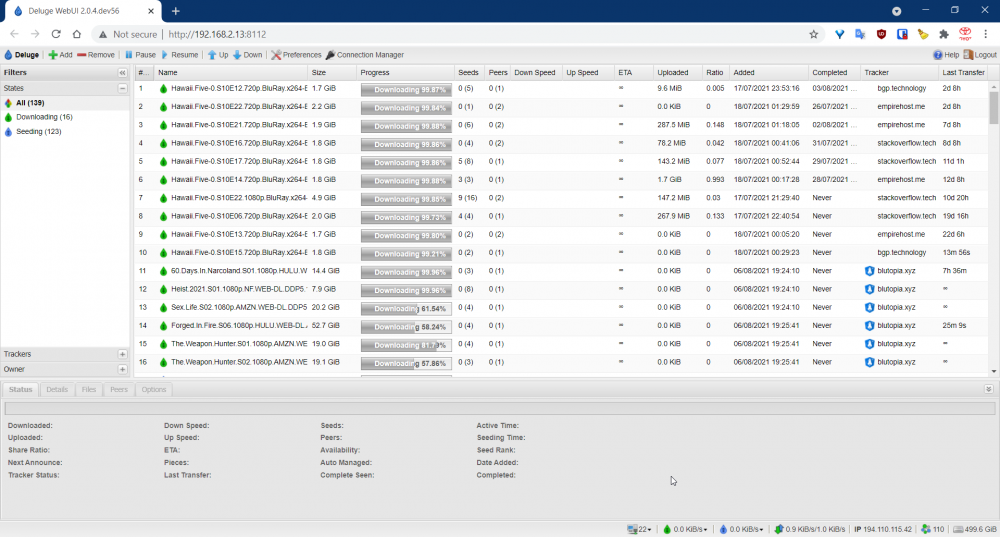
What is going wrong here? My deluge will only download a random percentage of my torrent, as though I am connectable and the torrents have enough seeders. I just won't fully download, it won't go to 100%.. It used to download up to 100% even with the newest (uploaded) torrents (jumping on them even doesn't work).

-
Hello again, I am thinking of building a new system for unRAID with the i3 and a socket 1200 mainboard. I have now a AMD A4-3300 build with 11 disks, mostly under 4TB. So I would like to split up the current build into a new build (i.e. with an i3-10100) with the bigger drives and the second with the A4-3300 for a data-only server for the backups via FreeNAS or some other free server OS and some of the leftover drives (lets say 5). Thanks to you guys I got this answer on an other topic here: Is that a good idea (to build a second server) I've been recommended to split up my only server, so this is how I would do it. Here the two builds I would end up with: Server 1 (with a free OS): https://pcpartpicker.com/list/ngDQ4d Server 2 (with unRAID OS): https://pcpartpicker.com/list/gz88Vc (this one will have a Supermicro HBA that I already own in my server atm.) So I have to buy some parts, but then I will have two servers. But are these build good for two servers and not too beefy Dockers? Because I only use some docker apps for my current server, so I am not using my unRAID build for VM's. I hope you guys can advice me on this one.
-
Hi guys, I just installed this (binhex-minecraftserver) docker image on my unraid. The pull went all right, but my container stopped working with this error line in the log file: xxxx-XX-xx xx:XX:xx.964990 [info] JAVA_VERSION defined as '8' '/usr/lib/jvm/java-8-openjdk/jre' is not a valid Java environment path Not so weird at all, because I never installed any java on my tower. I had already did a repull force last version update, in the hope it would also immediatly instaal java or openjdk8. That is what I found with a simple google search. Unlucky me, it did not install java or even a open source version of the needed data.... My question is how can I install java or openjdk on my unraid tower...? I have already tried to install that via a dockerhub container called openjdk8, and furthermore running that installed docker, but that didn't solve a thing. I am a huuuuge newbie with docker and unraid so how do I get the right files needed for the container "binhex-minecraftserver"? So that I can at least change the path or so that the files are on the right place as for the docker. Thanks in advance. Regards, Rik
-
To change from PIA ovpn file and so from endpoint, I just uploaded Czech_Republic.ovpn and removed the Switzerland.ovpn from the openvpn folder at Deluge's appdata folder on Unraid. After uploading a new ovpn file (without renaming), I reboot my "Deluge-docker" and open the web-UI after full start of the docker. Full start will say, that the docker is completley done loading everything, and keep your eye at the log files. The docker is done "booting" when it says: 20xx-xx-xx xx:xx:19,xxx DEBG 'watchdog-script' stdout output: [debug] iptables chain policies are in place 20xx-xx-xx xx:xx:19,xxx DEBG 'watchdog-script' stdout output: [debug] VPN incoming port is xxxxx [debug] Deluge incoming port is xxxxx [debug] VPN IP is xx.xx.xx.x [debug] Deluge IP is xx.xx.xx.x
-
The seeding problem is solved. I think the problem was the PIA endpoint, as I switched to endpoint Czech Republic, and I can seed for days without torrents not seen at trackers... My problem is now solved!
-
Still nobody who knows why the private trackers doesn't see deluge seeding? Or can someone confirm that the issue lies at pia's endpoints? @darrenyorston maybe remove your vpn user and pass! I will try to seed again with the czech ovpn file.
-
But for the nextgen servers there are also OVPN files. Aren't there no endpoints that work and have port-forwarding??
-
Okay, thanks @xxDeadbolt. These ones don't work anymore, I conclude from your message? I just renewed a few weeks ago at PIA for two years, so I won't go for AirVPN as I cannot pay for 2 VPN's at the same time...
-
Is there a list which endpoint do work and which don't work?? The weirdest is that Deluge says it is seeding all my torrents but not the trackers. (That is due to above reason?)
-
Nobody who knows why the private trackers doesn't recognize my "active" torrents anymore... Same at binhex-rtorrentvpn, using PIA... After a full pause and resume, trackers does see them, but I need to repeat that 3 - 4 times a day... Not very friendly while seeding...
-
Got a problem with both binhex-rtorrentvpn as well with binhex-delugevpn. There are some 60-ish torrents seeding on different private trackers, but after some time seeding, the tracker doesn't notice that the torrents are seeding. I've got this problem also with rtorrent, after a while the private tracker doesn't sees them as seeding, but they are stated at deluge as seeding 100.0%. How can I resolve this problem??? Kind Regards, Rik
-
That is indeed a nice solution as second case. My first case (main) can also hold up to 9x 5,25" so I can still go to 15 drives without an second external enclosure. Thanks @meep
-
Thank you @meep, your page is very interesting. I am thinking about external placement of the other disks, and set them in a caddy on top of the tower. And then lead the SATA cable from outside to inside via the PCIe expansion slots. I only do not know where to buy external cases for 3,5" HDD's. And I am not looking for the external HDD cases (those Chinese things that makes your 3,5" HDD an external drive... Too slow via USB).
-
I do not have SMART warnings for any disk. But because @BRiT said so... And before I begin to change to 8TB disks... Hereby you've got my diagnostics. tower-diagnostics-20200108-0858.zip
-
Guys, I've ran on my disks a SMART extended self-test and have the txt files ready. But I now have spend some hours reading SMART guides etc. but still find it hard to simply declare a disk as faulty or getting faulty. Is it an option to upload it here or send it to someone to interpreter? I have too less knowledge to say something about the results... Greetings, Rik
-
Thanks both for the information. How do I run SMART tests on the drives, and how to read a SMART test? Greetings!
-
Hello all, So just before the new year, my Sharkoon T9 case is running out of 5.25" slots. They are filled with 3TB disks and 4 in 3x5.25 docks from IcyDock. I was thinking, it is possible to fabricate another case/tower that I can fill with to expand my unRAID. It is a pity to just drop the 3TB disks and replace them... So getting rid of them are no option. Do you guys can help me with this question? Many thanks and have a great new years eve!
-
Thank you, changed the port back to 8080 and it's totally working now! Thanks again!
-
I've changed "Container Variable: LAN_NETWORK" from 192.168.1.0/24 to 192.168.2.0/24 as my LAN is always at 192.168.2.x. But still cannot access the webUI, though I get something black while loading at port 8080... After the black page, I get page not found, as always. Even port 2020, 6881, 6882 or 8080 doesn't work. There isn't anything I need to add after the port number? As uTorrent standardly uses /gui or /webui after the address for the webUI... Here the new supervisord.log. Maybe you can find something where I looked over...? supervisord.log
-
I'm with PIA, but is that the problem? I still cannot access the qBittorrents GUI page... Not on any of the ports as shown with my screenschot. I'll upload the log here, and I have removed my VPN user & VPN pass from the log file. supervisord.log
-
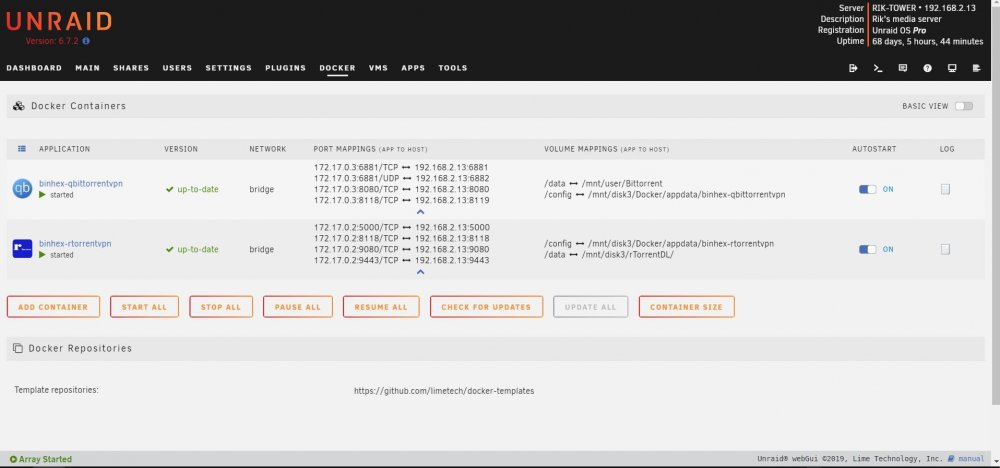
I try now for over one hour to get access to my unRAID docker qBittorrent service, but with no luck. I would like to run qBittorrent next to my rTorrent docker img. The main problem is that if I want to access the qBittorrent GUI, Chrome gives me a Page not Found error.... But I still can access rTorrent and not rTorrent and qBittorrent... Here an overview from my Docker-page, no conflicting ports, as the install should've failed... Is it possible, at all, to run qBittorrent and rTorrent on one unRAID system? Hope someone can help me if it is possible... Thanks!
-
Seems to work with min,% value set to 150. Thanks, @binhex
-
Just wanted to change the ratio settings in RuTorrent, 'cause all my torrents stop at 1.000 So gone to config button en clicked on ratio groups Here you can see the ratio groups, I've set all the torrents to group 8, but doesn't change anything... My Upload ETA is set to 150%. Has that something to do with stopping at 1.000
-
I now got it completely working. Thanks for all the help guys!!
-
I understand it now. /data is "mounted" in the settings to "/mnt/disk7/Usenet DL". Got it now and it works!!!! Thank you Stanley!!