





Raptor2k
Members
-
Joined
-
Last visited
Everything posted by Raptor2k
-
Need this feature. +1
-
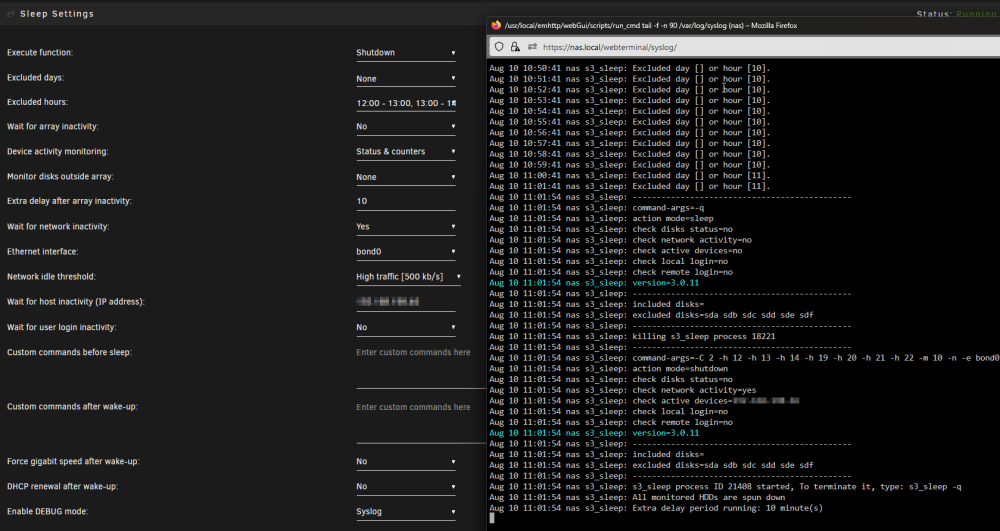
Hello, can you modfiy this as a solution? In Unraid 6.12.3 S3 Sleeping Settings is partially working . Spin down devices and this workaround does not work. This tool detects network activity and Online Pc / other devices.
-
Danke mgutt für deine Antwort. Tatsächlich ist etwas abgeschmiert und nach einmal herunterfahren (kein Neustart) hat alles wieder geklappt.
-
Folgende Fehlerbehebungen wurden durchgeführt: - Neustart. - Passwort des Arrays zwei mal eingegeben. - Cache gelöscht bei Firefox und Edge. - Statt Passwort ein Keyfile verwendet.
-
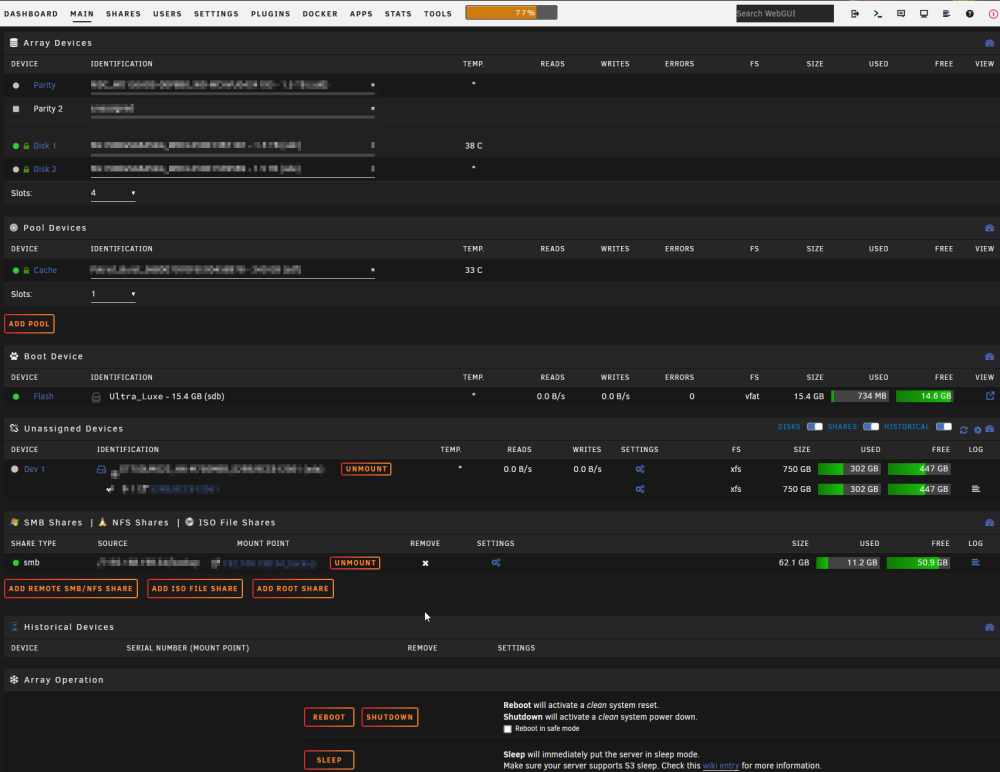
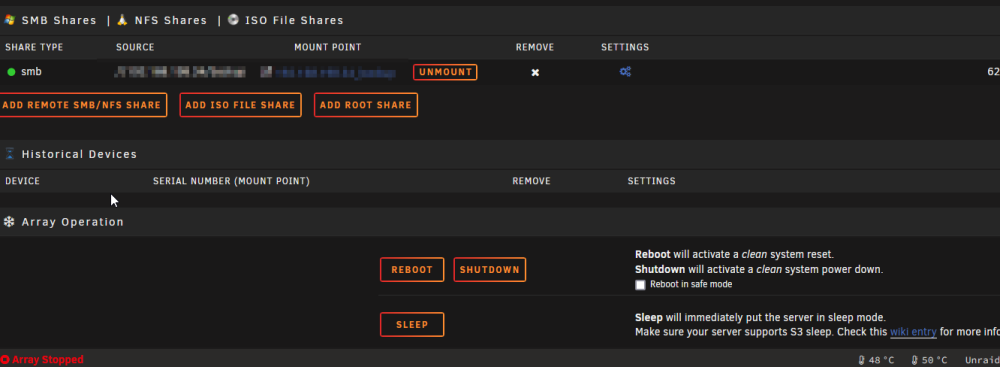
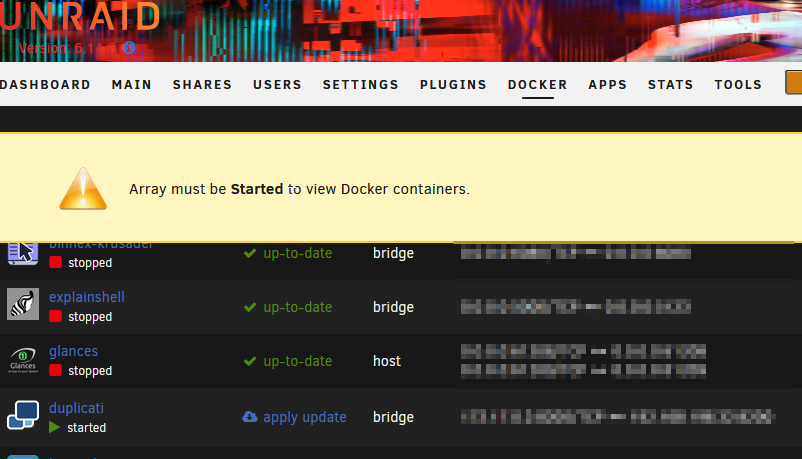
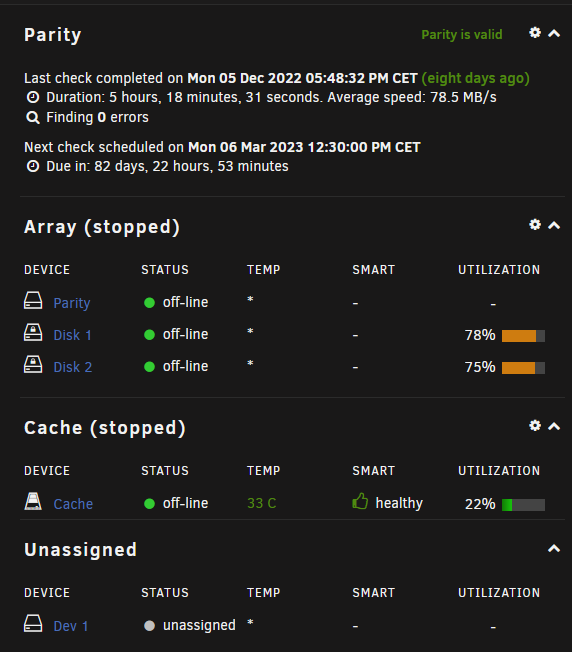
Guten Tag, seit einer Woche "spinnt" Unraid. Die GUI / das Interface zeigt an dass das Array nicht gestartet ist. Ich kann jedoch auf alle Shares zugreifen und meine Docker Container sind ebenso online. Es handelt sich um die neueste Unraid Version 6.11.5 Stable Branch. Habt Ihr für mich einen Tipp das zu beheben? Anbei ein paar Screenshots. Danke Euch für eure Hilfe. VG Raptor2k
-
Sadly the file conversation of video files does not work. I can upload the video files but nothing happens
-
Found a solution: In Unraid > Docker > Start Console: cd /app/paperless/src python3 manage.py document_retagger -c
-
Hello, i am to newbie to simply start the command for retagging my correspondents: How do i execute this command? https://paperless-ng.readthedocs.io/en/latest/administration.html#document-retagger In Django / Admin Page the cron job does not start.. Maybe i have to do this in unraid terminal? But how and where? Thank you for your help. The command: document_retagger [-h] [-c] [-T] [-t] [-i] [--use-first] [-f] optional arguments: -c, --correspondent -T, --tags -t, --document_type -i, --inbox-only --use-first -f, --overwrite
-
Ok danke. Also ohne weitere Hardware keine andere Möglichkeit es sicher zu konfigurieren... hm....
-
Danke euch allen für die ausführlichen Antworten. Da Ihr direkt auf die Hardware, sprich Router, abzielt (bis auf die Idee mit der Firewall über eine VM) nehme ich an, dass im Bereich Docker keine Lösung gibt ? Ich habe bei allen Docker die Möglichkeit einer Passwortzugangsbeschränkung, jedoch bringt es das nicht, da über HTTP das Passwort ja offen kommuniziert wird.
-
Hallo Unraider ! Mein kleiner J4105 Server funktioniert bis auf VM erste Sahne. Jetzt ändern sich aber in 1-2 Jahren unsere Wohnverhältnisse und ich bekomme die Möglichkeit mit meinen Nachbarn einen Internetanschluss zu teilen. Aus diesem Grund beschäftigt mich die Frage wie ich Docker Container wie z.B. Duplicati, Paperless, Thunderbird, Heimdall... dazu zwingend kann nur https / verschlüsselte Verbindungen zuzulassen. Meine Idee war ja bereits swag, dass ich für externe Verbindung zu meinen Mediendateien / Cloud nutze. Aber wie funktioniert das intern ? Ich kann ja für eine interne IP kein Lets Encyrpt Zertifikat anfordern ? Oder ? Bereits für Home Assistant auf einen Raspberry Pi habe ich mit OpenSSH ein internes Zertifikat erstellt. Aber beim Docker Duplicati finde ich z.B. in dem Ordner kein Verzeichnis, der für die Webpase zustäbdig ist. Wie geht ihr vor ? Ich danke im Voraus für Eure Antworten.
-
Can somebody confirm that Celeron Processors like J4105 are not working ? The plugin always says "not supported". https://ark.intel.com/content/www/de/de/ark/products/128989/intel-celeron-j4105-processor-4m-cache-up-to-2-50-ghz.html EDIT: A i see... sadly not possible ...: https://github.com/intel/gvt-linux/issues/64
-
Please can somebody give me the paramteres in Unraid Docker GUI for setting up a VNC Password only for the Thunderbird Docker? Thank you. Kind regards Raptor2k
-
sadly this not works. Nextcloud says an error: " ocrdata not found".
-
am i wrong ? I think there is another docker with Handbrake and Nvidia support. Any luck with this other docker container ?
-
has anyone an advice how to seperate appdata from "user upload data" ? i want appdata on my cache and the user data in array. Thx for your answer.
-
Np np. No rush. Great you find the error. I only searched my current maibo J4105 / cpu and find nothing about the error. Glad you searched "Gemini". Kind regards Raptor2k Summary: J4150, Error, Handbrake, GPU hardware encoding, Gemini, Lake, Abort.
-
I posted this on github but unfortunately i have received no answers since 6 days: Title: Unraid docker. Encode failed with h.265 or h.264 (QSV) (Intel GPU, J4105) #142 Hello everbody, i am using this docker on my Unraid NAS Version 6.8.3. I could succesfully add my Intel GPU to the docker image, but sad´ly i got an error: `------- CONVERSION OUTPUT Thu Aug 6 13:40:58 CEST 2020 ------- [13:40:58] hb_display_init: attempting VA driver 'iHD' libva info: VA-API version 1.8.0 libva info: User environment variable requested driver 'iHD' libva info: Trying to open /opt/intel/mediasdk/lib64/iHD_drv_video.so libva info: Found init function __vaDriverInit_1_8 libva info: va_openDriver() returns 0 Cannot load libnvidia-encode.so.1 [13:40:59] hb_init: starting libhb thread [13:40:59] thread 1467b39d4b20 started ("libhb") HandBrake 1.3.3 (2020080500) - Linux x86_64 - https://handbrake.fr 4 CPUs detected Opening /watch/Magic Home RGBW LED-Controller - Ersteinrichtung und Tasmota flashen haus-automatisierung.com -4K-.mp4... [13:40:59] CPU: Intel(R) Celeron(R) J4105 CPU @ 1.50GHz [13:40:59] - logical processor count: 4 [13:40:59] Intel Quick Sync Video support: yes [13:40:59] - Intel Media SDK hardware: API 1.33 (minimum: 1.3) [13:40:59] - H.264 encoder: yes [13:40:59] - preferred implementation: hardware (any) via ANY [13:40:59] - capabilities (hardware): breftype icq+la+i+downs vsinfo opt1 opt2+mbbrc+extbrc+trellis+ib_adapt+nmpslice [13:40:59] - H.265 encoder: yes (8bit: yes, 10bit: yes) [13:40:59] - preferred implementation: hardware (any) via ANY [13:40:59] - capabilities (hardware): bpyramid icq vsinfo opt1 [13:40:59] hb_scan: path=/watch/Magic Home RGBW LED-Controller - Ersteinrichtung und Tasmota flashen haus-automatisierung.com -4K-.mp4, title_index=1 udfread ERROR: ECMA 167 Volume Recognition failed disc.c:323: failed opening UDF image /watch/Magic Home RGBW LED-Controller - Ersteinrichtung und Tasmota flashen haus-automatisierung.com -4K-.mp4 disc.c:424: error opening file BDMV/index.bdmv disc.c:424: error opening file BDMV/BACKUP/index.bdmv bluray.c:2585: nav_get_title_list(/watch/Magic Home RGBW LED-Controller - Ersteinrichtung und Tasmota flashen haus-automatisierung.com -4K-.mp4/) failed [13:40:59] bd: not a bd - trying as a stream/file instead libdvdnav: Using dvdnav version 6.0.1 libdvdread:DVDOpenFileUDF:UDFFindFile /VIDEO_TS/VIDEO_TS.IFO failed libdvdread:DVDOpenFileUDF:UDFFindFile /VIDEO_TS/VIDEO_TS.BUP failed libdvdread: Can't open file VIDEO_TS.IFO. libdvdnav: vm: failed to read VIDEO_TS.IFO [13:40:59] dvd: not a dvd - trying as a stream/file instead Input #0, mov,mp4,m4a,3gp,3g2,mj2, from '/watch/Magic Home RGBW LED-Controller - Ersteinrichtung und Tasmota flashen haus-automatisierung.com -4K-.mp4': Metadata: major_brand : mp42 minor_version : 0 compatible_brands: isommp42 creation_time : 2019-04-07T11:13:14.000000Z Duration: 00:17:51.60, start: 0.000000, bitrate: 499 kb/s Stream #0:0(und): Video: h264 (Main) (avc1 / 0x31637661), yuv420p(tv, bt709), 1280x720 [SAR 1:1 DAR 16:9], 368 kb/s, 25 fps, 25 tbr, 12800 tbn, 50 tbc (default) Metadata: creation_time : 2019-04-07T11:13:14.000000Z handler_name : ISO Media file produced by Google Inc. Created on: 04/07/2019. Stream #0:1(und): Audio: aac (LC) (mp4a / 0x6134706D), 44100 Hz, stereo, fltp, 127 kb/s (default) Metadata: creation_time : 2019-04-07T11:13:14.000000Z handler_name : ISO Media file produced by Google Inc. Created on: 04/07/2019. [13:40:59] scan: decoding previews for title 1 Scanning title 1 of 1, preview 1, 0.00 %[13:40:59] scan: audio 0x1: aac, rate=44100Hz, bitrate=127999 Unknown (AAC LC) (2.0 ch) (127 kbps) Scanning title 1 of 1, preview 3, 30.00 % Scanning title 1 of 1, preview 7, 70.00 %[13:41:00] scan: 10 previews, 1280x720, 25.000 fps, autocrop = 0/0/0/0, aspect 16:9, PAR 1:1 [13:41:00] scan: supported video decoders: avcodec qsv [13:41:00] libhb: scan thread found 1 valid title(s) Using preset: modthom title 1: stream: /watch/Magic Home RGBW LED-Controller - Ersteinrichtung und Tasmota flashen haus-automatisierung.com -4K-.mp4 duration: 00:17:51 size: 1280x720, pixel aspect: 1/1, display aspect: 1.78, 25.000 fps autocrop: 0/0/0/0 chapters: 1: duration 00:17:51 audio tracks: 1, Unknown (AAC LC) (2.0 ch) (127 kbps) (iso639-2: und) subtitle tracks: [13:41:00] Starting work at: Thu Aug 6 13:41:00 2020 [13:41:00] 1 job(s) to process [13:41:00] json job: { "Audio": { "AudioList": [], "CopyMask": [ "copy:mp3", "copy:aac", "copy:ac3", "copy:dts", "copy:dtshd", "copy:eac3", "copy:flac", "copy:truehd" ], "FallbackEncoder": "none" }, "Destination": { "AlignAVStart": false, "ChapterList": [ { "Duration": { "Hours": 0, "Minutes": 17, "Seconds": 51, "Ticks": 96444077 }, "Name": "" } ], "ChapterMarkers": false, "File": "/output/.AFkSzD/Magic Home RGBW LED-Controller - Ersteinrichtung und Tasmota flashen haus-automatisierung.com -4K-.mkv", "InlineParameterSets": false, "Mp4Options": { "IpodAtom": false, "Mp4Optimize": false }, "Mux": "mkv" }, "Filters": { "FilterList": [ { "ID": 6, "Settings": { "mode": 1 } }, { "ID": 12, "Settings": { "crop-bottom": 0, "crop-left": 0, "crop-right": 0, "crop-top": 0, "height": 720, "width": 1280 } } ] }, "Metadata": {}, "PAR": { "Den": 1, "Num": 1 }, "SequenceID": 0, "Source": { "Angle": 0, "Path": "/watch/Magic Home RGBW LED-Controller - Ersteinrichtung und Tasmota flashen haus-automatisierung.com -4K-.mp4", "Range": { "End": 1, "Start": 1, "Type": "chapter" }, "Title": 1 }, "Subtitle": { "Search": { "Burn": true, "Default": false, "Enable": false, "Forced": false }, "SubtitleList": [] }, "Video": { "ColorFormat": 0, "ColorMatrix": 1, "ColorPrimaries": 1, "ColorRange": 1, "ColorTransfer": 1, "Encoder": "qsv_h265", "Level": "auto", "Options": "", "Preset": "quality", "Profile": "auto", "QSV": { "AsyncDepth": 4, "Decode": false }, "Quality": 28.0, "Tune": "", "Turbo": false, "TwoPass": false } } [13:41:00] Starting Task: Encoding Pass [13:41:00] Skipping crop/scale filter [13:41:00] job configuration: [13:41:00] * source [13:41:00] + /watch/Magic Home RGBW LED-Controller - Ersteinrichtung und Tasmota flashen haus-automatisierung.com -4K-.mp4 [13:41:00] + title 1, chapter(s) 1 to 1 [13:41:00] + container: mov,mp4,m4a,3gp,3g2,mj2 [13:41:00] + data rate: 499 kbps [13:41:00] * destination [13:41:00] + /output/.AFkSzD/Magic Home RGBW LED-Controller - Ersteinrichtung und Tasmota flashen haus-automatisierung.com -4K-.mkv [13:41:00] + container: Matroska (libavformat) [13:41:00] * video track [13:41:00] + decoder: h264 [13:41:00] + bitrate 368 kbps [13:41:00] + filter [13:41:00] + Framerate Shaper (mode=1) [13:41:00] + frame rate: 25.000 fps -> constant 25.000 fps [13:41:00] + Output geometry [13:41:00] + storage dimensions: 1280 x 720 [13:41:00] + pixel aspect ratio: 1 : 1 [13:41:00] + display dimensions: 1280 x 720 [13:41:00] + encoder: H.265 (Intel Media SDK) [13:41:00] + preset: quality [13:41:00] + profile: auto [13:41:00] + level: auto [13:41:00] + quality: 28.00 (ICQ) [13:41:00] + color profile: 1-1-1 [13:41:00] sync: expecting 26790 video frames [13:41:00] hb_display_init: using VA driver 'iHD' libva info: VA-API version 1.8.0 libva info: User environment variable requested driver 'iHD' libva info: Trying to open /opt/intel/mediasdk/lib64/iHD_drv_video.so libva info: Found init function __vaDriverInit_1_8 libva info: va_openDriver() returns 0 [13:41:00] qsv_hevc_make_header: MFXVideoCORE_SyncOperation failed (-17) ERROR: encqsvInit: qsv_hevc_make_header failed ERROR: Failure to initialise thread 'Quick Sync Video encoder (Intel Media SDK)' [13:41:00] vfr: 0 frames output, 0 dropped and 0 duped for CFR/PFR [13:41:00] vfr: lost time: 0 (0 frames) [13:41:00] vfr: gained time: 0 (0 frames) (0 not accounted for) [13:41:00] h264-decoder done: 0 frames, 0 decoder errors [13:41:00] sync: got 0 frames, 26790 expected [13:41:00] Finished work at: Thu Aug 6 13:41:00 2020 [13:41:00] libhb: work result = 3 Encode failed (error 3). HandBrake has exited.` Activity log: '[18:07:35] gtkgui: HandBrake 1.3.3 (2020080500) - Linux x86_64 - https://handbrake.fr [18:07:35] hb_display_init: attempting VA driver 'iHD' libva info: VA-API version 1.8.0 libva info: User environment variable requested driver 'iHD' libva info: Trying to open /opt/intel/mediasdk/lib64/iHD_drv_video.so libva info: Found init function __vaDriverInit_1_8 libva info: va_openDriver() returns 0 Cannot load libnvidia-encode.so.1 [18:07:35] hb_init: starting libhb thread [18:07:35] hb_init: starting libhb thread [18:07:35] hb_init: starting libhb thread [18:07:41] gtkgui: Custom Preset: /custom/modthom [18:07:41] Starting work at: Thu Aug 6 18:07:41 2020 [18:07:41] 1 job(s) to process [18:07:41] json job: { "Audio": { "AudioList": [], "CopyMask": [ "copy:mp3", "copy:aac", "copy:ac3", "copy:dts", "copy:dtshd", "copy:eac3", "copy:flac", "copy:truehd" ], "FallbackEncoder": "none" }, "Destination": { "AlignAVStart": false, "ChapterList": [ { "Duration": { "Hours": 0, "Minutes": 1, "Seconds": 9, "Ticks": 6222690 }, "Name": "" } ], "ChapterMarkers": false, "File": "/output/Felix Wal Spielzeug 19.07.2020 (1).mkv", "InlineParameterSets": false, "Mp4Options": { "IpodAtom": false, "Mp4Optimize": false }, "Mux": "mkv" }, "Filters": { "FilterList": [ { "ID": 6, "Settings": { "mode": 1 } }, { "ID": 12, "Settings": { "crop-bottom": 0, "crop-left": 0, "crop-right": 0, "crop-top": 0, "height": 1080, "width": 1920 } } ] }, "Metadata": { "Name": "Felix Wal Spielzeug 19.07.2020" }, "PAR": { "Den": 1, "Num": 1 }, "SequenceID": 0, "Source": { "Angle": 0, "Path": "/storage/media/Videos/Sonstige Videos/Private Videos/Felix Wal Spielzeug 19.07.2020.mkv", "Range": { "End": 1, "Start": 1, "Type": "chapter" }, "Title": 1 }, "Subtitle": { "Search": { "Burn": true, "Default": false, "Enable": false, "Forced": false }, "SubtitleList": [] }, "Video": { "ColorFormat": 0, "ColorMatrix": 1, "ColorPrimaries": 1, "ColorRange": 1, "ColorTransfer": 1, "Encoder": "qsv_h265", "Level": "auto", "Options": "", "Preset": "quality", "Profile": "auto", "QSV": { "AsyncDepth": 4, "Decode": false }, "Quality": 28.0, "Tune": "", "Turbo": false, "TwoPass": false } } [18:07:41] CPU: Intel(R) Celeron(R) J4105 CPU @ 1.50GHz [18:07:41] - logical processor count: 4 [18:07:41] Intel Quick Sync Video support: yes [18:07:41] - Intel Media SDK hardware: API 1.33 (minimum: 1.3) [18:07:41] - H.264 encoder: yes [18:07:41] - preferred implementation: hardware (any) via ANY [18:07:41] - capabilities (hardware): breftype icq+la+i+downs vsinfo opt1 opt2+mbbrc+extbrc+trellis+ib_adapt+nmpslice [18:07:41] - H.265 encoder: yes (8bit: yes, 10bit: yes) [18:07:41] - preferred implementation: hardware (any) via ANY [18:07:41] - capabilities (hardware): bpyramid icq vsinfo opt1 [18:07:41] hb_scan: path=/storage/media/Videos/Sonstige Videos/Private Videos/Felix Wal Spielzeug 19.07.2020.mkv, title_index=1 udfread ERROR: ECMA 167 Volume Recognition failed disc.c:323: failed opening UDF image /storage/media/Videos/Sonstige Videos/Private Videos/Felix Wal Spielzeug 19.07.2020.mkv disc.c:424: error opening file BDMV/index.bdmv disc.c:424: error opening file BDMV/BACKUP/index.bdmv bluray.c:2585: nav_get_title_list(/storage/media/Videos/Sonstige Videos/Private Videos/Felix Wal Spielzeug 19.07.2020.mkv/) failed [18:07:52] bd: not a bd - trying as a stream/file instead libdvdnav: Using dvdnav version 6.0.1 libdvdread:DVDOpenFileUDF:UDFFindFile /VIDEO_TS/VIDEO_TS.IFO failed libdvdread:DVDOpenFileUDF:UDFFindFile /VIDEO_TS/VIDEO_TS.BUP failed libdvdread: Can't open file VIDEO_TS.IFO. libdvdnav: vm: failed to read VIDEO_TS.IFO [18:07:52] dvd: not a dvd - trying as a stream/file instead Input #0, matroska,webm, from '/storage/media/Videos/Sonstige Videos/Private Videos/Felix Wal Spielzeug 19.07.2020.mkv': Metadata: creation_time : 2020-07-19T21:10:17.000000Z ENCODER : Lavf58.29.100 Duration: 00:01:09.14, start: 0.000000, bitrate: 9812 kb/s Stream #0:0: Video: hevc (Main), yuv420p(tv, bt709), 1920x1080 [SAR 1:1 DAR 16:9], 25 fps, 25 tbr, 1k tbn, 25 tbc (default) Metadata: DURATION : 00:01:09.141000000 Stream #0:1: Audio: aac (LC), 48000 Hz, stereo, fltp (default) Metadata: title : Stereo DURATION : 00:01:09.141000000 [18:07:52] scan: decoding previews for title 1 [18:07:52] scan: audio 0x1: aac, rate=48000Hz, bitrate=1 Unknown (AAC LC) (2.0 ch) [18:07:54] scan: 10 previews, 1920x1080, 25.000 fps, autocrop = 0/0/0/0, aspect 16:9, PAR 1:1 [18:07:54] scan: supported video decoders: avcodec qsv [18:07:54] libhb: scan thread found 1 valid title(s) [18:07:54] Starting Task: Encoding Pass [18:07:54] Skipping crop/scale filter [18:07:54] job configuration: [18:07:54] * source [18:07:54] + /storage/media/Videos/Sonstige Videos/Private Videos/Felix Wal Spielzeug 19.07.2020.mkv [18:07:54] + title 1, chapter(s) 1 to 1 [18:07:54] + container: matroska,webm [18:07:54] + data rate: 9812 kbps [18:07:54] * destination [18:07:54] + /output/Felix Wal Spielzeug 19.07.2020 (1).mkv [18:07:54] + container: Matroska (libavformat) [18:07:54] * video track [18:07:54] + decoder: hevc [18:07:54] + filter [18:07:54] + Framerate Shaper (mode=1) [18:07:54] + frame rate: 25.000 fps -> constant 25.000 fps [18:07:54] + Output geometry [18:07:54] + storage dimensions: 1920 x 1080 [18:07:54] + pixel aspect ratio: 1 : 1 [18:07:54] + display dimensions: 1920 x 1080 [18:07:54] + encoder: H.265 (Intel Media SDK) [18:07:54] + preset: quality [18:07:54] + profile: auto [18:07:54] + level: auto [18:07:54] + quality: 28.00 (ICQ) [18:07:54] + color profile: 1-1-1 [18:07:54] sync: expecting 1728 video frames [18:07:54] hb_display_init: using VA driver 'iHD' libva info: VA-API version 1.8.0 libva info: User environment variable requested driver 'iHD' libva info: Trying to open /opt/intel/mediasdk/lib64/iHD_drv_video.so libva info: Found init function __vaDriverInit_1_8 libva info: va_openDriver() returns 0 [18:07:54] qsv_hevc_make_header: MFXVideoCORE_SyncOperation failed (-17) [18:07:54] encqsvInit: qsv_hevc_make_header failed [18:07:54] Failure to initialise thread 'Quick Sync Video encoder (Intel Media SDK)' [18:07:54] vfr: 0 frames output, 0 dropped and 0 duped for CFR/PFR [18:07:54] vfr: lost time: 0 (0 frames) [18:07:54] vfr: gained time: 0 (0 frames) (0 not accounted for) [18:07:54] hevc-decoder done: 0 frames, 0 decoder errors [18:07:54] sync: got 0 frames, 1728 expected [18:07:54] Finished work at: Thu Aug 6 18:07:54 2020 [18:07:54] libhb: work result = 3 ' My NAS system: Asrock J4105 with 4 GB DDR3(or4?) RAM Docker is installed on a Cache SSD of the brand Patriot (Burst). Btw the encoding works without the iGPU Video Codecs for example h.265 or h.264. Thank you for your great work and thank you for your future answers. Have a nice day. Greetings from Germany. Raptor2k (maybe somebody in this forum knows the answers. Thx)
-
hello, can i use user scripts for scanning my nextcloud files? i want to insert this code: docker exec -it mynextcloudserver sudo -u abc php /config/www/nextcloud/occ files:scan --all the code should be executed daily. Thx for your replies.




