






Rendeaust
Members
-
Joined
Everything posted by Rendeaust
-
Power went down earlier. Booting up Unraid I can't reach the web gui. So far I've rebooted, restarted nginx server and restored a flash backup but no dice. If I restart nginx it says it's actually not started. I can start it but it only loads the server's login page, after that I get an http 500 error. Any ideas? tower-diagnostics-20251111-0051.zip
-
I'm trying to mount an rclone volume via userscript. If I run rclone mount, I get this error in Windows when the volume is accessed via samba: "You require permission from TOWER\root to make changes..." It works just fine if I run the rclone mount command via unraid terminal. It seems like the share is read-only if I run the script in userscript. Any idea what I'm missing here or if I'm doing something incorrectly? fusermount -u -z /mnt/disks/Gdrive sudo umount -l /mnt/disks/Gdrive mkdir -p /mnt/disks/Gdrive rclone mount Gdrive: /mnt/disks/Gdrive --allow-other --max-read-ahead 1024k
-
I'm trying to mount an rclone volume via userscript. If I run rclone mount, I get this error in Windows when the volume is accessed via samba: "You require permission from TOWER\root to make changes..." It works just fine if I run the rclone mount command via unraid terminal. It seems like the share is read-only if I run the script in userscript. Any idea what I'm missing here or if I'm doing something incorrectly? fusermount -u -z /mnt/disks/Gdrive sudo umount -l /mnt/disks/Gdrive mkdir -p /mnt/disks/Gdrive rclone mount Gdrive: /mnt/disks/Gdrive --allow-other --max-read-ahead 1024k
-
Hey, this 3 year old inactive account just want to say thanks. Basically I setup encryption for one of my drives for the first time yesterday, copied shares over to it already, then panicked when I realized my past self must've forgotten to save the encryption key in my password manager because I can't see it there. I think I remember the key... but I want a way to verify if it's correct without stopping the array because I'd be toast if it's incorrect (without making a back up first anyway). Your tool did exactly what I needed to do and verified my memory serves me correctly today. I just exited on the prompt for new passphrase as soon as it verified my key was right. Big kudos to you, dude. You just saved my ass.
-
I've set my age days to 6 months but I still can see files in the Recycle Bin folder older than that after hitting Remove Aged Files. Does that only work on schedule (which I have turned off) or am I doing something wrong? Also where can I find log deleted files? Thanks!
-
Thanks. How do I revert back to default unraid dark theme, though? Edit: You need to uninstall the plug in.
-
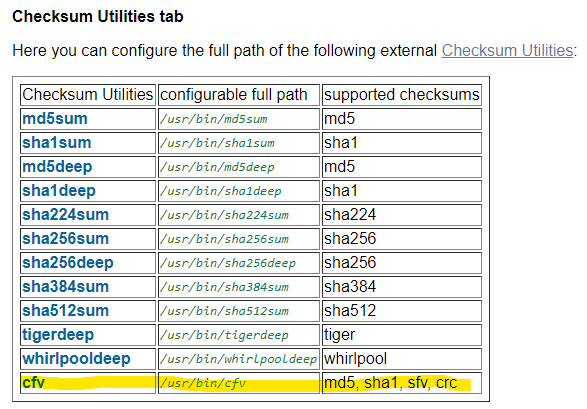
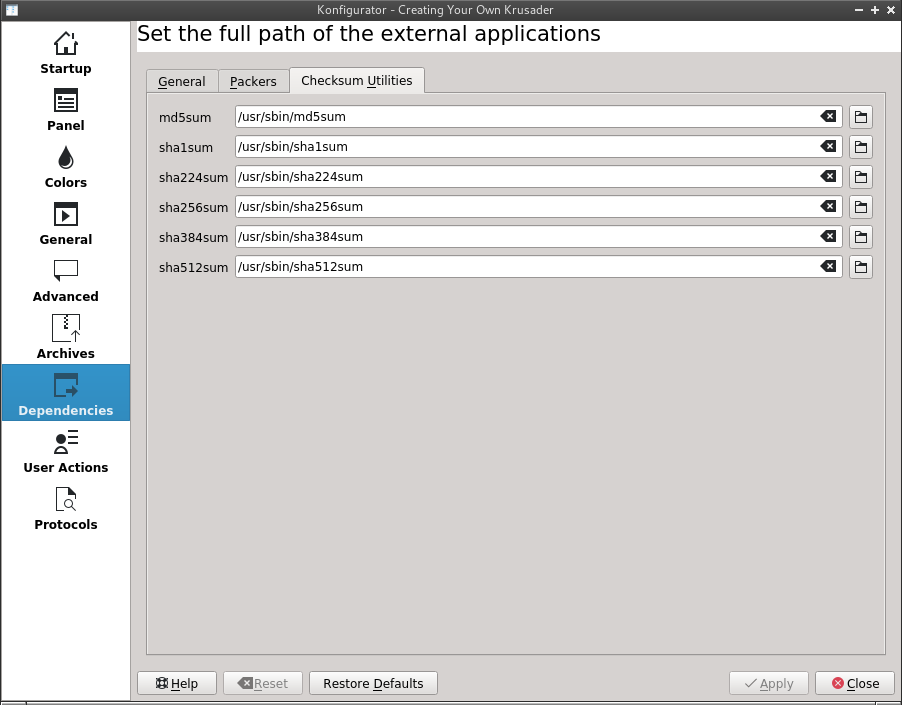
How can I add CRC checksum to krusader? It says on the docs that it should have one but I can't see it from the list. https://docs.kde.org/trunk5/en/extragear-utils/krusader/checksum.html https://docs.kde.org/trunk5/en/extragear-utils/krusader/konfig-dependencies.html
-
2 seconds. Is there a way for me to install the downloaded package manually? Thanks
-
Tried several times. Even tried installing manually and rebooting the entire server, no dice.
-
**Please excuse the poor photo, was on remote session. I apologize in advance if this a known issue. I can seem to download the plugin correctly for some reason. When I cancel this and try again, it will install successfully but the service/web ui won't start after enabling through settings. Logs: Invalid #command: /usr/local/emhttp/plugins/unbalance/scripts/start Invalid #command: /usr/local/emhttp/plugins/unbalance/scripts/stop

-
I have 3 questions about the S3 sleep plugin. If I set the plugin to not invoke sleep from 00:00 to 10:00, assuming all conditions has been met and it shutdown the server at 10:00, will it automatically turn back on at 00:00? What's the correct definition of array inactivity? When all disks are spun down (cache included or not) or if there's no activity in the array (no reads/writes transfers)? I'm not sure if I should follow @SpaceInvaderOne's youtube video definition of this or the plugin's description. If the array is running and if I set the plugin to shutdown, again assuming all conditions are met and it invoked the plugin to shutdown, will it safely stop the array first or it'll behave as Unraid's way of shutting down (which is to not safely stop array, services, etc...) About the system buttons, Same to question 3 above, will shutdown button invoke safe shutdown or no? Hope these are easy questions to answer. Thanks!
-
I ran File Integrity today. Long story short, power went down today and I want to see if that caused file corruption. If it got the hashes from when the array was started earlier this morning, then those hashes are useless. Hashes should be from yesterday. It all went well but I want to know what date it got the hashes are from? Also PS. I'm still confused what's the difference between build and export. Can someone ELI5? Thanks a lot.
-
Thanks. Didn't knew this was causing the conflict. I have both privoxy ports turned off (set to 'no'/defaults) but I've set the other port to 8119. Will that cause anything bad? Sorry, a bit new to this NAS and docker thing... Thanks!
-
What day and time does this run when I set it to weekly or monthly?
-
Is there a way to run binhex qbitorrent and rtorrent at the same time?
-
How can I view the status of the task when using another browser? I initiated the check on my phone but I want to view the status on my laptop and my PC.

