





zxhaxdr
Members
-
Joined
-
Last visited
-
Hi, I am trying to change to a larger disk, but I got that error. This does not make sense to me. Basically, I am trying to swap one of the 900G to a 1.8T drive, but not working. Btw these 2TB ones and 900GB ones are under different vdevs. Seems Unraid is expecting 2TB drives, which is not necessary. A temporary solution is: You can replace the drive with zpool replace you_tank_name /dev/sd* /dev/sd* After resilvering, stop the array, unassign all drives from the pool, click the pool name, and delete the pool. Then add a new pool and assign all the drives back.
-
To maximise the uptime and to fully utilise the hot-swappable ability. Why not allow the replacement of disks without stopping the array? I upgrade/replace hard drives frequently, and because are about 20 drives in the system. To replace all of them, I will have to start/stop the array 20 times, which causes significant downtime. Not sure why this is not the case already but I think this is the whole point of using ZFS.
-
It's been a while, and this is not addressed properly. Anyway, for anyone who runs into the same issue. You can replace the drive with zpool replace you_tank_name /dev/sd* /dev/sd* After resilvering, stop the array, unassign all drives from the pool, click the pool name, and delete the pool. Then add a new pool and assign all the drives back.
-
Hi everyone, I am running Unraid on an HPE ML350 Gen10 and all my drives are hot-swappable. Before Unraid officially supported ZFS, I used to replace the drive by simply unplugging the old drive and replacing it using the command line so my server would not have any downtime. It is crucial for me to NOT have any downtime because of all the services I am running on it and I believe ZFS was designed to avoid downtime. However, since ZFS was supported, I had to stop the array, replace the drive, assign the new drive and start the array to replace a drive. Now I need to upgrade all 8 drives in a cage and this becomes a serious problem. May I know if I can still use the ZFS command to replace the drive without stopping the array? Will this mess up the drive assignment etc.? Thanks
-
I have been experiencing the same issue since updating to 6.12 rc5. I updated from 6.11.* to rc1, and went through all the rc versions up to rc6, and the issue still persists in rc6 as well. However, after clearing some logs, I now have 1GB of free space remaining on my 32GB USB drive. Edit: Last night, I updated to RC7, and it seems to have fixed itself as the space has cleared up. Currently, the used space is 1.3GB, leaving me with 30GB of free space. The used amount hasn't seemed to increase since 8 hours ago.
-
According to the method https://github.com/open-iscsi/rtslib-fb/tree/master/rtslib def _gen_attached_luns(self): ''' Fast scan of luns attached to a storage object. This is an order of magnitude faster than using root.luns and matching path on them. ''' isdir = os.path.isdir islink = os.path.islink listdir = os.listdir realpath = os.path.realpath path = self.path from .root import RTSRoot from .target import LUN, TPG, Target from .fabric import target_names_excludes for base, fm in ((fm.path, fm) for fm in RTSRoot().fabric_modules if fm.exists): for tgt_dir in listdir(base): if tgt_dir not in target_names_excludes: tpgts_base = "%s/%s" % (base, tgt_dir) for tpgt_dir in listdir(tpgts_base): luns_base = "%s/%s/lun" % (tpgts_base, tpgt_dir) if isdir(luns_base): for lun_dir in listdir(luns_base): links_base = "%s/%s" % (luns_base, lun_dir) for lun_file in listdir(links_base): link = "%s/%s" % (links_base, lun_file) if islink(link) and realpath(link) == path: val = (tpgt_dir + "_" + lun_dir) val = val.split('_') target = Target(fm, tgt_dir) yield LUN(TPG(target, val[1]), val[3]) it scans subfolders under the /iscsi/ folder to delete luns. Everything is treated as a folder except the: excludes_list = [ # version_attributes "lio_version", "version", # discovery_auth_attributes "discovery_auth", # cpus_allowed_list_attributes "cpus_allowed_list", ] where this cpus_allowed_list is excluded. So it shouldn't still try to access it as a folder. the reason is, in the targetcli you are using, this cpus_allowed_list is not in the excludes_lsit. By checking the latest commit for the fabric module https://github.com/open-iscsi/rtslib-fb/commit/8d2543c4da62e962661011fea5b19252b9660822 I see So this might indicate that the targetcli is out dated in Unraid 6.10.3 for some systems that has cpus_allowed_list. Thank you Edit: targetcli 2.1.54 is already the newest version for and no newer package has been built. We need to rebuild the targetcli to use the latest rtslib-fb.
-
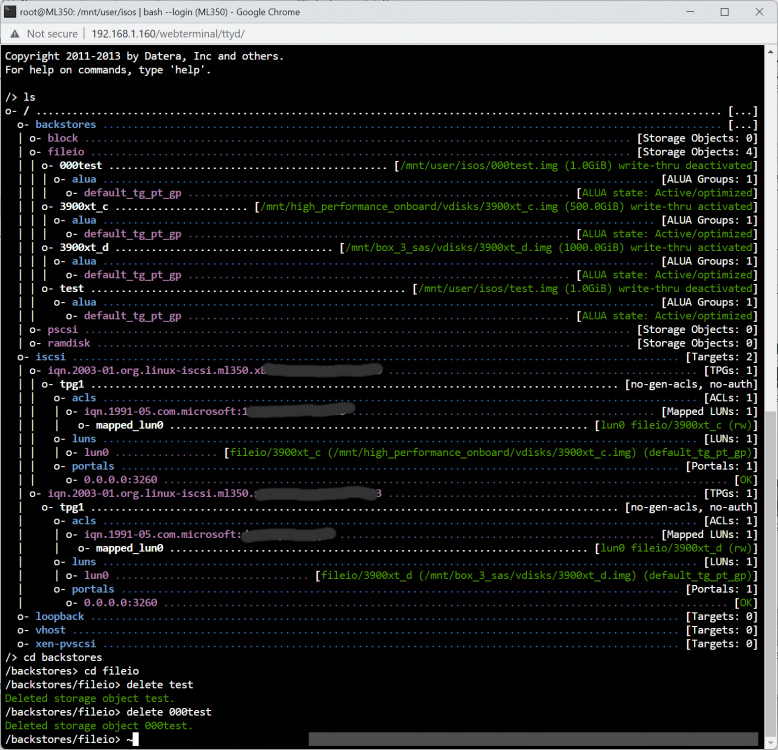
Mine works OK. It says cpu_allowed_list is not a directory in your case. Obviously, that is a file not a directory, and I don't have this file under that dir. That should be something else because I don't think this cpu_allowed_list file is relevant to the name of any fileIO. Why does it try to access that file? Hopefully, it's causing issues to the frontend only.
-
I have found the problem. In, $("#ft1 input[type='checkbox']").change(function() { var matches = document.querySelectorAll("." + this.className); for (var i=0, len=matches.length|0; i<len; i=i+1|0) { matches[i].checked = this.checked ? true : false; } $("#removeFileIO").attr("disabled", false); }); method querySelectorAll() throws exception Uncaught DOMException: Failed to execute 'querySelectorAll' on 'Document': '.000test' is not a valid selector. at HTMLInputElement.<anonymous> (<anonymous>:3:26) See the fileIO name is 000test and it seems it desen't like digits in the front. Other name formats are fine, e.g., test or test_test. So I think we need to regulate the class name by adding a prefix or something. Cheers
-
Thank you for the reply. Still doesn't work. Even in the incognito mode. Maybe the frontend isn't rendered properly. I removed the plugin and reinstalled but that doesn't help. At some point it's broken, and it's broken forever. I will look into in to get more info sometime.
-
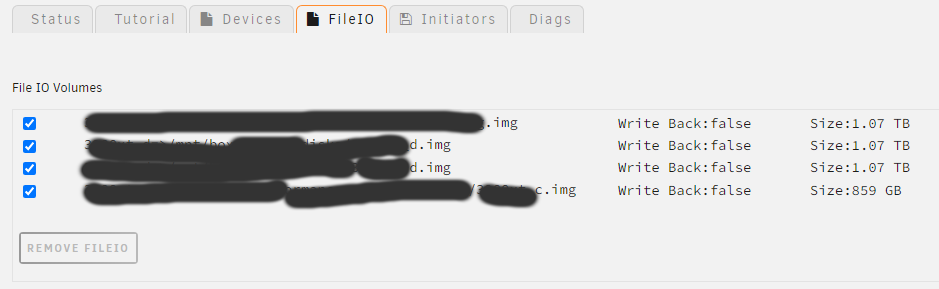
What I remember I did is. If I remember, at first, it does work, however it doesn't really delete the img under the /mnt. So I manually removed the .img and created another fileio. Since then, the button is forever greyed out. BTW, I didn't create the fileio under /mnt/user but under ZFS /mnt/**pool like that.
-
Hi, It seems that I cannot remove the fileio because the button is greyed out. Everything else can be removed though. I'm using unraid 6.10.3. Thanks
-
I found a strange behaviour for ZFS Master. I have three pools that are using lz4 as the compression algorithm. I changed one of them to gzip-9, and ZFS Master stopped showing dataset info. Only one row which has SHOW DATASETS, SCRUB POOL, EXPORT POOL and CREATE DATASET is showing. The rest pools are displayed correctly. Also, I checked with the command line, and the pool with gzip is normal. Does anyone else have this issue?
-
I found a strange behaviour. I have three pool that are using lz4 as compression algorithm. I changed one of them to gzip-9 and zfs master stopped showing dataset info. Only one row which has SHOW DATASETS, SCRUB POOL, EXPORT POOL and CREATE DATASET is showing. The rest pools are displayed correctly. Also, I checked with command line and the pool with gzip is normal. I'm not sure if this is the correct place to ask but I can't seem to find the support topic of ZFS Master.



