





Gee1
Members
-
Joined
-
Last visited
Everything posted by Gee1
-
the bigger problem for me is the new non colored syslog in unraid 6.10... is it possible to get the old one with clearly colored lines ?
-
my proFTPd configuration only have access to mnt/user.. so when i will an UD folder to be available to proFTPd i have to mount it in user folder.. it works fine except the restart thing.. but otherwise its not a big deal for me cause i only restart for new major updates every few months
-
cause i have to mount manually a UD dir into \\tower\01_root\mnt\user
-
pls bring back the colored syslog in unRAID 6.10. It was much clearer than the new black/white console looking version
-
its little complicated. Its for my proFTPd.. ive mounted a UD folder to be available over my FTP. Actually after restart the server i have to rename one share, after that im able to mount my UD HDD then i rename the share back to its original name
-
I need to mount Unassigned Devices completely before mounting the shares (on server startup) hows that possible ?
-
Is it possible to live change download speed limit by command line ?
-
Success! App '896660' already up to date. ---Prepare Server--- ---BepInEx for Valheim enabled!--- ---BepInEx for Valheim Version Check--- ---https://valheim.thunderstore.io/package/denikson/BepInExPack_Valheim/--- ---BepInEx v5.4.901 up-to-date--- ---Server ready--- ---Starting Backup daemon--- ---Start Server--- ---with BepInEx for Valheim--- ---https://valheim.thunderstore.io/package/denikson/BepInExPack_Valheim/--- ---Update Check for Valheim enabled, running automatically every 60 minutes.--- everything seems ok.. bit its still 148 update: now it has updated via autoupdate...
-
Valheim Server update? client version 150 and server still has 148
-
should i only actiavate udp and no tcp forwarding ? Cause with only udp it also dont work
-
Valheim Server dosnt apear in server others list, the can only connect via ip. Whats wrong?
-
still in actual Unraid RSS dosnt work
-
i will figure it out thanks
-
latest DD drivers i dont know if they are grounded properly it happens to all tuners
-
i often get these warnings: 2021-03-22 19:56:12.593 [WARNING] linuxdvb: DVB-S/S2X #4 : DVB-S #0 - poll TIMEOUT 2021-03-22 19:56:12.660 [WARNING] linuxdvb: DVB-S/S2X #5 : DVB-S #0 - poll TIMEOUT 2021-03-22 19:56:12.666 [WARNING] linuxdvb: DVB-S/S2X #7 : DVB-S #0 - poll TIMEOUT 2021-03-22 19:56:13.119 [WARNING] linuxdvb: DVB-S/S2X #7 : DVB-S #0 - retune nodata 2021-03-22 19:56:13.144 [WARNING] linuxdvb: DVB-S/S2X #4 : DVB-S #0 - retune nodata 2021-03-22 19:56:13.119 [WARNING] linuxdvb: DVB-S/S2X #7 : DVB-S #0 - retune nodata 2021-03-22 19:56:13.144 [WARNING] linuxdvb: DVB-S/S2X #4 : DVB-S #0 - retune nodata whats happend?
-
i already use ProFTPd.. i found a way to fix this. i mount now to /mnt/user/TV_RECORDS/TV_RECORDS instead of /mnt/user/TV_RECORDS
-
i dont know a other way
-
how can i disable these errors ?
-
my system log is full of these errors: Feb 23 00:51:20 Tower emhttpd: error: share_luks_status, 5984: Operation not supported (95): getxattr: /mnt/user/TV_RECORDS the TV_RECORDS share is cache only (but data istn realy on cache than only on the UD HDD) /mnt/user/TV_RECORDS is mountet from an UD HDD to access it via FTP. I get these errors since 1 day (i updated to latest unraid RC2)
-
DefaultAddress dosnt work
-
ok i will test it - cool it works But i dont understand it.. the only reason i use custom br is that i can assign my own ip
-
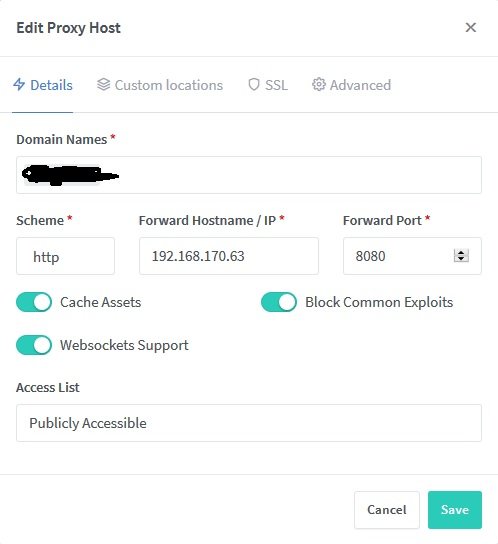
NPM is 170.55 its on the same bridge / network btw... NPM is Host (170.55) and 170.63 wehre the webserver is, is br0 and i have another problem: no matter what i try i cant change nginx port 8080 in unraid
-
Which error are you getting exactly ? -> 502 Bad Gateway Are you accessing your site locally or remotely ? localy it works, and remote over proxy it dosnt. (192.168.170.63 is a normal nginx webserver)
-
ok the first problem.. i easaly cann access http://192.168.170.63:8080/ut3/1.jpg but i cannot access it throug NPM via xx.xxx.de/ut3/1.jpg nee SSL needed
-
still waiting for Rocket Chat. With nginx it works

