Mihle
Members
-
Joined
-
Last visited
Everything posted by Mihle
-
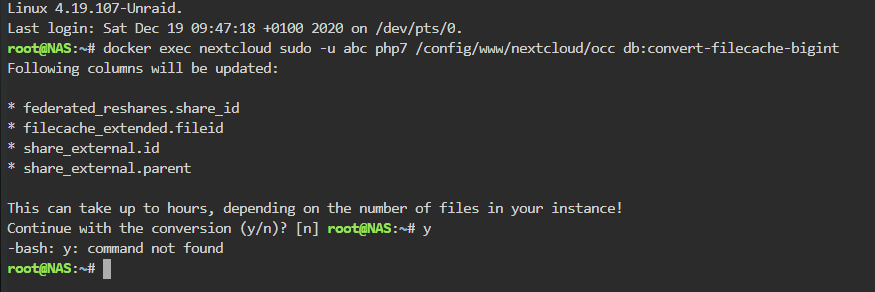
So My nextcloud ask me to run occ db:convert-filecache-bigint' While the instance is offline, but how do I do that? If I just do this: docker exec nextcloud sudo -u abc php7 /config/www/nextcloud/occ db:convert-filecache-bigint What happens is this: y doesnt work Tried this and it doesnt work docker exec nextcloud sudo -u abc php7 /config/www/nextcloud/occ y Both comes with unknown command/command not found.
-
Now I get mismatches because Nextcloud files_trashbin too. This plugin likes to give false positives when you have Nextcloud.
-
How I switched to swag that seemed to work: Create an folder named swag in appdata Copy all content from letsencrypt folder to swag (could also rename it but I did not want to change letscencrypt stuff before I knew swag worked fine) Install swag template and change settings Stop letsencrypt docker and start swag Change letsencrypt to swag in nextcloud config Done.
-
If only the docker got updated and that happened it is probably the same thing yes.
-
Docker probably updated to the one for version 19.0.2 while Nextcloud itself was 18.0.8.2 or something, I would not call that far behind. Would you reccomend in the future to upgrade via Nextcloud via web and then the docker next time? Or can that cause the same thing?
-
Because no help I gambled and updated Nextcloud via terminal. It seem to have fixed it. I am not sure, but I think its best to update Nextcloud via its own updater and then update the docker, and not the other way around?
-
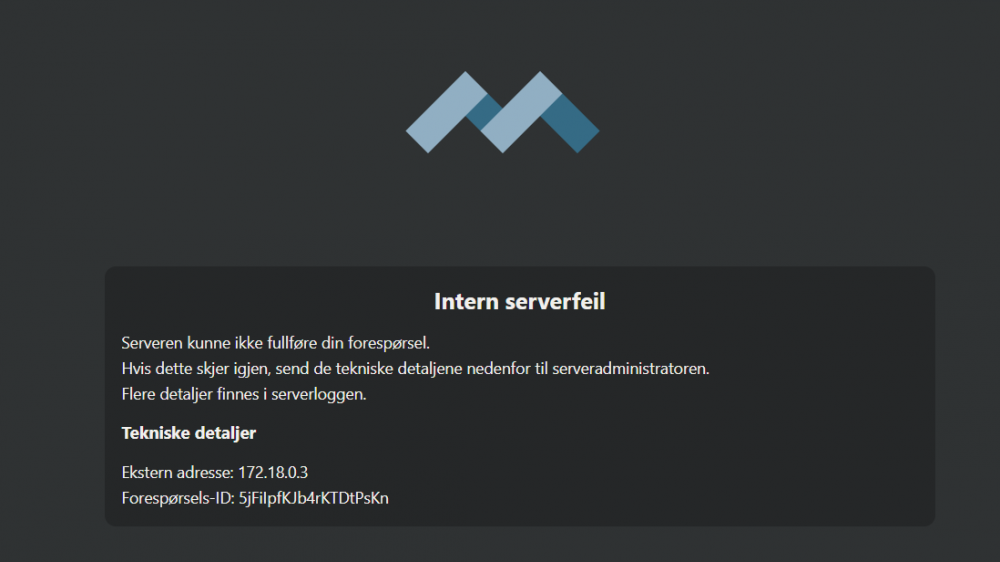
So I have started getting this when I try to connect to my Nextcloud server via browser: It says "Internal Server Error" and "more info in server log" Syncing of files to the desktop client and accessing the server via app on android seem to work fine, its just that when accessing via browser I get that. So i dont really know when it happened other than the last months as I usually have used it via desktop client and android app. As I know, its the file that for me is /Ncloud/nextcloud.log it talks about? (Ncloud is the share I have Nextcloud files in) When I search for one of the Request IDs of the tried attempts, this is what the line says: {"reqId":"DUjCYQvZMkiUBvHyhVo2","level":0,"time":"2020-09-05T19:23:23+00:00","remoteAddr":"172.18.0.3","user":"Mihle","app":"no app in context","method":"GET","url":"/apps/files/","message":"Deprecated event type for OCA\\Files::loadAdditionalScripts: Symfony\\Component\\EventDispatcher\\GenericEvent","userAgent":"Mozilla/5.0 (Windows NT 10.0; Win64; x64) AppleWebKit/537.36 (KHTML, like Gecko) Chrome/84.0.4147.135 Safari/537.36","version":"18.0.8.2"} {"reqId":"DUjCYQvZMkiUBvHyhVo2","level":3,"time":"2020-09-05T19:23:23+00:00","remoteAddr":"172.18.0.3","user":"Mihle","app":"index","method":"GET","url":"/apps/files/","message":{"Exception":"Exception","Message":"Argument 1 passed to \"Symfony\\Component\\EventDispatcher\\EventDispatcherInterface::dispatch()\" must be an object, string given.","Code":0,"Trace":[{"file":"/config/www/nextcloud/lib/private/AppFramework/App.php","line":125,"function":"dispatch","class":"OC\\AppFramework\\Http\\Dispatcher","type":"->","args":[{"__class__":"OCA\\Files\\Controller\\ViewController"},"index"]},{"file":"/config/www/nextcloud/lib/private/AppFramework/Routing/RouteActionHandler.php","line":47,"function":"main","class":"OC\\AppFramework\\App","type":"::","args":["OCA\\Files\\Controller\\ViewController","index",{"__class__":"OC\\AppFramework\\DependencyInjection\\DIContainer"},{"_route":"files.view.index"}]},{"function":"__invoke","class":"OC\\AppFramework\\Routing\\RouteActionHandler","type":"->","args":[{"_route":"files.view.index"}]},{"file":"/config/www/nextcloud/lib/private/Route/Router.php","line":299,"function":"call_user_func","args":[{"__class__":"OC\\AppFramework\\Routing\\RouteActionHandler"},{"_route":"files.view.index"}]},{"file":"/config/www/nextcloud/lib/base.php","line":1013,"function":"match","class":"OC\\Route\\Router","type":"->","args":["/apps/files/"]},{"file":"/config/www/nextcloud/index.php","line":38,"function":"handleRequest","class":"OC","type":"::","args":[]}],"File":"/config/www/nextcloud/lib/private/AppFramework/Http/Dispatcher.php","Line":109,"Previous":{"Exception":"TypeError","Message":"Argument 1 passed to \"Symfony\\Component\\EventDispatcher\\EventDispatcherInterface::dispatch()\" must be an object, string given.","Code":0,"Trace":[{"file":"/config/www/nextcloud/lib/private/EventDispatcher/SymfonyAdapter.php","line":70,"function":"dispatch","class":"Symfony\\Component\\EventDispatcher\\EventDispatcher","type":"->","args":["OCA\\Files::loadAdditionalScripts",{"__class__":"Symfony\\Component\\EventDispatcher\\GenericEvent"}]},{"file":"/config/www/nextcloud/apps/files/lib/Listener/LegacyLoadAdditionalScriptsAdapter.php","line":51,"function":"dispatch","class":"OC\\EventDispatcher\\SymfonyAdapter","type":"->","args":["OCA\\Files::loadAdditionalScripts",{"__class__":"Symfony\\Component\\EventDispatcher\\GenericEvent"}]},{"file":"/config/www/nextcloud/lib/private/EventDispatcher/ServiceEventListener.php","line":76,"function":"handle","class":"OCA\\Files\\Listener\\LegacyLoadAdditionalScriptsAdapter","type":"->","args":[{"__class__":"OCA\\Files\\Event\\LoadAdditionalScriptsEvent"}]},{"file":"/config/www/nextcloud/3rdparty/symfony/event-dispatcher/EventDispatcher.php","line":247,"function":"__invoke","class":"OC\\EventDispatcher\\ServiceEventListener","type":"->","args":[{"__class__":"OCA\\Files\\Event\\LoadAdditionalScriptsEvent"},"OCA\\Files\\Event\\LoadAdditionalScriptsEvent",{"__class__":"Symfony\\Component\\EventDispatcher\\EventDispatcher"}]},{"file":"/config/www/nextcloud/3rdparty/symfony/event-dispatcher/EventDispatcher.php","line":73,"function":"callListeners","class":"Symfony\\Component\\EventDispatcher\\EventDispatcher","type":"->","args":[[{"__class__":"Closure"},{"__class__":"Closure"},{"__class__":"Closure"},{"__class__":"Closure"},{"__class__":"Closure"}],"OCA\\Files\\Event\\LoadAdditionalScriptsEvent",{"__class__":"OCA\\Files\\Event\\LoadAdditionalScriptsEvent"}]},{"file":"/config/www/nextcloud/lib/private/EventDispatcher/EventDispatcher.php","line":80,"function":"dispatch","class":"Symfony\\Component\\EventDispatcher\\EventDispatcher","type":"->","args":[{"__class__":"OCA\\Files\\Event\\LoadAdditionalScriptsEvent"},"OCA\\Files\\Event\\LoadAdditionalScriptsEvent"]},{"file":"/config/www/nextcloud/lib/private/EventDispatcher/SymfonyAdapter.php","line":63,"function":"dispatch","class":"OC\\EventDispatcher\\EventDispatcher","type":"->","args":["OCA\\Files\\Event\\LoadAdditionalScriptsEvent",{"__class__":"OCA\\Files\\Event\\LoadAdditionalScriptsEvent"}]},{"file":"/config/www/nextcloud/apps/files_sharing/list.php","line":45,"function":"dispatch","class":"OC\\EventDispatcher\\SymfonyAdapter","type":"->","args":["OCA\\Files\\Event\\LoadAdditionalScriptsEvent",{"__class__":"OCA\\Files\\Event\\LoadAdditionalScriptsEvent"}]},{"file":"/config/www/nextcloud/apps/files/lib/Controller/ViewController.php","line":122,"args":["/config/www/nextcloud/apps/files_sharing/list.php"],"function":"include"},{"file":"/config/www/nextcloud/apps/files/lib/Controller/ViewController.php","line":260,"function":"renderScript","class":"OCA\\Files\\Controller\\ViewController","type":"->","args":["files_sharing","list.php"]},{"file":"/config/www/nextcloud/lib/private/AppFramework/Http/Dispatcher.php","line":170,"function":"index","class":"OCA\\Files\\Controller\\ViewController","type":"->","args":["","",null,false]},{"file":"/config/www/nextcloud/lib/private/AppFramework/Http/Dispatcher.php","line":99,"function":"executeController","class":"OC\\AppFramework\\Http\\Dispatcher","type":"->","args":[{"__class__":"OCA\\Files\\Controller\\ViewController"},"index"]},{"file":"/config/www/nextcloud/lib/private/AppFramework/App.php","line":125,"function":"dispatch","class":"OC\\AppFramework\\Http\\Dispatcher","type":"->","args":[{"__class__":"OCA\\Files\\Controller\\ViewController"},"index"]},{"file":"/config/www/nextcloud/lib/private/AppFramework/Routing/RouteActionHandler.php","line":47,"function":"main","class":"OC\\AppFramework\\App","type":"::","args":["OCA\\Files\\Controller\\ViewController","index",{"__class__":"OC\\AppFramework\\DependencyInjection\\DIContainer"},{"_route":"files.view.index"}]},{"function":"__invoke","class":"OC\\AppFramework\\Routing\\RouteActionHandler","type":"->","args":[{"_route":"files.view.index"}]},{"file":"/config/www/nextcloud/lib/private/Route/Router.php","line":299,"function":"call_user_func","args":[{"__class__":"OC\\AppFramework\\Routing\\RouteActionHandler"},{"_route":"files.view.index"}]},{"file":"/config/www/nextcloud/lib/base.php","line":1013,"function":"match","class":"OC\\Route\\Router","type":"->","args":["/apps/files/"]},{"file":"/config/www/nextcloud/index.php","line":38,"function":"handleRequest","class":"OC","type":"::","args":[]}],"File":"/config/www/nextcloud/3rdparty/symfony/event-dispatcher/EventDispatcher.php","Line":63},"CustomMessage":"--"},"userAgent":"Mozilla/5.0 (Windows NT 10.0; Win64; x64) AppleWebKit/537.36 (KHTML, like Gecko) Chrome/84.0.4147.135 Safari/537.36","version":"18.0.8.2"} And I have no idea what it says, anyone have any ideas? I dont know if Docker auto update before updating via nextclouds own updater can affect it? If so, how do I fix it? Last version I updated to via Nextcloud updater was the last version before version 19 I think?
-
This will, most likely already have now already, cost the company more than a Genuine Pro licence. What I personally would do, I am far far from an expert tho: 1. Try to switch the USB drive, if it works, switch to a genuine licence and software. 2. Try to salvage the Docker app data/VM data in to a new unRAID USB with genuine licence and just configure the rest manually and hope it works. 3. Just copy the data only and consider everything else lost and transfer to genuine software an licence.
-
I have no idea how you do that. Managed to do it instead with krusader docker
-
Same How?
-
Some recommend turning on HTTP2, but how do you do it? I havent found an actual guide I understand to do so, or if it is already? Edit: Inspect website says Protocol h2 so I am guessing its enabled already, maybe it only wasnt on older versions.
-
Anyone know how to get Nextcloud Talk working with the docker?
-
Maybe I should just give up and conclude that Nextcloud just got issues that is not fixable for me
-
I guess no one knows.
-
So after longer time than I wanted I set up preview generator for thumbnails. Its working fine for images that stored in Nextcloud itself. But for storage added as external storage, the previews are created, but neither web Nextcloud or the app actually uses the previews created. Nextcloud is instead creating new thumbnails instead for some reason. Anyone know why?
-
ok, thanks
-
Dont know F but its probably a sensor that isnt actually there that it shows
-
Oh, ok, will do once a week now then, have only one data disk (and one parity) so the same one will be every week until I get more when that happens. Btw I noticed I had it on once per day, I remembered that one person told me that is what I should do. But don't remember why and seemed little bit too much and cause unnecessary drive head movement. So I asked that here, will put it on once a week or something or less
-
I run parity once a month, and this once a week, is that fine?
-
Any way to figure out about how much memmory it will use or is the only way to turn it on and see?
-
Just a question, is there any point having Cache Dirs plugin if you keep your HDDs spinning all the time? Would it for example still cause less HDD head movement both with and without cache SSDs?
-
For fun I tried https://www.ssllabs.com/ssltest And this showed up, anything I should or should not do about that or is it just to ignore?

-
Updated to 17.0.1, can still not add exsternal storage anymore, still shows an Red ! without telling me what the error is
-
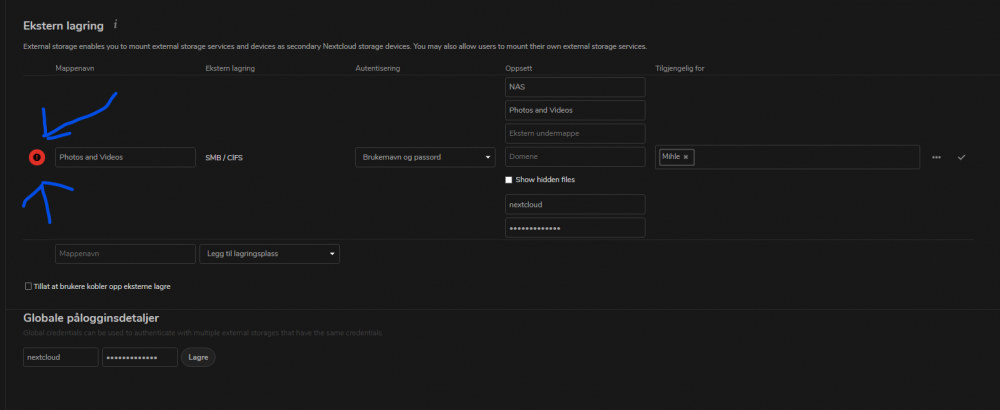
So I updated from 16.04 to 16.06 and got an issue. Everything seemed like normal except I could not share with link from stuff that is external storage. Found out the allow share setting was turned off after the update, so I tried to activate it again. But no, error symbol but it does not tell me what the error is! Then I tried to remove it to then add it again, but I cant add it again because the same thing happens! It just shows an red ! but doesnt say why! its exactly how it was when it worked before the update.... holding over the ! doesnt showing it, clicking on it doesnt show anything! Anyone know why? In worst case, can I revert back to 16.04?
-
How and why?