Mihle
Members
-
Joined
-
Last visited
Everything posted by Mihle
-
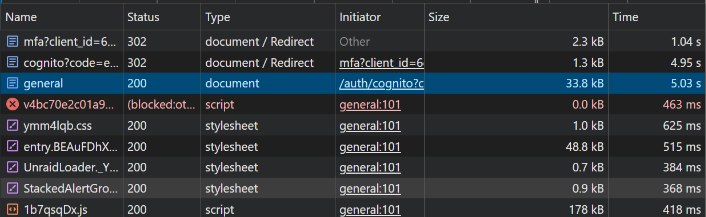
Seems to me like every action to do with user auth is super slow on that website. Logging in, changing MFA or password, creating backup codes etc. Its not the case with other websites. Do other people have the same experience and know why? For example login, super slow:
-
For me to have relevant data for that I would have to recreate the scenario by changing some of the settings and uploading stuff again, but can possibly do that, but later. This has nothing to do with the gap between moving thresholds I tested multiple settings and confirmed that. This has to do with how "Free down/prime up to this level of used Primary (cache) space:" acts when you have set it to only move files above 30MB. As described, lets say you have an 100 GB cache disk. 20 GB is used by files smaller than 30MB. What I would expect that threshold to work, was that then if I set it to 30%, It would move things down to 30GB left of the cache. And if there was 40 GB off files less than 30MB, it would move things so that its 40 GB left on it. But how it actually work, is that the "setpoint" of that threshold with 20GB of files smaller than 30MB, seem to be set to 0%. So to get it to reach 30% ish used, would have to set the setting to around 10% ish. It does mean if more files bellow 30MB is added, that point changes tho. If this is how its meant to work, thats probably fine but should then be written in the info boxes somewhere.
-
Have the "Free down/prime up to" setting changed how its calculated together with setting to only move files above certain size at some point? Because I remember my setting working fine, at some point, but I noticed it not moving enough data off cache and started investigating, For reference, I have set it to move all files that is larger than 30MB off cache. And from what I see, the % "Free down/prime up to" does not seem to be based on % off the whole drive and everything on it, as I expected it would. It seems like it ignores the data excluded because the size limit? What I mean is: Cache drives is 490GB Has 375GB data on it, 79% full. How I expected that setting to work, that if I set it to 50% it would move files until all files above 30MB, or total used place was less than 245GB, whatever came first. (And maybe it worked this way before or I missremember?): But now in my case above, it moves nothing, while if I set it to 0% it reports to move 114GB in test mode. That 114GB is about 23% of total space. While set it to 25% it reports moving nothing. Meaning it has to be ignoring the files that is too small from that calculation. I don't know how it should ideally work, but this confused me a lot. If this his intended behavior what I describe above, I think the info texts should improved to include that information to make it less confusing.
-
I have had an issue that I dont think was caused but he mover, but how mover works may have Affected what happened. In short, My NAS went down while mover was running I think? Or at least while I was uploading quite a bit of data to my NAS. When it came back online, things looked fine. Unraid GUI/file browser said the data was in cache still. But, when the mover did run again, both on schedule and started manually, there was some uploaded files on a share that should have been moved in a share, that wasnt moved. May be relevant at the time I set it to use mover not rsync but changing to rsync after the fact doesnt change it. Not even while going to the share and pressing "move now" button that is supposed to ignore settings didnt seem to move it either. But new uploads to the NAS was moved as they should when mover did run. So, I am thinking maybe the mover "lost track" of the files being on the cache while Unraid file browser said they still where dere? Is that possible?
-
I wish there was an way to specify folders that should always included in a move, ignoring other settings. For example, I have sat it to generally move files above 30MB off the cache. I wish I then you could also specify that content in X folders is always moved off the cache.
-
I find this very little user friendly, doesnt make sense to me. I checked some other forums I have been on, there clicking the body of a search result does nothing. That is fine to me. While the title brings to the post itself. Clicking on the whole body brings you to the topic as a whole doesnt make logically sense to me. The two solutions that make sense, is either the one above, or that body brings you to the specific post, and maybe clicking the xxx replies thing bring you to the post in general.
-
Is there any way to increase the amount of files the list of largest files is? It seems to be limited to 200 right now, can you increase it?
-
Hm.... Then I would consider it not that useful, personally. Hm.. I didnt find it at first, but I think I found it now. Hm.. OK Thanks
-
Hm, ok, In my case it would have been easier in my next-cloud share to choose what ones should be moved, rather than what one shouldnt. The only move files that is older than certain amount setting, I am guessing that one only counts from what time the file was written, not when its read from last time? Because if its only from when its written, its worthless in my scenario, as files may be read from without changed and still stay on the cache. Is it possible to have the move stuff over X size for example from cache different on different shares? Because of one share I may want it to be 0, but another I may want it to be 200 mb? If you enable larger than 200mb, and older than 60 days, is it AND or OR between them?
-
So I have my Nextcloud share on the cache. I want plenty of the files to be on the cache, but I dont want everything to be as its become 300 GB now. Is there any way to specify what folders the mover have on cache, and what is on the Array, inside an share? I rather want, "Everything on cache, except for X" rather than "Everything on Array, except for X", but may be able to work with both. If the share is set to Array --> Cache, how do the settings in this plugin work then? I am guessing "Move files based on minimum size?" counts for the same direction an share is set to, so in this case move from Array to cache and not the other way? Do "Move files off cache based on age?" ignore that Array --> Cache setting and move from cache to array no matter what? Maybe I have to flip the Array --> Cache setting to get something closer to what I want.
-
If I currently have a basic licence, will I be able to upgrade to a plus, after the change has happened, or would I be forced to stay on basic/upgrade all the way to pro?
-
So I did this with Nextcloud (Linuxserver) /tmp (not SWAG) a while ago by remapping it to a folder inside Nextclouds own Appdata folder. It worked fine at the time. But after a container/Nextcloud(v28) update, I started having issues with the photos app/viewing photos in Nextcloud making Nextcloud stop responding with few logs until I restarted my NAS, and then the docker service had to be turned on again manually. After a lot of testing I figured out removing the path remapping, fixed the freezing/stop responding issue. But Now I am back to /tmp being in the docker image. Anyone have heard about this before and know how to fix it or work around it? What about remapping a folder could cause problems with Nextcloud?
-
I am no longer getting that warning, but nextcloud stops responding every time the photo app in nextcloud tries to generate previews of photos. Nothing helps exept restaring the whole NAS. I have tried to find logs about it everywhere, nextcloud.log, docker.log, other logs, unraid syslog but there is zero logs that tells me anything about what is going on. At this point I think my only option is to try to roll back to an earlier appdata version.
-
The last while I have gotten this error now and then: Allowed memory size of 536870912 bytes exhausted (tried to allocate 608580088 bytes) at /app/www/public/lib/private/Files/Storage/Local.php#327 How do I fix that? How do I increase that limit to something higher? How do I find the file in the path the error mentions, I have tried looking for it it in Appdata but I havent found it yet. it is somewhere else?
-
After another update, its indeed fixed itself.
-
I just had an issue where Jellyfin on custom network would not start with error that port was already in use, after a lot of trying different things, I figured out that it was conflicting with itself. This started after some update. In the configuration, it had both a field named "Webui - HTTPS:" and one named "WebUI (HTTPS) [optional]:" that was both set to 8920. I changed the last one to something else and it then started up fine. Is this an issue with that its an older docker that has been updated as its basically the same name, or is it an issue with the docker itself? EDIT: I just noticed my Docker is not the linuxserver one, opsie.
-
I just updated (27.0.1, latest docker image I think), and I am getting the same errors, should I delete them manually or do something else or just wait?
-
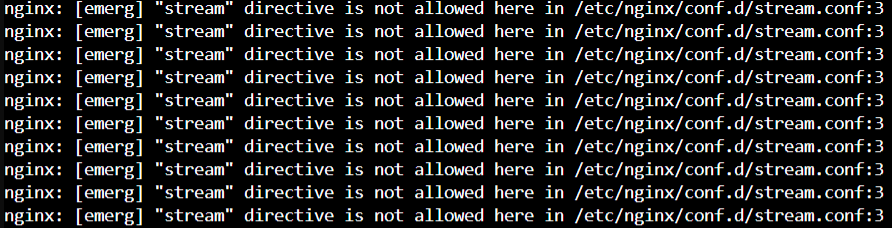
Same, only required to do ot with nginx.conf tho, not ssl.conf. For reference for other people, is is how the warning looks like in Swag log: I shut swag down and replaced the .sample with .conf and its working again
-
I only did the ngnx.conf and it worked, did not touch ssl.conf, and it worked. Thanks!
-
I figured it out, its not an issue with MariaDB at all. The issue is with SWAG. 1. Stop SWAG docker (dont know if this is required, but seems like a good practice to do?) 2. Go in to appdata/swag/nginx 3. Rename the nginx.conf like for example add .old (so you still have it, just in case) 4. Rename the nginx.conf.sample to just nginx.conf 5. Start SWAG docker 6. Profit. EDIT: Found this thread after the fact right now:
-
Ah, Thanks, i must be blind.
-
Maybe stupid question, but where is $LOGFILE, how do you view it? (Krusader?) EDIT: I see its mentioned it is in /tmp but the /tmp I am looking in, doesnt have it, maybe there is multiple ones and I looked in the wrong one?
-
Why is it better to use alias than $LUKS for example?
-
My mistake, the command is what you say there, it was an error by copying it over. But yes, it is encrypted. $DEVICE do work for unmount tho so weird it doesnt for spindown, while using sde works? When using sde, it does say dev/sde and not /dev/mapper/mountpoint? Even tho its supposed to be an encrypted disk? EDIT: $LUKS works for spin down, Why is it better to use disk alias?
-
I have a problem, in device script I have this: 'REMOVE' ) # Spinning down disk logger Spinning disk down -t$PROG_NAME /usr/local/sbin/rc.unassigned $DEVICE But the disk do not spin down, it does do a notification I have after that part, and the system log does say: Dec 23 21:45:36 NAS OfflineBackup: Spinning disk down But if I replace the "$DEVICE" with "sde", it does spin down and the system log says: Dec 23 21:50:03 NAS OfflineBackup: Spinning disk down Dec 23 21:50:03 NAS emhttpd: spinning down /dev/sde Why doesnt "$DEVICE" work? Its probably not ideal to use "sde" in that script?