





nowhere99
Members
-
Joined
Everything posted by nowhere99
-
It's just bugging me out that I have files in this ONE encfs folder, physically on the array, with no signs of it on the cache but it only is visible in /mnt/user, You cannot see it in /mnt/user0. Encfs must somehow be hiding it by not allowing it to be visible in whatever replication scheme unraid is using to have a /mnt/user0...
-
This was a good suggestion and originally that was the case. The folders in question had been created with a mv command from a share on cache to a share on array. Linux just decided it will work to just rename the file instead of actually moving anything. And normally it does except with Unraid, that renames the file name but not the path since it's physically on the same drive space. Results in a folder that's physically on a cache drive even tho Unraid share is set to array only. But it doesn't account for new files being generated and not visible on user0 even tho they are physically on the array and not cache.
-
Thanks all. I know you're probably used to all the "what's the diff between user and user0" questions but that's not really my question. My question is about a newly created file, created long after the share was set to primary Array, secondary nothing. Whenever ANY FILE or FOLDER is created by any means in the decrypted folder while encfs is running in the docker, that file or folder is visible in /mnt/user but NOT visible in /mnt/user0 (incidentally, it also not visible in /mnt/cache either). So this is a case where a file is orphaned to show ONLY in the /mnt/user tree and not the other two. A side note: If I shut down encfs, and then create a file in that exact same folder, it IS visible in /mnt/user0 (but still not /mnt/cache because it's not supposed to be). My SUSPICION is that since user0 is deprecated, devs aren't spending any time on it (rightly so) and in this encfs case, that clearly can contol what is visible in a folder by some magic I don't know, just hasn't been accounted for in whatever code would normally make a file visible in user0. Again, I AM curious why, BUT the real question is do I care that a newly create file on a long time set ARRAY only share can for whatever reason show in /mnt/user but NOT show in /mnt/user0. And accept my gratitude for all the work you all spend on developing and entertaining our questions here!
-
Hi, I read that user0 implementation is deprecated but I want to check if something I am doing has unknown consequences. I have a test share "test", which is set to Array Only. I have a manually spun up docker container that has a barebone ubuntu image with encfs installed. I run it from the command line and run the encfs command via docker exec to prevent an encryption password being stored in a config somewhere. I have the permissions and bind-mount propagation set to what I believe is the proper settings. the /mnt/user/test/enc and dec folders are synced properly inside and outside the docker. If I peek in /mnt/user0/test, both enc and dec folders are there, all the enc files are there BUT the dec folder is empty. I suspect this is related to encfs somehow but I don't even know what /user0 is doing to be a "mirror" of /user but without cache files. Anyway, since user0 is deprecated, do I really even care? Can anyone point out a blind spot I have on this before I try to utilize this encrypted folder? THANKS!
-
I think I've solved it. I had already added --cap-add SYS_ADMIN and --devices /dev/fuse to the run command but I also added --security-opt apparmor=unconfined and made sure the volume lines ended in :shared and now it works. The real fix was the unconfining apparmor tho. Fun stuff! Thanks itimpi! UPDATE: I'm still testing. the mounts are located in a share "test", set to ARRAY only. I have /mnt/user/test/enc and /mnt/user/test/dec set as bind mounts with my solution above in the docker run and image creation, they are bound to /enc and /dec in the docker. Almost everything works GREAT. Creating files in /mnt/user/test/dec automatically creates the encrypted version in /mnt/user/test/enc. BUT if I look in /mnt/user0/test/dec, I don't see any of the files I create in /mnt/user/test/dec. However, I DO see the encrypted versions in the enc folder on both user and user0. So, I THINK something is still wrong with "propagation" but I don't think it's in the same terms as "docker bind propagation". Bind propagation seems to deal with sub mounts, not visibility of files in hard links of the decrypted folder. Is this getting interesting to anyone yet?
-
I think I've solved it. I had already added --cap-add SYS_ADMIN and --devices /dev/fuse to the run command but I also added --security-opt apparmor=unconfined and made sure the volume lines ended in :shared and now it works. The real fix was the unconfining apparmor tho. Fun stuff! Thanks itimpi!
-
I ran a test on a linux mint bare metal machine where I created an ubuntu docker image and installed encfs on it. If I map the encrypted folder and decrypted folder volumes, then any file I put in decrypted folder was encrypted into the encrypted folder and the docker and host sides were perfectly synced. Now I try to repeat on my Unraid machine. While in the docker image, a file placed in decrypted folder is encrypted just fine and shows up in the encrypted folder properly. If I look in the encrypted folder on the host, I see the encrypted file. If I look in the decrypted folder on the host, it's empty. If I create a file in decrypted folder on the host, it is NOT visible in the mapped folder inside the docker. When I unmount encfs inside the docker, now the file I created on the host is visible inside the docker. In fact, while encfs is not mounted, syncing in and out of the docker is fine. Since it's only the decrypted folder that not visible outside the docker, it has to have something to do some kind of encfs visibility permissions. I did try to encfs mount with -o allow_root and allow_user but it didn't help. What's going on? Thanks! UPDATE: I just tried the same scenario using a linux mint VM with the exact same results.
-
Hey! Anyone still following this forum topic? It's been a while. Just found and installed it but not sure I like what I have to do to get android scrobbling working. The apps all require some crazy permissions. If anyone is here, I'll post a specific question... Thanks!
-
This doesn't work for the 870 EVO. The fumagician script just complains about the required files not being located in the correct path. ERROR (7) Firmware Files Required For the Firmware Update Process are Not Located in the Correct Path!!!
-
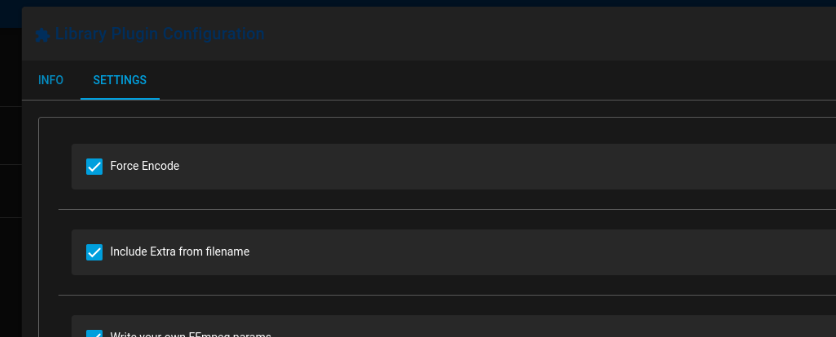
Hey Josh, I'm actually really enjoying this project. Once I got a handle on the plug-in system it was pretty simple to start modifying. If you recall I had a specific case where I wanted Unmanic to watch a folder and re-encode anything that showed there and the current h265 plug-ins would ignore any h265 files that were dropped in that folder. I modded the h265 cpu plug-in to add a force encode flag as well as a flag to signify that the plug-in should accept some ffmpeg options included in the filename of the file dropped into watch folder (i.e. -ss or -to to trim the file). I may touch base with you to see if there's a better way you envision to do file specific processing like this but for my specific case, it's working right now. But since it's totally specific to my case, I haven't tried to push a new plug-in but I'm willing to work to that end. Great project Josh! I'm loving it! Eric
-
AH! Just use the post processor plugin?
-
Oof. Deal breaker. Too bad. Wasted a ton of time getting it all set up, testing how custom ffmpeg commands are sent.
-
I'm assuming there's no way for me to decide when the runner asks to encode a file? I have a large library of ridiculously large h265 files that I wanted to re-encode with my own setting back to h265 but unmanic decides they are already h265 so does nothing to them. Can I change this anywhere?
-
Hey team. Intermittently, this container pegs 100% of the cores at 100% utilization. I haven't been able to nail down why but I get notified my SSD temp is high (46C) and it's because the cores are pegged. So however many cores the container is allowed to use get pegged to 100%. I limited the cores to only 4 e-cores for the time being. This phenom is happened on the Sonarr container a couple times also. I don't see anything interesting in the logs. Any ideas? What do you need from me to help troubleshoot? Edit: Oh yeah, just restarting the container stops it and gives me another few days or so before it happens again.
-
Thanks for the update!
-
It's probably a long shot but I just replaced a failing drive. I added a new PCIe SATA card and attached a new drive to it and tried to rebuild the data failed disk and it would cause the system to hang after a randomish 50% to 90% completion. Physical monitor was a blank screen, they keyboard num lock led went out, no web interface, no ssh. I ended up pulling all the sata cables and sata power cables out so I could label all the drives with their SSN and when I reseated everything, the system rebuilt the data drive, then rebuilt a bigger parity then cleared the old parity disk as a data drive, formatted and fired up no problem. I've had problems with the SATA cables with the clips on them to snap them in place. I think they actually prevent good connection sometimes and I've had three computers fixed this year by reseating hard drives...
-
OK, I scoured the hundreds of lines from the journalctl -xb command suggested at reboot time and I had apparently missed (or brushed off) a single line complaining about the inability to mount "shares", which is the Unraid share mountpoint configured in the setup xml. I never really considered that to be a problem because it always got mounted later anyway. So I decided to try adding "_netdev" to my fstab options setting on the Ubuntu server VM and it rebooted without a hitch the first try. I'll watch it over the next few weeks as I need to reboot naturally and if I find that didn't fix it, I'll report back. Otherwise, consider it fixed! Now off to fix the autostart setting in the bios so when my UPS shuts er down, everything will come back up after the power returns. Hope this helps someone else!
-
I saw this same question asked here in 2018 with no answer so I'm hoping someone can help in 2021 :-) Every time I reboot this VM or start it from power down it boots to safe mode and I have to enter ctrl-d on the keyboard to continue. It's been this way since about 2018 for me but my server is so stable I haven't cared until a recent road trip, some thunderstorms and my unraid server coming back up from UPS power down but my VM server stuck waiting for keyboard entry. Anyone have an suggestions on this? I seem to remember a suggestion concern root privs of something or another but it's been a long time. THANKS!
-
Not solved yet but worked around. My situation was two fold with this change. First, when using Privoxy for normal browsing, I could not connect to my containers. I've added the server IP to the containers Ignore addresses both with and without http(s)://, I've added the ports to delugevpn ADDITIONAL_PORT var, I've reset, rebooted etc. I ended up using a proxy switcher extension for now to go direct for 192.168.* but now I have an extension that potentially could be monitoring my traffic. Second, the containers couldn't connect to the indexers in Jackett (although Jackett had no trouble connecting to delugevpn and I could search and download manually from Jackett). Again, adding the server IP address to Sonarr/Radarr's ignore line did nothing neither did telling both to not even use proxy. Mind you this all worked fine last week. What I had to do was disable proxy inside Sonarr and Radarr then go to Settings/Indexers and click every indexer in both Sonarr and Radarr and click the test button. After doing that for each indexer, each one would start to work fine but only with proxy disabled.
-
Same problem here only I've been running a couple years or more. Deluge downloader is working fine. I can manually search on Jackett, find things and download fine. Looks like it broke last Sunday given all the red on Sonarr calendar...
-
I deleted and reinstalled the docker and now I can't connect with the thin client either. The connect button is greyed out so I guess the daemon isn't running? It's been working fine for three years now dead. Any ideas at all? Here's the log with some errors I found tonight... File "/usr/lib/python3.8/site-packages/deluge/common.py", line 198, in archive_files os.remove(sorted(all_arcs)[0]) builtins.IsADirectoryError: [Errno 21] Is a directory: '/config/archive/state-2020-10-05T01-08-16' 2021-01-13 23:36:17,989 DEBG 'watchdog-script' stdout output: [info] Deluge process listening on port 58846 2021-01-13 23:36:21,841 DEBG 'watchdog-script' stdout output: Setting "random_port" to: False Configuration value successfully updated. 2021-01-13 23:36:25,143 DEBG 'watchdog-script' stdout output: Setting "listen_ports" to: (51117, 51117) Configuration value successfully updated. 2021-01-13 23:36:29,119 DEBG 'watchdog-script' stdout output: [info] No torrents with state 'Error' found 2021-01-13 23:36:29,120 DEBG 'watchdog-script' stdout output: [info] Starting Deluge Web UI... [info] Deluge Web UI started 2021-01-13 23:36:29,121 DEBG 'watchdog-script' stdout output: [info] Attempting to start Privoxy... 2021-01-13 23:36:30,129 DEBG 'watchdog-script' stdout output: [info] Privoxy process started [info] Waiting for Privoxy process to start listening on port 8118... 2021-01-13 23:36:30,134 DEBG 'watchdog-script' stdout output: [info] Privoxy process listening on port 8118 2021-01-13 23:44:19,626 DEBG 'watchdog-script' stderr output: Unhandled error in Deferred: 2021-01-13 23:44:19,627 DEBG 'watchdog-script' stderr output: Traceback (most recent call last): File "/usr/lib/python3.8/site-packages/twisted/internet/defer.py", line 654, in _runCallbacks current.result = callback(current.result, *args, **kw) File "/usr/lib/python3.8/site-packages/twisted/internet/defer.py", line 1116, in _cbDeferred self.callback(self.resultList) File "/usr/lib/python3.8/site-packages/twisted/internet/defer.py", line 460, in callback self._startRunCallbacks(result) File "/usr/lib/python3.8/site-packages/twisted/internet/defer.py", line 568, in _startRunCallbacks self._runCallbacks() --- <exception caught here> --- File "/usr/lib/python3.8/site-packages/twisted/internet/defer.py", line 654, in _runCallbacks current.result = callback(current.result, *args, **kw) File "/usr/lib/python3.8/site-packages/deluge/ui/web/json_api.py", line 190, in _on_rpc_request_failed return self._send_response(request, response) File "/usr/lib/python3.8/site-packages/deluge/ui/web/json_api.py", line 232, in _send_response response = json.dumps(response) File "/usr/lib/python3.8/json/__init__.py", line 231, in dumps return _default_encoder.encode(obj) File "/usr/lib/python3.8/json/encoder.py", line 199, in encode chunks = self.iterencode(o, _one_shot=True) File "/usr/lib/python3.8/json/encoder.py", line 257, in iterencode return _iterencode(o, 0) File "/usr/lib/python3.8/json/encoder.py", line 179, in default raise TypeError(f'Object of type {o.__class__.__name__} ' builtins.TypeError: Object of type Failure is not JSON serializable 2021-01-13 23:44:19,627 DEBG 'watchdog-script' stderr output: Unhandled error in Deferred: 2021-01-13 23:44:19,627 DEBG 'watchdog-script' stderr output: Traceback (most recent call last): Failure: deluge.error.NotAuthorizedError: Auth level too low: 0 < 5 2021-01-13 23:51:07,422 DEBG 'start-script' stdout output: [info] Successfully assigned and bound incoming port '51117' 2021-01-14 00:06:07,800 DEBG 'start-script' stdout output: [info] Successfully assigned and bound incoming port '51117' 2021-01-14 00:21:08,163 DEBG 'start-script' stdout output: [info] Successfully assigned and bound incoming port '51117'
-
Hi, I can no longer get sonar or radar to connect to deluge-vpn. When I test the connection I get a "Authentication Failed" error. All was working before 12/22. I have unraid auto-updating nightly so that's likely when it died. I can log in from a linux box with the deluge thin client running, Connects and is fully operational. The web interface runs but it doesn't really work. It's there, accepts logining in and all the buttons work, but most of the preferences are blank, changing any doesn't stick, it doesn't show any active torrents and won't actually add any torrents. The biggest problem is getting sonar and radar authenticated again. I copy paste the address that just worked to get me in the web interface (one I haven't ever changed). Not sure what all info y'all need to help. Sonar settings for deluge are stupid simple. IP address of unraid machine, port 8112 (deluge port) and password, which I'm certain is correct. Any ideas? Let me know if you need some info. THANKS! EDIT only thing interesting in the logs is SOMETIMES I can make this show up. But I think that's only when I was playing around with the web client and trying to make it connect to the localhost daemon... 2021-01-13 23:44:19,627 DEBG 'watchdog-script' stderr output: Traceback (most recent call last): Failure: deluge.error.NotAuthorizedError: Auth level too low: 0 < 5
-
For a while now, whenever the container is updated it completely empties my queue and I have to go back and re-add everything. What's up with that? Let me know where to have a look. THANKS!
-
Hi, Privoxy is not starting. I tried repulling the image but I'm still getting the same issue. This is all I'm seeing in the log 2019-05-07 18:22:00,596 DEBG 'watchdog-script' stdout output: [debug] Waiting for Privoxy process to start... 2019-05-07 18:22:01,600 DEBG 'watchdog-script' stdout output: [warn] Wait for Privoxy process to start aborted, too many retries [warn] Showing output from command before exit... 2019-05-07 18:22:03,603 DEBG fd 16 closed, stopped monitoring <POutputDispatcher at 22775243352888 for <Subprocess at 22775243981656 with name watchdog-script in state RUNNING> (stdout)> 2019-05-07 18:22:03,603 DEBG fd 20 closed, stopped monitoring <POutputDispatcher at 22775243353056 for <Subprocess at 22775243981656 with name watchdog-script in state RUNNING> (stderr)> 2019-05-07 18:22:03,604 INFO exited: watchdog-script (exit status 1; not expected) 2019-05-07 18:22:03,604 DEBG received SIGCHLD indicating a child quit I was working fine until the update you all mentioned last week (Thursday?) but it's not working anymore. Any ideas? UPDATE: I was going to delete this before moderators approved, but I found a solution and thought I'd go ahead a post it for others. I stopped container, deleted the "privoxy" folder from the container folder, and restarted as suggested earlier. Didn't work for others leading to an updated image from binhex but it seems to have fixed my issue. It seems to be working now.

