





nktm85
Members
-
Joined
Everything posted by nktm85
-
For anyone whose 2fauth app just loads a blank screen and SSL (via reverse proxy) not working correctly, I was able to fix by added two variables to the container: ASSET_URL: use your reverse proxy domain TRUSTED_PROXIES: with value * (I think because the app is loading assets from outside domain, you have to set this otherwise the SSL certificate will fail) This is on UNRAID: v6.12.4 2FAuth – v5.2.0 Reverse Proxy Docker: Swag

-
This app does not work for me anymore. I tried changing the release, but still get a blank page
-
same requires higher version of PHP to run
-
I am having the same issue. I cannot log into root in Adminer as it says "Access denied for user 'root'@'172.17.0.1' (using password: YES)" I am actually putting server IP and not the internal. The weird thing is I CAN login to root via the container's command line with: mysql -u root -p. But I prefer GUI interface. It seems like MariaDB is blocking access from outside ip's (172.17.0.1) I can log into Adminer with the database that I created when I first installed the docker container app. (I tried using cmd line to create a new database and user and granted permissions to database, but that user also gets the "Access denied for user [newuser]@'172.17.0.1' "
-
nope, I do unraid-api restart, wait for 30 seconds but still disconnected. The only thing that will get it back working again is restarting the unraid server
-
same here, it's happening more frequent making unraid unusable until I restart. The recent update (2023.01.23.1223) says this fixes it, but I've upgraded to this version and still happening. I can't even use terminal to do cmd "unraid-api restart" to get it to refresh.
-
is there a way to register multiple people? i can see https://[2fauthurl]/register/, but when I try to add user it says I cannot add more than one user
-
this doesn't work for me =(
-
same issue, posting to bump
-
I have been doing that, however when I try to provision a certificate, it says successful, but when it reloads to hash url, it doesn't work (site can't be reached). I can still only access from local. Here's the appropriate log time when I did the ssl provisioning. I've deleted SSH and SSL in config of flash drive, and same results. From the log below, this file "/etc/ssl/certs/unraid_bundle.pem" doesn't exist on my server, so I'm wondering if that is the issue?
-
clicked update dns, but no change. I still cannot access hash.unraid.net url locally or remotely. Still have access to local url/ip address. In syslog i am seeing this error Edit: I just realized if I change the hash url from https to http, it works. So definitely some issue with SSL cert loading
-
So the SSL issue still remains (at least now I know what the issue is...) I was able to rebuild the parity, and got server backup and running. I installed the Unraid.net in community apps, and got everything working according to SpaceInvader's tutorial video. Everything works UNTIL I provision the certificate and it refreshes to the new https://[hash].unraid.net where I get the same error again that refuses to connect to web interface. On unraid.net my servers: it shows online but only local access with green lock. When I click on local access, I get error page. I setup port forwarding (different port) and remapped to 443 on router but cannot get remote access to work. Luckily, I found out the way to access web interface is now http://gardenhill.local with SSL set to auto so at least I have access to my server still. All I want to do is be able to access the hash.unraid.net again. It was working beautifully before all this =(
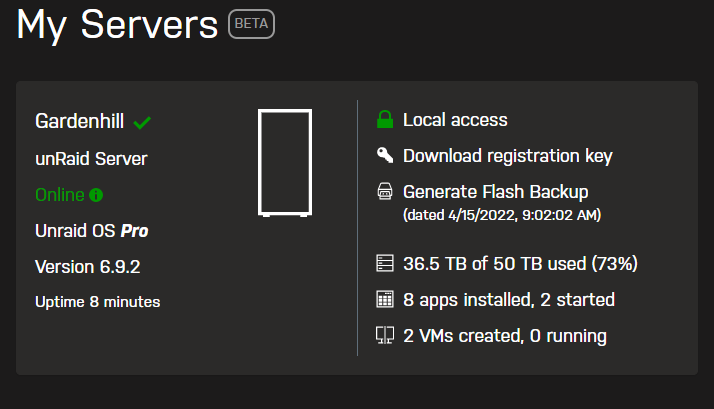
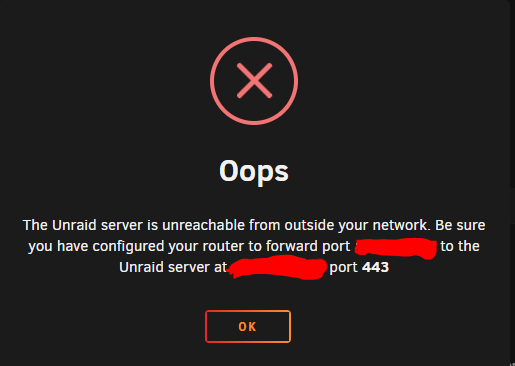
-
lesson learned, will do that once parity finishes rebuilding 😭
-
I was able to figure out the drives, and restarted array. Parity drives are rebuilding atm. Thank you all for your help!
-
Here is a snapshot of current disks I am trying to figure out. I for sure got 14tb for parity, so that's 100% right. Based on the 4/10/21 system log, I put in ST6000 into slot 6. So I'm not sure if the old 10TB parity drive went to disk 4 or 5. I got rid of the 4, 3, and 2 tb drives. and got another 8TB drive (WDC_WD80EMAZ) that should also be in disk 4 or 5 Other question: if i create new config, will all my files and folder be intact (assuming I finally figure out proper array)
-
yea i see it, i am now down to two hdd's trying to figure out 😅 Unfortunately I don't have any other diagnostic files that are recent.
-
yea, but where? what am I looking for
-
I know what the parity drives are though, out of 8 slots, 4 are looking for the wrong drive. this was generated AFTER i successfully loaded a backup, but an older one. I don't have any newer backups unfortunately so I am left with figuring out the slots
-
yea, that's what I am asking if syslogs or diagnostics have any info on which disk is to which slot. I just to make sure i get drives right before starting the array. here is a later diagnostics from my original usb drive that was after the old backup I loaded =( I also have a screenshot of my array with hdd serial's that I can dm if it makes it easier to search gardenhill-diagnostics-20210410-1433.zip
-
i thought i did, but the one I loaded was a year ago before I swapped some drives. I can sort of figure out which drives I swapped in order to figure out the array. If i do a new config and get the drives wrong, will it not start or mount?
-
oh ok =( do I need to preserve any current assignments? I only have one cache drive which was known.
-
whoa! that did the trick! I can see the web interface now! BUT I have another issue, the array seems to be looking for older hard drives, which I have since replaced. Is there any way I can see the array config from only a couple of weeks ago? Which file would that be under. I just want to makes sure I am using the correct drives for slots that I was using before when it was working so I don't lose any files.
-
just to add on, the unraid box does get an ip address which is what I've been using to telnet into the server
-
here is updated diagnostics. This was generated from the NEW USB drive I created using Unraid's flash drive tool with 6.9.2 and copied all my config contents to the new drive gardenhill-diagnostics-20220413-1158.zip
-
yes i know I generated the system log with a cmd via ssh. How can I generate a system diagnostics from command line? edit, I am dumb...just type diagnostics in cmd line 😅

