





Telcar
Members
-
Joined
-
Last visited
-
I have a question about the unifi-poller container. What are its dependencies? Is it an all-in-one application, or do i need separate running instances of InfluxDB or Prometheus and Grafana?
-
Yes it is updated. I have that container set to manual update and some how it auto updated.
-
Ive been checking every few day or so for the update. If indeed it has been updated, i apologize. Im not sure how i mist it.
-
Im just curious when or if the UNMS (UISP) container is going to be updated. The update for the software has been out for some time now. Im not rushing or complaining, but I use this for my business and need to seek alternative if its not going to be updated. Ive used this container for years with no issues and would like to continue using it. Im not very useful with out a package manager but im available if i can help in any way.
-
You can change docker to save all it's containers to a directly now, instead of a image. Now I would love not to have to worry about the size of my docker image file or it getting corrupted and having to be rebuild. My question is there any prose to keep the legacy docker image file, docker.img.
-
I feel stupid asking this, But i just cant figure it out. Ive tried google, But all i can find is about this ultimate unraid dashboard. I know that spaceinvaderone made a video on the dashboard that was different from the custom banner video, but i cant find that either. Ive been doin alot of work on my server lately, And I've installed lots of new stuff. Now my dashboard is all over the place. I could have swore you use to be able to unlock the dashboard. Move stuff around, And relock it. I've screwed and screwd around with it but, All i can figure out how to do is move things up and down.
-
Yes, i realize this and have downloaded webtop as well as a few others to play around with. That's a simple turnkey solution but thats way to easy, weres the fun in that. I jus clicked start in the unraid gui under the docker tab and same way you run any other container thats normally from the app store this one just came from the DockerHub instead of community applications. im not sure how else to say it. Thats ok tho fellas i appreciate the help but i dont want to waste yalls time. Ill research docker more and learn the commands and come back with some solid usable information. if im not able to figure it out myself. Thank yall for everything.
-
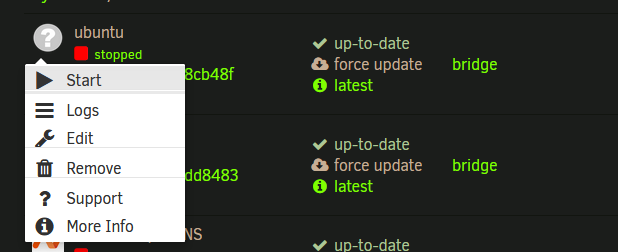
I left click on the icon of the container under the unraid docker tab and left click the start button with the little triangle play sigh. Like you would normally start a container on unraid. Do i need to do this threw the unraid terminal at first to set everything up? Ill admit ive used virtual machins for 10 plus years but had never even heard of docker till i discovered unraid and ive only been using it a couple of years. i downloaded the container threw the community applications from DockerHub and left the template as it was didn't add or change anything but did look on the dockerHube page for info that would have been relevent to the template, but not with much luck. Look im not looking to make a big deal out of this. i just kinda figured i could download the container run it access the terminal and install everyhting and be good to go. If theres more to it then that, witch its looking like it is. We can just forget this, Ill marked solved, and ill do more research before wasting anybody's time with stupid questions.
-
First please don't crucifie me if this is in wrong place i can delete and move. Just a quick question, please i promise. I downloaded for example the official ubuntu container from DockerHub. I understand theres not going to be any template, porting, or anytype of webui anything. I have to add that. I figured i would still be able to run the container and get terminal access. When i run the container, acts like its going to start but doesn't, thats it nothing am i missing something, No logs nothing. The DockerHub page dont give much a few commands and other stuff here and there. Do i need to access threw the unraid terminal first or something? I just wanted this to be quick im not asking and dont want a long drown out thread about building containers or something because thats not what im asking.
-
If you have this plugin do you still need the libvirt vm hotplug plugin?
-
I'm on Unraid 6.9.2 and I can change the server name under identification. When I change the top level domain under Management Access tho it does not change and update like it's suppose to. So it shows up as "server-name-right.top-level-domain-wrong.net". It shows up as server-name.Local.
-
Nobody knows how to change this?
-
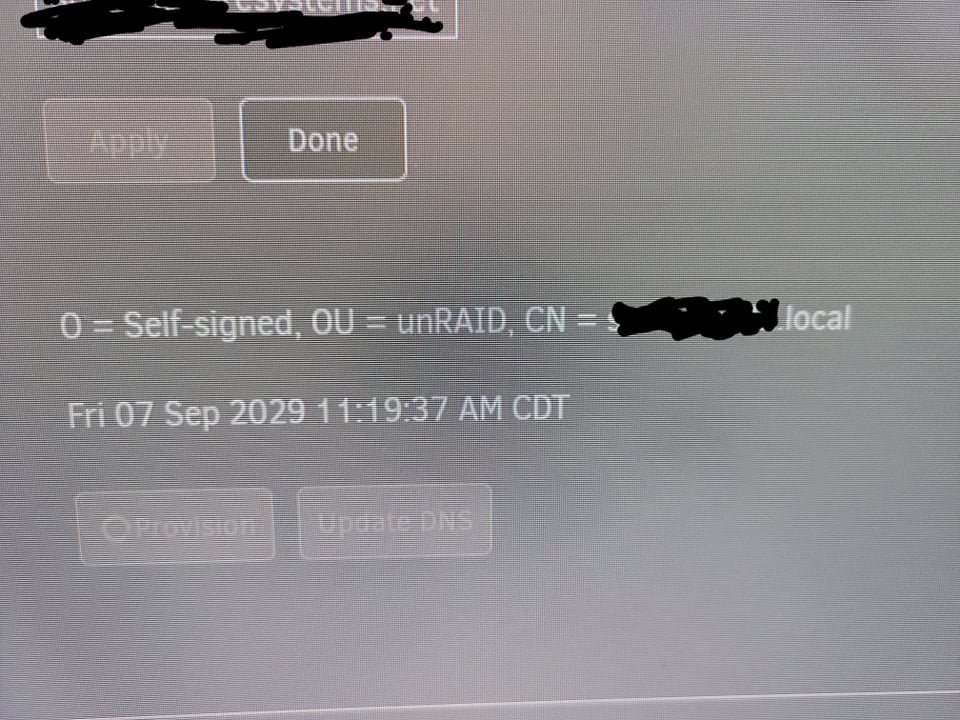
I noticed today that the domain of my unraid server is wrong. Under Management Access i changed the top level domain to my domain. Unraid still shows it wrong. It shows it as Server-Name.local, instead of Server-Name.mydomain.net. Just so everybody knows none of this is accessible from the internet. Is there some were else this setting needs to be changed. I've looked in network and all around. I rebooted and everything still no change, and I don't like having to reboot or shutdown.
-
will this delete, clean, or modify any files or just scan and give results
-
Telcar changed their profile photo
-
How do you fix errors found by this plugin?

