





deanosim
Members
-
Joined
-
Last visited
Everything posted by deanosim
-
Yeah that's exactly what I saw too, And I got so far as seeing that it was related to the ID variable in the Folder.View plugin but didn't get a chance to look into it other than forking it, seems like VladoPortos managed to fix it anyway in his fork.
-
Okay I just went and checked to see what plugins I had updated last and the last plugin that was updated was the Unraid Connect plugin, So I tried uninstalling it, and all of a sudden Folder.View started working again and all the weird displaying issues I've had in the last couple of days also went away, so it's something to do with the latest update to the Unraid Connect plugin, I'll look into it more tomorrow, it's already 5:30am for me.
-
Yeah I'm having the exact same problem, don't know when it started happening but I only just noticed it. Can't edit the folders, make new folders and the docker containers list below never loads. I have exactly the same unraid version and plugin version too.
-
Well it stopped for a little while, but happened again tonight and I stopped the plex docker container and everything went back to normal for awhile, but then it happened again like an hour later so it can't have been plex the second time. I'm out of ideas so I've submitted a support request with Limetech with a bucketload of diagnostics files, Hopefully they can spot something I'm missing.
-
Interesting, I'll have to give that a try, currently it's just called PineappleFlix but I've been using that name for years and across reinstalls of plex including the recent one, I'll try adding a 1 or something to it and see if that helps.
-
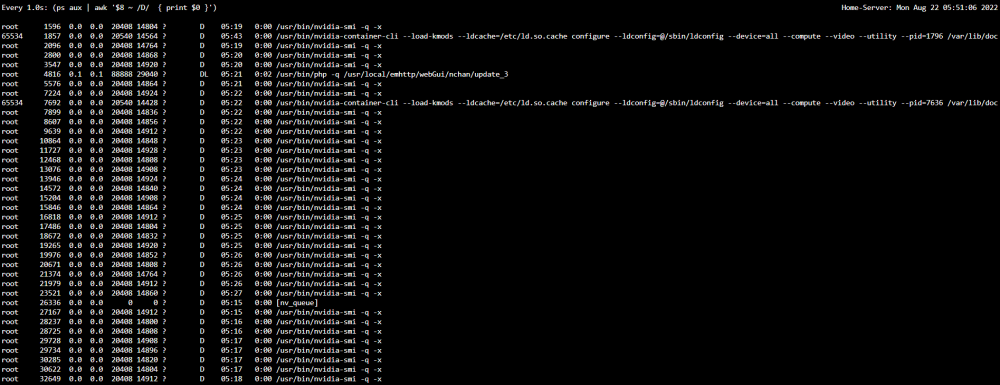
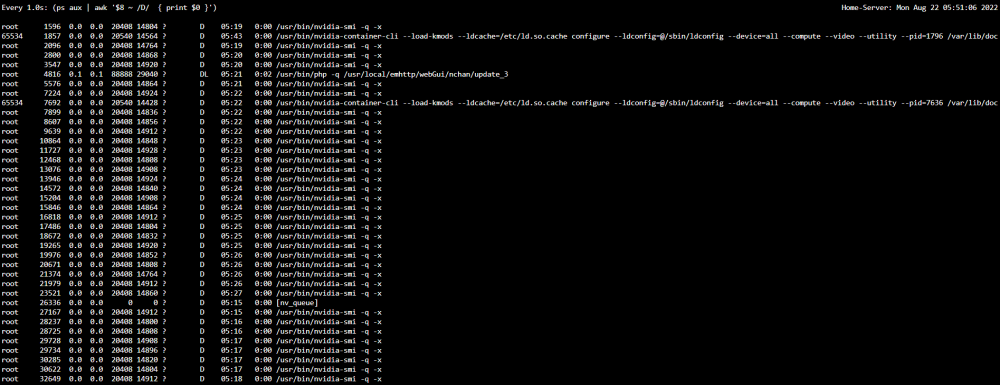
Happened again and this time bugged out something using nvidia-smi and caused that to leave a ton of nvidia-smi proccess in ps aux in the uninterruptible sleep D state home-server-diagnostics-20220822-0602.zip Edit: Just noticed theirs a page fault in the syslog relating to nvidia-smi, sooo that's probably not good. and I need to restart the server to get it to work properly again.
-
Has anyone had this problem? I can tell if it's Nvidia Node exporter that's causing it, but I don't run anything else that runs that. and I can't kill any of them without restarting the system because they're in uninterruptible sleep D state, it seems to massively slowdown my server.
-
Unraid Version: 6.10.3 Plex Server version: 1.28.2.6106 in LSIO Docker Entire server grinds to a halt in the middle of the night usually, and I've worked out it's Plex Media server, because if I stop the docker container everything recovers, and it seems to happen during Plex Maintenance, what I can't figure out is what exactly is causing it, the plex container is a fresh install too because the same problem was happening and I wiped the plex configs and completely reinstalled it, sadly doing that only fixed it for a short period and now it's happening again. I've attached Unraid Diagnostics. Edit: Forgot to mention that I can usually see when the server is grinded to a halt by running watch -n 1 "(ps aux | awk '\$8 ~ /D/ { print \$0 }')" And it'll be full of things trying to run, and as soon as I run `docker stop plex` and wait a few seconds for a stop that list completely clears. home-server-diagnostics-20220819-0511.zip
-
I am also having this exact same problem, been a couple of week since I used linkace, and I was wondering why the browser extension wasn't working, When I went to the webgui the setup mode was active and if I try to run it when you get to the database setup it already has all the configs and says the database isn't empty. So the data is still there. Should also mention that the .env is all setup and SETUP_COMPLETED is set to true for me too.
-
So I'm having this problem, Unraid can't ping any of the docker containers that are getting an IP from the router on br0, and stopping the docker engine applying, disabling Host access to custom networks and applying, then re-enabling Host access to custom networks applying and then starting the docker engine. But it still doesn't work unraid just gets Destination host Unreachable. this also doesn't seem like a very good solution because it would just break any time you need to reboot the host. Has no one found a real solution?
-
Hey everyone, So I've been loving your SteamCMD containers, I've been using the Colony Survival one mainly, only problem I've had with it though is that it doesn't shutdown the server properly when stopping the container and so it doesn't save the world and can corrupt the save file. I did a bit of digging and theirs no save command to force the server to save, so you'd need to probably modify the way it runs the colony survival so that it can shutdown the server properly. Keep up the great work!



