





dgs2001
Members
-
Joined
-
Last visited
Everything posted by dgs2001
-
If you end up with an LG1200 board as I did, make sure you choose one with good pcie coverage. many of the newer boards have m.2 slots but if you use them this dissables onboard sata connections. I made the mistake of grabbing a cheap Z490 msi motherboard. Its a great board but only has two full size pcie slots and 2 x m.2 slots and once the m.2 slots are in use some of the six onboard sata connections are dissabled. I think Im going to end up having to change it for a larger e-atx sized board which will have better conenctivity. It depends what your aiming for. I was using a repurposed dell T620 tower server with two x e52690 cpu's and 128gb ram. It coped with alot and never let me down, running file storage for a small company and many dockers and vm's too. A change of job has meant building new and wanting to future proof the setup and being a cheapskate I went amazon warehouse LGA1200 with an 11th gen i91100 both used but fully functional. All just seems a little leaner and smoother than the old hardware, but its impossible to know if that's just my perception.
-
Thanks Squid, your correct. Using an alternate browser the text displays correctly. I was using Firefox when i noticed the problem, but Edge (Chrome based) does not have the same issue and neither does Chrome. Interesting as its not something I remember from before I upgraded from 6.8.3 to 6.9.1 - makes me wonder if I'm just getting old 🤔
-
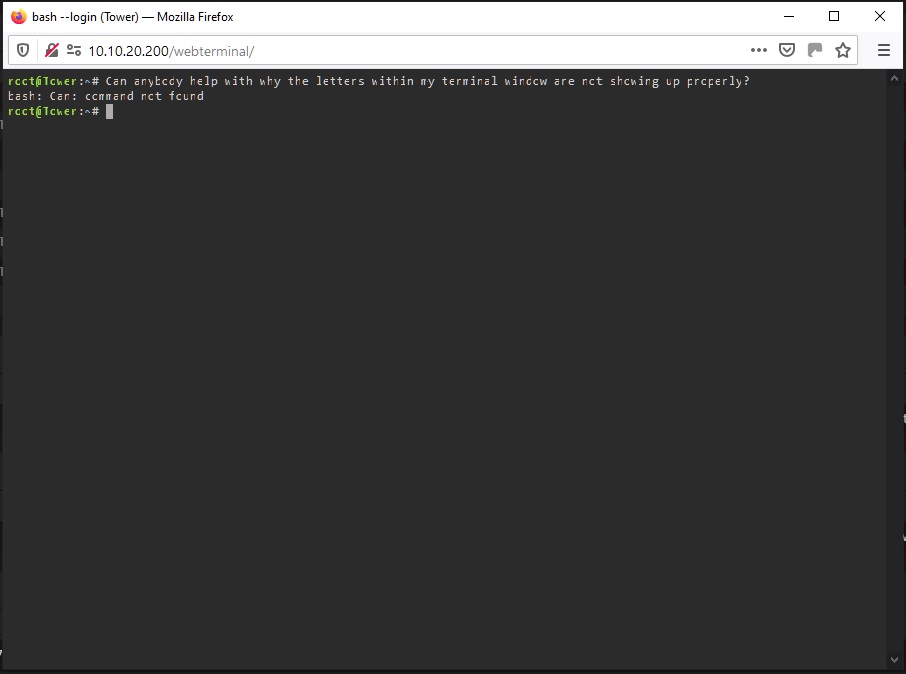
Strange one, Can anybody help me uncover why my terminal window is not displaying text properly. The picture shows how text displays whenever I open a terminal window, this also remains after a reboot. As you can see the right hand side of the letters is simply not showing
-
Hi Jason, Have you managed to pass through a Dolby Atmos soundtrack in Handbrake? If yes can you let me know which version you are using? Using the djaydev fork of handbrake which allows NVENC and removes quick sync I have been unable to pass through an Atmos sound track. Thanks dgs2001
-
Josh5, 25 pages late into your Unmanic docker but just wanted to say a big Thumbs Up from me. This is looking like a great docker. The feature I like most is the ability to pass through the sound as is. Handbrake will not currently pass through an Atmos sound track instead re-encoding it which is really annoying!! One feature request if I may - The ability to move an encoded file to an 'output' folder. Keep up the good work and Thanks
-
Hi SpaceInvaderOne Another outstanding contribution ! Not sure if this is the right place to ask but here goes - Can you please do a tutorial on creating and publishing a docker container start to finish, for unraid. Its such a fab part of the Unraid Server I would be really interested to see somebody walk us through a deployment from start to finish. Nothing overly complex just a simple one! What do you recon? Thanks dgs2001
-
OK Problem Solved. To recap it seems even though I selected passthrough for just about all the audio formats, the audio is not passed through if it is marked as Unknown unless unknown is selected in the track behavior window. I had not realised this before. Thanks again for the help and the excellent container. dgs2001
-
@dee31797 Thanks for the suggestion. Looking at the log I see the following [15:53:08] libhb: scan thread found 1 valid title(s) + Using preset: 265AUTOpass + title 1: + stream: /watch/series/Some Episode to Encode.S07E20.720p.HEVC.x265-MeGusta/82070f.mkv + duration: 00:43:31 + size: 1280x718, pixel aspect: 1/1, display aspect: 1.78, 23.976 fps + autocrop: 0/0/0/0 + chapters: + 1: duration 00:43:31 + audio tracks: + 1, Unknown (AC3) (5.1 ch) (384 kbps) (iso639-2: und), 48000Hz, 384000bps + subtitle tracks: [15:53:08] Starting work at: Mon Apr 6 15:53:08 2020 So the audio is there nut it's Unknown. Further on I see [15:53:08] json job: { "Audio": { "AudioList": [], "CopyMask": [ "copy:aac", "copy:ac3", "copy:dts", "copy:dtshd", "copy:eac3", "copy:truehd" ], "FallbackEncoder": "fdk_aac" } So I think the setup is all good. But then the audio is not copied through to the output file. It only happens intermittently, but I'm guessing HB is ignoring audio marked as "Unknown". I will go and check the Audio settings for track selection. Thanks dgs2001
-
Hi @dee31797 I have been using your handbrake docker but seem to have an issue with AC-3 audio. Although I have AC-3 audio ticked for passthrough whenever a file contains AC3 audio it is stripped completely from the output so I get picture with no sound? Is this something you have come accross before? and can you help me fix it. And Thanks for the containers dgs2001
-
Hi Djoss, Thankls for the clarification, I have this sorted now. I was looking in the 'Preferences' menu instead of the encoder list. I have now selected the encoder as 'nvenc' and confirm all is working and can be seen with the watch nvidia-smi command in terminal. Happy to report that enoding with nvenc on a quattro p2000 is roughly 10 times faster than using ten cores/threads of the 2 xeon cpu's I have so thanks for the great work you do
-
Hi @Djoss Thanks for the container. Im a novice so sorry for the question if its simple! How can i tell whether handbrake is using my GPU? I can see if emby is transcoding by using watch nvidia-smi or from the emby settings page. The Unraid dashboard shows the cpu cores pinned to Handbrake maxing out whenever it is in use, and this makes me wonder if it is using the P2000 card? Thanks for your help. Hardware - Unraid Nvidia 6.7.2 2 x Xeon E5 2690 32GB Ram Dell T620 server
-
I'm a newbie too but here are a few things I had to check when I set this up a couple of months ago.! Have you set up your google domain records to point back to your static IP address? I used cloudflare as per the excellent spaceinvader tutorial and all works fine with dns validation. Check that you have set the top level domain name in the letsencrypt container settings. i.e. if your domain is 'example.domain' and you are creating a certificate for the subdomain 'my.example.domain' then the docker container setting for domain name would be 'example.domain' Also make sure your router/firewall is forwarding traffic, so from your router/firewall port 443 should be forwarded to your local unraid server ip address port 1443 or whatever port number you specified in the docker container settings under 'https' Hope that helps
-
Thanks for the response. Its all a little odd really, probably a server/hardware issue initially which somehow corrupted the letsencrypt instance. Either that or somebody was trying to hack me! All is working as expected again now so thanks for the excellent docker container, along with several other of yours I use
-
Ok, did some more digging, deleted the "dhparams.pem" file in the /letsencrypt/nginx folder and letsencrypt has now restarted successfully and regenerated a new dhparams.pem file I would like to try and understand what had happened though? any insight or pointers would be most appreciated. Thanks
-
Hi All, Ive been a convert to Unraid for around 8 months and so far its all been good. One of my first adventures has been into the excelent docker containers from LinuxServerIO (Thanks) I had a fully working Letsencrypt until some point this weekend when something strange happened. The server suddenly reported the cache drive as "read only". A reboot seemed to sort this and i thought all had gone back to normal. However this morning I have encountered errors with the Letsencrypt docker. Trying to fix this I deleted the container and the image, also deleting the appdata folder then a complete re-install. I now have the following error - nginx: [emerg] PEM_read_bio_DHparams("/config/nginx/dhparams.pem") failed (SSL: error:0909006C:PEM routines:get_name:no start line:Expecting: DH PARAMETERS) Putting this into google I found a thread which suggested running this command openssl dhparam -out /etc/nginx/ssl/dhparam.pem 2048 however running this gets the following error Can't open /etc/nginx/ssl/dhparam.pem for writing, No such file or directory 22358693844800:error:02001002:system library:fopen:No such file or directory:crypto/bio/bss_file.c:72:fopen('/etc/nginx/ssl/dhparam.pem','w') 22358693844800:error:2006D080:BIO routines:BIO_new_file:no such file:crypto/bio/bss_file.c:79: Now I am out of my depth and would appreciate some assistance please Thanks
-
Hi, No the PERC H710 is Raid only so I have swapped it for a LSI 9211 8i. Glad to report my problem was a school boy error..... I had not inserted the drives into the caddies correctly !! ................. Feeling rather stupid now ! Thank you for trying to help.
-
*** UPDATE *** Always check the obvious, I'm embarrassed to confirm I had not mounted the drives in the caddies properly so they were not making connection to the back plane. Must of had my eyes shut................. *** *** Hi All, First up, apologies if this is covered somewhere in the 65 pages of this thread! I have aquired a dell T620 server. It had a PERC H710 raid card which I have removed and replaced with an LSI 9211 8i card flashed reportedly successfully to FW 20.00.07.00 and bios 07.39.02.00 According to syslog Unraid can see the controller and all appears ok, it reports as in IT mode. Into the controller I have two SAS leads plugged into a Dell M05TM 8 x LFF Backplane. Into the drive bays I have two different WD Red Hard drives one 3TB and one 6TB drives but neither drive is showing up within Unraid Unassigned devices nor in the bios anywhere. I have tried all 8 slots with both drives but they just dont show up. Has anybody had experience of backplanes failing? or can anybody give me some further pointers as I am trying not to spend much cash on getting my unraid box moved into new hardware. Thanks
