





faulty_lamp
Members
-
Joined
-
Last visited
Everything posted by faulty_lamp
-
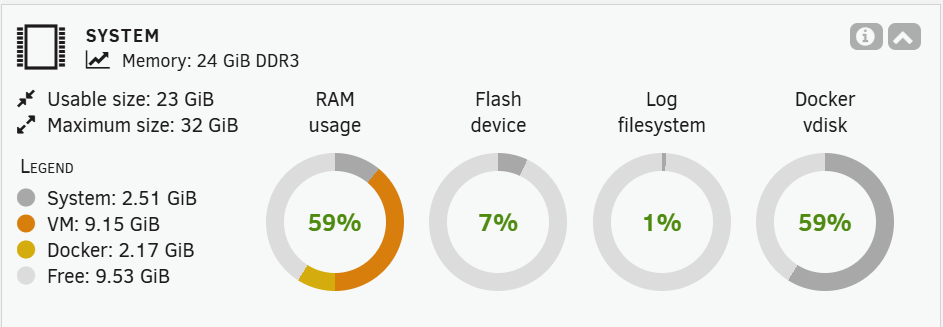
Over the past week or so I've started having trouble accessing the unraid UI. Today I noticed that some containers were also unresponsive whenever trying to connect to their UI. Things seem to somewhat start working again upon reboot. However, some containers are still having issues such as my unifi controller which is now reporting space errors. "2025-10-11 10:08:21,315 main ERROR Unable to create file logs/server.log java.io.IOException: No space left on device" I've checked the space in my docker image and it doesn't seem to be full. root@Tower:~# df -h /var/lib/docker/ Filesystem Size Used Avail Use% Mounted on /dev/loop2 60G 34G 24G 59% /var/lib/docker I've attached my latest diagnostics. Any suggestions on what may be causing this? tower-diagnostics-20251011-1007.zip
-
I've backed the drive up, but have not formatted yet. Went ahead and started memtest and it does look like there are some errors already. I'm assuming I'll just need to remove all memory sticks and place one at a time and test again to see which one has errors? After removing the erroring stick should I still format the drive?
-
Actually, now it looks like the cache is mounted as read-only (Drive mounted read-only or completely full). The drive is less than 50% full. I've attached the newest diagnostics, is there anything in that or would the next step be to run a memtest? tower-diagnostics-20231024-1150.zip
-
That worked, thank you!
-
My cache drive became unmountable overnight, showing Unmountable: Unsupported or no file system. I tried rebooting but that didn't make a difference. Following the manual I was going to try to scrub the drive as it is BTRFS but it says Scrub is only available when array is Started even though the array is started. Any thoughts on the next steps that I should try to remount the cache drive? I've attached my most recent diagnostics. tower-diagnostics-20231024-1017.zip
-
The log window shows the following when trying to install it. Oct 2 17:43:19 Tower root: plugin: running: anonymous Oct 2 17:43:19 Tower root: plugin: checking: /boot/config/plugins/appdata.backup/appdata.backup-2023.09.27.tgz - SHA256 Oct 2 17:43:19 Tower root: plugin: skipping: /boot/config/plugins/appdata.backup/appdata.backup-2023.09.27.tgz already exists Oct 2 17:43:19 Tower root: plugin: running: anonymous Oct 2 17:43:19 Tower root: plugin: running: anonymous I also tried deleting that file and then reinstalling it and get the following. Oct 2 17:44:20 Tower root: plugin: running: anonymous Oct 2 17:44:20 Tower root: plugin: creating: /boot/config/plugins/appdata.backup/appdata.backup-2023.09.27.tgz - downloading from URL https://github.com/Commifreak/unraid-appdata.backup/releases/download/2023.09.27/appdata.backup-2023.09.27.tgz Oct 2 17:44:20 Tower root: plugin: checking: /boot/config/plugins/appdata.backup/appdata.backup-2023.09.27.tgz - SHA256 Oct 2 17:44:20 Tower root: plugin: running: anonymous Oct 2 17:44:20 Tower root: plugin: running: anonymous With both instances I still see the same error (plugin: run failed: '/bin/bash' returned 255) in the install window.
-
I don't recall what time I attempted, but here is a fresh diagnostics. I attempted to install it right before downloading these diagnostics at 6:03pm CST on 9/29. tower-diagnostics-20230929-1804.zip
-
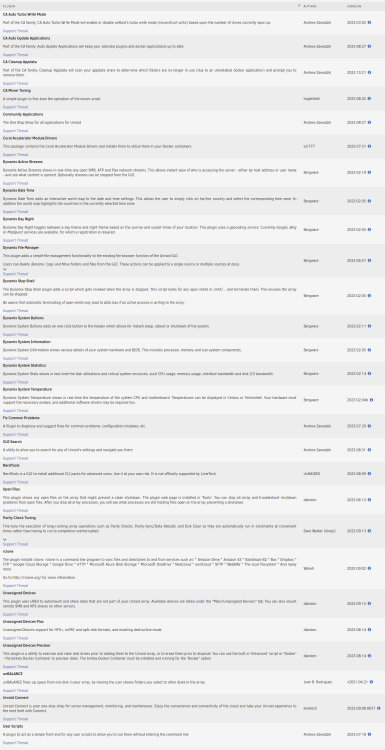
6.12.3, I've been working through a few things before updating to 6.12.4. Here are the plugins that I have installed, as well as diagnostics. tower-diagnostics-20230928-2049.zip
-
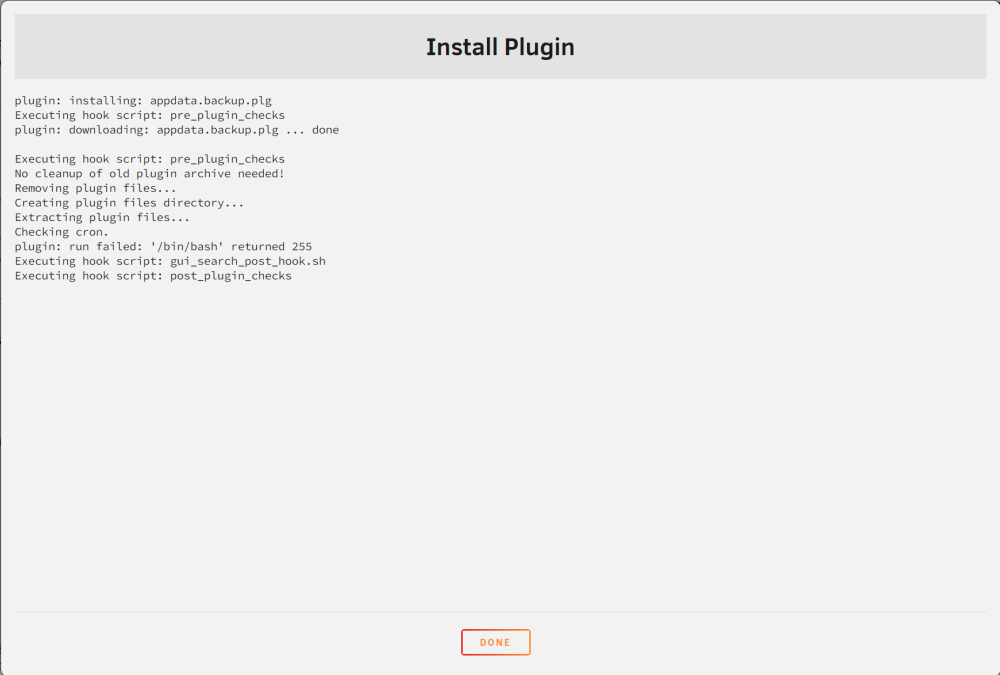
Still seeing the same I think plugin: installing: appdata.backup.plg Executing hook script: pre_plugin_checks plugin: downloading: appdata.backup.plg ... done Executing hook script: pre_plugin_checks No cleanup of old plugin archive needed! Removing plugin files... Creating plugin files directory... Extracting plugin files... Checking cron. plugin: run failed: '/bin/bash' returned 255 Executing hook script: gui_search_post_hook.sh Executing hook script: post_plugin_checks
-
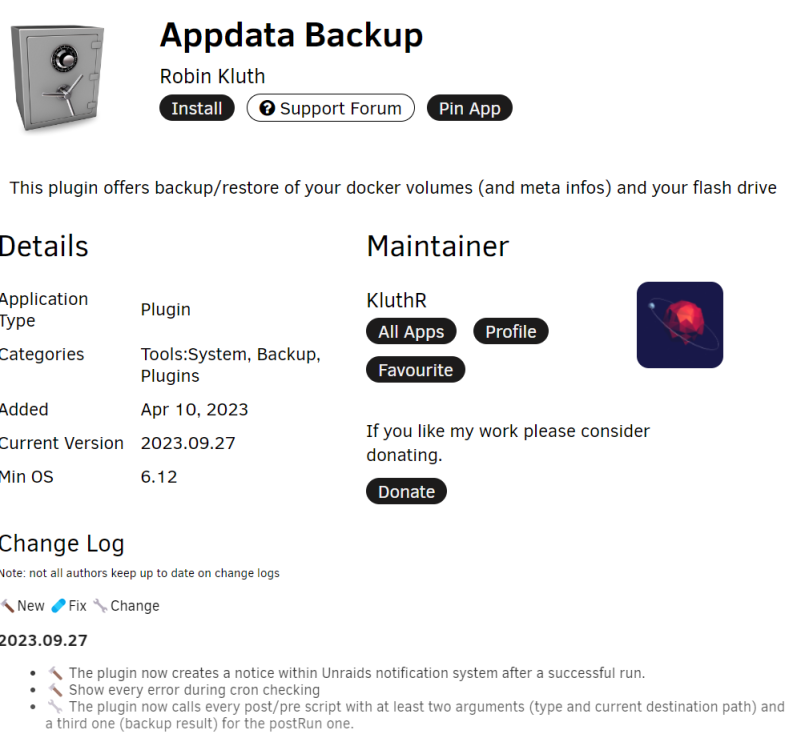
I have been trying to update to this plugin from the previous but can't seem to get it installed. When I attempt to install it I see the following error: plugin: installing: appdata.backup.plg Executing hook script: pre_plugin_checks plugin: downloading: appdata.backup.plg ... done Executing hook script: pre_plugin_checks No cleanup of old plugin archive needed! Removing plugin files... plugin: downloading: appdata.backup-2023.09.12.tgz ... done Extracting plugin files... Checking cron. plugin: run failed: '/bin/bash' returned 255 Executing hook script: gui_search_post_hook.sh Executing hook script: post_plugin_checks I've tried rebooting Unraid as well but always end up seeing the run failed '/bin/bash' error when attempting to install it. Any thoughts?
-
Unraid because unresponsive sometime overnight. I was unable to access the web ui or ping the machine. I physically shut the server down, but now I receive a boot device not found error. I am unable to see the flash drive in the bios, or boot menu. I was able to plug the flash drive into a windows machine and could see it, I also ran chkdisk on it but no errors were found. I've tried plugging the flash drive into a few different ports but that did not make a difference. Oddly enough, I can still use a keyboard with the dongle plugged into the same ports that I've tried the flash drive in. Am I able to plug the unraid flash drive into a different machine to see if it allows me to boot from it? I wasn't sure if the flash drive was linked specifically to this machine and if it would cause any problems if I attempted to boot from it on another machine. I'm just trying to rule out if this is an issue with the flash drive or the motherboard at this point.
-
The long test finally finished. I went ahead and ordered a drive to replace it but wanted to share the final diagnostics in case there was anything else that could be identified from the completed test. tower-diagnostics-20230902-0813.zip
-
The scrub of the cache showed 3 corrupted files, I've deleted those and it appears to be ok now. The long SMART test ran for ~24 hours but has been stuck at 100% for a few hours now. I've attached a new diagnostics output. tower-diagnostics-20230901-1051.zip
-
Hello, I was hoping to have someone take a look at my diagnostics to see what I need to do with a disk that entered an error state. I was running a parity check and around 70% complete when I received an alert that Disk 1 is in error state. I checked the smart error log and it shows 1 delayed ECC and 8 rereads/rewrites errors corrected, but no uncorrected errors. In addition, I have two disks that I was planning on removing after the parity check completed. Dev1 which is already unassigned, and Disk2 which will need to be cleared and removed. tower-diagnostics-20230831-0735.zip
-
That looks like that worked, thank you for all of the assistance!
-
That seemed to work, but shortly after the parity sync completed I started to receive errors on the new drive and then it disabled itself. I tried removing the drive and re-adding it, but it remains disabled. I forgot to mention, but this is the first SAS drive that I'm adding to my array. All of my SATA drives are hooked up directly to the mobo. I am using an ASR-7805 SAS card in HBA mode with an SFF-8643 to SFF-8482 cable. Whenever I first added the drive I ran a preclear and everything came back fine with it. I've attached both the diagnostics and SMART report for the drive. tower-diagnostics-20221214-1702.zip tower-smart-20221214-1702.zip
-
Ah, I was thinking that was the only way to unassign the disk. What would be the appropriate next steps to be able to use the new drive at this point?
-
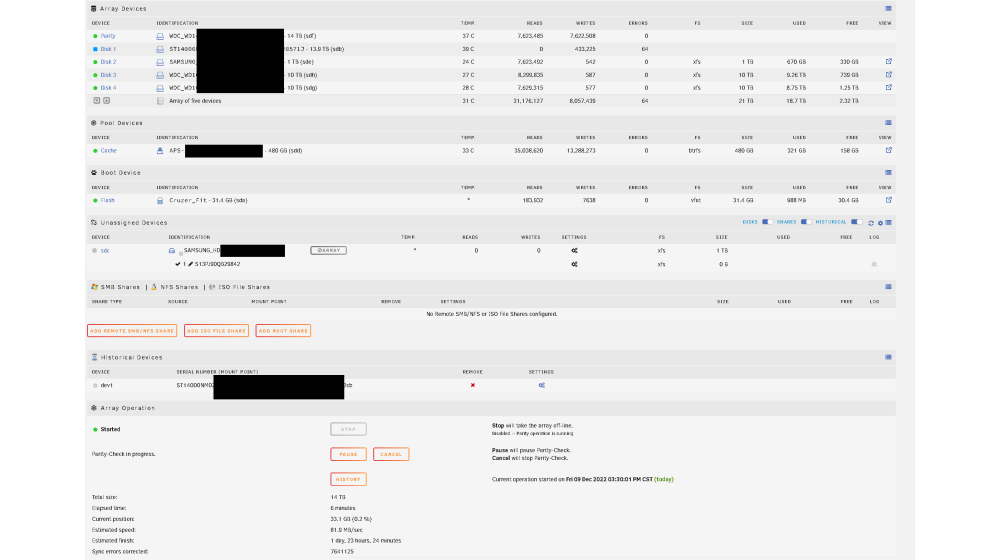
I was able to do this and after starting the array again a parity check began. The parity check completed but the drive was blank under size. I stopped the array again and then started it just now and it looks like it is running another parity check. The icon next to the new 14tb disk is blue rather than green though. I also see the same drive listed under historical devices. Any idea what I'm doing wrong or what I need to do so that I can begin using this drive? attached updated diagnostics tower-diagnostics-20221209-1530.zip
-
I had a 1tb drive fail earlier this week and planned to replace it was a 14tb drive. I've been running a preclear on it for the last few days and it just finished. I thought that the 1tb drive was still assigned to disk 1 so I assigned the 14tb drive to disk 5 and started the array. A preclear started to run again but with a much shorter expected amount of time. I realized that I needed to assign the 14tb drive to disk 1, so I stopped the preclear and array. I'm no longer able to assign the 14tb drive to disk 1 though. What is the best path forward to fully remove the 1tb drive, and add the 14tb drive to the array? tower-diagnostics-20221208-0805.zip
-
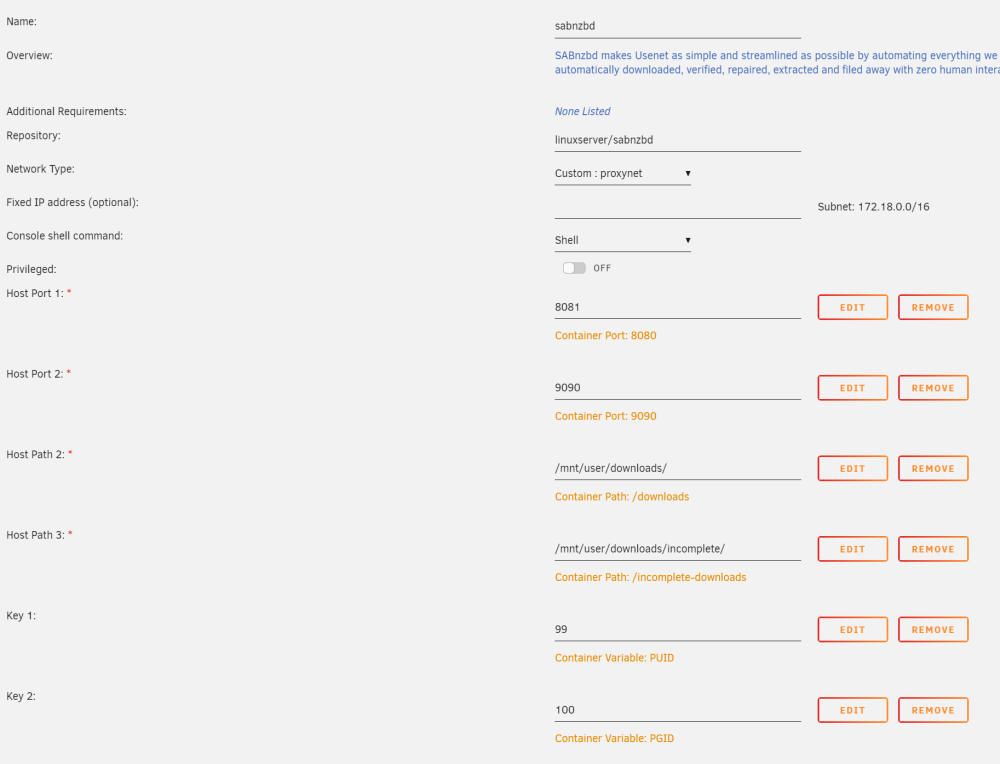
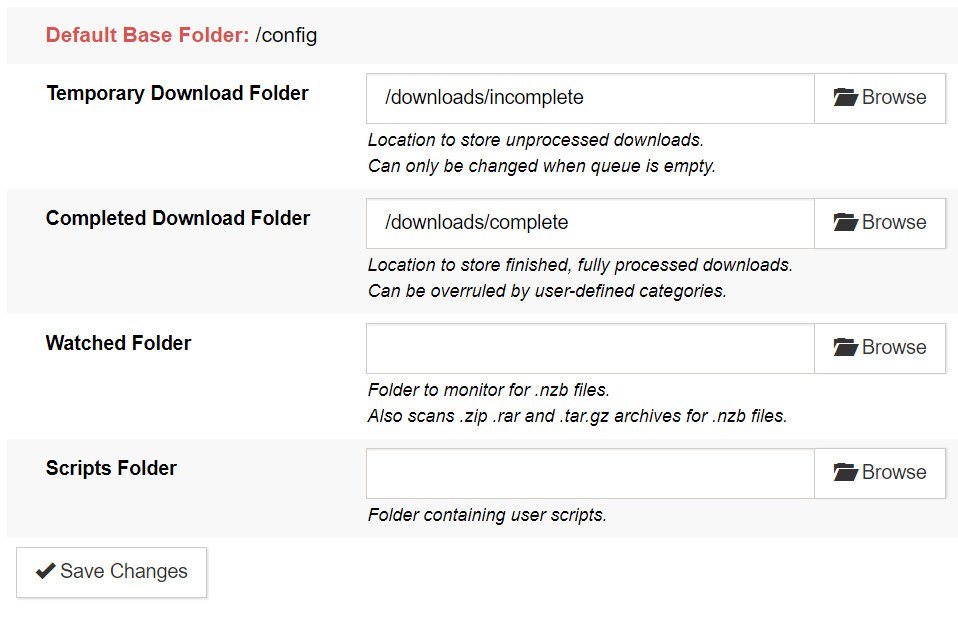
Here is how I have sabnzbd configured, does anything look incorrect?
-
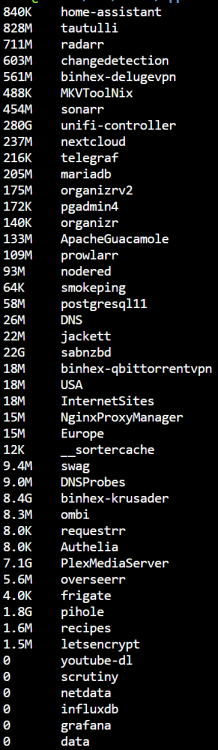
In the past few days I noticed that my cache has began filling up all of a sudden. I haven't made any changes in the past few days that I would think would coincide with this. It seems like a few containers are taking up quite a bit of space, mainly unifi-controller. cd /mnt/cache/appdata du -sh * | sort -rn Using the above commands I can see that my appdata folder has grown to 322G. Below is a snip of the folders in appdata. Unifi-controller is the most concerning with 280G. However a few others, sabnzbd - 22G, binhex-krusader - 8.4G, PlexMediaServer - 7.1G (may be due to metadata and thumbnails), are also fairly large. I have attempted to run mover to try to free some initial space, but it seems to start and then stop immediately. When running mover this is all that I see in the logs emhttpd: shcmd (97): /usr/local/sbin/mover &> /dev/null & I also noticed a few other errors related to space in the logs: Nov 2 17:44:27 Tower kernel: blk_update_request: critical space allocation error, dev loop2, sector 39389248 op 0x1:(WRITE) flags 0x1800 phys_seg 105 prio class 0 Nov 2 17:44:27 Tower kernel: blk_update_request: critical space allocation error, dev loop2, sector 39913536 op 0x1:(WRITE) flags 0x1800 phys_seg 105 prio class 0 Nov 2 17:44:27 Tower kernel: BTRFS: error (device loop2) in btrfs_commit_transaction:2438: errno=-5 IO failure (Error while writing out transaction) Nov 2 17:44:27 Tower kernel: BTRFS info (device loop2): forced readonly Nov 2 17:44:27 Tower kernel: BTRFS warning (device loop2): Skipping commit of aborted transaction. Nov 2 17:44:27 Tower kernel: BTRFS: error (device loop2) in cleanup_transaction:2011: errno=-5 IO failure Nov 2 17:44:28 Tower kernel: docker0: port 7(veth89f500d) entered disabled state At this point I'm unable to start any containers, or run mover. I'm at a loss as to how to clear any space and unsure of what actually caused the cache to begin filling up in the first place. Any thoughts or suggestions? tower-diagnostics-20221102-1731.zip
-
I've started having some issues with my cache drive filling up. It looks like the unifi container is consuming >270GB. I've checked for orphaned images and do not see any when switching to advanced mode. Any idea what might be causing this or how to free up the space? tower-diagnostics-20221102-1602.zip
-
I've been following the videos to set up Nginx Proxy Manager and Authelia. I can access Overseerr through my subdomain without Authelia. I can access the Auth portal through my subdomain. Once I set the config for the Authelia Portal and Overseer I can access the auth portal through the overseerr domain, but as soon as I log in it gets stuck in a loop returning the following error. Scheme of target URL http://overseerr.MYDOMAIN.com/ must be secure since cookies are only transported over a secure connection for security reasons I have checked the configs multiple times, and pulled fresh copies from both the Ibracorp site and Github but I continue to see the same error. Any idea what could cause this, or where to look to begin debugging it?
-
Awesome, yeah changing back to Toronto fixed it.
-
Here is the full log supervisord - Copy.log





