BoKKeR
Members
-
Joined
-
Last visited
Everything posted by BoKKeR
-
+1 I would love to have this. Otherwise I might have to run a virtualisation OS and use that to run unraid
-
if you preset new like https://www.reddit.com/r/funny/new/.rss it should give you the newest submissions without the stickies. By default it uses top afaik. Does this work for you? @m0ngr31
-
Hey! sure I will look what I can do about it!
-
Overview: Support for Docker image RSSTT in the bokker/rss.to.telegram repo. Application: RSS-To-Telegram - http://deluge-torrent.org/ Docker Hub: https://hub.docker.com/r/bokker/rss.to.telegram GitHub: https://github.com/BoKKeR/RSS-to-Telegram-Bot PS: Icon was made in PS under 10 minutes
-
How would I test out if my XML works as intended without submitting? Also how would I submit it? Where do I host the XML? Much of this information is hard to find as the documentation is scattered across multiple threads in multiple categories. Would be so much better if this info would be hosted in the plugin itself on its own page, "How to publish".
-
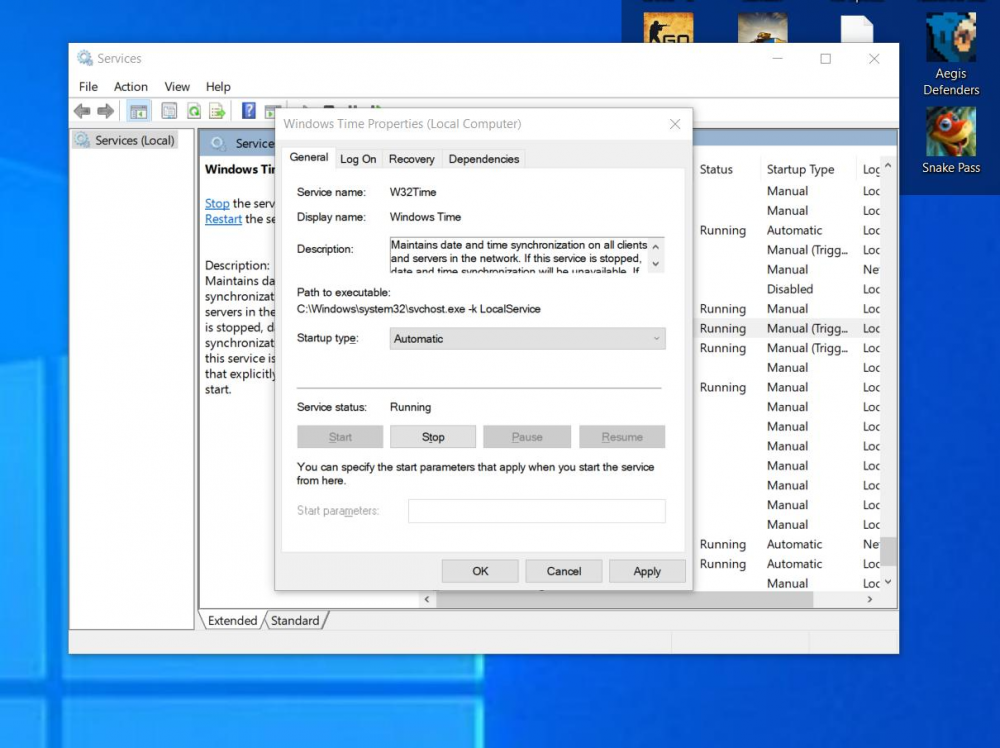
I have had the same issue, but I solved it by enabling windows time sync on startup. services->windows time->automatic
-
If anyone is using the USB Hot Plug for VM's with no passthrough, the modified version, the ignore list items need to have the lsusb device ids, not device names!
-
It would be nice to have the option to remember the logged in root user sessions in the WebUI just like the forum can remember our credentials. The current behaviour is that the sessions get cleared after rebooting. Which can result in multiple logins a day per device, when thinkering with unraid. This can be considered a security issue but its down to the users how they use it.
-
Everything has been working wonderfully. With most of the configs for different linux-server containers its really easy to setup. But I ran into a issue when I wanted to set a reverse proxy for a webdav docker container. The issue is that the container runs on port 80 internally! if I add it to proxynet it will crash with letsencrypts port 80. Only way I see to fix this is by changing the port internally in the container. But I dont see that being possible without rebuilding the container https://hub.docker.com/r/bytemark/webdav/
-
I am having problems with the iw4x container, the game server runs fine about 3-5 minutes than crashes every tiem. because of some internal command failing https://pastebin.com/EYpWYA5N I have included the full log but the crash is at: 0009:err:winediag:nodrv_CreateWindow Make sure that your X server is running and that $DISPLAY is set correctly. 0009:fixme:dbghelp:elf_search_auxv can't find symbol in module 0009:fixme:dbghelp:MiniDumpWriteDump NIY MiniDumpWithHandleData 0009:fixme:dbghelp:MiniDumpWriteDump NIY MiniDumpScanMemory wine: Unhandled page fault on read access to 0BCC5F08 at address 006B5FE0 (thread 0009), starting debugger... Can't attach process 0008: error 5
-
In the first post IW4x (CoD:MW3 Mod Server), it should be MW2
-
yeah! My bad, I thought this was a general help thread. Thanks anyway!
-
I was having some issues with my old linuxserver/docker container. the deluge daemon would die suddenly once in every 1-3 days and I would need to reboot the container to get it back running. The web platform would still work and whatnot but the daemon was unavailable. I wanted to try to upgrade the container, I choose to upgrade to a newer build that is still on an older non 2.x version. The last 1.3.15 build 5b398f77-ls22. I have all my config folder mounted just as I had before. When I start the new container the first time it starts normally. If I stop it and start it again all my torrents are gone from it, and they only come back if I recopy the config files. It does not wipe the whole folder but it replaces some file for sure. Any help is appreciated. And now if I move the config back to the old container it wipes it after every restart too :((( Upon review the after reboot deluged.log contains this: [INFO ] 12:37:12 configmanager:70 Setting config directory to: /config [INFO ] 12:37:12 daemon:127 Deluge daemon 1.3.15 [INFO ] 12:37:12 configmanager:70 Setting config directory to: /config [INFO ] 12:37:12 core:87 Starting libtorrent 1.1.5.0 session.. [INFO ] 12:37:12 rpcserver:369 Starting DelugeRPC server :58846 [WARNING ] 12:37:12 preferencesmanager:528 GeoIP Unavailable [INFO ] 12:37:12 core:97 *** Start Label plugin *** [INFO ] 12:37:12 pluginmanagerbase:158 Plugin Label enabled.. [INFO ] 12:37:12 pluginmanagerbase:158 Plugin Extractor enabled.. [INFO ] 12:37:13 pluginmanagerbase:158 Plugin SeedTime enabled.. [WARNING ] 12:37:13 torrentmanager:648 Unable to load state file: [Errno 2] No such file or directory: '/config/state/torrents.state' [WARNING ] 12:37:13 torrentmanager:648 Unable to load state file: [Errno 2] No such file or directory: '/config/state/torrents.state.bak' [INFO ] 12:37:13 torrentmanager:780 Successfully loaded fastresume file: /config/state/torrents.fastresume [INFO ] 12:37:13 rpcserver:206 Deluge Client connection made from: 172.17.0.1:52846 [INFO ] 12:37:13 rpcserver:226 Deluge client disconnected: Connection to the other side was lost in a non-clean fashion: Connection lost. [INFO ] 12:37:15 rpcserver:206 Deluge Client connection made from: 172.17.0.1:52849 [WARNING ] 12:37:18 core:74 seedtime loop starting [INFO ] 12:37:31 daemon:196 Waiting for components to shutdown.. [ERROR ] 12:37:31 torrentmanager:735 Unable to backup /config/state/torrents.state to /config/state/torrents.state.bak: [Errno 2] No such file or directory [INFO ] 12:37:31 torrentmanager:737 Saving the state at: /config/state/torrents.state [INFO ] 12:37:31 pluginmanagerbase:170 Plugin Extractor disabled.. [INFO ] 12:37:31 pluginmanagerbase:170 Plugin SeedTime disabled.. [INFO ] 12:37:31 pluginmanagerbase:170 Plugin Label disabled.. [INFO ] 12:37:31 rpcserver:226 Deluge client disconnected: Connection to the other side was lost in a non-clean fashion: Connection lost. [INFO ] 12:37:31 daemon:196 Waiting for components to shutdown.. and this is how my files change over time: before first start: admin@SNAS:/volume2/docker/deluge/state$ ls -l torrents* -rwxrwxrwx+ 1 admin users 3883136 Aug 10 13:11 torrents.fastresume -rwxrwxrwx+ 1 admin users 3883133 Aug 10 13:07 torrents.fastresume.bak -rwxrwxrwx+ 1 admin users 580588 Aug 10 13:11 torrents.state.bak -rwxrwxrwx+ 1 admin users 227548 Aug 10 13:12 torrents.state.tmp after reboot: admin@SNAS:/volume2/docker/deluge/state$ ls -l torrents* -rwxrwxrwx+ 1 admin 1024 3883136 Aug 10 13:11 torrents.fastresume -rwxrwxrwx+ 1 admin 1024 3883133 Aug 10 13:07 torrents.fastresume.bak -rwxrwxrwx+ 1 admin 1024 118965 Aug 10 15:37 torrents.state.tmp I added the log from deluge. linuxserver-deluge.csv