






lelei
Members
-
Joined
-
Last visited
Everything posted by lelei
-
At the moment I am running Unraid OS Plus on my ASRock Z690 PG Riptide, i5 14400 with 64 GB DDR4 Ram. Runs a few dockers. sabnzbd, some *arrs Plex & tautulli fr24feed-piaware paperless-ngx immich (don't really use it) nextcloud (don't really use it) rustdeskserver-AIO luckybackup and 3 VMs Home Assistant OS Windows XP (old backup from my father in law, he access it every now and then via VNC) - no network in the VM Windows 10 VM with ETS programming (most time offline) Storrage Array 3x Toshiba MG10ACA20TE with 20 TB each (25,4 TB used, 14,3 TB free) Pool 2x Kingston 2TB nvme (cache mirror) (holding app data and VMs) 1x Gigabyte 512 GB nvme (download temp for sabnzbd) Most of the storage is used for "Media" (plex), TimeMachine (Mac Backups) some for personal Backup like Pictures and Files (they are also in OneDrive). I have still got an DELL i7 OptiPlex 7060 microSFF with an i5-8500T, 16 GB Ram on the shelf. I could put in the 512 GB nvme from my current build and a 1 TB SSD 2,5" in the SATA slot for an unraid installation (with no Array) just to hold the Dockers and the 3 VM (whereby 2 of the 3 are more in stand by mode anyways) and would migrate the 3x 20 TB Toshibas and the 2x 2 TB Kingston nvmes to a Unifi UNAS 4 Bay, with all my Network gear I am already on the Unifi Universe. It would out of the box do my storage, my pictures sync from all my mobile Phones, my Time Machine. Running the 3x 20 TB Toshibas in Raid 5 would give me the same space and protections as I do have right now and I could get an other 20 TB in the future to extend it to "about 60 TB useable storage". The UNAS would hold the 2x 2TB Kingston as a read/write cache and network would be connected via 2.5 GBit/s to my Switch, while the "good old" unraid Optiplex would be on the network via 1 Gbit/s. Dockers on the downscaled unraid would only be sabnzbd, some *arrs Plex & tautulli fr24feed-piaware paperless-ngx rustdeskserver-AIO luckybackup Whereby only sabnzbd/*arrs would write to the NAS (SMB share mounted) on completion and Plex would read from the NAS (SMB share mounted). Luckybackup would write the Paperless files and backups of the VM/Dockers to the NAS periodically. The CPU load of the current server (when Plex is used) is less than 20% - videos are mostly direct streams but I also have a Plex Pass which enables hardware transcoding on the iGPU - which also the DELL OptiPlex has. Would that kind of make sense? Would it be lower on power consumption?
-
thanks, works now 😀
-
In the unifi-toolkit docker console or in the unraid console?
-
When I check my UDM-Pro IP Address and the API token it test successfully. When I then try to "save" it I got following error. ValueError: Invalid ENCRYPTION_KEY in .env file. The key must be a valid Fernet key (32 url-safe base64-encoded bytes). Please run ./setup.sh to generate a new key, or generate one manually with: python -c "from cryptography.fernet import Fernet; print(Fernet.generate_key().decode())" I tried to run the ./setup.sh in the docker Select deployment type [1-2]: 1 ✓ Selected: local deployment Step 2: Generating Encryption Key ℹ Generating secure encryption key... ✓ Encryption key generated Step 3: Writing Configuration ✓ Configuration saved to .env ✓ Data directory already exists ℹ The data/ directory stores the SQLite database. The container ℹ needs write access to /app/data (mapped from ./data on the host). ================================================================= Setup Complete! ================================================================= But still no success. What am I doing wrong?
-
Settings - VPN Manager - das Wireguard Profil von Mullvad hinzufügen und folgendes auswählen. Dann habe ich in meinen Dockern folgendes zur Auswahl


-
Zeit nein, Bock schon. Aber das Ding steht schon wieder Headless im HWR und macht gerade den Pool Rebuild. Dazu müsste ich die NVMes wieder raus nehmen und die SATA drives vom Strom trennen, oder? Für den Urlaub werde ich wohl HAOS VM auf einen Mini PC migrieren, damit der Unraid Server nicht durchlaufen muss. Vielleicht kann ich das - bevor ich den wieder in Betrieb nehme nach dem Urlaub (3 Woche im August) - dann ein mal machen. Habe aber nur Messergebnisse die ich von so einem Shelly Plug auslesen kann.
-
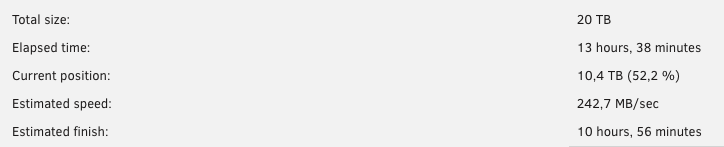
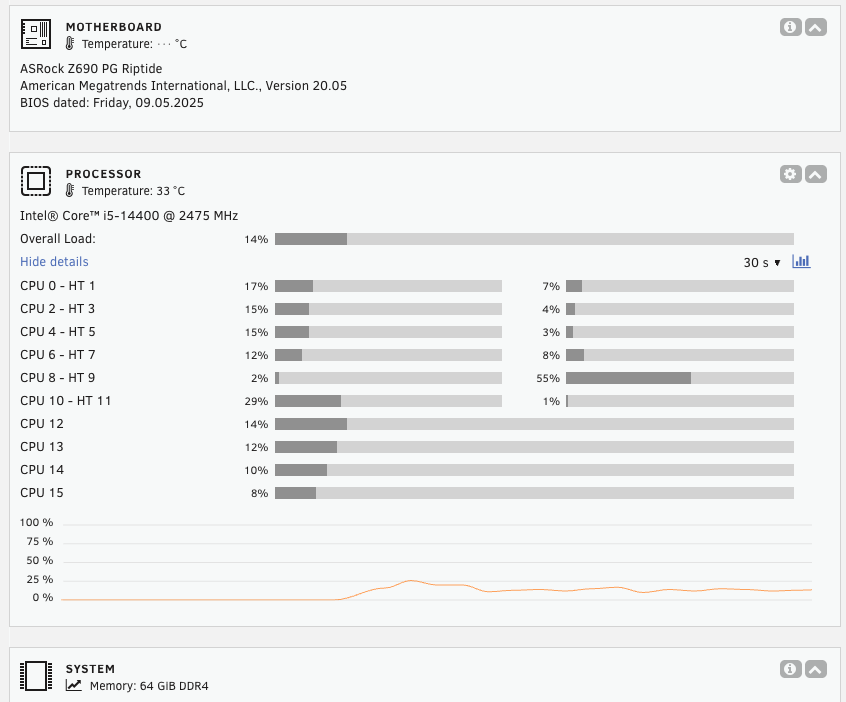
So den RAM hatte ich von dem XMP noch auf STD getauscht. Gestern altes Board & PSU raus, neue Dinge rein und auch gleich die 12 TB gegen eine 20 TB (baugleich mit den anderen 20 TB) ausgetauscht. Re-Build läuft bei ca 65 Watt. Werde mir von @_alo_ noch mal den Thread anschauen, ob ich da noch was Strom sparen kann. Die i5-14400 CPU hat ja 6 P cores (mit HT) und 4 E cores. Wie sollte man die am besten "pinnen"? Home Assistant VM auf die E cores? Windows VM auf die P cores? Docker überhaupt CPU pinnen?
-
Gute Frage. Kann ich mir damit die Docker in einem "state" sicher, wo ich sie auf einem Ersatzsystem wieder hoch fahren kann (Datenbanken)? Ja, dachte ich mir - geht das mit Luckybackup zu automatisieren? VM runterfahren (also ordentlich, nicht forced), VM sichern (kopiervorgang sollte so in 45 Minuten erledigt sein für 50 GB) und wieder die VM starten.
-
Ich habe 2 Standorte, nennen wir in der Einfachheit halber Standort A und Standort B. Diese verfügen beide über FTTH - Standort A hat "nur" 400/200, Standort B hat 600/300 Mbit/s - diese sind mit Unifi Routern ausgestattet und verfügen über ein Site-to-site VPN und der Durchsatz ist auch absolut okay. Standort A hat den Unraid Server und Standort B hat ein Synology NAS (8 TB), was nur als "Datengrab" genutzt wird. Folgende Dinge werden schon dahin gesichert HomeAssistant sichert Backups schon dort hin (nicht die komplette VM, aber das interne Backup Feature) Ein paar Shares werden schon via Lucky Backup dort hin synchronisiert - ist das die beste Lösung? Folgende Dinge sollen gesichert werden: Docker und deren Content (liegen auf Shares)? immich paperless-ngx nextcloud nodered VMs HomeAssistant (brauch ich glaube ich die VM nicht sicher, die kann ich ja so wieder runter laden und Backup von den Settings einspielen= Windows 10 für ETS Programmierung (ca. 50GB) - hier würde ich gerne eine Sicherung ein mal die Woche auf das remote NAS haben und die letzte 3 Versionen behalten Gibt es dazu nützliche Skripte/Apps die das machen? Wie stelle ich das am besten an? Das remote NAS ist auf dem Unraid Server gemounted Danke schon mal für euern Input

-
Ah, that was "reseting" my keys ... changed it to the standard appdata folder like all the other dockers.
-
Hatte den nur genommen, weil es der günstigste war. Die Preis für DDR4 Ram sind in die höhe geschossen. Der ohne XMP/Blechdeckel kostet sogar mehr und die Mushkin 64 GB Kit sind bei 160 Euro. https://geizhals.de/?cmp=2169890&cmp=2950989&active=1 Ja, wobei mich das mit diesen MT und CL etc pp maximal verwirrt. Den letzten Rechner, den ich zusammen gebaut habe war vor 6 Jahren der Server, ansonsten kaufe ich nur noch Apfelkisten, wo man nix falsch machen kann bei der Konfiguration. Update, habe die Liste nun so bestellt - vielen Dank für den Support.
-
@alturismo den "scope" von CB kenne ich durchaus und daher weiß ich auch, wie ich die Antworten "dort" zu lesen habe - dafür bin ich dort schon "zu" lange. Wollte jetzt auch nicht die eine Community gegen die andere ausspielen. Die "lange" Erfahrung mit der Community hier, hatte ich noch nicht - wußte nicht, dass ihr hier auch so schnell seid und gute Ideen habt, daher hatte ich mir das mal erlaubt - um zumindest zu wissen, ob RAM, Board und CPU zusammen passen. @_alo_ danke nochmals. Ja die Riser Cards war nur ein Beispiel, dass ich da eine neue kaufen müsste für PCIe 5.0 wäre mir klar. Passt diese Config denn vom RAM/Board/CPU her? https://geizhals.de/wishlists/4557704
-
@_alo_ erst Mal vielen Dank für deine ausführliche Antwort und dem Hinweis zu deinem Thread. Habe jetzt mal ein Z690/DDR4 zusammen gestellt (mit Boxed CPU mit Kühler). https://geizhals.de/wishlists/4557704 Habe noch vom alten System 2x https://www.amazon.de/dp/B07FN3YZ8P so etwas könnte man auch nehmen, wenn man eine (oder mehrere) PCIe 5.0 x4 nvme nachrüsten wollen würde? Geht bei dem Board bifurcation? Habe nix im Handbuch gesehen.
-
Moin, mein kleiner Unraid Server möchte ein Upgrade bekommen. Aktuell läuft Unraid 7.1.4 und folgende Dinge (24/7, PV Anlage vorhanden): Docker immich nextcloud sabnzbd NodeRed paperless-ngx rust desk server Plex (mit Plex Pass) Flightradar ... VMs HomeAssistant OS Windows 10 (für ETS Programmierung) Windows XP (für den Schwiegervater, sein alter PC virtualisiert, ohne Netzwerk) Auf dem Array liegt hauptsächlich die Plex Medien aber auch private Medien (GoPro Aufnahmen, Fotos, etc pp) Aktuelle Config: Fractal Define 7 ATX Gehäuse (3x 120er Gehäuselüfter) - soll bleiben Gigabyte C246-WU4 i3-8300 64 GB ECC Ram 4x m2 NVME 2x 2TB PCIe 4.0 x4 (Mirror, cache für's schreiben auf die Shares, Speicherort für die VMs) 1x 512 GB PCIe 3.0 x4 (cache für downloads, sabnzbd) 1x 240 GB PCIe 3.0 x2 (cache für Plex Transcoding) 3x SATA 3,5" 20 TB array Parity 20 TB array disk1 12 TB array disk 2 Netzteil muss ausgetauscht werden Das hervorgehobene soll geupgraded werden. Dabei dachte ich an folgendes: https://geizhals.de/wishlists/2134525 In der Geizhals Liste sind aktuell (13.07.2025, 10 Uhr) folgende Produkte Intel Core i5-14400 (B0), 6C+4c/16T, 2.50-4.70GHz, tray (iGPU UHD 730) Crucial DIMM Kit 64GB, DDR5-5600, CL46-45-45 ASRock Z790 PG Riptide (gewählt wegen 8x SATA, 5x m2 NVME, 2.5 Gbit/s Ethernet Intel) Arctic Freezer 36 Black be quiet! Pure Power 13 M 550W ATX 3.1 Passen die Komponenten zusammen, sowohl aus Hardwaresicht, als auch für Unraid und den Einsatzzweck?
-
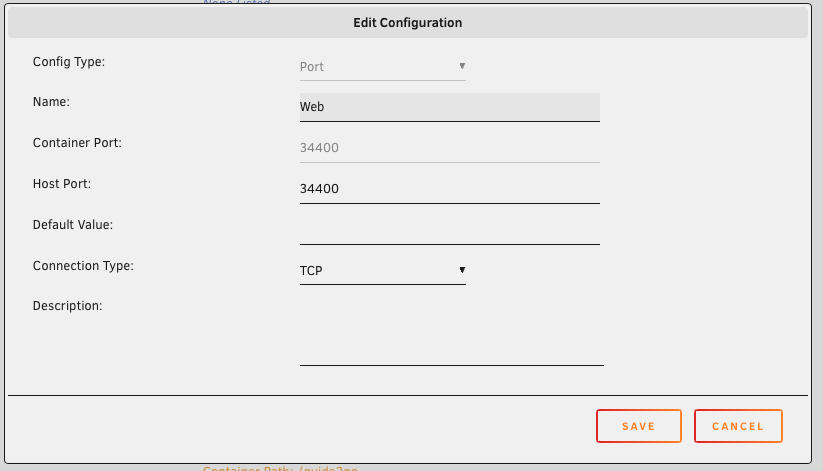
I guess I found the issue. I had to add a port config to the docker config in unraid. mapping was created and still routing outbound thru unraid built in wireguard

-
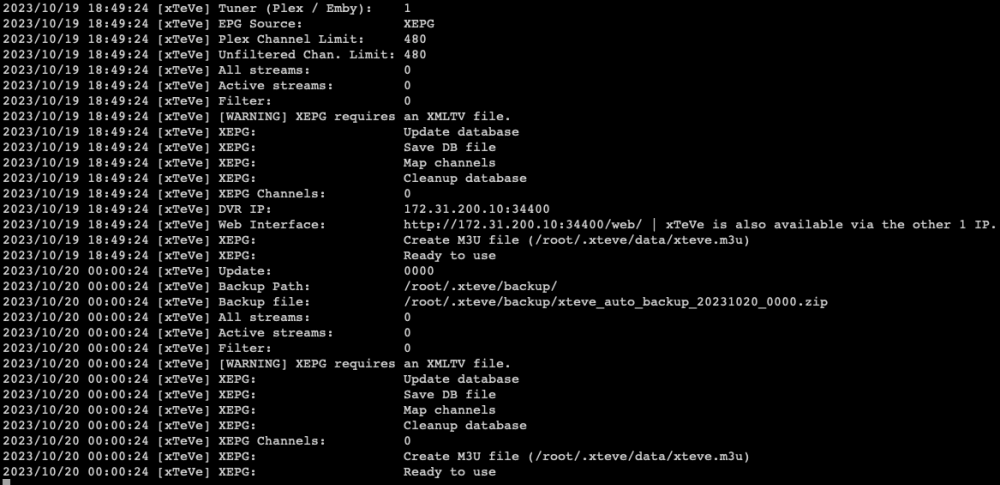
Good Morning, I've got an issue with using unraid's WireGuard feature with the xteve docker (sabnzbd works fine) wg0 is setup like here sabnzbd connected fine and I can access it via LAN on the 192.168.3.9:8080 xteve I can't Do I need to change anything? I do not want to use an additional VPN connection - the existing tunnel should be fine?



-
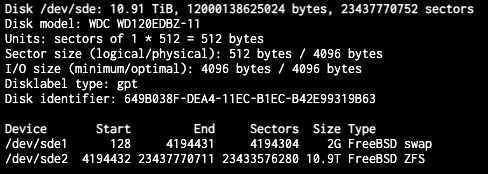
looks like it was enabled.
-
I've created in CORE, migrated to Scale - where can I check that, you know?
-
Thanks @russo for the feedback. The Problem is, I will not have TrueNAS running anymore, when I have build the unraid, because it is the same hardware. The youtube video claims it is now possible to import from TrueNAS? "Importing existing zpools from other systems such as TrueNAS." So maybe it is worth investing on a USB stick (which one is best to buy) and on 2 of those 18 or 20 TB HDDs. Create that as a set, so 1 Parity and 18/20 usable - mounting the zpool and migrating the data over and adding the 8 + 12 TB to the "pool"(?) that makes roughly 40 TB usable? Right? Can I still use the m2 flashes for TEMP drives and VMs (back them up to the pool with parity)?
-
Hello, I've got a T***NAS Scale Build with following hardware Intel(R) Core(TM) i3-8300 CPU @ 3.70GHz 32 GB ECC Ram Gigabyte C246-WU4 Board, 2x Intel NIC 1GBit/s, 10x SATA Ports, 2x M2 Disks 2x WD-Red 3TB running as a ZFS Mirror, LZ4, no dedup - some 800 GB more or less important data (backed up offsite via rscyn to a NAS) 1x WD 8TB single, LZ4, no dedup - Plex data (5TB used) 1x WD 12TB single, LZ4, no dedup - Plex data (5TB used) 1x 512GB, m2 flash - download temp 1x 256GB, m2 flash - VM Home Assistant Supervisor and other "Apps Data" 1x 128GB SSD for T***NAS Scale OS USB attached APC Back UPS BX – BX950MI-GR Intel 4 Port GBe NIC I do run following "Apps" wg-easy (wireguard server, could go back to my UDM Pro) plex (with hardware transcoding) download tools uptime-kuma paperless-ngx cloudflared file manager (giving me access to the storage via browser) speedtest minecraft server and a full Home Assistant Supervisor VM Do I get that over to Unraid? Probably YES! But how to avoid loosing all the data? (not to keen to download all the plex stuff again) I may want to buy some (2) 18TB HDDS (what brand/model to buy) and remove the 3 TB WD Reds finally. Also I may want to upgrade to 10 GBe NIC (removing the Intel 4 Port GBe NIC - don't make much use of it atm). Any recommendations, how to migrate from T***NAS Scale to Unraid without losing my stuff, ...?




