





DontWorryScro
Members
-
Joined
-
Last visited
Everything posted by DontWorryScro
-
I'd search this topic but for some reason the search function is not working for me at the very moment. So I'll just ask, is there a way to fix the date/time drift I get using this? I'll notice the date/time of the download sometimes displays as some point in the future. Restarting the container fixes it. So there is some drift going on and I'm not sure the best way to go about fixing it.
-
came here because i have the same problem. anyone ever answer this?
-
Any one able to point me in the right direction for how to install File Manager?
-
Entering this in your Repository field should get you back to the last stable release: binhex/arch-rtorrentvpn:rtorrent-ps-1.1.r54.ga787dd9-1-28
-
file manager was meant to work?? ive never had it working for me, figured it was some limitation of the containerizing of rtorrent.
-
Yep that last line was the doozy. Removed it and all is well now. Do we know if there is an updated way to indicate a larger max file size that wont sink the launch? Thanks for the help. Edit: Found it, I think. "set_max_file_size" was deprecated. The new way to accomplish this is with: system.file.max_size.set =
-
Great, thanks for taking a look! Hope you spot something I missed. Here you go: rtorrent.rc
-
I renamed the old .rc file, updated the container again to the new one and let a new .rc file get generated but im still getting: 2021-02-11 12:31:38,726 DEBG 'watchdog-script' stdout output: [warn] Failed to start rTorrent, skipping initialisation of ruTorrent Plugins... 2021-02-11 12:32:08,909 DEBG 'watchdog-script' stdout output: [info] rTorrent listening interface IP 0.0.0.0 and VPN provider IP 10.x.xxx.101 different, marking for reconfigure 2021-02-11 12:32:08,912 DEBG 'watchdog-script' stdout output: [info] rTorrent not running 2021-02-11 12:32:08,916 DEBG 'watchdog-script' stdout output: [info] Removing any rTorrent session lock files left over from the previous run... 2021-02-11 12:32:08,919 DEBG 'watchdog-script' stdout output: [info] Attempting to start rTorrent... 2021-02-11 12:32:08,920 DEBG 'watchdog-script' stdout output: Script started, output log file is '/home/nobody/typescript'. 2021-02-11 12:32:08,942 DEBG 'watchdog-script' stdout output: Script done. 2021-02-11 12:32:19,994 DEBG 'watchdog-script' stdout output: [warn] Wait for rTorrent process to start aborted, too many retries 2021-02-11 12:32:19,994 DEBG 'watchdog-script' stdout output:
-
Thanks @learningunraid you just saved my bacon
-
Just updated this container about 20 mins ago and now i cant get the client to load. Just loops in the log. Lots of messages like: 2021-02-11 11:24:53,221 DEBG 'watchdog-script' stdout output: [warn] Wait for rTorrent process to start aborted, too many retries [warn] Failed to start rTorrent, skipping initialisation of ruTorrent Plugins... 2021-02-11 11:24:53,221 DEBG 'watchdog-script' stdout output: [warn] Wait for rTorrent process to start aborted, too many retries [warn] Failed to start rTorrent, skipping initialisation of ruTorrent Plugins... 2021-02-11 11:25:23,499 DEBG 'watchdog-script' stdout output: [info] rTorrent listening interface IP 0.0.0.0 and VPN provider IP [REDACTED] different, marking for reconfigure 2021-02-11 11:25:23,503 DEBG 'watchdog-script' stdout output: [info] rTorrent not running 2021-02-11 11:25:23,507 DEBG 'watchdog-script' stdout output: [info] Removing any rTorrent session lock files left over from the previous run... 2021-02-11 11:25:23,510 DEBG 'watchdog-script' stdout output: [info] Attempting to start rTorrent... 2021-02-11 11:25:23,511 DEBG 'watchdog-script' stdout output: Script started, output log file is '/home/nobody/typescript'. 2021-02-11 11:25:23,534 DEBG 'watchdog-script' stdout output: Script done. 2021-02-11 11:25:34,592 DEBG 'watchdog-script' stdout output: [warn] Wait for rTorrent process to start aborted, too many retries [warn] Failed to start rTorrent, skipping initialisation of ruTorrent Plugins... The client UI will load but it's all empty. Just looks like a fresh install of Rtorrentvpn with no torrents in it. Before I start getting H&R warnings all over the place is there a means to revert just this container to whatever I previously had working?
-
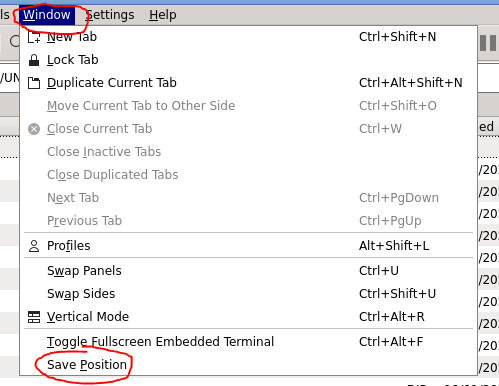
Try navigating to the windows youd like to be your new default and then inside Krusader go to Window>Save Position
-
At some point in the last month or so this app has stopped working for me and i can no longer connect to my unraid. Possible it's because I updated to 6.9.0-rc1 and went in on the early access My Servers thing? Edit: my app is on iPhone if that makes a difference
-
Ive recently noticed a phenomenon with my rutorrentvpn client that my download speed is severely hampered. I'll restart the container and get a good amount of my speed back. But sure enough the next day it's at a sorry crawl again. Until I restart the container and the cycle repeats. on and on. What sort of info would i need to provide to help troubleshoot this? TIA
-
ya i had to remove the old one and re-install the latest since it seems to have had an outdated template. Manually hitting Force Update probably would have worked as well. Though just as a I feared I get this up and running and instantly getting Banned Client errors. sigh... damned if i do damned if i dont lol
-
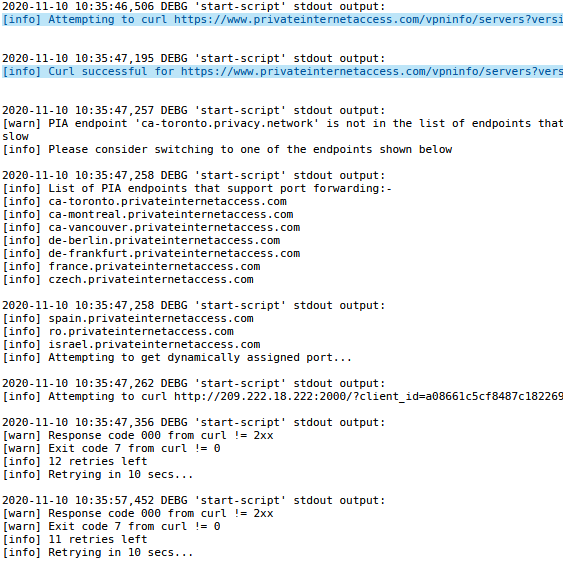
ive updated to the current delugevpn yet supervisord still showing the old addresses even when im using the nextgen zip. whats going on here? I even deleted the openvpn folder all together and copied over the openvpn folder from my binhex-rutorrentvpn set up that is confirmed working and confirmed shows the privacy.net servers when this screen is displayed as a tester. do i need to just uninstall deluge and reinstall at this point to shake out the bugs? is this somehow cached data? EDIT: Yes I had to remove the old client completely as simply updating the repository pull did not update the newer template. Seems to be working now that I uninstalled and reinstalled.
-
When I try to update from binhex/arch-delugevpn:2.0.3-2-01 to binhex/arch-delugevpn:latest I get error spam re: No such container. Why is dis?
-
i dont know if this is helpful but i had a similar issue. I had been using the download link for the next gen servers in the FAQ and the auth errors were persisting. But then I made sure I was actually logged in to the PIA site and only then did I download from their openvpn - next gen link on the site and it connected no problem. Not sure if logging in updates a link for you or gives you a more current cert or what. Could also be total coincidence or something else. All this to say can't hurt to double check that as another step in troubleshooting.
-
thank you for this. i may need to go that route. i dread the thought of having to recheck my 2100+ torrents all living in different folders with various labels. but if thats what i gotta do....
-
ok can anyone chime in on a specific 2.0.4 build that plays nice with the most amount of private trackers without getting you banned/blocked/timedout? Give me your favorite tag! TIA Edit: tho i guess the real issue is they're all dev versions. No stable version. So I'm up a creek.
-
Does binhex/arch-delugevpn:2.0.3-2-01 support all this next gen, updated servers stuff? My current experience would suggest no. But maybe I'm just misconfigured somewhere. Ive been through the FAQ up and down, though.
-
I'm using v.2.0.3. I just dont want it updating to :latest where it's bleeding edge new before trackers have a chance to whitelist the latest iteration. So I suppose I don't mean old old. And though I did read that they shut the legacy servers down on 10/31 I just connected to the old DE-Berlin about an hour ago so maybe they haven't technically pulled the plug yet.
-
hi PIA user here, according to Q19, i need to get latest docker image but i dont want the latest and greatest delugevpn, if im understanding correctly. i want the older version of delugevpn that i run that makes the trackers i am on the most happy. when clients are too new they get blocked on trackers. in any case, i keep trying to do the thing i see in Q20 with the multi end points cycling through but every time i start up delugevpn it wipes all but one of the endpoints out leaving it to just a single end point .ovpn file again. ive tried all the next gen stuff and renaming from privacy back to privateinternetaccess and back again and nothing works besides me trial and erroring, one by one, the older ovpn files until one finally connects. im confused how so many other people are up and running without a hitch on the new servers...
-
Once this is set up and with the express purpose of this being an always on irc, should we be excluding this docker container from auto updates?
-
huh weird ok yea, it was a combination of things i had to do to get it to work. would not work on firefox, works on chrome, and using http, not https
-
im having this exact same problem. log shows its stopping at the same point as yours. changing between browsers fixed nothing for me. nor did going in incognito mode to ensure its not a cache issue. also confirming http vs https. whats goin on here?



