





ultimz
Members
-
Joined
-
Last visited
Everything posted by ultimz
-
Thanks - found the logs. Is it safe for me to post them here? Not sure if it includes any sensitive information...
-
Ok thanks guys and yes the syslog server was enabled before the reboot (a while back actually)... how can I share those logs?
-
Hi, This morning I noticed that I couldn't connect to my Sonarr docker (nothing out of the ordinary in its logs) so I tried to stop it but the "server error" warning came up and it just continued running. I tried docker kill command from console and it still wouldn't stop. I then killed the Sonarr process by finding that specific PID and then it stopped but wouldn't start up. I also noticed that the mover was running for a long time and didn't ever complete so I stopped the mover process from console and then tried to restart. That stopped and then I tried to stop the array to restart the server but couldn't. It was just stuck at "Sync filesystems". The only thing that was accessing /mnt/user was some syslog processes so after a while of nothing happening I killed those. No luck stopping the array. powerdown -r also didn't help as I then lost connection to IP of unraid server but the server was still on. Ended up doing a hard shutdown. Not sure why this happened but it's doing a parity check now... but everything seems to be back up. Can anyone tell me why this happened? Logs attached. server-unraid-diagnostics-20230824-0805.zip
-
I made the jump from 7.1.68 to 7.3.83. Only issue I had was an error when starting the container... it complained about invalid memory heap size. I had to set the MEM_LIMIT and MEM_STARTUP back to default and it worked again.
-
@KluthR yes I can start the container manually without any issues. Auto update is not enabled.
-
Hi @KluthR I have installed the plugin again (over the old one) but I am still getting errors when trying to start a certain docker container. linuxserver/unifi-controller Any idea what I could try to solve this? For now I have set the backup to not stop this container and have also excluded its data folder.
-
Thanks to @m33ts4k0z for finding a solution for this issue and to @Squid for the plugin! My docker containers are no longer showing as "not available".
-
I successfully upgraded from 6.10 to 6.11.5 and everything went smoothly. Thanks to all the Unraid devs - you guys rock!
-
Thanks I have installed the old version again. Will keep an eye out here to see when issues have been resolved and install again (but I will be able to test new version if required - just let me know!)
-
I agree - thanks for the effort on this @KluthR. It is appreciated!
-
Is there a way to reinstall the old plugin?
-
@KluthR How do I tell if I have IPv6 enabled? I don't see that anywhere so I assume not... under Settings -> Network Settings -> Network Protocol = IPv4 Only Please see logs attached for Unraid and let me know if you need more info? server-unraid-diagnostics-20221220-1735.zip
-
Hi all, Ever since updating my backup is also failing. It seems to be the unifi-controller docker that fails to start up... See logs attached. I did not have this issue previously and have not updated the unifi-controller docker recently. When I check in the morning the docker is stopped and I just normally start it so not sure why this plugin is having a hard time starting it? AppDataBackupLog.txt
-
Thanks @Squid (and @KluthR) for assisting!
-
Did you uninstalled the old version first? I did. I ticked the selection under Uninstall column and pressed the "Remove" button. Then installed the new plugin. Is there something else I should do? Is anyone else getting the same alert from Update Assistant tool?
-
Not sure where to post this but I have changed over to "Appdata Backup/Restore v2" and when I run the Update Assistance it returns the following: Issue Found: ca.backup2.plg is not known to Community Applications. Compatibility for this plugin CANNOT be determined and it may cause you issues.
-
No worries at all - thanks for all the work you put into this plugin... really appreciate it along with the support you provide!
-
Update: I followed a previous posts advice and deleted the plugin using the terminal. Reinstalled, rebooted and running fine now.
-
Hello, I am having an issue with this plugin. I rebooted my server and it was no longer showing up. I tried to install it but am receiving this: -----ERROR - ERROR - ERROR - ERROR - ERROR - ERROR - ERROR - ERROR - ERROR------ ----Can't get Production Branch version and found no installed local driver----- -----Please wait for an hour and try it again, if it then also fails please----- ------go to the Support Thread on the unRAID forums and make a post there!------ plugin: run failed: /bin/bash retval: 1 I have attached my logs/diagnostics. Hopefully someone can help server-unraid-diagnostics-20220709-0837.zip
-
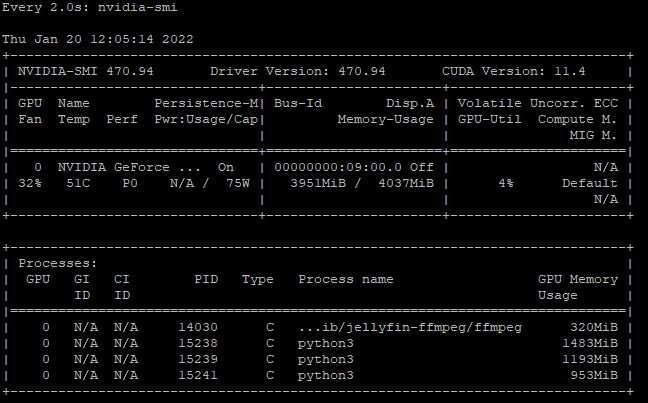
Yes and it seems to be working fine - the python3 app you see there is Deepstack I will try switching over later and see what happens! Thanks
-
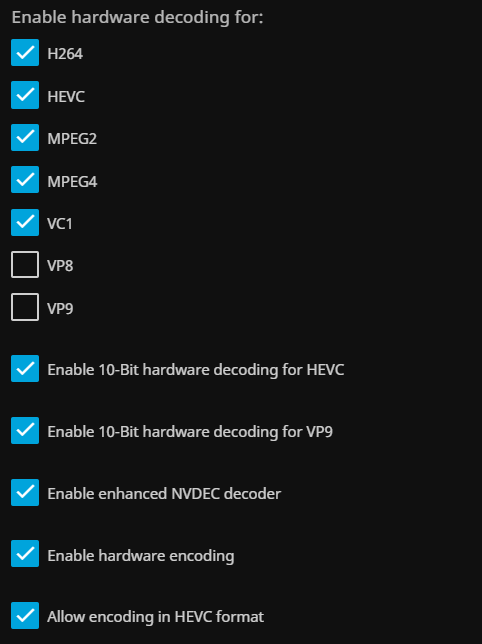
Yes that is correct See below - this is with HEVC transcoding enabled in the Jellyfin options: Currently how it is now (and I have the issue playing videos)... if I disable HEVC the video plays normally Strange... I will need to find a way to try a different container... currently using Linuxserver but will look at switching to yours without a reinstall. I do have another 1070 graphics card in the server used by a VM so I could also try that...
-
Thanks - I'll try reinstalling your container later instead of just changing the repo
-
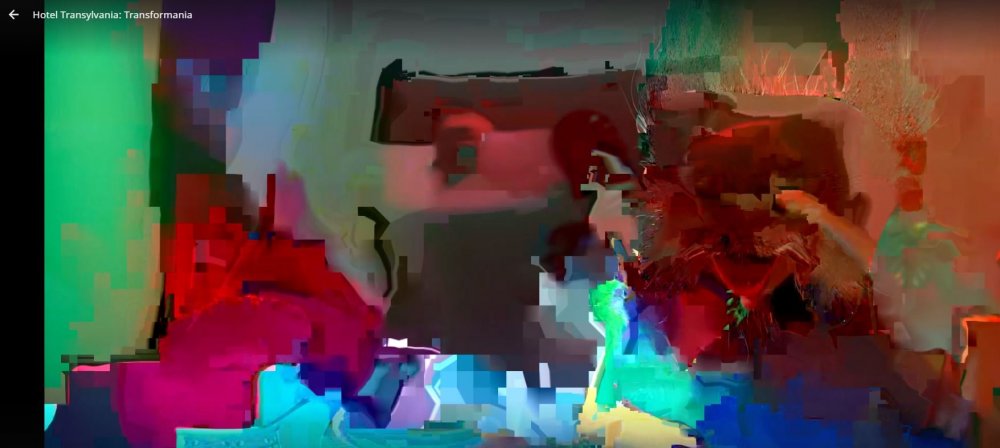
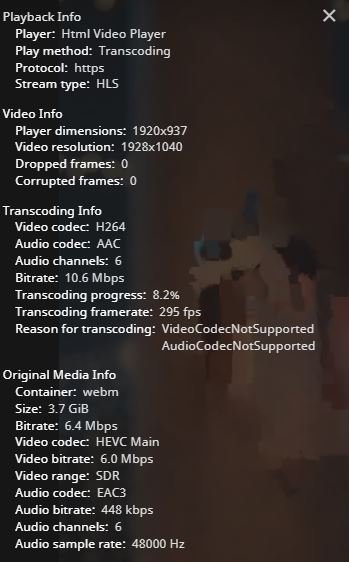
Hi, I seem to be having an issue with transcoding HEVC media - see images below. Could this be an issue with my graphics card or driver? I have a NVIDIA GeForce GTX 1050 Ti. I have tried the latest driver as well as the current production driver with the same results. With HEVC transcoding disabled With HEVC transcoding enabled Transcoding Data My diagnostic data server-unraid-diagnostics-20220120-1106.zip

-
Thanks - I tried migrating to this container but it didn't work (from the Linuxserver version). When I changed the repo and started it... it showed me the initial setup for the container ... like it couldn't find the old data.
-
Thanks @ich777 - do you perhaps know what the difference is between the containers? I will try switching later tonight




