





WeAreTheDynamite
Members
-
Joined
-
Last visited
-
Hi guys, I updated to unraid V6.10.0 RC5 and im gettin an unknow runtime nvidia error when trying to start the container, anyone know if the process for this changed? Cheers!
-
Hey, I'd like to request a Klipper/fluidd container, I've been playing around and I just don't understand things well enough to get it to work. 😔 I've found what I thought to be a good starting point, but i'm struggling. https://github.com/dimalo/klipper-web-control-docker https://hub.docker.com/r/dimalo/klipper-moonraker Cheers!
-
I have had a few connections, seemingly all shortly after initial setup - I haven't had anything since messing with the port forwarding and posting here. Though my node does say it's up on the my nodes page on mystnodes. It appears that UPnP/Holepunching is working but port forwarding is broken in the software itself?
-
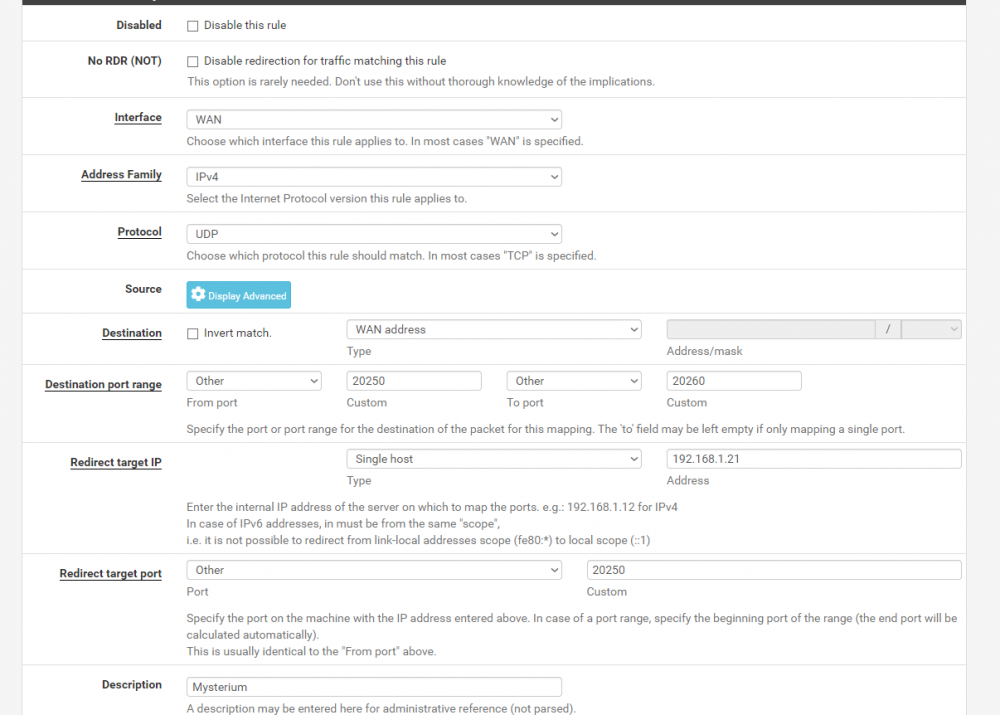
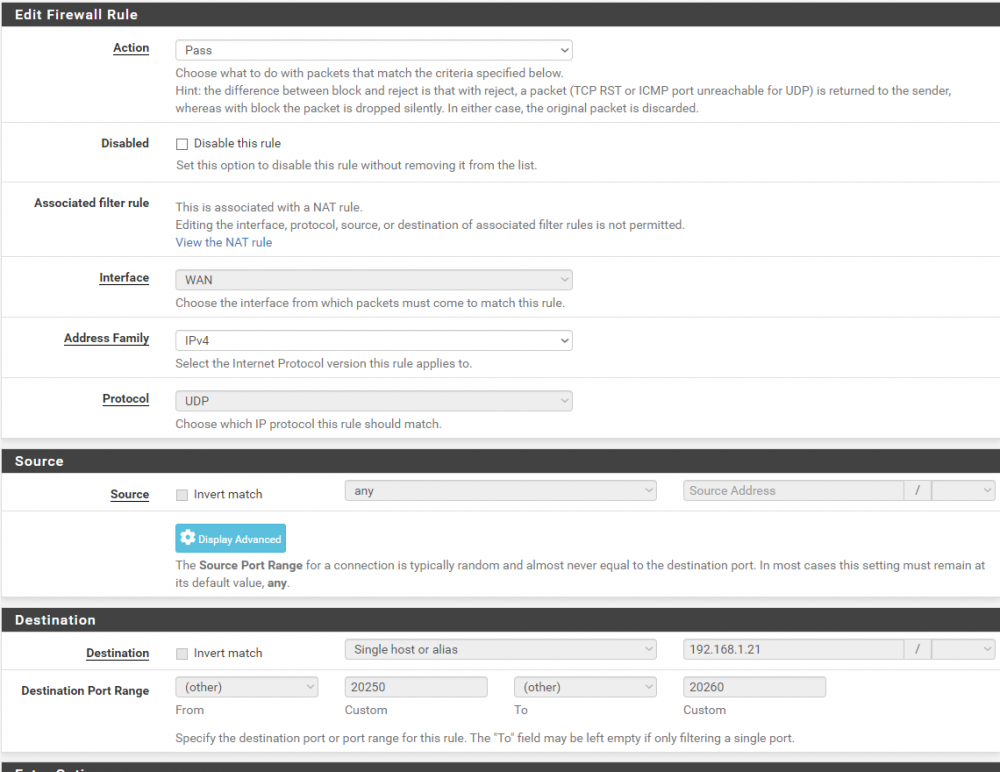
Hey, I have no problem sharing screenshots, maybe it could help someone else. 😊 I've set the port range as 20250:20260. Here is the Port forward setup - And here is the associated firewall rule. I also have Nat Refelection for port forwards set to NAT+Proxy by default, but this can be changed per rule and I've tried all three options; Disable, Pure NAT and NAT+Proxy. I'm kinda lost at this point, as I say, I know it's a pretty specfiic setup, so I appreciate your help. 😊 Cheers!
-
Hey, so I have this semi-working but I'm having issues with my port forwarding, I've had to change my nat type to get a "most" for my connections. I've set the port range on the web interface, double checked the change in the config file, set up the udp forward on PfSense and tested the ports are open, I get and Open|Filtered response and in pfsense the state table shows NO_TRAFFIC:SINGLE; suggesting it's not getting a response from the service? I've tried setting the container to bridge and adding the port mappings manually, but still get the same response. I could be totally wrong, but it seems like the container isn't responding to the forwarded requests. I have a fairly niche setup, I know, was just wondering if you could provide any insight! 😅 Cheers.
-
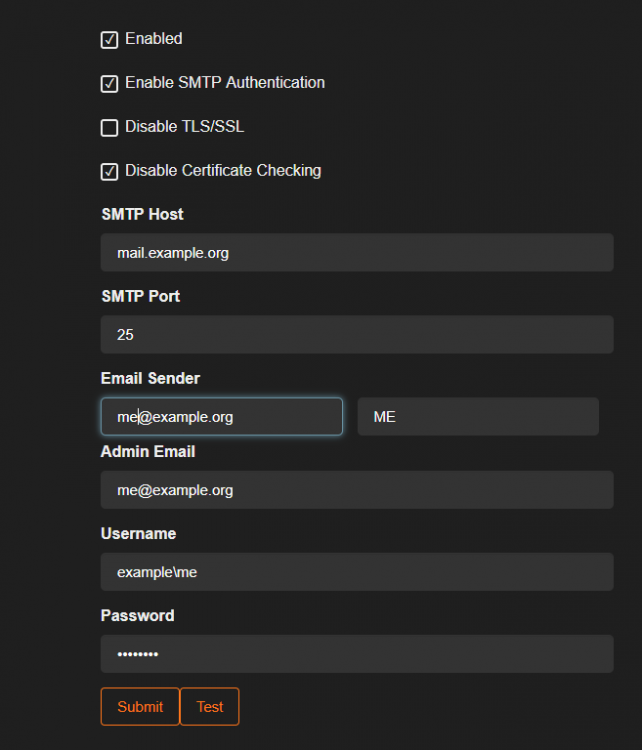
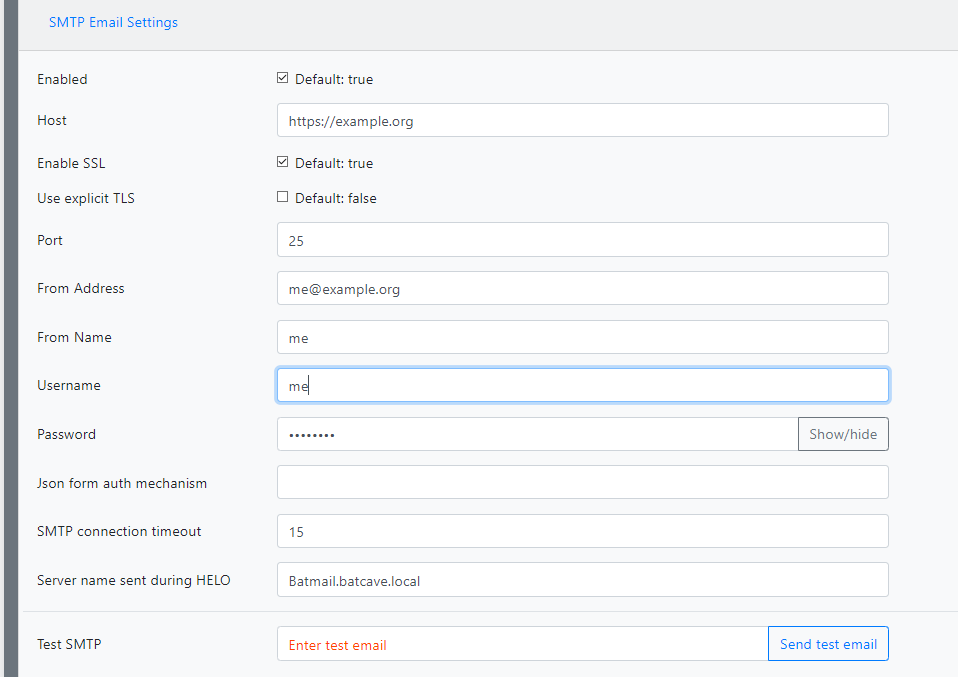
Hey, I know this is a pretty niche problem, but I have my own local exchange server for mail and I can't for the life of me figure out why SMTP isn't working.... I have the receive connector relay setup up, and works totally fine with Ombi, whenever I try to send a test in the Admin panel I just get SMTP error, which isn't hugely helpful... Here's an example of the settings, I've obviously modified for privacy, but the address/usernames are all actually correct. There's really not a lot to go on, so I'm just wondering if anyone has managed to get this working and has any tips?
-
Hey, I'm having some weirdness with the HyRoSa container. I am unable to connect to the SABnzbd client either through the web interface or IP:port Hydra and rTorrent both work fine. I ran a test and on a custom IP, it was fine, move back to bridge and it breaks again. I've tried modifying the ports, I've tried the default ports, but no dice running as a bridge, which unfortunately is required for me... Any ideas? Cheers Edit** Figured it out, It seems SABnzbd itself defaulted to port 8081, with docker trying to route 8081 to 8080, it wasn't finding it. so modifying the template from 8080 to 8081 fixed it. Cheers
-
Without the mods was unsuccessful but after wiping the appdata folders and reinstalling the container, I seem to be up and running! Thanks so much for your help! 😊
-
The mods and serverconfig.xml were transferred using windows file explorer directly into the appdata/7dtdbeta folder, runing chomd/chown from the terminal seems to have fixed the permission issue. Its now using between 15-300MB of ram just cycling through a boot loop... Loading Steam API...Warning: failed to init SDL thread priority manager: SDL not found OK. Connecting anonymously to Steam Public...Logged in OK Waiting for user info...OK Success! App '294420' already up to date. ---Prepare Server--- ---SaveGameFolder location correct--- ---Savegame location found--- ---UserDataFolder location correct--- ---UserDataFolder location found--- ---Server ready--- ---Start Server--- Found path: /serverdata/serverfiles/7DaysToDieServer.x86_64 /opt/scripts/start-server.sh: line 91: 66 Aborted ${SERVER_DIR}/7DaysToDieServer.x86_64 -configfile=${SERVERCONFIG} ${GAME_PARAMS} ---Checking if UID: 99 matches user--- usermod: no changes ---Checking if GID: 100 matches user--- usermod: no changes ---Setting umask to 000--- ---Checking for optional scripts--- ---No optional script found, continuing--- ---Starting...--- ---Update SteamCMD--- Redirecting stderr to '/serverdata/Steam/logs/stderr.txt' [ 0%] Checking for available updates... [----] Verifying installation... Steam Console Client (c) Valve Corporation -- type 'quit' to exit -- Loading Steam API...Warning: failed to init SDL thread priority manager: SDL not found OK. Connecting anonymously to Steam Public...Logged in OK Waiting for user info...OK ---Update Server--- Redirecting stderr to '/serverdata/Steam/logs/stderr.txt' [ 0%] Checking for available updates... [----] Verifying installation... Steam Console Client (c) Valve Corporation -- type 'quit' to exit -- Loading Steam API...Warning: failed to init SDL thread priority manager: SDL not found OK. Connecting anonymously to Steam Public...Logged in OK Connecting anonymously to Steam Public...Logged in OK Waiting for user info...OK Success! App '294420' already up to date. ---Prepare Server--- ---SaveGameFolder location correct--- ---Savegame location found--- ---UserDataFolder location correct--- ---UserDataFolder location found--- ---Server ready--- ---Start Server--- Found path: /serverdata/serverfiles/7DaysToDieServer.x86_64 All is fine on my primary server which is on the stable release branch, and i don't think I've done anything different.... I've probably missed something.
-
Upon a second restart, it appears the container is trying to set file permissions but is being denied access to do so...
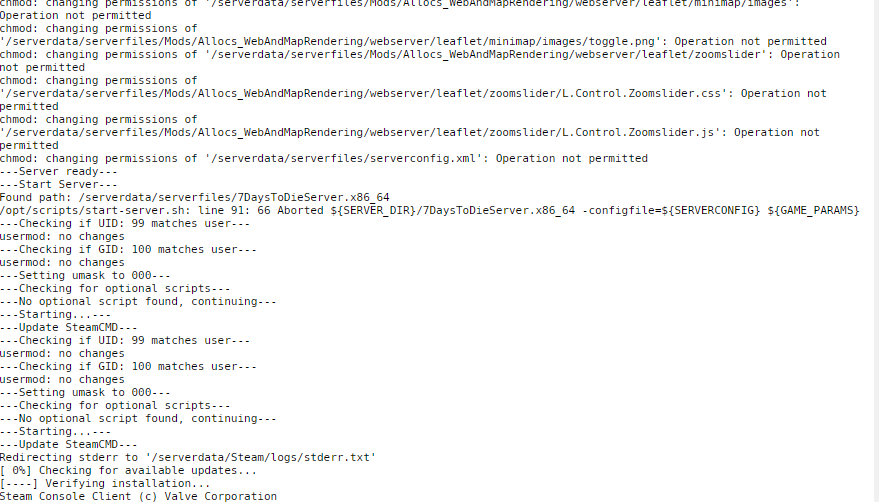
-
Mine seems to have Downloaded after a reboot of the docker, but it still won't start... Here are the logs. Success! App '294420' fully installed. ---Prepare Server--- ---Moving SaveGameFolder location--- ---Savegame location found--- ---Moving UserDataFolder location--- ---UserDataFolder location found--- ---Server ready--- ---Start Server--- Found path: /serverdata/serverfiles/7DaysToDieServer.x86_64 [S_API FAIL] SteamAPI_Init() failed; SteamAPI_IsSteamRunning() failed. Setting breakpad minidump AppID = 251570 ---Checking if UID: 99 matches user--- usermod: no changes ---Checking if GID: 100 matches user--- usermod: no changes ---Setting umask to 000--- ---Checking for optional scripts--- ---No optional script found, continuing--- ---Starting...--- ---Update SteamCMD--- Redirecting stderr to '/serverdata/Steam/logs/stderr.txt' [ 0%] Checking for available updates... [----] Verifying installation... Steam Console Client (c) Valve Corporation -- type 'quit' to exit -- Loading Steam API...Warning: failed to init SDL thread priority manager: SDL not found OK. Connecting anonymously to Steam Public...Logged in OK Waiting for user info...OK ---Update Server--- Redirecting stderr to '/serverdata/Steam/logs/stderr.txt' [ 0%] Checking for available updates... [----] Verifying installation... Steam Console Client (c) Valve Corporation -- type 'quit' to exit -- Loading Steam API...Warning: failed to init SDL thread priority manager: SDL not found OK. Connecting anonymously to Steam Public...Logged in OK Waiting for user info...OK Success! App '294420' already up to date. ---Prepare Server--- ---SaveGameFolder location correct--- ---Savegame location found--- ---UserDataFolder location correct--- ---UserDataFolder location found--- ---Server ready--- ---Start Server--- Found path: /serverdata/serverfiles/7DaysToDieServer.x86_64 [S_API FAIL] SteamAPI_Init() failed; SteamAPI_IsSteamRunning() failed. Setting breakpad minidump AppID = 251570 The server doesn't seem to actually start, though I do have the server files in appdata...
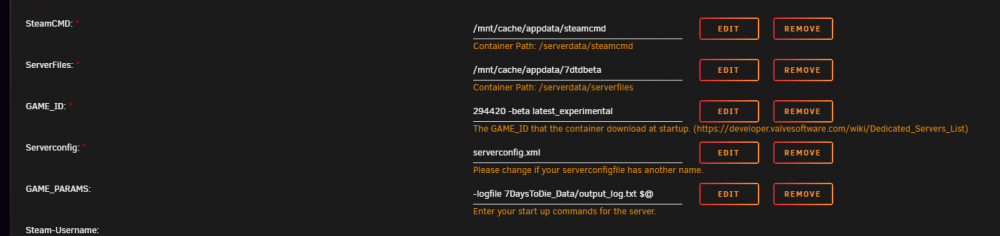
-
I'm having trouble installing the 7dtd -beta latest_experimental, just keeps boot looping Steam Console Client (c) Valve Corporation -- type 'quit' to exit -- Loading Steam API...Warning: failed to init SDL thread priority manager: SDL not found OK. Connecting anonymously to Steam Public...Logged in OK Waiting for user info...OK ---Update Server--- Redirecting stderr to '/serverdata/Steam/logs/stderr.txt' [ 0%] Checking for available updates... [----] Verifying installation... Steam Console Client (c) Valve Corporation -- type 'quit' to exit -- Loading Steam API...Warning: failed to init SDL thread priority manager: SDL not found Any idea? Cheers!
-
Log posted in pastebin. https://pastebin.com/RAAu9huL Thanks so much for your help! If you need a copy of the game for testing, happy to gift it to you on steam as a small token of appreciation! Perhaps you could shed some light on the appdata path thing for me though? I've seen a few differing ideas on this. My understanding is /mnt/user/appdata with the share set to cache only is the "best" way to do this? But i've seen people suggest using /mnt/cache/appdata - this maps it directly to the drive without creating an exportable user share as far as I know? Wouldn't your suggestion of using /mnt/user/cache/ just create a new user share called cache with which I could set any of the same parameters as my current appdata share? Sorry, I know it's off topic but I'm interested in peoples different ideas on the best way to do things.
-
Hey, I seem to be having the same issue with the 7 Days to Die container. Was working great, I moved my appdata share onto my cache drive and now i'm getting the same error. Loading Steam API...Failed to init SDL priority manager: SDL not found Failed to set thread priority: per-thread setup failed Failed to set thread priority: per-thread setup failed Hopefully I haven't killed it! Any ideas? Cheers.
-
I’m in! Cheers! Now to figure out how to use it! Thanks for your advice, much appreciated. Hope you have a pleasant weekend away from home. 👍🏻




