





VelcroBP
Members
-
Joined
-
Last visited
Everything posted by VelcroBP
-
I have 2 Plex Libraries, and I want to mirror a bunch of movies from one to the other without duplicating storage. I am familiar with creating hard links individually via console, but was hoping there might be an easier solution since I am looking at ~100 movies.
-
great to hear! I have run the Unraid USB Creator tool downloaded from the site, and it finished "unraid 7.0.1 successfully installed to SandDisk Cruser..." etc. Do I now simply unzip the backup-flash and overwrite the newly created usb data with it? Then a (hopefully) successful boot and (hopefully) the "GUID mismatch" will trigger an license transfer automatically?
-
My flash is also not recognized on by windows, or rather it throws an error after failing to read it. So I am anxiously awaiting to hear how your system turns out with the new usb drive and parity check.
-
that didn't last long. I was able to boot, start the array (auto-parity-check started), then enabled local syslog server to mirror to flash and write to an array folder. Then the system became entirely unresponsive (maybe 1 minute in to the parity check). Webui, IMPI KVM nothing, so I hard power off again. I think I should follow user @wirenut's lead and get another flash drive... Also I might have uploaded the wrong zip, I thought I put both diag files into the archive with all the screens, but I'll attach it here again just to be sure. mootower-diagnostics-20250501-1510.zip
-
I will try, but it froze and failed to complete the 2nd one.
-
Sounds like just what happened to my server 10 minutes before your post. I'm following to see what suggestions you get. I have other issues to that this occured in the context of, so good chance it's just coincidence.
-
the webUI froze, then reloaded with no styling/css or whatever (see screenshot 1 (ss1)) and an error that the flash drive was missing. IPMI KVM showed errors (ss2). About this time, a discord notification indicated party check completed with all the errors again (ss3), though it showed 0 errors the entire duration it was running. The server then became unresponsive via all methods, so I hard-reset via the chasis power button. Upon reboot, the os loaded normally and unRaid loaded normally. The parity check was listed as complete on the Main>>Array OPerations (ss4). The boot device (ss5), ssd pools (ss6), and array hdds (ss7) are all visible. I have diagnostics from before this parity check was initiated, and one from right after his forced cold shutdown. I've uploaded all screens and diagnostic zips as 1 archive, but If it isn't acceptable I can upload the diagnostics here and put the screens as gallery link? Thanks for taking a look! unraid troubles 2025May.zip
-
Yes I did the parity swap procedure in October. Then in November I migrated the hardware to the new case. If I run another check and still get errors, what would the next step be? And should I run it with "Write Corrections" enabled? It is disabled for scheduled.
-
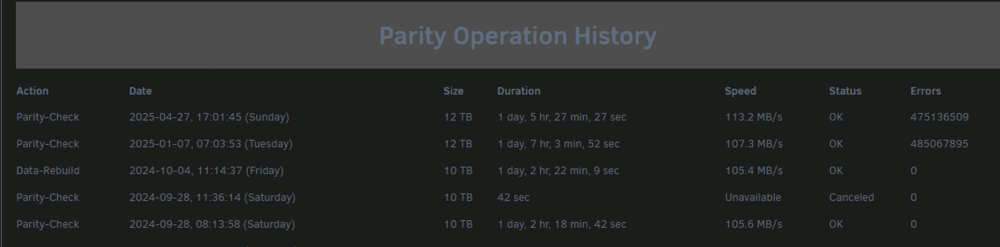
Most recent parity check finished today with ~500 million errors. I was shocked and checked the history to see that the prior check in January returned similar. I don't know how/why I didn't see that at back then. It would have shocked me then too since I have only ever had 0 errors. The server has been running just fine as far as I can tell. In the interim, I have upgraded the OS twice, first 6.11.5 -> 6.12.5 then ->7.0.1. Prior to the January check, but after the last "0-error" one, I did a total case migration. During this, all HDDs were moved from old norco hotswap bays to direct mounting and connections in a bigger case. Also upgraded the CPU, added 2 SSDs, and replaced all the sata cables (that aren't connected via breakout cable. I'm hoping someone can tell from the diagnostics how best to proceed. mootower-diagnostics-20250427-1707.zip
-
My server is in desperate need of expansion. I stumbled on ServerPartDeals and their prices seem to be the best I can find. I've done a little searching and they appear to be legit with plenty of positive testimonials. My tower currently has a 10tb parity disk. I have been slowly swapping old 2-4 tb drives with WD Red 8 tbs over the past 2 years, so I'm looking for 8tb ideally. I need help picking from the available recertified drives (listed below). There are 4 8tb drives. But I can't seem to find any specs or discussions of the Toshiba MD series. What are people's thoughts on the Barracuda or Archive series from Seagate? I normally see their IronWolf Pro line recommended. If the 12-14 drives are the only ones suggested over these (either the Ultrastar or the IronWolf), I will have to make it my new parity drive and move the current 10tb into the data array. Not sure I feel comfortable with a recert drive as parity, but will it matter if it undergoes a badblock/preclear stress test and passes (and has a 2 yr warranty with SPD)? 8tb = Toshiba MD05 or MD06 (both $80) 8tb = Seagate Barracuda or Archive series ($110 & $90 respectively) 12 tb = Ultrastar ($110) 12 tb = IronWol Pro ($130) 14 tb Ultrastar (512 cache) ($130)
-
Nevermind. My issue seems to be with the Crunchy iOS reader app. Apparently, it can't handle files >1 GB.
-
I've upped my docker image file size to 50 GB and my download is still timing out, so it doesn't seem to be an image size limitation.
-
KOMGA question: I've been running the container for years without issue. I use the Crunchy app on iOS and download books via OPDS. I'm using a custom domain and NPM reverse proxy setup with a CF tunnel. This has been fine, but now I'm trying to download a single, large book ~2.9 GB. The download fails every time with a Crunchy error "Network Connection Lost". It seems that the container is hitting some limit filling up the Docker disk image file. unRaid notifies that the disk image utilization is high around 20% of the download, then the DL fails before 50%, and the image utilization returns to normal. My docker config for the image file is 35 GB, with ~28 GB contained. The warning notification fires if it goes above 70%. Is there anything I can adjust?
-
Can someone ELI5 an annoyance I have accessing my shares via SMB and File Explorer from a Win11 PC on my network? Basically, why does it sometimes access the "TOWER" right away, but other times I get "ACCESS DENIED"? I have an uNRaid user that matches my Windows user. In File Explorer on Windows, the shares show up in the navigation pane's "Network" group as "TOWERNAME". IF that's displayed, I can just double click and get right into the shares as expected. Sometimes, however, I have to expand the "Network" group. If that's the case and I try to click on "TOWERNAME", I get Access Denied. Also, the 2nd scenario seems to always be the case when accessing vie a "Browse..." menu for saving files. In either case, I am always able to access if I type the IP address into File Explorer's address bar regardless of how TOWERNAME displays in the navigation pane. I'm a networking idiot so I don't know if this is due to my bad configuration or just quirk in how windows does SMB?
-
I'm not finding any info in either documentation regarding an existing configuration option for permissions or how to add them to the template. I'm probably overlooking it.
-
Is there an environment variable available to set UMASK for the SLSKD container? Right now all files/folders are set as -rw-r--r--
-
I am using the default. Oddly enough, I upgraded unRaid last night from v6.11.5 to v6.12.4, and now it is working as expected. Loving the container!
-
I just installed SLSKD and it works great! However, if I launch the WebUI via unRaid, browser URL field is blank and nothing loads. However entering the IP:PORT in the browser works. I am routing the container through another for VPN. In the VPN container I have added both the HTTP & HTTPS ports indicated in the SLSKD template. I'm sure I'm overlooking something basic in my config.
-
I've been putting off upgrading but think I'd like to take the plunge so as to not fall any farther behind. I've been reading up on the history of the MACVLAN vs. IPVLAN issues and am hoping I won't have trouble. But I'd like to know if there are steps I can take to help make sure it will go as smoothly as possible. For instance: I've not used any manual/static IPs for my containers. Would it benefit me to switch them all/some over prior to the upgrade? Should I try switching to IPVLAN before the upgrade? Server mobo has 2 NICs + IPMI. I currently have the NICs as bond0 for redundancy, but only 1 is currently connected to the switch. I am using a custom Docker network for all of my containers (except iPerf3 as Host & Macinabox as Bridge). Will this help or hurt my chances for issues? I am using a domain with Cloudflare tunnel + NGINX reverse proxy. I only 1 router port forwarded to the server for PLEX. Will anything need adjusted on my router? Home network is simple: Modem > Router > Switch (unmanaged) > Clients (unRaid Server, PCs, VOIP, & AP [for phones, tablets, & TV]) The server is assigned a static IP in the router. I don't have any other Container-specific configurations, VLANS, or special firewall rules for unRaid What tests/diagnostics/errors should I look our for after the upgrade? Anything else I'm overlooking? Here is a link to my Network & Docker configs. Please let me know if any other settings or console outputs would be useful.
-
I followed THIS GUIDE for setup
-
I've used "GRANT ALL" & "SET OWNER" for the user on this database Sent from my Pixel 5 using Tapatalk
-
I've tried to follow the install instructions for Invidious but I am unable to access the WebUI. I am getting the following error in the logs (seems to repeat for all tables): Unhandled exception in spawn: permission denied for table users (PQ::PQError) from lib/pg/src/pq/connection.cr:202:22 in 'handle_error' from lib/pg/src/pq/connection.cr:220:65 in 'handle_async_frames' from lib/pg/src/pq/connection.cr:162:7 in 'read' from lib/pg/src/pq/connection.cr:414:31 in 'perform_query' from lib/db/src/db/statement.cr:80:7 in 'query:args' from lib/db/src/db/pool_statement.cr:29:30 in 'query:args' from lib/db/src/db/query_methods.cr:61:12 in 'begin' from src/invidious/jobs.cr:37:15 in '->' from /usr/share/crystal/src/fiber.cr:146:11 in 'run' from ??? Please let me know what info/files I can attach for more info.
-
Is this not possible? Should I just delete the VM and start over?
-
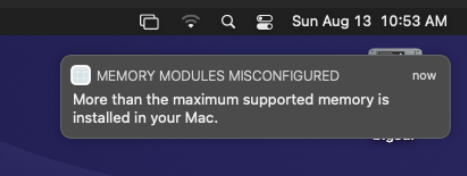
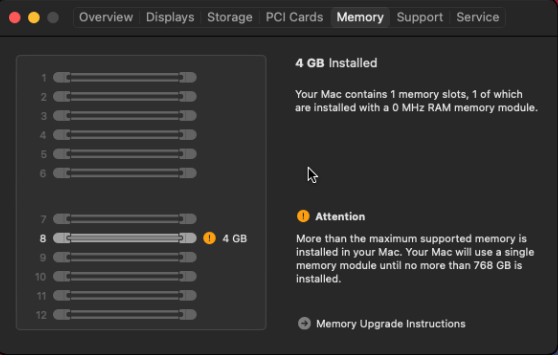
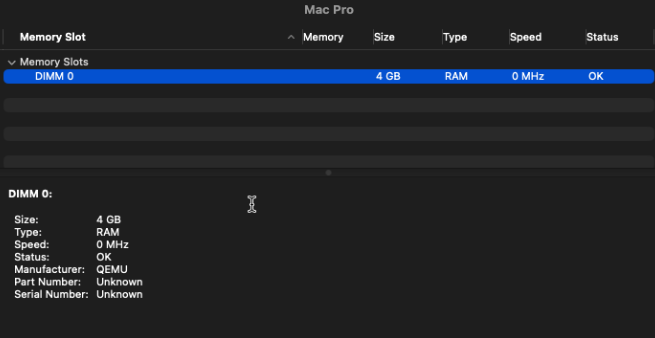
Every time I spin up the VM I get an error about memory module configuration. Here are screenshots of the error as well as the info from macOS.
-
Woke up to this error notification this morning. The system seems to be ok now so I'm not sure of the severity, other than this should never happen if everything is configured correctly, right? I set up a macOS VM yesterday using the Macinabox container. This is the first VM I've used (aside from quick testing way back when), so I'm guessing I might have configured that wrong somehow? can someone please take a peek at my diagnostics to see what the culprit is so I can read up on a solution? mootower-diagnostics-20230813-0739.zip

