





VelcroBP
Members
-
Joined
-
Last visited
Everything posted by VelcroBP
-
https://gist.github.com/velcrobp/034a5587eab623af24051b341d328cbd
-
That is indeed the video I followed back when I originally set up cloudflare and NGINX. However I since followed their video for creating an tunnel via CF. To clarify, my setup is working currently with other containers. It has also worked previously with a different template for Nextcloud (linuxserver.io). I switched to this official container because of other problems I was having with Nextcloud. Since this has worked previously and is currently working with other containers, I think the problem is with my Nextcloud config. Given the fact that the requests are making it through CF and NGINX and hitting Nextcloud, but are getting flagged as insecure, I don't think I'm whitelisting properly since it doesn't solve the issue.
-
How to access remotely via Cloudflare tunnel & NPM ? I'm running unRaid 6.11.1 I have a Nextcloud container using the official template with default port mapping. It is running on the same custom docker network I use for all of my containers. I have a domain (mydomain.net) on Cloudflare with a tunnel set up to my server. I have created a CNAME for Nextcloud (cloud.mydomain.net). I have set up a proxy host in NPM using my domain cert from CF and the following settings enabled: HTTP scheme, cache asstes, block common exploits, force SSL, HTTP/2 support, HSTS Enabled, HSTS subdomains I can't connect remotely. If I try with HTTPS scheme, I get a Bad Gateway Cloudflare error. If I try with HTTP scheme, I get a Nextcloud "Access through untrusted domain" error. I have tried adding variations of mydomain to the whitelist in config.php with no change (*.mydomain.net; cloud.mydomain.net; https://mydomain.net; etc.) What is the proper, most secure way to get remote access to an official image instance of Nextcloud from CA?
-
New theory: issue occurs when Plex is transcoding AND Nextcloud sync operation is running? That was the system state at the time of hanging today anyway. So far Plex has been running for all the hangs I've been present for. And the only non-Plex was with Jellyfin?? Also new with today's freeze: the UI returned many errors of devices not being available for unmounting during the Powerdown, resulting in an unclean shutdown. mootower-diagnostics-20230120-1458 - HANG TIME.zip mootower-diagnostics-20230120-1501 - POST BOOT.zip
-
I had a though last night, don't know if it's relevant. I have been getting CRC errors on one of my data drives. I've kept an eye on it, and recently it started happening more frequently. I've swapped the cable, and the mobo port and they continued. Yesterday I moved it into a different bay in the Norco 3x5 and if it still grows then I'm assuming bad drive. With that said about the drive, is it possible for an error communicating with a data drive, like during playback or transcode or whatever, could cause the OS/UI to freeze? With several of my reboots from hangs, the system fails to POST due to a SMART error with that drive. I press F1 to retry and it boots normally. Just grasping at straws really. I hope to have funds in the next few months to rebuild my server and replace/upgrade everything but the data drives. Just needs to hang in there until then lol.
-
ok thanks for looking. I will keep going with plugins, then I'll try disabling iGPU transcoding. Just grasping at straws really. If I can't find a root cause, I hope to have funds in the next few months to rebuild my server and replace/upgrade everything but the data drives. Just needs to hang in there until then.
-
Just hung up again. This time, a user was initiating a Plex remote stream that was transcoding from 1080 - SD (no idea why she would have her iOS Plex app set to SD). Attached are the diagnostics from during the freeze (~15:25) and right after reboot and starting the array. Any help anyone can provide in parsing these for a potential cause to start troubleshooting next would be greatly appreciated. I will continue disabling 1 plugin at a time unless other suggestions come in. Though I the fact that the 2 most recent incidents involved Jellyfin playback or Plex transcoding/playback make me inclined to think it's something related to video? I'm at a loss really. mootower-diagnostics-20230116-1527 -- DURING FREEZE.zip mootower-diagnostics-20230116-1537 -- AFTER REBOOT and ARRAY START.zip
-
I was not able to force a hang by replicating the actions with Jellyfin. It might have just coincidentally froze while I was testing Jellyfin - client stream?
-
So I disabled all plugins and have been running in normal mode since 12/30. Every couple of days I re-enabled a few plugins, with the final batch being on 1/12. So far, no issues or freezes at all and I thought all must be well, the issue was with a plugin that was corrected by reinstalling. Today I was testing the Roku Jellyfin app (having recently setting up a container), and upon playing a file and returning to the menu, unRaid locked up again. Just the same as before, with all shares accessible and the console as well via SSH. Just the UI and apps are not responding. I can log into the Main and container WebUIs, but nothing loads. I'm attaching a diagnostic zip from during the hang (generated via console command), as well as the auto generated post-boot one. The freeze occurred at ~12:10. Syslog doesn't seem to report anything relevant, but I can attach it if needed. mootower-diagnostics- DURING - 20230114-1211.zip mootower-diagnostics- POST REBOOT - 20230114-1217.zip
-
So far running stable after a couple days running in safe mode. I've renamed the extension of the .plg files. Clarification on the plugin testing: Is it enough to install one at a time during the current safe boot session? Or do I need to reboot into normal mode after restoring each .plg extension?
-
Or can I just restore a copy of the .plg file into the /plugins/ folder? I have backed up the folder to another PC.
-
This is by deleting all plugins (per below from a different post), then re-install one-by one and boot in normal mode? Can I leave the config folders in /plugins/ for the re-install?
-
I will try safe mode. But, since I don't have a definitive way of forcing the issue, or any correlated events to test, how will I rule out plugin issues? Do I leave it run and if there's no freeze-up for x # of days then I assume it's a plugin?
-
and here is the version created just before powerdown reboot mootower-diagnostics-20221228-1940.zip
-
Just had another OS freeze. The shares are still accessible but not any of the webUIs. I was able to run generate a diagnostics via IPMI and have attached. mootower-diagnostics-20221228-1931.zip
-
is there a way to get diagnostics via command line? They are reset upon reboot, or are they still available in the flash drive somewhere?
-
I've been experiencing intermittent freezes where the UI and all container apps become unresponsive. I am still able to connect via SSH and IPMI, and rebooting via powerdown -r restores functionality for a while. I haven't been able to correlate to any particular action by container or service. However, just prior to the most recent freeze this a.m. I noticed high RAM usage in the dashboard (98%). TOP only accounted for ~55%, so I don't think it was actually using all of the allocated RAM but thought I'd mention it. I've been running a Kiwi server on another PC since the last hang, and the syslog from today is attached. MootowerSyslogCatchAll-2022-12-27.txt
-
Does this container stop or prevent qbt from accessing the internet if the VPN fails? For example if the VPN sub expires overnight does qbt lose connection?
-
I'm worried about the IPMI implications leaning motherboard. but to clarify: i was able to connect via IPMI, and it showed the chassis status as powered on, there was just no video signal via the KVM console (or physical monitor for that matter). Sent from my Pixel 5 using Tapatalk
-
My server just suddenly went unresponsive. I got the "content unavailable" error suddenly while watching Plex. I was then unable to load the unRaid webUI or access via IPMI KVM console. Pings were also unresponsive at this point. I then plugged in a physical monitor/keyboard to the server. No video output was picked up there either. I then hit the chassis reset button to initiate an unclean reboot. Everything came back up normally and began the parity check as expected (after I manually restarted the array). This is the first instance I've had of this kind of total OS freeze-up. No recent hardware changes. I upgraded from 6.11.0 to 6.11.1 this past week. I've also manually installed Python packages that were missing from NerdPack deprecation. Those are the only software changes I can think of since the 6.11.0 upgrade a few weeks ago. I need to know what logging I can set up to help troubleshoot this if it happens again. Are there any other options I should turn on or configure? Verbose or Trace modes anywhere for hardware monitoring? I have syslog server setup and writing to Kiwi on my Windows PC. I just downloaded an unRaid diagnostic .zip so I'll have a before and after of that also. Is there anything else I can do proactively?
-
I have a cache pool of 2 SSDs. One is starting to throw reallocated sector count errors about once a week or so. It is up to 4 now. I've attached the SMART report. My questions are: Is this indicative of imminent failure? If so I will have to shrink back down to the single cache drive until I can afford to purchase a replacement. Samsung_SSD_840_PRO_Series_S12PNEAD315804J-20220906-1008.txtIs parity the main/only benefit of a cache pool? I was thinking to replace the failing drive with a 512gb one. In that case, I could free up a physical drive slot in my server by just replacing the remaining SSD instead of adding the new and creating another pool. I don't really need the extra slot. I currently pre-clear new HDDs via a usb-SATA adapter and that seems to work fine. But it would be nice to have a warm spare.
-
I finally bit the bullet and got the nerve to flash my BIOS. It seems to be working as expected now! Thanks so much for going the extra mile and reporting your results back!
-
Thanks! I have setup a FreeDOS disk using Rufus. I'll hopefully be doing this later today or tomorrow. I should be reporting back this weekend, fingers crossed.
-
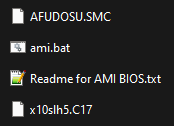
Ok SM emailed got me the 3.0a download. However I don't know which file inside the ZIP is the actual BIOS, to be included in the DOS "Flash.BAT XXXX" command? Which one of these is it? the .C17 or the .SMC ?
-
That is true, I forgot. The reason I had to rebuild everything the last time was due to changing my entire share structure. I Consolidated all media shares under one top-level share. I also had to redo my *.arr stack at that time. Since I (hopefully) don't have to change any of my paths again I could just migrate my Plex appdata. I'll have to consider it after I've updated BIOS and see how lsio's container works.
