





VelcroBP
Members
-
Joined
-
Last visited
Everything posted by VelcroBP
-
nvm. figured it out. it was a derp moment on my end
-
I followed the guides and looks like everything is talking to each other nicely, with a few exceptions. hopefully someone can set me straight on them, otherwise I'll trim some things down: Blank Docker queries: Dockers (ALL), Docker Details, Dockers Running, Dockers Stopped Unassigned Devices lookup in header reverts to first disk in list immediately after I unselect it. There aren't any unassigned devices connected to my server Array Growth is blank, and what is "fB" unit? How can I change to GB? Plex History queries are all blank Array Status, Parity Status, Mover Running, Parity Check Running, Dockers Running, Dockers Stopped -- all are blank No temp or fan data anywhere. Sensors show as expected under IPMI in unRaid UI dashboard Where does the Sonarr/Radarr integration from Varken come into play? Thanks in advance! I look forward to further tinkering with the dashboard and data!
-
I just installed the prometheus-qbitorrent-exporter. I have it set up as a source in Grafana but have no data yet. I'm completely new to both prometheus and grafana so I'm lost as to where to configure the environment variables for my qbitorrent instance. can someone point me in the right direction please?
-
How do I run this container if I already have ports 80 & 443 in use? I tried changing the ports in the template but still get "Execution Error: Server Error" trying to start it either way.
-
My bad! After posting I dug through my containers and sure enough, Komga still had that path mapped. Completely overlooked it before, but I've removed it now and should be good. Thanks!
-
I have a share that has been several times. It keeps being recreated somehow. The share is /media. It only ever contained ONE folder, /media/books. I have since moved all of my stuff into a new structure, so everything is under one share, /data. So now all of my book files are located at: /data/books. However /media keeps coming back, with only one (empty) instance of the /books folder on one disk in the array. I delete the /books folder via MC, then delete the share via unRaid, but it will come back in a few days/weeks. What would be causing unRaid to automatically recreate a previously deleted share? I do not have any book downloading containers (i.e. claibre) installed. I can't think of any other automation software that would have that path mapped.
-
I will read up on that, thanks!
-
I'm trying to find out what is causing recent performance issues with my server. Over the past couple of months I've noticed increasingly frequent hiccups in performance. Typically this is during video playback of a file via SMB/VLC on the network, but has also been when opening/navigating SMB shares via Windows PC on the network. When this happens I check the unRaid Dashboard and notice CPU cores bouncing from 70-80% and spiking at 100%. There is no other activity from the server at this time (i.e. remote Plex plays initiating or transcoding). Now I'm at a loss as to the best way to pinpoint what container/process/service is causing the hit to the CPU. I have a few utility dashboard containers installed, but honestly I am not knowledgeable enough to interpret these and don't know what I'm looking for. I also have SolarWinds Kiwi on my Windows PC and just configured remote Syslog server in unRaid. But again, I'm not familiar at all with this so I don't know what to look for in the syslogs or what filters to set up in Kiwi to track performance long term. My question is: what is the easiest method to identify what is drawing so much utilization from the CPU and RAM? Is there a newb-friendly container or application I can run? What's the best way for me to go about this?
-
I selected "Dive into Subdirs..." option and it completed instantly like the other share
-
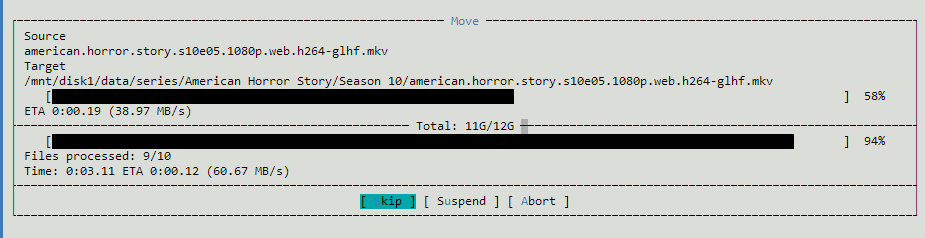
At this rate it will take days to renMove all of the subfolders within my "TV" share. What am I doing wrong here?
-
renMov operation for my "Movies" share was indeed almost instant for each disk. However, The "TV" folders are quite slow. A progress bar displays for each file as though it is in fact moving the data. Is this normal?
-
that's great news! thanks! Sent from my Pixel 5 using Tapatalk
-
I want to change my overall approach to media shares since I am now running *.arr apps and such on the server. When I did the initial config years ago I was not even using Plex. Currently I have 7 main shares involved with my media server setup. 3 for movies, 3 for tv, and one for downloads. I have read that it is best to have everything organized as subfolders under a single "data" share. so that is what i want to migrate to. Is Midnight Commander the best option to move a substantial amount of files? does it by default bypass cache, or should I initially have cache disabled on the new share? Will it be better to do a fresh install of Plex and/or my *.arr containers after the migration is complete and all the new paths are in place? Sent from my Pixel 5 using Tapatalk
-
Hmm, seems like my Windows 11 box is the culprit. Wonder what's what here but it looks like it's not an unRaid issue after all...


-
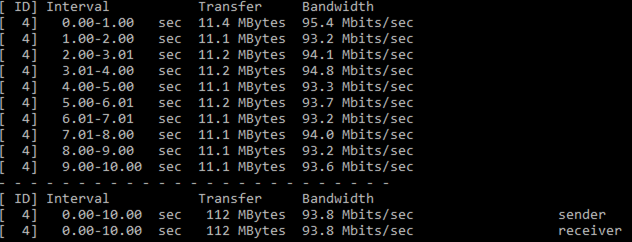
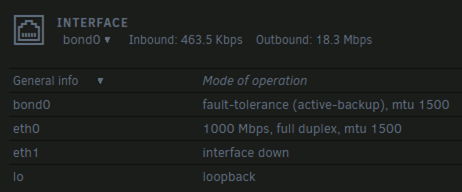
per a reddit thread I ran iperf with my unRaid as server and my windows box as client. Here are the results: Unraid dashboard indicates it's registered full gig duplex, so does this mean my switch might be at fault? What to check from here?
-
I have a Gig local network. All devices are routed through gig connections. There is a dumb switch in the middle. My server a cache pool with 2 SSDs totaling 378gb, with a minimum of ~90 used for appdata and docker. For as long as I can remember using the cache drives has ensured transfer speeds as expected. I don't do many transfers from my Windows 11 box to the server, maybe once per week on average. Today I transferred some files over to a cached share, each being between 30-50mb. Normally files of this size and type wouldn't even trigger the Windows Explorer transfer dialog box as they'd be near instant. This time it did and it caught my attention. I noted all transferred seemed to cap out ~12 MB/s. I then tried copying some files from my array to the Windows machine, and those transferred peaked ~11 MB/s. I then transferred some other small files to a different share and saw speeds from 8-10 MB/s. I have Netdata container installed, and some other dashboard types as well. But to be honest, I haven't put the time in yet to learn to interpret Netdata's output. I'm really at a loss troubleshooting. Could it be a problem with the an SSD in the cache pool? Something in the switch I should be checking? Are there numbers I can grab from Netdata or another monitor to help identify the bottleneck? The only thing I have changed in the config this week was creating a custom network for Docker and moving all my containers over to it. Can that have something to do with it? Any guidance on what to troubleshoot would be greatly appreciated. I'm attaching my diagnostics .zip. Please let me know if any other logs are needed and I will oblige. mootower-diagnostics-20220507-2047.zip
-
I'm so dumb. It will not start after the chmod. I still had it using HOST, so it starts but will not load the webUI in HOST. In BRIDGE I still get the SERVER ERROR immediately after trying to start the container.
-
Spoke too soon. It starts and runs now. However, I do not get the webUI when I open it. Instead I get a page with the following text only: {"status":"OK","version":{"major":2,"minor":9,"revision":18}}
-
That seems to have fixed it for me also! Thanks!
-
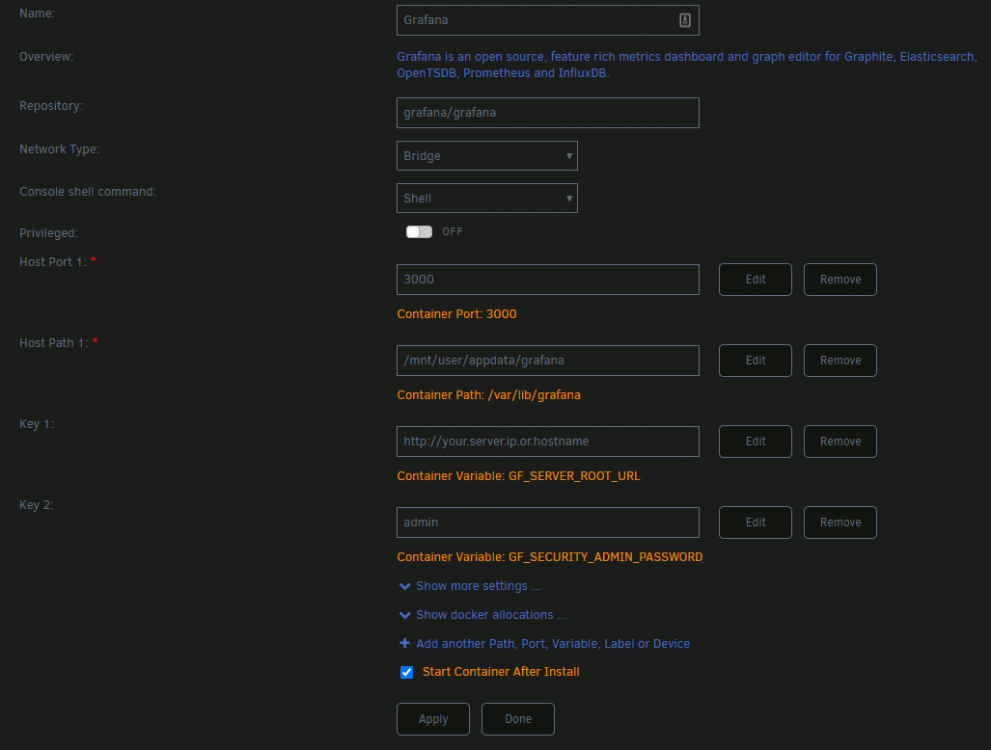
I'm still unable to start Grafana with the same error. I tried switching to HOST and it actually starts, but stops shortly after with the following error: logger=server t=2022-04-16T22:41:00.79-0400 lvl=eror msg="Server shutdown" error="*api.HTTPServer run error: failed to open listener on address 0.0.0.0:3000: listen tcp 0.0.0.0:3000: bind: address already in use"
-
After a reboot it was indeed assigned another 172. I changed the bind to 127.0.0.1 as suggested and it's working great! thanks again! Sent from my Pixel 5 using Tapatalk
-
I'll keep that in mind and maybe test after a reboot. I did move it into a folder and down in the boot order and it is still working.
-
I got it to work by setting it to listen to the 172.xxx domain in the config.yml, and then set up my cloudflare/Nginx to point to the server's port on the 192.xxx.
-
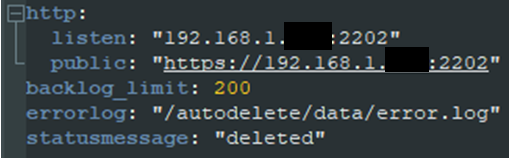
I'm trying to self-host a discord bot. I am using the instructions on their Dockerhub page. I am able to map the correct paths and have the config.yml file updated with my variables. However, I don't seem to have the port/address mapping correct, as it will not connect. In the container log it just keeps repeating an error like "bind: cannot assign requested address". Is this a simple misconfiguration that I can correct? Or have I bit off more than I can chew in terms of setting this up with my lack of Docker knowledge? Attached are the unRaid container log, the HTTP snippet of my config.yml, and the status from the unRaid Docker tab


-
I'm not able to start Grafana container on Unraid 6.9.2 after install. It immediately fails with an "Execution Error: Server Error" and doesn't generate any logs. I'm using the below defaults, but swapping in my server IP after the "http://" in the Key 1 field. I do not have any other containers using port 3000.


